
QQE_MTF
Wskaźnik
185 pobrania
Wersja 1.0, Mar 2026
Windows, Mac
4.0
Opinie: 1
Od 16/01/2025
3.15M
Wolumen transakcji
2.04K
Zysk w pipsach
398
Bezpłatne instalacje
Opis
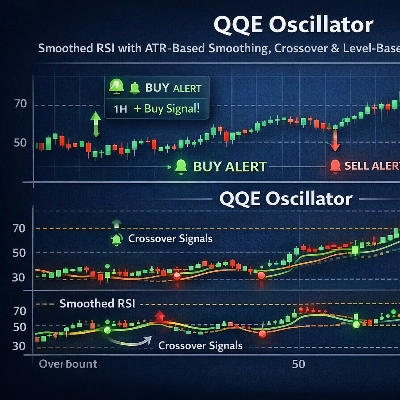
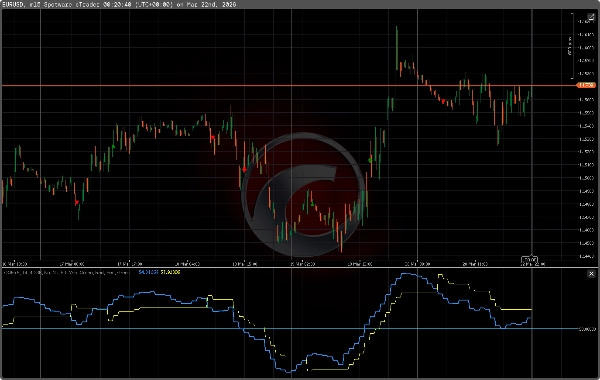
QQE (Qualitative Quantitative Estimation) to wskaźnik w stylu oscylatora, który łączy średnią kroczącą RSI z wygładzaniem zmian RSI opartym na ATR, aby uzyskać wygładzoną linię sygnału i filtr trendu. Jest zaimplementowany dla cTrader i obsługuje działanie na wielu ramach czasowych, wizualne strzałki oraz alerty e-mail. Wskaźnik jest przeznaczony dla traderów korzystających z sygnałów momentum/oscylatora do wejść i wyjść.
Jak to działa (podsumowanie techniczne)
- Główne składniki:
-
- RSI obliczane na cenie (konfigurowalny okres).
- Wykładnicza średnia krocząca (MA) zastosowana do RSI (wygładzanie FastFactor).
- Pomiar podobny do ATR absolutnych zmian w RSI MA, wygładzany za pomocą wygładzania typu Wildera i skalowany przez SlowFactor.
- Wygładzony „poziom” (TrLevelSlow) wyprowadzony z RSI MA i wygładzania ATR-of-RSI.
- Sygnały:
-
- Kupno: RSI MA (niebieski) przecina poziom 50 od dołu po wcześniejszym przecięciu powyżej wygładzonej linii (żółtej).
- Sprzedaż: RSI MA przecina poziom 50 od góry po wcześniejszym przecięciu poniżej wygładzonej linii.
- Wieloramkowość: możesz wybrać wyższą ramę czasową do obliczania QQE na słupkach z wyższej ramy czasowej, wyświetlając wyniki na aktualnej ramie czasowej wykresu.
- Alerty i wizualizacje: konfigurowalne strzałki na wykresie przy przecięciach i przekroczeniach poziomów; opcjonalne alerty e-mail.
Wejścia / Domyślne parametry
- FastFactor (wygładzanie RSI MA): domyślnie 5
- Okres RSI: domyślnie 14
- Slow Factor (mnożnik ATR-of-RSI): domyślnie 4.236
- AlertOnCrossover, AlertOnLevel: wartości logiczne do włączania powiadomień
- AlertLevel: domyślnie 50
- ArrowsOnCrossover / ArrowsOnLevel oraz kolory ikon w górę/w dół
- EnableEmailAlerts + AlertEmailFrom / AlertEmailTo
- UpperTimeframe: opcjonalne ustawienie MTF
- ObjectPrefix: prefiks używany dla rysowanych ikon
Zalecane użycie i ustawienia
- Ramki czasowe: działa na dowolnej ramie czasowej; powszechne wybory to 15-minutowe do dziennych w zależności od horyzontu handlowego. Tryb wieloramkowy dobrze sprawdza się przy dopasowywaniu wejść z niższej ramy czasowej do momentum z wyższej ramy czasowej.
- Rynki: działa z FX, metalami, indeksami, kryptowalutami i akcjami — na każdym płynnym rynku, gdzie stosuje się oscylatory typu RSI.
- Typowe domyślne ustawienia początkowe: Okres RSI = 14, FastFactor = 5, SlowFactor = 4.236. Dostosuj FastFactor dla szybszego/wolniejszego wygładzania oraz SlowFactor, aby zmienić czułość na zmienność RSI.
- Sygnały powinny być używane z zarządzaniem ryzykiem i potwierdzeniem (struktura cen, wsparcie/opór, kontekst trendu). Rozważ użycie trendu lub filtra z wyższej ramy czasowej przed działaniem na przecięciach z niższej ramy czasowej.
Wizualizacje i alerty
- Rysowane ikony dla:
-
- Przecięcie w górę / w dół (konfigurowalne kolory)
- Poziom w górę / w dół na AlertLevel (domyślnie 50)
- Opcjonalne alerty e-mail przy wystąpieniu przecięć lub zdarzeń na poziomie.
Ograniczenia i uwagi
- Jak wszystkie wskaźniki, QQE jest narzędziem opóźnionym/opartym na momentum; fałszywe sygnały występują na rynkach niestabilnych, bez wyraźnego trendu.
- Przetestuj wstecznie i przód na koncie demo przed użyciem z prawdziwym kapitałem.
- Upewnij się, że ustawienia alertów e-mail są poprawnie skonfigurowane w cTrader i u dostawcy poczty, aby otrzymywać wiadomości.
Instalacja / wskazówki dotyczące użytkowania
- Dodaj wskaźnik do wykresu, opcjonalnie ustaw UpperTimeframe dla działania MTF.
- Włącz/wyłącz strzałki i alerty zgodnie z Twoim sposobem pracy.
- Użyj ObjectPrefix, aby uniknąć kolizji z innymi wskaźnikami.
Podsumowanie
AI summary
QQE_MTF is an oscillator indicator for the cTrader platform that combines a smoothed Relative Strength Index (RSI) with an Average True Range (ATR)-based smoothing technique. It calculates RSI on price data, applies an exponential moving average for smoothing, and measures RSI volatility using an ATR-like method. The indicator generates buy and sell signals based on crossovers of the smoothed RSI line and a defined level (default 50). It supports multi-timeframe (MTF) operation, allowing calculation on a higher timeframe while displaying results on the current chart. Visual arrows mark crossover and level-cross events, and optional email alerts can notify users of these signals. Default parameters include an RSI period of 14, FastFactor smoothing of 5, and a SlowFactor multiplier of 4.236 for ATR smoothing. QQE_MTF is suitable for various liquid markets including forex, commodities, indices, cryptocurrencies, and stocks. It works on any timeframe, commonly from 15 minutes to daily charts, and is designed for traders using momentum or oscillator-based entry and exit signals. Users can customize alert settings, arrow visuals, and timeframe preferences to fit their trading style. The indicator is intended to be used alongside risk management and confirmation tools such as price structure and trend context.
Profil wskaźnika
Opinie klientów
4.0
Opinie: 1
5 | 0 % | |
4 | 100 % | |
3 | 0 % | |
2 | 0 % | |
1 | 0 % |
Opinie klientów
April 9, 2026
Nice indicator, just a pity that it doesn't function optimally with Renko blocks.
Dyskusja
Częste pytania
Forex
Signal
Scalping
Indices
Commodities
Crypto
Stocks
Produkty dostępne za pośrednictwem cTrader Store, w tym boty handlowe, wskaźniki i wtyczki, dostarczane są przez deweloperów zewnętrznych i udostępniane wyłącznie w celach informacyjnych oraz w celu zapewnienia dostępu technicznego. cTrader Store nie jest brokerem i nie zapewnia doradztwa inwestycyjnego, nie udziela spersonalizowanych rekomendacji ani nie gwarantuje przyszłych wyników.
Więcej od tego autora








Cena
Od 16/01/2025
3.15M
Wolumen transakcji
2.04K
Zysk w pipsach
398
Bezpłatne instalacje