Descrizione
Cos'è Quantum Flow?
Quantum Flow è un indicatore di precisione overlay per cTrader che misura dove si trova il prezzo attuale all'interno del suo intervallo storico — espresso come rango percentile da 0 a 100. A differenza degli oscillatori tradizionali come RSI o Stocastico, Quantum Flow non si basa su soglie fisse di ipercomprato/ipervenduto. Invece, si adatta dinamicamente all'effettivo intervallo di prezzo della finestra di lookback scelta, offrendo un quadro molto più accurato e contestuale della forza del mercato.
Il risultato è un sistema di segnali pulito e azionabile che ti dice non solo cosa sta facendo il prezzo, ma quanto è estremo quel movimento rispetto alla storia recente — e se ha il supporto multi-timeframe per essere affidabile.
────────────────────────
Altri indicatori premium disponibili nel cTrader Store:
- Quantum Flow – Motore di momentum percentile-rank adattivo con conferma MTF https://ctrader.com/products/4330
- SmartArrows AI V2 – Indicatore di segnale per grafici Renko con analisi MTF https://ctrader.com/products/1797
- VoltyPulse – Sistema di segnali tecnici multimodale con 3 livelli di filtro indipendenti https://ctrader.com/products/4233
- TDI Signal Pro – Motore TDI avanzato con segnali Shark Fin, Extreme Cross e Divergenza https://ctrader.com/products/4343
- PipMiner – Indicatore di momentum MACD e validazione trend focalizzato sulla precisione https://ctrader.com/products/4242
- Elliot Wave Impulse Pro – Rilevamento automatico delle onde di Elliott con filtri professionali https://ctrader.com/products/3221
────────────────────────
Caratteristiche principali
> Motore Percentile Rank
Adattabile a qualsiasi mercato e timeframe. Nessun livello fisso — l'indicatore si calibra sull'effettiva azione del prezzo nella finestra di lookback. Funziona su Forex, Indici, Commodities, Crypto e Azioni.
> Colorazione Dinamica delle Barre
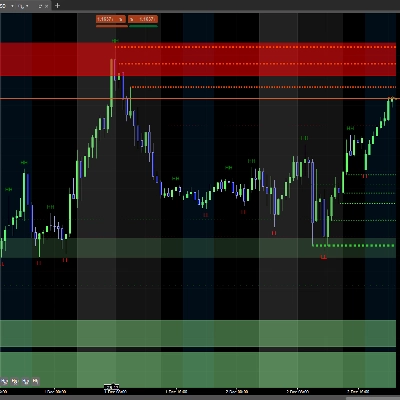
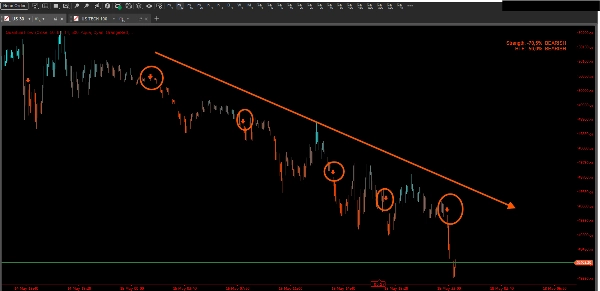
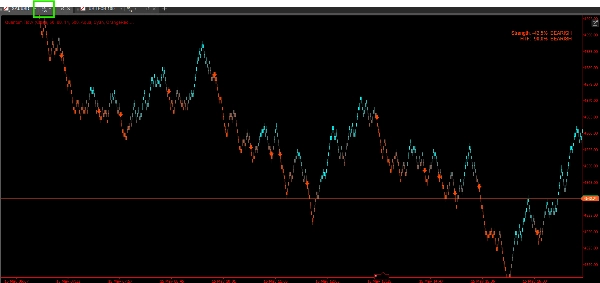
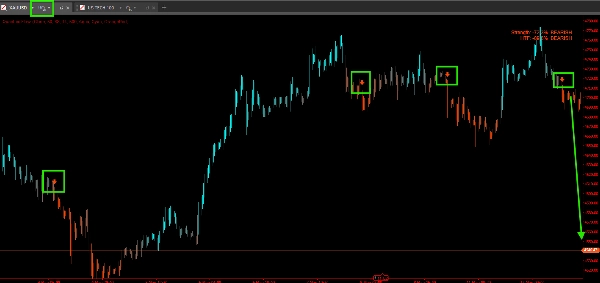
Ogni barra è colorata con una sfumatura graduale che riflette l'intensità del rango corrente. Il momentum rialzista passa dal grigio al tuo colore per i rialzi (default: Ciano), il ribassista dal grigio al tuo colore per i ribassi (default: ArancioRosso). A colpo d'occhio puoi leggere tutta la storia del momentum del grafico senza studiare un pannello oscillatore separato.
> Frecce di Segnale con Posizionamento Basato su ATR
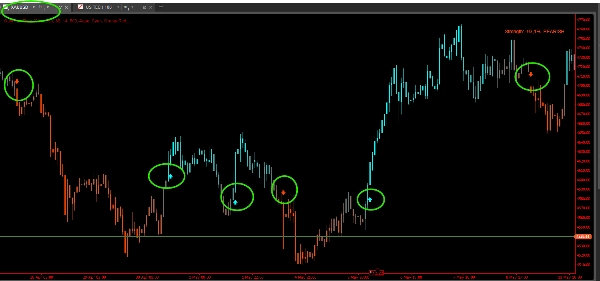
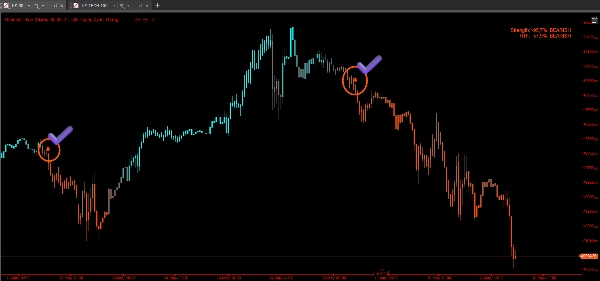
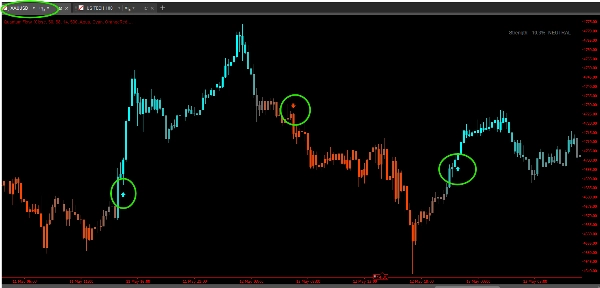
Quando il rango supera la soglia di segnale (default: 88 per rialzo, 12 per ribasso), Quantum Flow disegna una freccia sopra o sotto la barra. Lo spostamento della freccia è calcolato usando l'ATR corrente così da non sovrapporsi alle candele — si scala automaticamente con la volatilità.
I segnali si attivano solo una volta per direzione del trend — non ci sono spam di reingresso. Una volta attivo un segnale rialzista, non vengono disegnate altre frecce rialziste finché il mercato non si inverte e si riqualifica.
> Conferma Multi-Timeframe (MTF)
Una delle funzionalità più potenti di Quantum Flow. Abilita la modalità MTF e seleziona un timeframe superiore (es. H1 quando si fa trading su M15). Quantum Flow mostrerà un segnale rialzista sul grafico corrente solo se anche il rango del timeframe superiore conferma un bias rialzista — e viceversa per i segnali ribassisti.
Questo singolo filtro riduce drasticamente il rumore contro-trend e ti mantiene allineato con il flusso dominante del mercato.
> Avvisi alla Chiusura della Barra
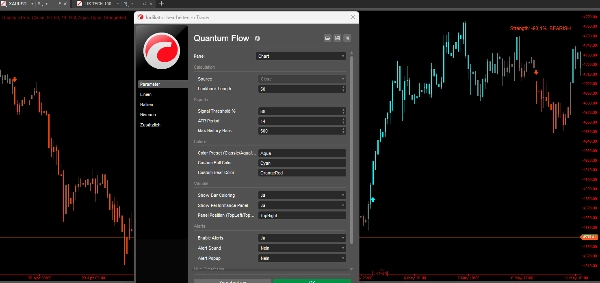
Gli avvisi si attivano dopo la chiusura della barra — non su fluttuazioni intrabar. Questo significa che ogni avviso che ricevi corrisponde a una barra di segnale confermata e chiusa. Niente più falsi trigger da stoppini o picchi temporanei. Supporta sia avvisi popup che notifiche sonore.
> Pannello di Forza in Tempo Reale
Un pannello compatto e sempre visibile (posizione configurabile: TopLeft, TopRight, BottomLeft, BottomRight) mostra:
- % di Forza della barra corrente espressa come deviazione dal neutro (es. +76% Rialzista)
- % di Forza HTF quando la modalità MTF è abilitata
- Etichetta di bias in linguaggio semplice: RIALZISTA / RIBASSISTA / NEUTRO
> 5 Preimpostazioni di Colore + Colori Personalizzati
Scegli tra Classic (verde/rosso), Aqua (ciano/arancione — default), Cosmic (verde acqua/viola), Cyber (ciano/arancio scuro), o Neon (giallo/magenta). Oppure definisci i tuoi colori esatti usando qualsiasi nome colore supportato da cTrader.
> Controllo della Finestra Storica
Definisci esattamente quante barre storiche ricevono colorazione e frecce di segnale (default: 500, max: 5000). Utile per mantenere il grafico pulito senza caricare storia non necessaria.
Come usare Quantum Flow
Passo 1 — Applicare al grafico
Aggiungi Quantum Flow a qualsiasi grafico come overlay. Seleziona la tua Fonte preferita (di default Close) e imposta la Lunghezza Lookback in base al tuo stile di trading:
- Scalping / M1–M5: 20–30 barre
- Intraday / M15–H1: 50 barre (default)
- Swing / H4–Daily: 100–200 barre
Passo 2 — Leggere i colori delle barre
Una volta applicato, il grafico ridipingerà i colori delle barre basandosi sul rango live:
- Colore brillante rialzista = il prezzo è vicino al massimo del suo intervallo recente → il momentum è forte
- Colore brillante ribassista = il prezzo è vicino al minimo → la pressione di vendita domina
- Tono grigio / smorzato = il prezzo è vicino al punto medio → nessun chiaro vantaggio direzionale, evitare di fare trading
Passo 3 — Aspettare le frecce di segnale
Non agire solo sul colore. Aspetta una freccia:
- Freccia verso l'alto sotto la barra = il rango ha raggiunto la soglia rialzista → possibile setup long
- Freccia verso il basso sopra la barra = il rango ha raggiunto la soglia ribassista → possibile setup short
Combina con il tuo modello di ingresso — supporto/resistenza, pattern di candele o flusso di ordini. Quantum Flow identifica il contesto del momentum, non il trigger esatto di ingresso.
Passo 4 — Usare la conferma MTF (consigliato)
Abilita Mostra conferma MTF e imposta il Timeframe superiore a 3–5 volte il timeframe del grafico corrente. Per esempio:
- Trading su M15 → imposta HTF su H1
- Trading su H1 → imposta HTF su H4 o Daily
Prendi setup long solo quando sia il timeframe corrente che l'HTF mostrano rango rialzista. Questa singola regola può migliorare significativamente il tuo tasso di successo mantenendoti dalla parte giusta del trend più ampio.
Passo 5 — Monitorare il pannello di forza
Usa il pannello come riferimento rapido per il bias corrente senza dover scorrere il grafico. Una lettura di +60% RIALZISTA o superiore su entrambi i timeframe è una zona di forte confluenza. Una lettura vicino a 0% NEUTRO su uno dei timeframe suggerisce di aspettare.
Passo 6 — Impostare gli avvisi
Abilita gli avvisi per essere notificato sui segnali confermati alla chiusura della barra senza dover guardare lo schermo. Il messaggio popup include simbolo, timeframe e direzione del segnale così puoi fare trading su più grafici contemporaneamente.
Per chi è?
Quantum Flow è progettato per trader che vogliono una lettura del momentum pulita e obiettiva senza il rumore degli oscillatori tradizionali. È adatto a:
- Trader intraday che necessitano di un feedback visivo rapido e affidabile sul momentum
- Trader swing che vogliono entrare solo quando il momentum multi-timeframe è allineato
- Follower di trend che vogliono evitare di combattere il momentum dominante
- Trader di price action che vogliono un livello di contesto non soggettivo aggiunto al loro setup esistente
Cosa rende Quantum Flow diverso?
La maggior parte degli indicatori di momentum misura la velocità di variazione o la forza relativa rispetto a una formula fissa. Quantum Flow invece pone una domanda più semplice e potente: "Questa barra è più vicina a un massimo recente o a un minimo recente?"
Questo approccio percentile-rank significa:
- Nessuna media mobile ritardata al suo interno
- Nessuna soglia fissa di ipercomprato/ipervenduto che fallisce nei mercati trend
- Piena adattabilità a qualsiasi regime di volatilità
- La colorazione delle barre ti offre una storia visiva continua — non solo un oscillatore separato da correlare mentalmente
Combinato con il filtro MTF e gli avvisi alla chiusura della barra, Quantum Flow ti offre un sistema di momentum completo e autonomo che funziona su tutti i mercati e timeframe — pronto all'uso immediato.
Riepilogo
Key features include signal arrows triggered when the rank crosses customizable thresholds, with arrow placement scaled by the Average True Range (ATR) to avoid clutter. Signals occur only once per trend direction to prevent re-entry noise. A multi-timeframe (MTF) confirmation mode filters signals by requiring alignment with a higher timeframe's momentum, reducing counter-trend noise. Alerts fire only after bar close, ensuring confirmed signals.
A real-time strength panel displays current and higher timeframe momentum percentages and a plain-language bias label (Bullish, Bearish, Neutral). The indicator supports Forex, indices, commodities, cryptocurrencies, and stocks across all timeframes. Users can customize colors, history length, and alert settings. Quantum Flow is designed for intraday, swing, trend-following, and price action traders seeking an objective, adaptive momentum context overlay.
Discussioni
Recensioni dei clienti
5 | 50 % | |
4 | 50 % | |
3 | 0 % | |
2 | 0 % | |
1 | 0 % |