Description
What is Quantum Flow?
Quantum Flow is a precision overlay indicator for cTrader that measures where the current price stands within its historical range — expressed as a percentile rank from 0 to 100. Unlike traditional oscillators such as RSI or Stochastic, Quantum Flow does not rely on fixed overbought/oversold thresholds. Instead, it dynamically adapts to the actual price range of your chosen lookback window, giving you a far more accurate and context-aware picture of market strength.
The result is a clean, actionable signal system that tells you not just what price is doing, but how extreme that move is relative to recent history — and whether it has the multi-timeframe backing to be trusted.
────────────────────────
Other premium indicators available in the cTrader Store:
- Quantum Flow – Adaptive percentile-rank momentum engine with MTF confirmation https://ctrader.com/products/4330
- SmartArrows AI V2 – Signal indicator for Renko charts with MTF analysis https://ctrader.com/products/1797
- VoltyPulse – Multi-mode technical signal system with 3 independent filter layers https://ctrader.com/products/4233
- TDI Signal Pro – Advanced TDI engine with Shark Fin, Extreme Cross & Divergence signals https://ctrader.com/products/4343
- PipMiner – Precision-focused MACD momentum and trend validation indicator https://ctrader.com/products/4242
- Elliot Wave Impulse Pro – Automatic Elliott Wave detection with professional filters https://ctrader.com/products/3221
────────────────────────
Key Features
> Percentile Rank Engine
Adaptive to any market and any timeframe. No fixed levels — the indicator calibrates itself to the actual price action in your lookback window. Works on Forex, Indices, Commodities, Crypto, and Stocks.
> Dynamic Bar Coloring
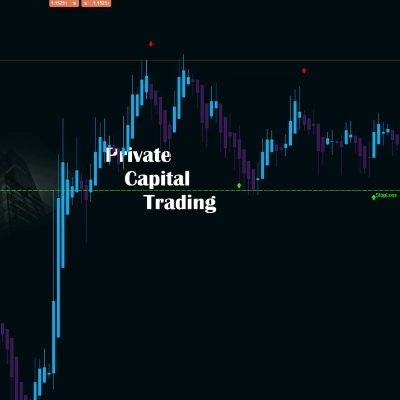
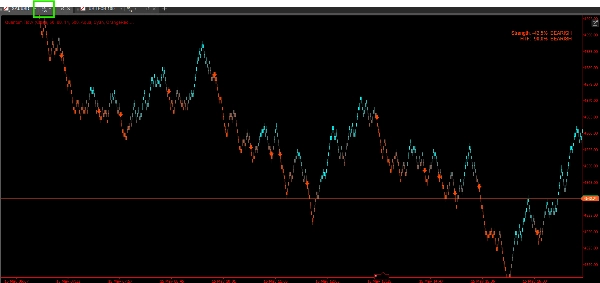
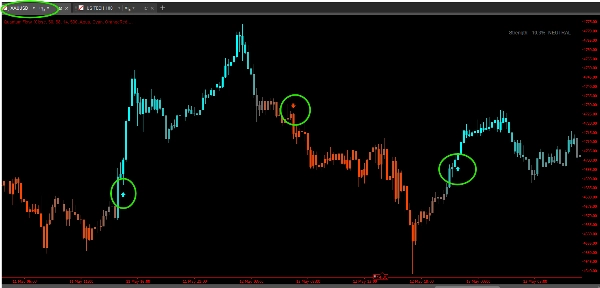
Every bar is colored with a smooth gradient that reflects the current rank intensity. Bullish momentum transitions from grey to your bull color (default: Cyan), bearish from grey to your bear color (default: OrangeRed). At a glance, you can read the entire chart's momentum history without studying a separate oscillator panel.
> Signal Arrows with ATR-Based Placement
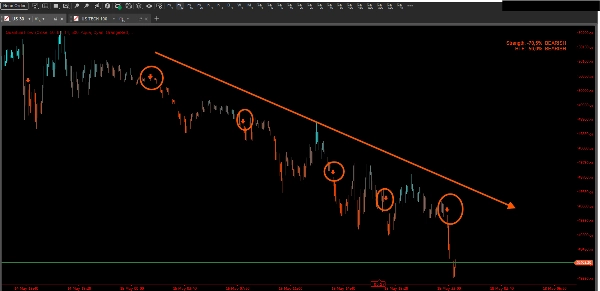
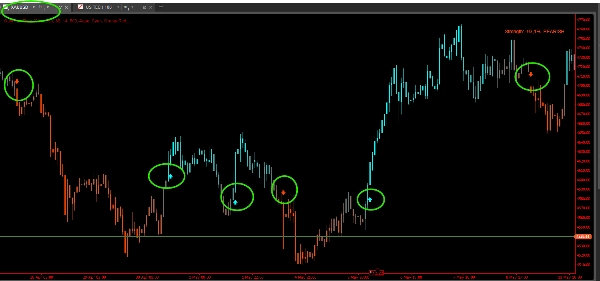
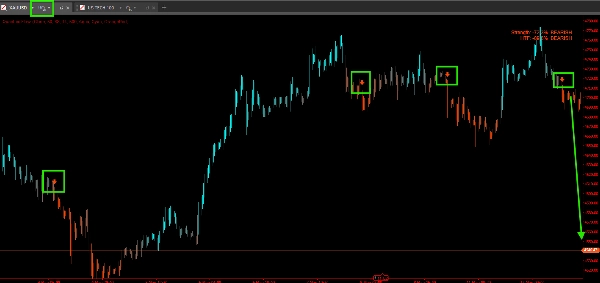
When the rank crosses the signal threshold (default: 88 for bull, 12 for bear), Quantum Flow draws an arrow above or below the bar. The arrow offset is calculated using the current ATR so it never clutters the candles — it scales automatically with volatility.
Signals fire only once per trend direction — there is no re-entry spam. Once a bull signal is active, no further bull arrows are drawn until the market reverses and re-qualifies.
> Multi-Timeframe (MTF) Confirmation
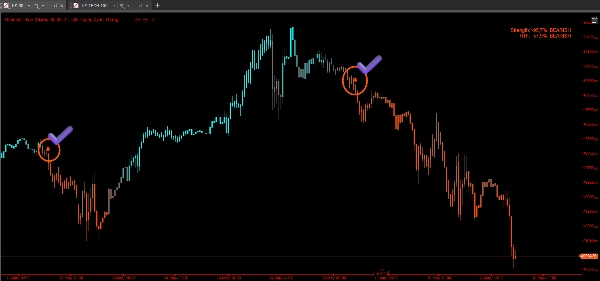
One of Quantum Flow's most powerful features. Enable MTF mode and select a higher timeframe (e.g., H1 when trading M15). Quantum Flow will only show a bull signal on your current chart if the higher timeframe rank also confirms bullish bias — and vice versa for bear signals.
This single filter dramatically reduces counter-trend noise and keeps you aligned with the dominant market flow.
> Bar Close Alerts
Alerts fire after bar close — not on an intrabar fluctuation. This means every alert you receive corresponds to a confirmed, closed signal bar. No more false triggers from wicks or temporary spikes. Supports both popup alerts and sound notifications.
> Real-Time Strength Panel
A compact, always-visible panel (configurable position: TopLeft, TopRight, BottomLeft, BottomRight) shows:
- Strength % of the current bar expressed as a deviation from neutral (e.g., +76% Bullish)
- HTF Strength % when MTF mode is enabled
- Plain-language bias label: BULLISH / BEARISH / NEUTRAL
> 5 Color Presets + Custom Colors
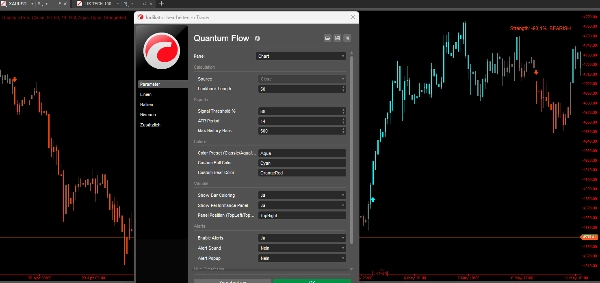
Choose from Classic (green/red), Aqua (cyan/orange — default), Cosmic (teal/purple), Cyber (cyan/dark orange), or Neon (yellow/magenta). Or define your own exact colors using any cTrader-supported color name.
> History Window Control
Define exactly how many historical bars receive coloring and signal arrows (default: 500, max: 5000). Useful for keeping the chart clean without loading unnecessary history.
How to Use Quantum Flow
Step 1 — Apply to Chart
Add Quantum Flow to any chart as an overlay. Select your preferred Source (Close by default) and set the Lookback Length to match your trading style:
- Scalping / M1–M5: 20–30 bars
- Intraday / M15–H1: 50 bars (default)
- Swing / H4–Daily: 100–200 bars
Step 2 — Read Bar Colors
Once applied, the chart will repaint bar colors based on the live rank:
- Bright bull color = price is near the top of its recent range → momentum is strong
- Bright bear color = price is near the bottom → selling pressure dominates
- Grey / muted tone = price is near the midpoint → no clear directional edge, avoid trading
Step 3 — Wait for Signal Arrows
Do not act on color alone. Wait for an arrow:
- Up arrow below the bar = rank has reached the bull threshold → potential long setup
- Down arrow above the bar = rank has reached the bear threshold → potential short setup
Combine with your own entry model — support/resistance, candlestick patterns, or order flow. Quantum Flow identifies momentum context, not the exact entry trigger.
Step 4 — Use MTF Confirmation (Recommended)
Enable Show MTF Confirmation and set the Higher Timeframe to 3–5x your current chart timeframe. For example:
- Trading on M15 → set HTF to H1
- Trading on H1 → set HTF to H4 or Daily
Only take long setups when both the current timeframe and the HTF show bullish rank. This single rule alone can significantly improve your win rate by keeping you on the right side of the larger trend.
Step 5 — Monitor the Strength Panel
Use the panel as a quick reference for current bias without scrolling the chart. A reading of +60% BULLISH or higher on both timeframes is a strong confluence zone. A reading near 0% NEUTRAL on either timeframe suggests waiting.
Step 6 — Set Alerts
Enable alerts to get notified on confirmed bar-close signals without watching the screen. The popup message includes the symbol, timeframe, and signal direction so you can trade across multiple charts simultaneously.
Who Is This For?
Quantum Flow is designed for traders who want a clean, objective momentum reading without the noise of traditional oscillators. It suits:
- Intraday traders who need fast, reliable visual feedback on momentum
- Swing traders who want to enter only when multi-timeframe momentum aligns
- Trend followers who want to avoid fighting dominant momentum
- Price action traders who want a non-subjective context layer added to their existing setup
What Makes Quantum Flow Different?
Most momentum indicators measure rate of change or relative strength versus a fixed formula. Quantum Flow instead asks a simpler, more powerful question: "Is this bar closer to a recent high or a recent low?"
This percentile-rank approach means:
- No lagging moving average at its core
- No fixed overbought/oversold thresholds that fail in trending markets
- Full adaptability to any volatility regime
- Bar coloring gives you a continuous visual history — not just a separate oscillator you have to correlate mentally
Combined with the MTF filter and bar-close alerts, Quantum Flow gives you a complete, self-contained momentum system that works across all markets and timeframes — ready to use out of the box.
Summary
Key features include signal arrows triggered when the rank crosses customizable thresholds, with arrow placement scaled by the Average True Range (ATR) to avoid clutter. Signals occur only once per trend direction to prevent re-entry noise. A multi-timeframe (MTF) confirmation mode filters signals by requiring alignment with a higher timeframe's momentum, reducing counter-trend noise. Alerts fire only after bar close, ensuring confirmed signals.
A real-time strength panel displays current and higher timeframe momentum percentages and a plain-language bias label (Bullish, Bearish, Neutral). The indicator supports Forex, indices, commodities, cryptocurrencies, and stocks across all timeframes. Users can customize colors, history length, and alert settings. Quantum Flow is designed for intraday, swing, trend-following, and price action traders seeking an objective, adaptive momentum context overlay.
Customer reviews
5 | 50 % | |
4 | 50 % | |
3 | 0 % | |
2 | 0 % | |
1 | 0 % |