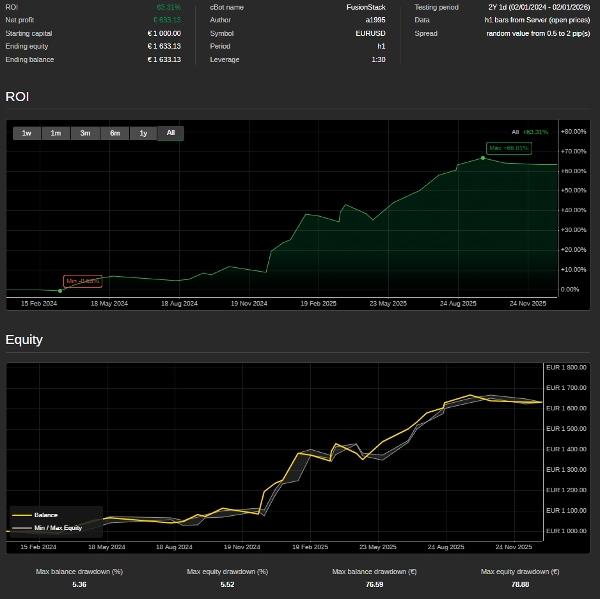
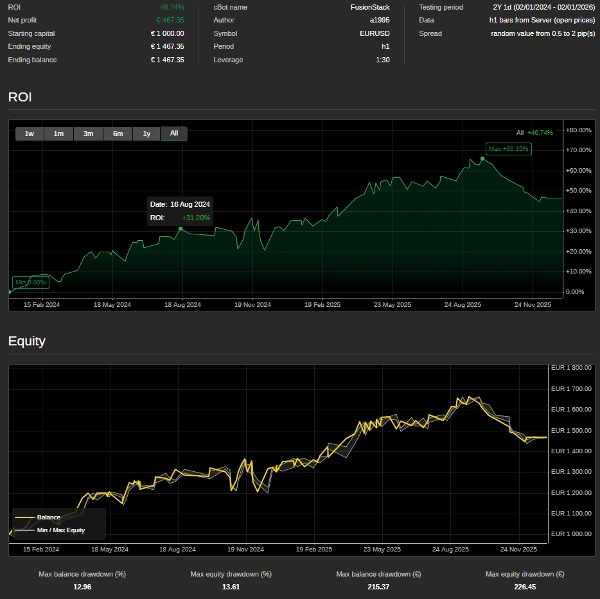
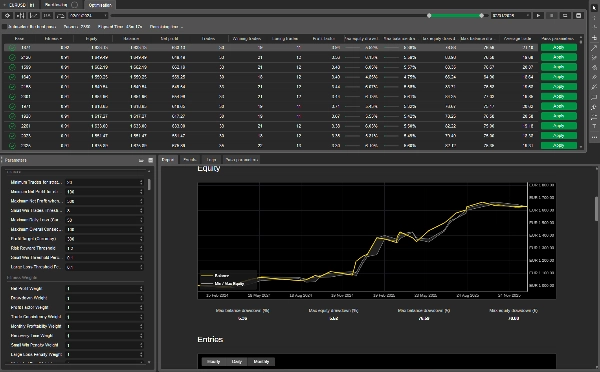
Description
FusionStack is a configurable multi-signal trading system for cTrader (cAlgo) built around weighted decision scoring, higher-timeframe confirmation, and configurable order-management rules. It is designed for traders who want one engine that can be conservative, directional, experimental, or optimization-driven.
All time-based configuration in FusionStack is standardized to UTC. Trading windows, pivot-session timing, and any user-facing hour inputs should be configured as UTC values so behavior stays consistent across brokers, server locations, and trader geographies.
This guide is written as a standalone product document. It explains what the strategy does, which integrations are included, how orders are approved or blocked, how risk is managed, and how every parameter group should be used in practice.
FusionStack is not intended for beginners. Full configuration requires solid understanding of market structure, indicator interaction, position sizing, order routing, risk management, and optimization discipline. If you are not already comfortable evaluating trade logic, parameter dependencies, and live-versus-backtest behavior, this strategy should be treated as an advanced tool rather than a beginner-ready system.
Installation Checklist
Before running FusionStack in cTrader, confirm all of the following:
FusionStackis imported into cTrader Automate as the main cBot.ChoppinessIndex,RollingCorrelation, andQQE_MTFneed to be imported into cTrader.
If any one of these checks fails, the bot lose configurable features, and compilation fails.
Executive Summary
- Multi-indicator decision engine with weighted Buy, Sell, and No-Order scoring.
- Base timeframe plus higher-timeframe confirmation support.
- Market, limit, and stop order placement modes.
- Duplicate suppression, netting, pyramiding, reverse-close, and time-window gating.
- Fixed lot sizing or risk-based position sizing.
- Fixed risk/reward mode or manually defined TP.
- Time-based exits, trailing stop logic, ATR-driven SL/TP/trailing, and dynamic stop adjustments.
- Built-in optimization hooks through custom fitness parameters and weights.
- Experimental modules for random indicator comparisons, random trade generation, and forced directional bias.
Required Files And cTrader Setup
FusionStack is not only a single cBot file. For full configurable use, it also depends on custom indicator source files included in the package under strategies/indicators.
Required custom indicators or compiled version from cTraderStore automatically installed.
strategies/indicators/ChoppinessIndex.csstrategies/indicators/RollingCorrelation.csstrategies/indicators/QQE_MTF.cs
These indicators are referenced from the bot through the cAlgo.Indicators namespace and instantiated with Indicators.GetIndicator<T>(). They are part of the strategy package and should be installed in cTrader together with the main FusionStack cBot.
For a complete installation in cTrader:
- Buy from CtraderShop the main cBot
FusionStack. - Import/Buy or copy all custom indicators from
strategies/indicatorsinto the cTrader Indicators area. - Build the indicators first, then build the cBot.
- Confirm that cTrader recognizes
ChoppinessIndex,RollingCorrelation, andQQE_MTFwith no compile errors. - Only then configure and run FusionStack .
If those custom indicators are missing in cTrader, the bot will not be fully configurable and any logic that depends on those modules will fail to compile or will be unavailable.
What The Cbot Actually Does
On each evaluation cycle, FusionStack performs six core steps:
- Refresh market and indicator state.
- Calculate all enabled signals.
- Add weighted contributions to Buy, Sell, or No-Order buckets.
- Convert those totals into decision ratios.
- Check whether the winning side clears the trade threshold.
- Apply order gating before placing a market or pending order.
The result is not a single-indicator trigger system. It is a configurable scoring engine where each module contributes conviction. You decide which modules are active and how much influence each one has.
Decision Engine
1. Indicator Refresh
The strategy updates current and prior values for the enabled indicators on every bar. It also keeps higher-timeframe state for modules that use multi-timeframe confirmation.
Examples of cached values include:
- Price and bar structure.
- MACD main, signal, histogram, and prior readings.
- RSI current and previous values.
- Williams %R, ADX, Parabolic SAR, Bollinger Bands, Keltner Channels, Stochastic, Aroon, Ichimoku, OBV, CCI, TEMA, Supertrend, QQE_MTF, VWAP, and Donchian levels.
- Session pivot points and Fibonacci levels.
- Spread, support/resistance context, double top/bottom context, choppiness, and rolling correlation.
2. Weighted Scoring
Each enabled module adds weight to one of three totals:
placeBuyOrderplaceSellOrderplaceNoOrder
This means the strategy can explicitly favor standing aside when the market is mixed or low quality.
3. Ratio Conversion
After all enabled checks run, the raw scores are normalized into:
ratioBuyOrderratioSellOrderratioNoOrder
The side with the highest ratio becomes the candidate action.
4. Threshold Test
The winning ratio must exceed TradeThreshold. A setup can win the internal comparison and still be rejected if conviction is not high enough.
5. Trade Gating
Even if a side wins, the order is still blocked unless it passes:
- direction enable checks
- session-hour checks
- duplicate-trade suppression
- open-time spacing rules
- netting rules
- pyramiding rules
- optional single-trade-per-session behavior
Very important to check all the parameters when you dont know why it is not trading.
6. Execution And Lifecycle Management
If a trade is approved, the strategy can place:
- a market order
- a limit order
- a stop order
After entry, the strategy manages the position through stop loss, take profit, time-based closing, trailing logic, reverse-signal behavior, and optional ATR-driven adjustments.
Integrated Modules
FusionStack includes the following integrations.
Trend And Momentum Integrations
- Moving Average stack: SMA, EMA, HMA, plus VWAP comparisons.
- MACD with crossover, histogram, higher-timeframe confirmation, divergence weighting, zero-cross timing, and delta-change logic.
- RSI with principal thresholds, divergence, trend confirmation, and momentum-change weighting.
- Linear Regression R-Squared with slope and higher-timeframe confirmation.
- ADX with strength and slope confirmation.
- TEMA slope and crossover logic.
- Supertrend directional and stable-trend logic.
Mean Reversion And Oscillator Integrations
- Williams %R.
- Stochastic Oscillator.
- CCI.
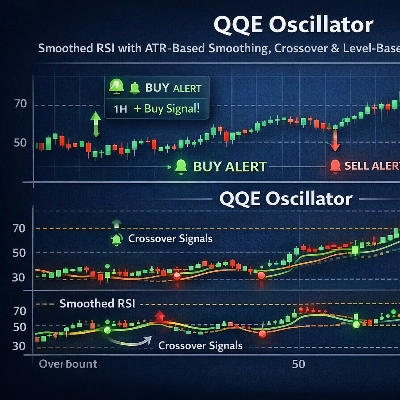
- QQE_MTF.
- Bollinger Bands.
Structure And Breakout Integrations
- Keltner Channels.
- Donchian Channel.
- Pivot Point signal logic.
- Fibonacci retracement context.
- Support and resistance analysis.
- Double top and double bottom context.
- Maximum high and minimum low period detection.
Volume, Price, And Regime Integrations
- On-Balance Volume.
- VWAP.
- Spread filter.
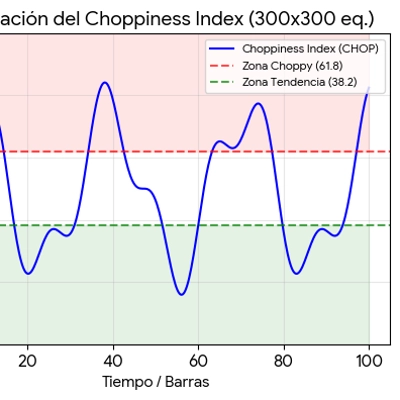
- Choppiness Index.
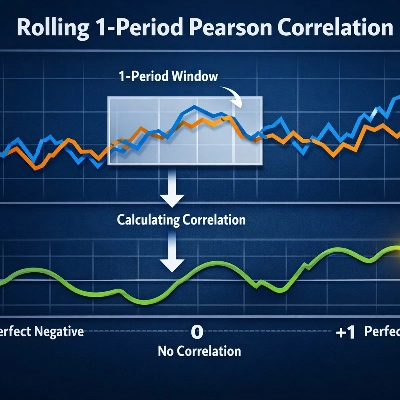
- Rolling correlation.
- Volume spike detection.
Custom indicator dependency note:
QQE_MTF,ChoppinessIndex, andRollingCorrelationare custom indicators shipped instrategies/indicatorsand must also be present in cTrader for these modules to be available.
Directional Framework Integrations
- Aroon.
- Ichimoku Kinko Hyo.
- Parabolic SAR.
- EMA versus PSAR higher-timeframe comparison.
Pattern And Experimental Integrations
- Engulfing pattern.
- Hammer and Hanging Man pattern logic.
- Random Indicator 1 and Random Indicator 2 comparison modules.
- Random Trading Sequence module.
- Instant Direction module.
Order Approval And Blocking Rules
This is the part of the strategy that determines whether a valid signal is actually allowed to trade.
Duplicate Trade Suppression
The strategy tracks recent orders by direction and bar index.
- If
DuplicateTradesOnNextBars = true, same-direction duplicates are blocked only on the current bar. - If
DuplicateTradesOnNextBars = false, same-direction duplicates are blocked forBarsToTrackbars.
This behavior is controlled by HasRecentOrder.
- Session Trading Window
Orders are allowed only when the current UTC hour is inside the configured trading window.
- If
TradingStartHour <= TradingEndHour, the session is treated as a normal intraday window. - If
TradingStartHour > TradingEndHour, the session is treated as an overnight window that crosses midnight.
- Minimum Time Between Entries
OpenHours defines the minimum number of hours since the last tracked order-open time before another order may be accepted.
- Netting Behavior
If NettingMode = true, the strategy blocks a new order whenever there is already an open position in either direction.
This creates one-position-at-a-time behavior.
- Pyramiding Behavior
If EnablePyramiding = false, the strategy does not stack a new position in the same direction while one is already open.
If EnablePyramiding = true, the strategy allows additional entries in the same direction once the OpenHours timing rule has been satisfied.
- Single Session Trade Behavior
If SingleSessionTradeEnable = true, the strategy stops evaluating new entries after one trade has been placed during the active session cycle tracked by the bot state.
This is useful when you want a single clean attempt per session rather than continuous re-entry.
- Reverse-Signal Closing
If an opposite-side position exists when a new trade is about to be placed:
CloseOnReverse = truemakes the strategy try to close the opposite-side position first.CloseOnReverseOnlyWhenLosing = truelimits that close action to cases where the opposite-side position currently has negative net profit.
This gives three practical operating styles:
- Netting flip model:
NettingMode = true,CloseOnReverse = true - Controlled hedge model:
NettingMode = false,CloseOnReverse = true,CloseOnReverseOnlyWhenLosing = true - Free hedge model:
NettingMode = false,CloseOnReverse = false
Order Placement Logic
The strategy supports three execution styles.
- Market Orders
If both pending-order toggles are disabled, the strategy executes a market order immediately.
- Limit Orders
If EnablePlaceLimitOrder = true, the strategy places a pullback-style pending order.
- Buy limit orders are placed below current price.
- Sell limit orders are placed above current price.
- Stop Orders
If EnablePlaceStopOrder = true, the strategy places a breakout-style pending order.
- Buy stop orders are placed above current price.
- Sell stop orders are placed below current price.
Pending Order Expiration
PendingOrderExpirationHours controls how long a pending order remains valid.
Risk And Position Management
Fixed Volume Or Risk-Based Sizing
The strategy can size positions in two ways.
- Fixed size using
Quantityin lots. - Risk-based sizing using
EnableRiskSizingandRiskAmount.
When risk sizing is enabled, volume is derived from stop-loss distance and the target cash risk. The code includes broker-compatibility logic around pip-value scaling so sizing remains usable across symbols and account setups.
- Fixed Risk/Reward Mode
If EnableFixedRR = true, take profit is calculated as:
TakeProfitPips = StopLossPips * FixedRiskReward
AllowManageTPWhenFixedRR controls whether later TP management is allowed to override that fixed RR target.
- ATR-Based Risk Controls
If enabled, the strategy can replace manual pip values with ATR-derived values:
EnableSLATREnableTPATREnableTrailingATR
The corresponding multipliers are:
ATRStopLossMultiplierATRTakeProfitMultiplierATRTrailingMultiplier
Period-Extrema Derived TP/SL
- The strategy can also derive SL or TP from recent structure:
EnableMinimumPeriodTPEnableMinimumPeriodSLEnableMaximumPeriodTPEnableMaximumPeriodSL
When these are enabled, the bot calculates recent minimum lows or maximum highs and converts those distances into pip targets.
- Time-Based Closing
CloseHours determines when open positions become eligible for time-based closure.
- Trailing Stop Management
The trailing system uses:
TrailingThresholdPipsTrailingThresholdGainTrailingStepPips
The strategy begins trailing only after profit reaches the threshold. It then moves stop loss toward a protected level based on the configured gain fraction and trailing step.
Losing-Trade Dynamic Stop Behavior
TrailingStopTimeSpanHours is used for time-based stop tightening on losing positions. Once a losing trade remains open beyond the configured number of hours, the dynamic stop-loss logic adds pressure toward tightening the stop.
TrailingStopSupportMargin is used together with detected strong support and resistance levels during losing-position management:
- for Buy positions, the dynamic stop can be anchored just below strong support by the configured pip margin
- for Sell positions, the dynamic stop can be anchored just above strong resistance by the configured pip margin
This makes the losing-trade stop logic structure-aware instead of relying only on ATR, volatility, and elapsed time.
- Dynamic Stop-Loss Scoring Weights
The stop-adjustment decision system can incorporate weighted context from:
- ADX
- RSI
- Choppiness
- Double top and bottom structure
- volatility
- time adjustment
- trend adjustment
These are configured under Stop Loss Weights.
Parameter Reference
This section folds configuration guidance directly into each parameter group so the guide works as a standalone reference.
Global Variables
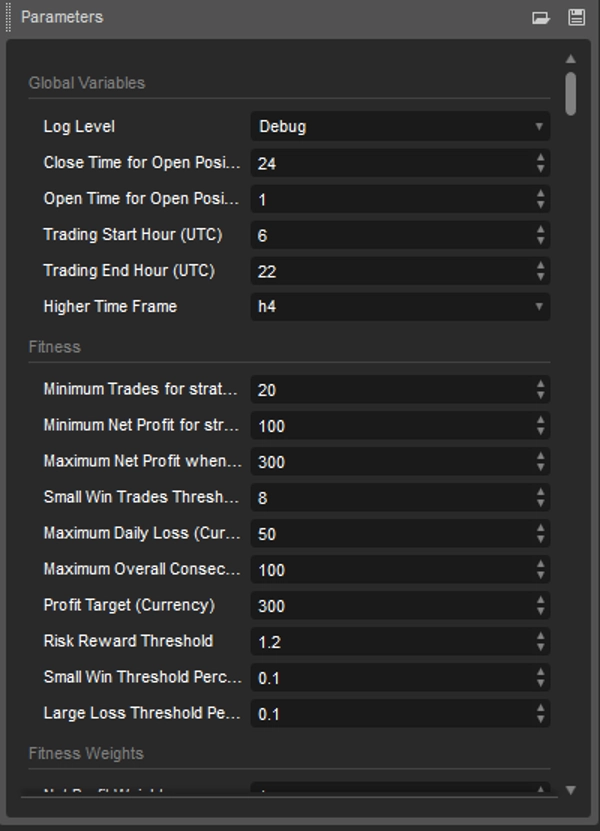
Log LevelControls internal logger verbosity. UseInfoorWarningfor normal runs andDebugonly when diagnosing logic.Close Time for Open Positions (hours)Maximum holding time before the strategy can close positions by timeout logic.Open Time for Open Positions (hours)Minimum spacing between new entries from the bot's tracked order-open time.Trading Start Hour (UTC)andTrading End Hour (UTC)Session gate for order approval using the bot's unified UTC clock.Higher Time FrameSecondary timeframe used by modules with higher-timeframe confirmation.
Fitness
This group is used mainly during optimization and model selection rather than discretionary live operation. We use a custom Fitness Method to build out a enhaced Fitness Score all configurable.
minimumTradesMinimum number of trades expected for a run to count as valid.minimumNetProfitMinimum acceptable net profit in account currency.maxNetProfitProfit cap used to reduce over-rewarding of extreme runs.smallWinPipsDefines what the engine considers a small win.maxDailyLossThresholdDaily-loss guardrail used in fitness scoring.maxGlobalLossThresholdOverall-loss or drawdown guardrail used in fitness scoring.profitNetTargetThresholdNet profit target used for bonus fitness scoring.riskRewardThresholdMinimum acceptable reward-to-risk quality.smallWinThresholdPercentPenalizes systems that produce too many low-value wins.largeLossThresholdPercentPenalizes systems that produce too many outsized losses.
Fitness Weights
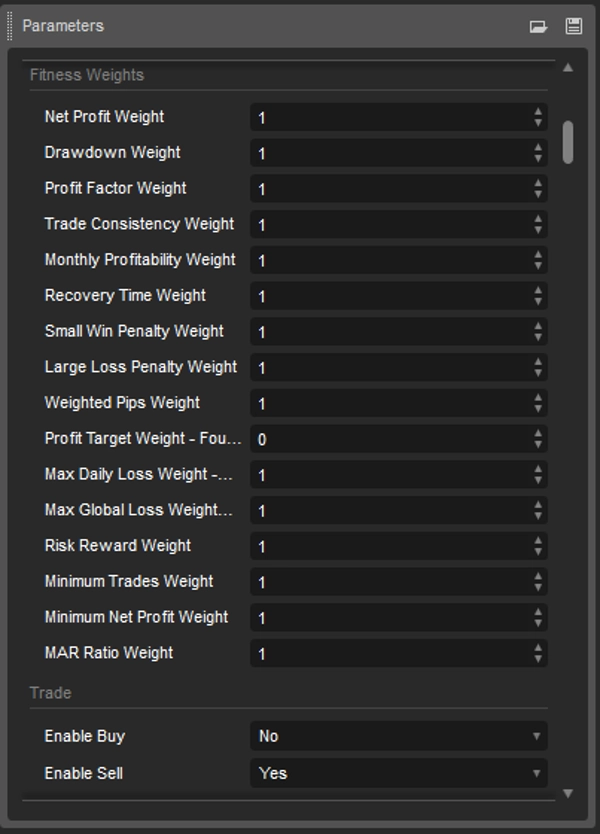
These weights tune how optimization ranks one run versus another. Best use case set all to 1.
netProfitWeightdrawdownWeightprofitFactorWeighttradeConsistencyWeightmonthlyProfitabilityWeightrecoveryTimeWeightsmallWinPenaltyWeightlargeLossPenaltyWeightweightedPipsWeightprofitTargetWeightmaxDailyLossWeightmaxGlobalLossWeightriskRewardWeightminimumTradesWeightminimumNetProfitWeightmarRatioWeight
Higher values make that metric matter more during optimization.
Trade
This is the most important operating section.
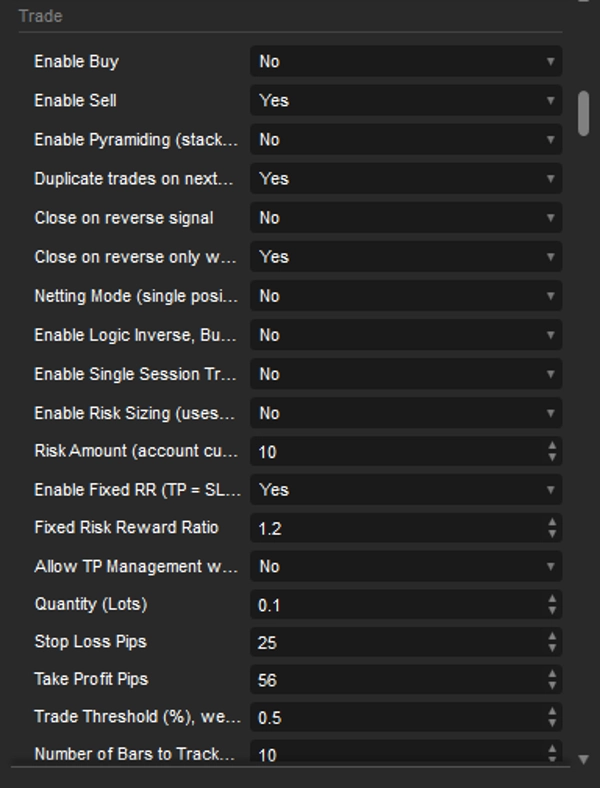
Enable Buy,Enable SellTurn each direction on or off independently.Enable Logic InverseSwaps Buy and Sell decision outcomes after scoring. Useful for testing whether the engine is directionally inverted on a symbol.Enable Single Session TradeAllows at most one trade per active bot session cycle.Enable PyramidingAllows same-direction stacking after time gating passes.Duplicate trades on next barsIf enabled, only same-bar duplicates are blocked. If disabled, duplicates are blocked forBarsToTrackbars.Close on reverse signalAttempts to close the opposite-side position before entering the new direction.Close on reverse only when losingRestricts reverse close-out to losing opposite-side positions.Netting ModeBlocks new entries if any position is already open, creating single-position operation.Enable Risk Sizing,Risk AmountUse cash-risk-based volume instead of fixed lots.Enable Fixed RR,Fixed Risk Reward RatioForces TP to be a multiple of SL.Allow TP Management when Fixed RRKeeps the fixed RR target intact when disabled; allows later TP management changes when enabled.Quantity (Lots)Fixed lot size used when risk sizing is disabled.Stop Loss Pips,Take Profit PipsManual SL and TP distances unless replaced by ATR or period-extrema logic.Trade Threshold (%)Required conviction ratio before a trade can be placed.Number of Bars to TrackUsed for duplicate suppression and ratio/order history tracking.Trailing Threshold (pips)Profit required before trailing begins.Trailing Stop Gain (%)The protected fraction of the threshold once trailing activates.Trailing Step (pips)Distance used to ratchet the stop as the trade moves in profit.Dynamic Stop Time Span (Hours)Time trigger for additional stop tightening pressure on losing positions.Support Level Margin for Dynamic Stop Loss (pips)Buffer in pips applied around detected strong support or resistance when the strategy manages losing-position stop loss dynamically.Stop Loss Threshold (%)Internal threshold used by stop-adjustment decisioning.Enable Place Limit Order,Enable Place Stop OrderSelect pending-order behavior. If both are off, the strategy uses market execution.Pending Order Expiration (hours)Lifetime for pending orders.ATR Stop Loss Multiplier,ATR Take Profit Multiplier,ATR Trailing MultiplierScaling factors for ATR-based risk management.Enable ATR-based SL,Enable ATR-based TP,Enable Trailing ATRActivates ATR-derived values.Enable Minimum of Period for TP/SL,Enable Maximum of Period for TP/SLRebuilds SL or TP from recent structural extremes.
Recommended operating styles:
- Conservative single-position trend mode
NettingMode = true,CloseOnReverse = true,EnablePyramiding = false - Controlled hedge mode
NettingMode = false,CloseOnReverse = true,CloseOnReverseOnlyWhenLosing = true - Aggressive stacking mode
NettingMode = false,EnablePyramiding = true,CloseOnReverse = false - Strict duplicate lockout
DuplicateTradesOnNextBars = falseand raiseBarsToTrack
Indicators
Moving Average
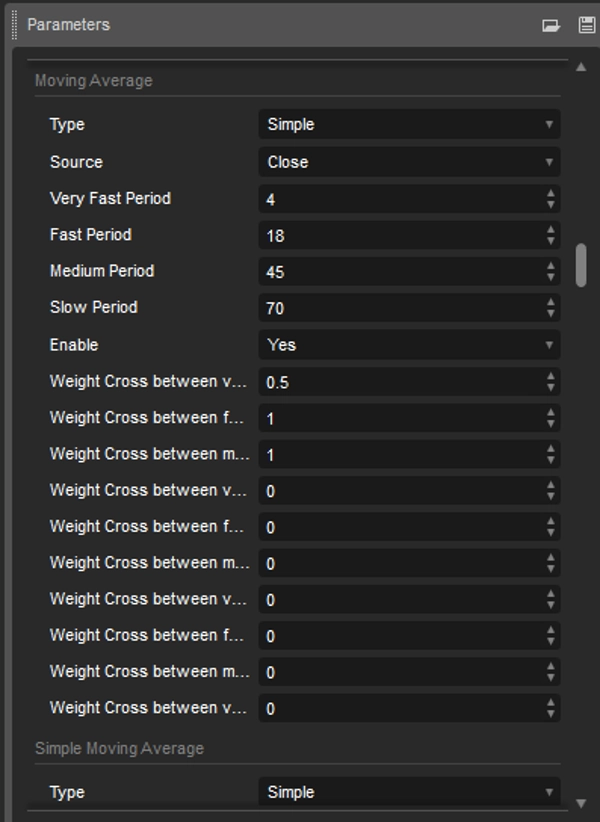
Type,Source,Very Fast Period,Fast Period,Medium Period,Slow PeriodConfigure the MA family.EnableMaster switch.MAWeight1toMAWeight10Weight cross relationships across SMA, EMA, HMA, and VWAP comparison logic.
MACD
Source,LongCycle,ShortCycle,Period,EnableStandard MACD configuration.MACDWeight1MACD line versus signal line cross.MACDWeight2Histogram behavior.MACDWeight3Higher-timeframe confirmation.MACDWeight4Divergence weighting.MACDWeight5Zero-cross timing rule using prior readings.MACDWeight6MACD delta-change rule.
Linear Regression R-Squared
Source,Period,Filter,EnableMeasures trend quality.LRRWeight1,LRRWeight2Slope and higher-timeframe confirmation weighting.
Williams %R
Period,Overbought Threshold,Oversold Threshold,EnableWRWeight1toWRWeight5Principal threshold logic, higher-timeframe confirmation, trend confirmation, divergence, and simple growth behavior.
Parabolic SAR
Minaf,Maxaf,EnablePSARWeight1toPSARWeight4Price relation, higher-timeframe confirmation, ATR volatility filter, and trend confirmation.
RSI
Source,Period,FilterUp,FilterDown,EnableRSIWeight1Principal RSI threshold logic.RSIWeight2Divergence confirmation.RSIWeight3Trend-direction confirmation.RSIWeight4Change-bias logic based on recent RSI movement.
Important implementation note:
The current FusionStack code adds Buy weight when RSI[t-1] < RSI[t-2] and Sell weight when RSI[t-1] > RSI[t-2]. If your interpretation of RSI momentum expects the reverse, tune this weight carefully or set it to zero.
Bollinger Bands
Source,Period,Deviation,MA type,EnableBANDSWeight1,BANDSWeight2Breakout and volatility confirmation.
Stochastic Oscillator
K Periods,K Slowing,D Periods,Moving Average Type,Low Filter,High Filter,EnableSTOCHOSCWeight1,STOCHOSCWeight2Cross-in-zone confirmation and higher-timeframe confirmation.
Aroon
Period,Strong Filter,EnableAROONWeight1,AROONWeight2,AROONWeight3Up/down structure, higher-timeframe confirmation, and divergence weighting.
Ichimoku
Tenkan-sen Period,Kijun-sen Period,Senkou Span B Period,Chikou Span Period,EnableICHIWeight1toICHIWeight4Cross, cloud, Chikou, and higher-timeframe confirmation.
On-Balance Volume
Source,OBV MA Period,OBV MA Type,EnableOBVWeight1toOBVWeight3Trend, divergence, and higher-timeframe confirmation.
ADX
Period,Filter,Filter for ADX stop loss,EnableADXWeight1,ADXWeight2Trend strength and higher-timeframe confirmation.
Keltner Channels
Central Line Period,Central Line MA Type,ATR Period,ATR MA Type,Multiplier,EnableKeltnerWeight1toKeltnerWeight3Breakout, slope, and higher-timeframe confirmation.
Average True Range
Period Indicator,Period for Take Profit,Period for Stop Loss,Period for Trailing at win,Gain Low,Gain High,Type
This group provides ATR data used across filters and ATR-derived risk management.
Commodity Channel Index
Source,CCI Period,CCI Overbought Threshold,CCI Oversold Threshold,Enable,Weight
Triple Exponential Moving Average
TEMA Period,Enable,TEMAWeight1,TEMAWeight2Price crossover and slope weighting.
Supertrend
Supertrend ATR Period,Supertrend Multiplier,Enable,SupertrendWeight1,SupertrendWeight2
Support Level And Resistances Level
Period,LookBack Period Multiplier,Margin,Count Repeat
These settings define how support/resistance context is derived.
Double TOP And BOTTOM
PeriodLookback used for pattern context.
CMI
Period,Up Filter,Down Filter
This module depends on the custom ChoppinessIndex indicator file included in strategies/indicators.
Rolling Correlation
Period,Up Filter,Down Filter
This module depends on the custom RollingCorrelation indicator file included in strategies/indicators.
QQE_MTF
QQE RSI Period,QQE Slow Factor,QQE Fast Factor,QQE Level,Enable,Weight
This module depends on the custom QQE_MTF indicator file included in strategies/indicators.
Spread
Spread Period,Spread Threshold Factor,Enable,Weight
Fibonacci
Fibonacci Retracement Period,Enable,Weight
EMA-PSAR
Enable,WeightUses EMA and PSAR relationship as a confirmation layer.
Random Indicator 1 And Random Indicator 2
- indicator index A
- indicator index B
- operator choice
- trade side choice
- enable flag
- weight
These modules compare chosen indicator values. Setting the index to -1 lets the strategy select a random indicator index.
VWAP
VWAP Period,Enable VWAP,VWAP Weight
Random Trading Sequence
Enable,Weight
When enabled, this module randomly assigns Buy, Sell, or No-Trade weight. It is intended for experimentation and should not be used casually in production.
Instant Direction
Enable,Weight,Use Buy
This module injects a direct directional bias without market analysis. It is useful for testing order-management behavior independently from signal generation.
Engulfing Pattern
Enable,Weight
HammerHangingMan
Big Shadow Multiplier,Small Shadow Multiplier,Enable,Weight
Volume Spike
Volume Spike Threshold
Maximum Minimum Bar
Period Maximum (bars),Period Minimum (bars)
Donchian Channel
Donchian Channel Period,Enable,Weight
Pivot Points
Pivot Session Start Hour (UTC),Weight: R1 Comparison,Enable PivotPointSignal
Stop Loss Weights
ADX Stop WeightRSI Stop WeightChoppy Stop WeightDouble Top/Bottom Stop WeightVolatility Stop WeightTime Adjustment Stop WeightTrend Adjustment Stop Weight
Important Implementation Notes
MACD Zero-Cross Rule
MACDWeight5 is not a generic "MACD above zero" rule in practice. In FusionStack it uses prior MACD readings to weight a specific zero-cross timing condition.
RSI Change-Bias Orientation
RSIWeight4 should be validated carefully during optimization because its directional interpretation may differ from what some traders expect.
Pending Order Placement Distances
Limit and stop orders are derived from the current SL and TP distance logic. If you switch between market and pending modes, review the resulting placement geometry before live deployment.
Netting Versus Hedging
NettingMode blocks all new entries while any position is open. If you want simultaneous long/short exposure or reverse-only-if-losing behavior, keep netting disabled.
Optimization Versus Live Trading
The strategy can be configured very aggressively because it exposes many experimental modules. Not every valid optimization setup is suitable for live deployment. Treat the Fitness groups as research tools, not as proof of robustness.
Practical Use Guidance
- Start with fewer enabled modules and add complexity only after you understand which families genuinely help on your symbol and timeframe.
- Treat high thresholds as a quality filter and low thresholds as an activity booster.
- If you enable risk sizing, verify pip-value behavior on the exact broker and instrument you plan to trade.
- If you enable fixed RR, decide whether TP management should ever be allowed to override the original ratio.
- If you use pyramiding, pair it with stricter duplicate controls and narrower session windows.
- If you use experimental modules such as random indicator comparisons or random trading sequence, isolate them in research profiles rather than mixing them into production profiles blindly.
Troubleshooting
Use Debugging Mode
When something is unclear, run the strategy in debugging mode before changing parameters blindly.
Recommended debugging workflow:
- Set
Log LeveltoDebugin theGlobal Variablesgroup. - Start the bot on a chart with the exact symbol and timeframe you want to test.
- Watch the cTrader Automate log output for indicator initialization, decision ratios, gating checks, order placement decisions, and stop-loss management messages.
- If the bot does not trade, compare the debug log against the main blockers documented below: trading hours, threshold, duplicate suppression, open-time restrictions, netting, pyramiding, single-session mode, and missing custom indicators.
Use debugging mode especially when you are validating:
- whether a signal is being generated but blocked by gating
- whether stop loss or take profit values are being replaced by ATR, fixed RR, or structure-based rules
- whether reverse-close, pyramiding, or netting settings are behaving as expected
The Strategy Does Not Trade
Check the following first:
Enable BuyandEnable Sell- trading hours
TradeThreshold- duplicate-trade lockout settings
OpenHours- netting or pyramiding restrictions
SingleSessionTradeEnable- custom indicator files installed in cTrader when using
QQE_MTF,CMI, orRolling Correlation
The Strategy Trades Too Often
Increase one or more of:
TradeThresholdBarsToTrackOpenHours
Also consider disabling random or forced-direction modules.
The Strategy Reverses Too Aggressively
Review:
CloseOnReverseCloseOnReverseOnlyWhenLosingNettingMode
TP Or SL Looks Different From Manual Settings
That usually means one of these is active:
- ATR-based SL/TP/trailing
- minimum-period or maximum-period TP/SL derivation
- fixed RR mode
Pyramiding Does Not Happen
Check:
EnablePyramidingOpenHours- current position state
- duplicate-trade blocking
License And Risk Disclosure
Strategy FusionStack, including source code and documentation, is proprietary and licensed exclusively under the cTrader user a1995 license. It is not open source. All rights reserved.
- No copying, modification, redistribution, or commercial use except as expressly permitted by the a1995 license agreement.
- Access, evaluation, and deployment must remain within the scope of that license.
- Any use outside the granted license requires written approval from the rights holder.
Trading involves risk. This strategy should be backtested, forward-tested, and validated on the exact symbol, broker environment, and timeframe you intend to trade before any live deployment.
Summary
Key features include:
- Integration of diverse indicators such as Moving Averages (SMA, EMA, HMA, VWAP), MACD, RSI, ADX, Bollinger Bands, Keltner Channels, Donchian Channel, Fibonacci retracements, Ichimoku, On-Balance Volume, and custom indicators like QQE_MTF, ChoppinessIndex, and RollingCorrelation.
- Flexible order placement modes: market, limit (pullback), and stop (breakout) orders with configurable expiration.
- Comprehensive order approval and blocking rules including duplicate trade suppression, session-hour gating (all times in UTC), netting (single position), pyramiding (stacking positions), and single-session trade limits.
- Risk and position management with fixed lot sizing or risk-based sizing derived from stop-loss distance and risk amount, ATR-based stop loss, take profit, and trailing stop calculations, plus dynamic stop adjustments based on market context.
- Experimental modules for random indicator comparisons and forced directional bias.
- Detailed logging and debugging support for trade logic validation.
FusionStack requires importing custom indicator files into cTrader and is intended for experienced traders familiar with market structure, indicator interactions, and optimization. It supports trading across multiple markets including Forex, commodities, indices, stocks, and cryptocurrencies. All time-based settings use UTC to ensure consistent behavior across brokers and geographies.
Customer reviews
5 | 33 % | |
4 | 67 % | |
3 | 0 % | |
2 | 0 % | |
1 | 0 % |