present
Sign up and get $50 off your first purchase
Trading product for ClickAlgo CodePilot Desktop plugin AI Integration, image 1
ClickAlgo CodePilot
Desktop plugin
218 downloads
Version 1.1, Jul 2026
Windows, Mac
Trading product for ClickAlgo CodePilot Desktop plugin AI Integration, image 2
645
Free installs

Description

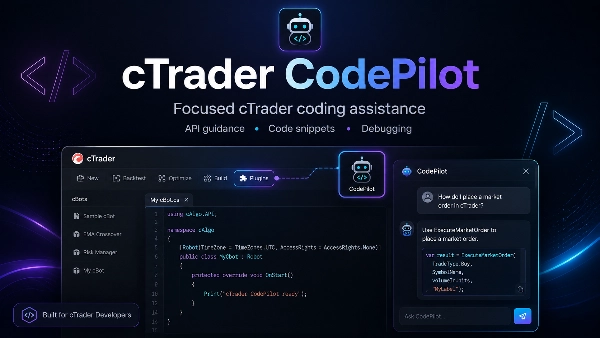
cTrader CodePilot is a focused development assistant for cTrader users who need API guidance, short C# examples, debugging help and clear technical explanations while working with cBots, indicators and plugins.

The plugin opens CodePilot directly from the cTrader toolbar, giving developers quick access to specialist cTrader support without leaving the platform.


Built for cTrader Development

Unlike a general AI assistant, CodePilot is designed around the cTrader ecosystem. It helps explain cTrader Algo APIs, method signatures, lifecycle events, chart controls, trading operations and common platform behaviour.

Use it to understand compiler errors, review a focused section of code, correct an isolated method or generate a short example for a specific feature.


Focused Coding Support

CodePilot can help with position and order handling, indicator calculations, chart drawing, risk calculations, multi-symbol logic, multi-timeframe data and other common cTrader development tasks.

It is designed for focused assistance rather than complete project generation.


Launch from cTrader

Install the cTrader CodePilot plugin and open it directly from the cTrader Desktop toolbar whenever you need development guidance while coding or testing.

Summary

AI summary
cTrader CodePilot is a specialized development assistant plugin for the cTrader platform, designed to support users in building, refining, and deploying algorithmic trading strategies. It enables users to describe trading strategies in plain English and instantly generates clean, well-structured C# cBot code compatible with cTrader Algo. Unlike general AI tools, CodePilot is custom-trained on extensive cTrader-specific datasets, including official documentation and real-world code examples, providing precise interpretation of user instructions and platform-specific coding solutions.

Key features include guidance on cTrader Algo APIs, method signatures, lifecycle events, chart controls, trading operations, and common platform behaviors. It assists with position and order handling, indicator calculations, chart drawing, risk management, multi-symbol logic, and multi-timeframe data. CodePilot helps debug and troubleshoot code by identifying bugs, syntax issues, and logic errors, while also explaining complex technical concepts such as indicators, backtesting, optimization, and API usage.

The plugin integrates directly into the cTrader Desktop toolbar, offering quick access without leaving the platform. It supports rapid prototyping with modular, scalable, and readable code that can be easily updated by adjusting user instructions. CodePilot also facilitates converting indicators from other platforms like MT4 and TradeView to cTrader. This tool is intended for focused coding support rather than full project generation, serving as an intelligent co-pilot for cTrader developers.

Plugin profile

Customer reviews

0.0
Reviews: 0
Customer reviews
No reviews for this product yet. Already tried it? Be the first to tell others!

Discussion

FAQ

AI Integration
Products available through cTrader Store, including trading bots, indicators and plugins, are provided by third-party developers and made available for informational and technical access purposes only. cTrader Store is not a broker and does not provide investment advice, personal recommendations or any guarantee of future performance.

You may also like

Desktop plugin
Prop
Forex
+4
Visual monthly trading journal that displays your performance day-by-day in a calendar view.
Desktop plugin
Risk Reward management tools (风险回报管理工具)
Desktop plugin
Prop Firm Fit
Trade Journal
+1
Paper trade your broker’s live prices in cTrader: demo accounts, prop challenges, a stats dashboard and trading journal
Desktop plugin
AI
DeepSeek Plugin for cTrader
Desktop plugin
Chart UI Tools
Keep lines, zones and channels synced across selected same-symbol charts from one desktop plugin.
Desktop plugin
Forex
Crypto
+4
Apply Stop Loss and Take Profit to all positions and pending orders in one click.
Desktop plugin
ECN-friendly
Chart UI Tools
Any timeframe cTrader lacks: seconds, minutes, hours, tick & range bars, Heikin-Ashi in the timeframe menu.
Desktop plugin
Risk Alerts
Prop Firm Fit
+5
Read-only risk cockpit for prop-firm traders: live drawdown gauges, FTMO-style permitted loss, alerts and reports.
Desktop plugin
Forex
Crypto
+3
Seconds | Ticks | Range | RangeY | Delta | Heikin-Ashi Bar types. Any size or Symbol.
Desktop plugin
Position Sizer
Risk Calculator
Size manual trades from your risk settings and review Market, Limit or Stop orders before execution.
Desktop plugin
Forex
Crypto
+2
This plugin allows you to jump to a specific data on a chart.
Desktop plugin
Forex
Signal
+2
Adaptive Renko chart builder for precise, flexible trading - ideal for both scalping and trend analysis.
Desktop plugin
Risk/Reward
Trade Journal
+5
cTrader Journal - Automatic Trade Capture. Offline Reviews. No Subscription.
Desktop plugin
Trade Journal
AI Integration
+1
#1 Trade Journal, PnL analytics, bot monitoring and strategy statistics.
Desktop plugin
Trade Journal
Trade Statistics
Track. Analyze. Improve. A journal and statistics for your real cTrader trades, with a prop challenge guard.
Desktop plugin
External Data
Trade Journal
+2
Real Quant Audit, Live equity, open-position risk and 24 quant tests on your full account. IS THE EDGE REAL?
Desktop plugin
A powerful Plugin for cTrader that enables traders to identify and visualize advanced market patterns
Desktop plugin
AI
ATR
+27
Turn your cTrader trade history into a visual performance dashboard to see trading patterns and strategy strength

Price

645
Free installs