คำอธิบาย
Heikin Ashi Structure Bias (cTrader Indicator)
โซนอุปสงค์-อุปทานอัตโนมัติพร้อมการเบี่ยงเบนหลายกรอบเวลา
สิ่งที่มันทำ – อธิบายง่ายๆ
อินดิเคเตอร์นี้จะทำโดยอัตโนมัติ:
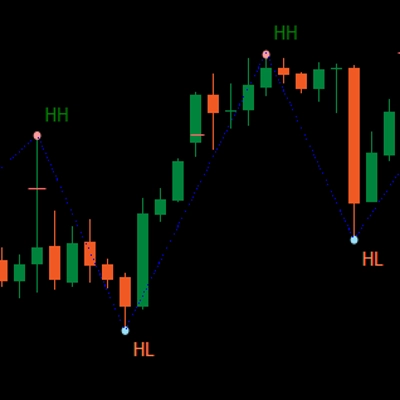
- อ่านการเคลื่อนไหวราคาของ Heikin Ashi และตรวจจับการเปลี่ยนแปลงจุดหมุนที่มีความหมาย
- สร้างโซนอุปสรรค์และแนวรับแบบไดนามิก รอบๆ จุดหมุนเหล่านั้น โดยใช้ทั้งปลายไส้เทียนและตัวแท่งเทียน (ไม่ใช่แค่เส้นสุ่ม)
- รวมโซนที่อยู่ใกล้กันอย่างชาญฉลาด เพื่อให้คุณเห็นระดับที่ชัดเจนและสามารถเทรดได้ แทนที่จะเป็นป่าของเส้นแนวนอน
- สร้างการเบี่ยงเบนขาขึ้นหรือขาลงที่ชัดเจน ทุกครั้งที่ราคาทะลุผ่านโซนแนวรับหรือแนวต้านล่าสุดอย่างเต็มที่
- แสดงการเบี่ยงเบนสำหรับ:
-
- กรอบเวลาบน ชาร์ตของคุณ และ
- กรอบเวลาที่สูงกว่า (ค่าเริ่มต้น H2) — โดยไม่วาดความยุ่งเหยิงของ HTF บนชาร์ตของคุณ
ผลลัพธ์: เพียงแค่ดูครั้งเดียวก็รู้ ระดับที่แท้จริงอยู่ที่ไหน และตลาดกำลัง โน้มเอียงขึ้นหรือลง ในขณะนี้
ปัญหาที่มันแก้ไข
เทรดเดอร์ส่วนใหญ่มีปัญหาเหมือนกัน:
- เส้นแนวรับ/แนวต้านที่วาดด้วยมือ:
-
- มีความลำเอียง,
- ไม่สม่ำเสมอ,
- และมักจะวาดเกินความจำเป็น
- อินดิเคเตอร์ “ซิกแซก + เส้นแนวนอน” แบบง่ายๆ:
-
- ไม่จัดการความกว้างของโซนอย่างถูกต้อง,
- ซ้อนระดับกัน,
- หรือขยายโซนจนครอบคลุมครึ่งหนึ่งของชาร์ต
- การเบี่ยงเบนมักจะ “อยู่ในหัวคุณ” – ไม่ใช่สิ่งที่คุณเห็นหรือใช้ได้อย่างชัดเจนตามกฎ
อินดิเคเตอร์นี้ถูกสร้างขึ้นเพื่อ:
- เปลี่ยน โครงสร้าง Heikin Ashi ให้เป็น โซนที่ชัดเจนและเป็นวัตถุประสงค์,
- ให้คุณมี แนวโน้มหรือการเบี่ยงเบนตามกฎ ที่อิงจากโซนเหล่านั้น,
- ในขณะที่ทำให้ชาร์ต สะอาดและอ่านง่าย.
วิธีการสร้างโซน (คำอธิบายสำหรับเทรดเดอร์)
สำหรับแต่ละจุดหมุน Heikin Ashi อินดิเคเตอร์จะดูที่ โครงสร้าง 3 แท่งเทียน:
- เมื่อ HA เปลี่ยน จากสีแดงเป็นสีเขียว จะเป็นการกำหนดจุดหมุน แนวรับ
- เมื่อ HA เปลี่ยน จากสีเขียวเป็นสีแดง จะเป็นการกำหนดจุดหมุน แนวต้าน
จากนั้นจะสร้างโซน:
โซนแนวรับ
- ค้นหา ปลายไส้เทียนต่ำสุด ในแท่งเทียน 3 แท่ง (จุดต่ำสุดจริง)
- ค้นหา จุดต่ำถัดไปที่ยังสูงกว่าจุดต่ำสุดนั้น.
- ใช้ ตัวแท่งเทียน (เปิด/ปิด) ใกล้จุดต่ำภายในนั้น เพื่อกำหนดด้านที่ “เทรดได้” ของโซน
- โซนแนวรับสุดท้าย:
-
- ด้านล่าง = ปลายไส้เทียนต่ำสุด,
- ด้านบน = ระดับภายในที่อิงจากตัวแท่งเทียน
โซนแนวต้าน
- ค้นหา ปลายไส้เทียนสูงสุด ในแท่งเทียน 3 แท่ง
- ค้นหา จุดสูงถัดไปที่ยังต่ำกว่าจุดสูงสุดนั้น.
- ใช้ตัวแท่งเทียนใกล้จุดสูงภายในนั้น
- โซนแนวต้านสุดท้าย:
-
- ด้านบน = ปลายไส้เทียนสูงสุด,
- ด้านล่าง = ระดับภายในที่อิงจากตัวแท่งเทียน
ดังนั้นแต่ละโซนจึงไม่ใช่แค่แถบสุ่ม:
มันคือ ช่วงจากไส้เทียนถึงตัวแท่งเทียน ที่แสดงถึงจุดที่ราคาปฏิเสธหรือกลับตัวจริงๆ
ตรรกะการรวมโซน (ทำไมชาร์ตถึงสะอาด)
โซนประเภทเดียวกัน (แนวรับกับแนวรับ, แนวต้านกับแนวต้าน):
- ถูกปฏิบัติเหมือน หน่วย บนเส้นเวลา
- สามารถรวมกันได้เฉพาะเมื่อ ทับซ้อนกันจริงในราคา
- การรวมเป็นแบบ ท้องถิ่น อย่างเคร่งครัด:
-
- โซนใหม่สามารถรวมกับ:
-
- โซนล่าสุด (ติดกัน), หรือ
- โซนที่สองล่าสุด (+1 ช่องว่าง), และ
- รวม “สมอ” เพิ่มเติมหนึ่งจุดด้านหลังถ้าโซนรวมใหม่ทับซ้อนกับโครงสร้างก่อนหน้า
สิ่งนี้ทำให้พฤติกรรมเป็นไปอย่างเข้าใจง่าย:
- โซนไม่ “กลืน” ประวัติทั้งหมด
- ระดับเก่าจะได้รับการเคารพแต่ไม่อนุญาตให้สร้างโซนขนาดใหญ่เกินไป
- โครงสร้างท้องถิ่นเช่น A–B–C หรือ A–C+D ถูกจัดการอย่างมีการควบคุม
ตรรกะการเบี่ยงเบน (วิธีที่คุณเทรดจริงๆ กับมัน)
สำหรับแต่ละกรอบเวลา (หลักและ HTF):
- อินดิเคเตอร์ติดตาม โซนแนวรับที่รวมล่าสุด และ โซนแนวต้านที่รวมล่าสุด
- จากนั้น ในแต่ละแท่งเทียนที่ปิด:
-
- ถ้าราคาปิดเหนือโซนแนวต้านล่าสุด → การเบี่ยงเบนกลายเป็น ขาขึ้น.
- ถ้าราคาปิดต่ำกว่าโซนแนวรับล่าสุด → การเบี่ยงเบนกลายเป็น ขาลง.
มันเก็บข้อมูล:
- เวลา ของการเปลี่ยนแปลงการเบี่ยงเบนล่าสุด,
- ระดับ ราคาที่ราคาทะลุโซนนั้น
บนชาร์ต แผงข้อความเล็กๆ จะแสดง:
Main (H1) Bias: BullishMain (H1) Shift: 11/26 15:00 @1.08750
ถ้าเปิดใช้งาน HTF คุณจะเห็นข้อความประมาณนี้:
HTF (H2) Bias: BearishHTF (H2) Shift: 11/25 08:00 @1.09200
คุณยังสามารถเปิดใช้งาน เสียงแจ้งเตือน เมื่อการเบี่ยงเบนของกรอบเวลาหลักเปลี่ยนแปลง
สิ่งที่คุณเห็นบนชาร์ต
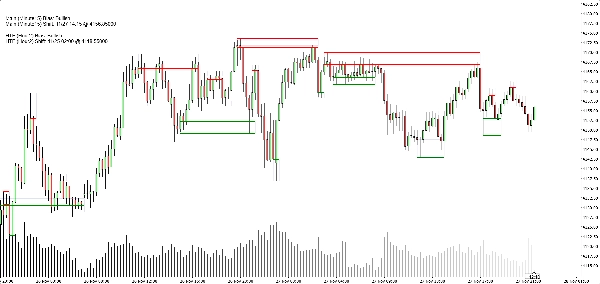
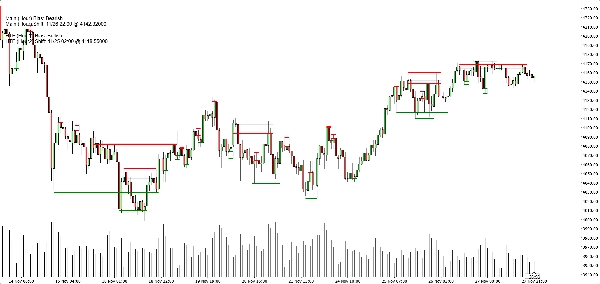
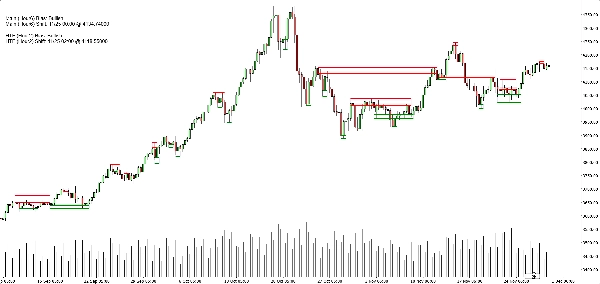
- โซนแนวรับ:
-
- เส้นฐาน/เส้นทริกเกอร์สีเขียวแนวนอน (เลือกเปิด/ปิดได้),
- สี่เหลี่ยมสีกรมท่าอ่อนๆ (ความทึบแสงต่ำมาก) แสดงแถบแนวรับทั้งหมด
- โซนแนวต้าน:
-
- เส้นสีแดง + สี่เหลี่ยมสีกรมท่าอ่อนสำหรับแถบ
- ตัวเลือกแสดงผลที่สะอาด:
-
- แสดง/ซ่อนโซนแนวรับ,
- แสดง/ซ่อนโซนแนวต้าน,
- เปิด/ปิดสี่เหลี่ยมที่เติมสี,
- เปิด/ปิดเส้นฐาน/เส้นทริกเกอร์,
- เปิด/ปิดแผงการเบี่ยงเบน
สิ่งนี้ช่วยให้เทรดเดอร์แต่ละคนเลือกได้ระหว่าง:
- ลุคที่ เรียบง่าย (อาจเป็นแค่สี่เหลี่ยม), หรือ
- มุมมองที่ แม่นยำ (เห็นเส้นที่ชัดเจน)
กรณีการใช้งานทั่วไป
คุณสามารถใช้มันได้อย่างมีประโยชน์สำหรับ:
- การกรองแนวโน้ม
-
- มองหาการซื้อเฉพาะเมื่อ ทั้ง การเบี่ยงเบนของกรอบเวลาหลักและ HTF เป็นขาขึ้น
- มองหาการขายเฉพาะเมื่อทั้งสองเป็นขาลง
- การเข้าซื้อในโซน
-
- ใช้โซนเป็น พื้นที่ที่น่าสนใจ สำหรับ:
-
- คำสั่งจำกัด,
- การยืนยันการเข้า (เช่น ราคากลับมาที่โซนที่ถูกทำลายและปฏิเสธอีกครั้ง),
- การวางจุดหยุดเพียงเลยแถบด้านนอก
- การวิเคราะห์จากบนลงล่าง
-
- การเบี่ยงเบน HTF (ค่าเริ่มต้น H2) เป็นภาพรวมใหญ่,
- การเบี่ยงเบนกรอบเวลาชาร์ตสำหรับการจับจังหวะ,
- โซนสำหรับระดับการดำเนินการที่ชัดเจน
สิ่งที่มันไม่ใช่ (สำคัญสำหรับการขายอย่างซื่อสัตย์)
- มัน ไม่ใช่ หุ่นยนต์ที่เทรดอัตโนมัติให้คุณ
- มัน ไม่ใช่ สัญญาณ “พระกรุ” ที่รับประกันกำไร
- มันเป็น เครื่องยนต์โครงสร้างและการเบี่ยงเบน:
-
- กำหนดโซนอย่างเป็นวัตถุประสงค์,
- กำหนดแนวโน้มหรือการเบี่ยงเบนอย่างเป็นวัตถุประสงค์ตามโซนเหล่านั้น,
- ปล่อยการจัดการเทรดจริงให้กับเทรดเดอร์/กลยุทธ์
สรุป
It provides a rule-based bullish or bearish bias by tracking price breaks above resistance or below support zones on both the current chart timeframe and an optional higher timeframe. This bias is displayed on a built-in dashboard panel, with optional sound alerts for bias changes.
The indicator works across all timeframes and markets where price forms swings, including forex, crypto, stocks, and futures. It features customizable lookback periods, automatic cleanup of old zones, and toggles for display elements to suit different trader preferences.
Typical uses include trend filtering by aligning biases across timeframes, identifying zone entries for limit or confirmation orders, and supporting top-down analysis. The tool timestamps and sequences pivots and bias shifts, facilitating automation or journaling. It is a structure and bias engine that aids traders in objectively defining market levels and trends while maintaining chart clarity.
รีวิวจากลูกค้า
5 | 33 % | |
4 | 67 % | |
3 | 0 % | |
2 | 0 % | |
1 | 0 % |