
Beschreibung
Liquidity Cluster Order (LCO) 🔍💧
1. Was LCO zeigt
Liquidity Cluster Order erkennt und zeichnet automatisch:
- Bullishe Liquiditätscluster (potenzielle Nachfrage- / Akkumulationszonen) ✅
- Bearishe Liquiditätscluster (potenzielle Angebots- / Distributionszonen) 🔻
Jedes Cluster ist:
- verankert an einer Volumen-Pivot-Bar (ein lokales Volumenmaximum),
- klassifiziert als bullish oder bearish basierend auf der jüngsten Preisbewegung,
- zeitlich nach vorne verlängert bis der Preis das Cluster mildert (konsumiert).
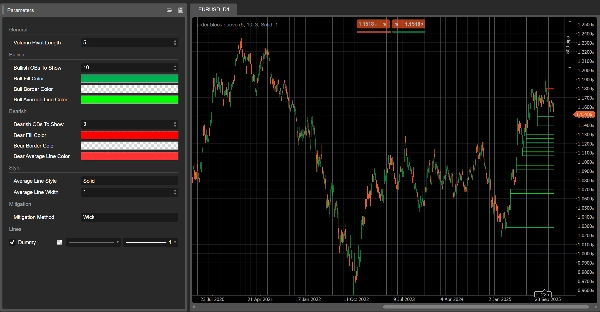
Im Chart sehen Sie:
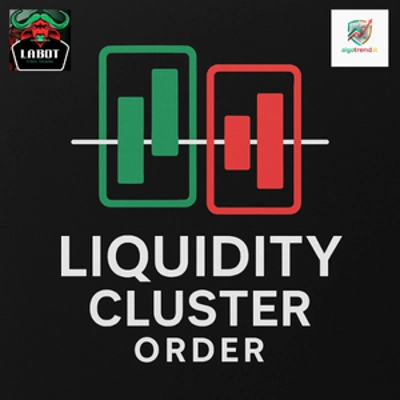
- Grüne Rechtecke → bullishe Liquiditätscluster
- Rote Rechtecke → bearishe Liquiditätscluster
- Eine graue Linie innerhalb jedes Rechtecks → das durchschnittliche Preisniveau dieses Clusters
Sobald ein Cluster als gemildert gilt, verschwindet es aus dem Chart und nur aktive Cluster bleiben sichtbar.
2. Erkennungslogik (einfach erklärt)
- Volumen-Pivot
-
- LCO sucht nach Bars, bei denen das Volumen höher ist als bei den vorherigen und nächsten
Volume Pivot LengthBars. - Diese Bars sind Volumen-Pivots – potenzielle Anker für Liquiditätscluster.
- LCO sucht nach Bars, bei denen das Volumen höher ist als bei den vorherigen und nächsten
- Kontext: bullish vs bearish
-
- Das jüngste Preisverhalten definiert einen Kontext:
-
- Bullisher Kontext → Abwärtsbewegung hat dominiert.
- Bearisher Kontext → Aufwärtsbewegung hat dominiert.
- Dieser Kontext entscheidet, ob der nächste Volumen-Pivot ein bullishes oder bearishes Liquiditätscluster erzeugt.
- Bullishes Liquiditätscluster
In einem bullishen Kontext: -
- Cluster-Boden = Tief der Pivot-Bar
- Cluster-Top = Mittelpunkt der Bar (
(hoch + tief) / 2) - Interpretation: Zone, in der der Abwärtsdruck absorbiert wurde und Käufer aggressiv eingestiegen sind.
- Bearishes Liquiditätscluster
In einem bearishen Kontext: -
- Cluster-Boden = Mittelpunkt der Pivot-Bar
- Cluster-Top = Hoch der Pivot-Bar
- Interpretation: Zone, in der der Aufwärtsdruck absorbiert wurde und Verkäufer die Kontrolle übernahmen.
- Durchschnittslinie
-
- Für jedes Cluster berechnet LCO den Mittelwert von oben & unten und zeichnet eine graue Mittellinie.
- Diese fungiert als internes Gleichgewichtsniveau des Clusters.
- Milderung (Cluster-Konsum)
Bei jeder neuen Bar prüft LCO, ob ein Cluster gemildert ist: -
- Für bullishe Cluster:
-
- Es verfolgt einen Abwärts-Zielpreis über die letzten
Volume Pivot LengthBars: -
Mitigation Method = Wick→ niedrigster Tiefststand.Mitigation Method = Close→ niedrigster Schlusskurs.
- Wenn dieser Zielpreis unter den Cluster-Boden fällt, gilt das bullishe Cluster als gemildert und wird entfernt.
- Es verfolgt einen Abwärts-Zielpreis über die letzten
- Für bearishe Cluster:
-
- Es verfolgt einen Aufwärts-Zielpreis:
-
Wick→ höchster Höchststand.Close→ höchster Schlusskurs.
- Wenn dieser Zielpreis über das Cluster-Top steigt, gilt das bearishe Cluster als gemildert und wird entfernt.
Gemildert = Liquidität in diesem Cluster wird als konsumiert / ungültig angenommen.
3. Wie man LCO im Chart liest
Sie sehen hauptsächlich:
- Grüne Cluster unter dem Preis → potenzielle Nachfrage-Liquiditätszonen
- Rote Cluster über dem Preis → potenzielle Angebots-Liquiditätszonen
Typische Lesart (kein Handelsrat):
- Frische Cluster
-
- Kürzlich erstellte Cluster sind oft relevanter:
-
- Bullishes Cluster unter dem Preis → Bereich, in dem Käufer zuletzt Verkaufsdruck absorbiert haben.
- Bearishes Cluster über dem Preis → Bereich, in dem Verkäufer zuletzt Kaufdruck absorbiert haben.
- Retests eines Clusters
-
- Der Preis kehrt von oben zu einem bullishen Cluster zurück:
-
- Wenn der Preis reagiert und den Boden hält → mögliche Abprall- / Long-Reaktionszone.
- Der Preis kehrt von unten zu einem bearishen Cluster zurück:
-
- Wenn der Preis es nicht schafft, über das Top zu handeln → mögliche Abweisung- / Short-Reaktionszone.
- Gemilderte vs aktive Cluster
-
- Wenn der Preis ein Cluster gemäß der gewählten Milderungsmethode durchbricht,
→ wird dieses Liquiditätscluster in den folgenden Bars entfernt. - Cluster, die noch sichtbar sind, sind aktive Liquiditätszonen, die noch nicht vollständig durchlaufen wurden.
- Wenn der Preis ein Cluster gemäß der gewählten Milderungsmethode durchbricht,
- Verwendung der Mittellinie
-
- Diese graue Mittellinie kann verwendet werden als:
-
- ein Gewinnmitnahme- oder Teil-Ausstiegsniveau innerhalb des Clusters,
- eine „faire Preis“-Referenz innerhalb der Liquiditätszone,
- eine schnelle Möglichkeit zu sehen, ob der Preis in der oberen oder unteren Hälfte des Clusters handelt.
4. Parameter (Englisch)
Volume Pivot Length
- Bars, die verwendet werden, um:
-
- Volumen-Pivots zu erkennen,
- Extrema und Milderungsziel zu berechnen.
- Niedrigere Werte → mehr Cluster, mehr Rauschen;
- Höhere Werte → weniger, aber bedeutendere Cluster.
Anzuzeigende bullishe Liquiditätscluster
(ehemals Anzuzeigende bullishe OBs)
- Maximale Anzahl an bullishen Clustern, die im Chart angezeigt werden.
Anzuzeigende bearishe Liquiditätscluster
(ehemals Anzuzeigende bearishe OBs)
- Maximale Anzahl an bearishen Clustern, die angezeigt werden.
Bull Fill Color / Bear Fill Color
- Füllfarbe der bullischen/bearischen Cluster.
- Sie können Alpha-(Transparenz-)Werte einschließen.
Bull/Bear Average Line Color
- Farbe der internen Mittellinie für jedes Cluster.
Average Line Style
- Visueller Stil für die Mittellinie:
"Solid","Dashed","Dotted".
Average Line Width
- Dicke der Mittellinie.
Mitigation Method
"Wick"→ Milderung basierend auf Hoch-/Tiefdochten (sensibler)."Close"→ Milderung basierend auf Schlusskursen (konservativer).
Zusammenfassung
On the chart, bullish clusters appear as green rectangles below the price, indicating areas where buyers absorbed selling pressure. Bearish clusters are shown as red rectangles above the price, marking zones where sellers absorbed buying pressure. Each cluster includes a grey mid-line representing the average price level, serving as an internal equilibrium reference.
Clusters extend forward in time until price "mitigates" or consumes them, at which point they disappear, leaving only active liquidity zones visible. Mitigation is determined by tracking price extremes (high/low wicks or closing prices) over a configurable number of bars.
Key parameters include the volume pivot length (defining sensitivity and cluster significance), maximum clusters displayed, cluster colors, mid-line style, and mitigation method. LCO supports various markets including forex, indices, commodities, stocks, and cryptocurrencies, and integrates with multiple trading strategies and indicators such as RSI, MACD, Bollinger Bands, and Fibonacci levels.
Kundenbewertungen
5 | 100 % | |
4 | 0 % | |
3 | 0 % | |
2 | 0 % | |
1 | 0 % |














![„Smart Money Concepts (SMC) [Iridio Capital]“-Logo](https://cdn.ctrader.com/image/webp/b4b5414d-a5ca-44b7-a947-e28eca44a218_61548)