

Açıklama
M-Algo EURUSD M1 Pro, M-Algo Systems EURUSD kurtarma/grid ticaret sisteminin gelişmiş abonelik sürümüdür.
Öncelikle 1 dakikalık zaman diliminde EURUSD için tasarlanmış ve optimize edilmiştir ve M1, M2, M3, M4 ve M5 grafiklerini destekler. PRO sürümü, birden fazla Pozisyon Boyutlandırma Modu, yapılandırılabilir hesap riski kontrolleri ve gelişmiş optimizasyon kontrolleri isteyen kullanıcılar için tasarlanmıştır; ana özel strateji mantığını koruyarak ve önceden yapılandırılmış halde tutar.
Strateji türü: Kurtarma / ilerleyici pozisyon boyutlandırmalı grid
Hedef sembol: EURUSD
Optimize edilmiş zaman dilimi: M1
Desteklenen grafik periyotları: M1-M5
Ticaret kullanım durumu: Yapılandırılabilir boyutlandırma ve hesap koruması ile otomatik EURUSD sepeti/kurtarma ticareti
Önerilen kaldıraç: 1:500
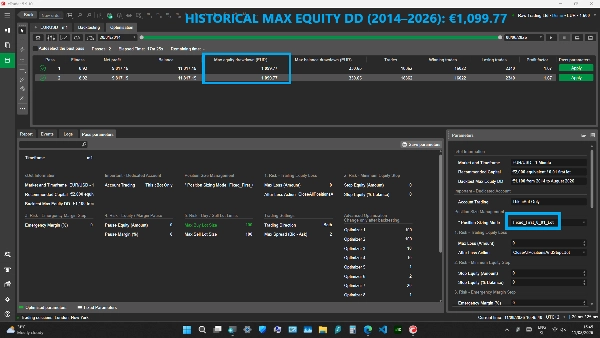
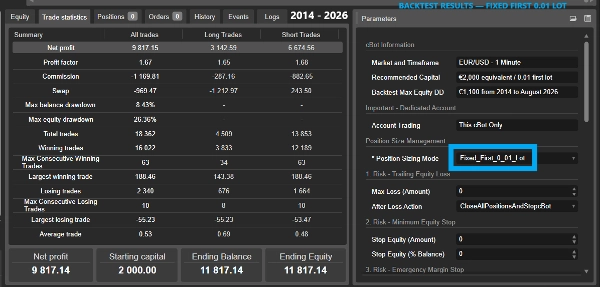
Önerilen sermaye: Fixed_First_0_01_Lot referans yapılandırması için €2.000 eşdeğeri
Hesap türü: Hedging gerekli
Erişim hakları: AccessRights.None - Tam Erişim gerekli değildir
PRO SÜRÜMÜ
• Dört Pozisyon Boyutlandırma Modu
• Otomatik Alış ve Satış sepeti yönetimi
• İlerleyici kurtarma pozisyon boyutlandırması
• Paylaşılan Kar Al yönetimi
• Yeniden başlatma ve açık pozisyon devamlılığı
• Takip eden öz sermaye hesap koruması
• Para ve yüzde ile minimum öz sermaye koruması
• Acil Marjin koruması
• Öz sermaye ve Marjin giriş-durdurma kontrolleri
• Yapılandırılabilir maksimum Alış ve Satış pozisyon boyutları
• Ticaret Yönü kontrolü
• Maksimum spread filtresi
• Gelişmiş geriye dönük test için Optimize Edici 1-9 kontrolleri
• cBot'un GetFitness yöntemi aracılığıyla özel cTrader Optimizasyon Kriterleri
• Gerekli cTrader döviz dönüşümü mevcut olduğunda farklı hesap para birimleri desteklenir
• Ana özel strateji parametreleri sabit ve gizli kalır
POZİSYON BOYUTLANDIRMA MODLARI
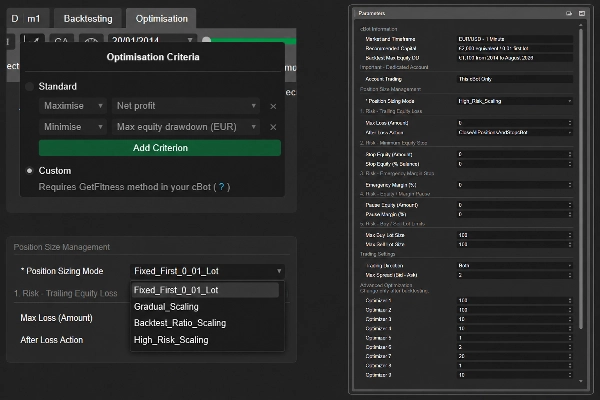
PRO sürümü dört Pozisyon Boyutlandırma Modu içerir:
• Fixed_First_0_01_Lot
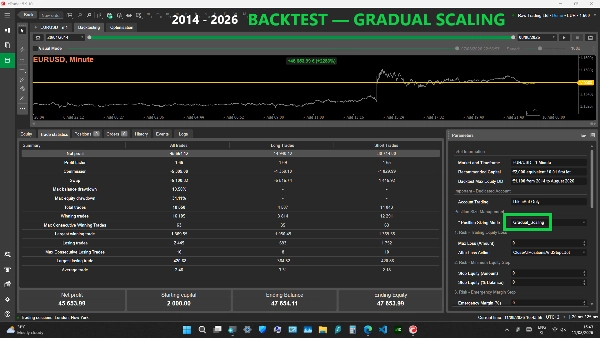
• Gradual_Scaling
• Backtest_Ratio_Scaling
• High_Risk_Scaling
Fixed_First_0_01_Lot:
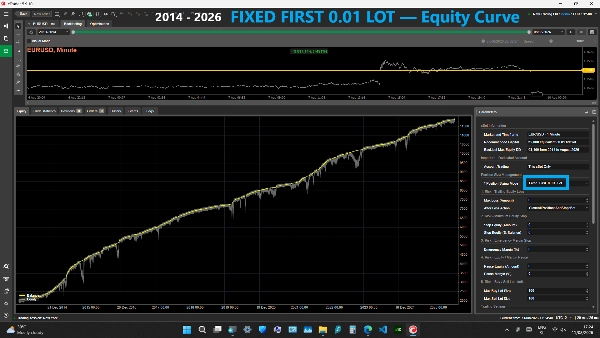
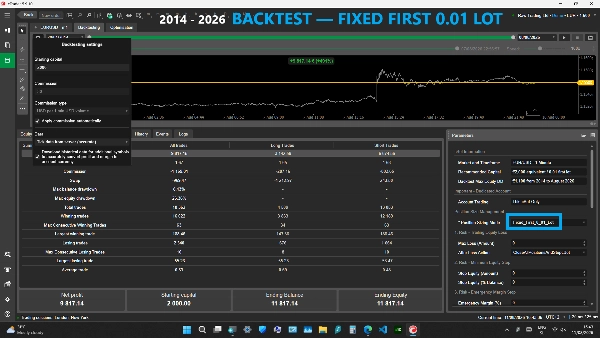
Her yeni yönlü sepet için sabit bir 0.01-lot ilk pozisyon kullanır. Hesap sermayesi arttığında ilk pozisyon boyutunu otomatik olarak artırmaz. Kurtarma pozisyonları yine normal ilerleyici kurtarma boyutlandırmasını kullanır.
Gradual_Scaling:
Üç otomatik ölçeklendirme modunun en yavaş ve en muhafazakâr olanıdır. Yeni sepetlerin ilk pozisyon boyutu, uygun hesap sermayesi arttıkça kademeli olarak artar. Otomatik ölçeklendirme isteyen ancak Backtest_Ratio_Scaling veya High_Risk_Scaling'den daha yavaş ilk pozisyon büyümesi isteyen kullanıcılar için tasarlanmıştır.
Backtest_Ratio_Scaling:
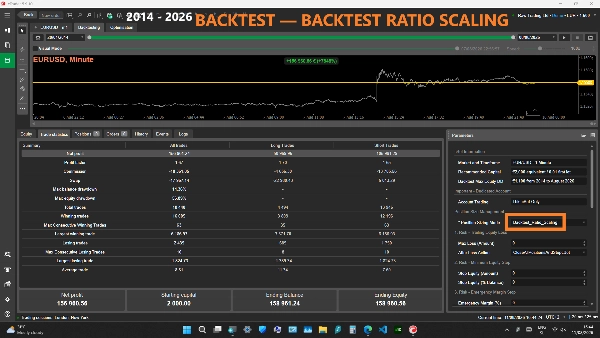
Orta otomatik ölçeklendirme modu. Yeni sepetlerin ilk pozisyon boyutlandırmasını, sabit lot tarihsel geriye dönük test referansında kullanılan sermaye ilişkisiyle uyumlu tutmak için tasarlanmıştır. Gradual_Scaling'den daha hızlı, High_Risk_Scaling'den daha yavaştır.
High_Risk_Scaling:
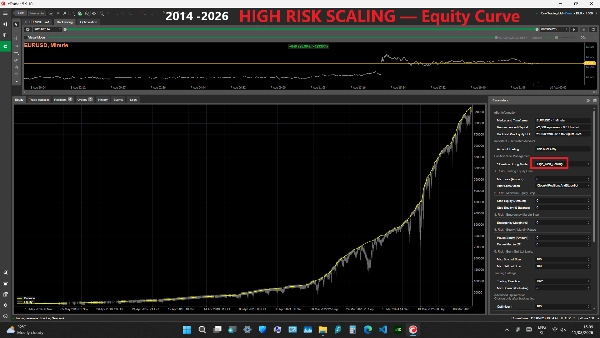
En hızlı ve en agresif otomatik ölçeklendirme modu. Yeni sepetlerin ilk pozisyon boyutu, uygun hesap sermayesi arttıkça daha hızlı artabilir. Bu, kar potansiyelini artırabilir ancak kurtarma pozisyon boyutlarını, yüzen zararları, marjin kullanımını ve hesap kaybı riskini de artırabilir. Tarihsel PRO ürün videosu bu modu kullanır.
Gradual_Scaling, Backtest_Ratio_Scaling ve High_Risk_Scaling, uygun EUR eşdeğeri hesap sermayesinden her YENİ Alış veya Satış sepeti için ilk pozisyon boyutunu ayrı ayrı hesaplar.
Otomatik modlar için uygun sermaye, onaylanmış ilk giriş sinyalinde EUR'ya dönüştürülmüş mevcut hesap Bakiyesi ve Öz Sermayesi arasındaki daha düşük değere dayanır. Yüzen kar, boyutlandırma tabanını Bakiyenin üzerine çıkaramazken, yüzen zarar bir sonraki yeni sepet için kullanılan tabanı azaltabilir.
Otomatik modlar, ilk ölçeklendirme eşiklerinin altında hala 0.01-lot ilk pozisyon kullanabilir.
Otomatik ilk pozisyon boyutu, Alış/Satış yönü başına maksimum 10.00 lot ile sınırlandırılmıştır. Bu 10.00-lot sınırı yalnızca yeni otomatik boyutlandırılmış sepetin İLK pozisyonuna uygulanır.
Kurtarma pozisyonları, 10.00-lot otomatik ilk pozisyon tavanıyla sınırlandırılmaz. Kurtarma pozisyonları, kurtarma ilerlemesine göre büyüyebilir ancak her bireysel emir, seçilen Maksimum Alış Lot Boyutu / Maksimum Satış Lot Boyutu ve broker'ın izin verdiği hacim limitlerine tabidir.
Hiçbir Pozisyon Boyutlandırma Modu güvenlik garantisi vermez.
ÖNEMLİ - AÇIK POZİSYONLARLA POZİSYON BOYUTLANDIRMA MODUNU DEĞİŞTİRME
Pozisyon Boyutlandırma Modunu değiştirmek, zaten açık olan bir sepeti dönüştürmez veya yeniden boyutlandırmaz.
Mevcut bir Alış veya Satış sepeti, o yön tamamen kapatılana kadar oluşturulduğu Pozisyon Boyutlandırma Modunu ve kilitli ilk pozisyon tabanını korur.
Yeni seçilen Pozisyon Boyutlandırma Modu yalnızca o yönde YENİ bir sepet için kullanılır.
Alış ve Satış sepetleri bağımsızdır. Örneğin, mevcut bir Alış sepeti orijinal boyutlandırma modunda devam edebilirken, Satış yönü boş ve izinliyse yeni bir Satış sepeti yeni seçilen boyutlandırma modunu kullanabilir.
STRATEJİ VE POZİSYON YÖNETİMİ
cBot, ilerleyici pozisyon boyutlandırmalı bir kurtarma/grid stratejisi kullanır.
Piyasa aktif yönlü bir sepete karşı hareket ettiğinde ve strateji koşulları sağlandığında, aynı yönde ek kurtarma pozisyonları açılabilir.
Kurtarma pozisyon boyutları ilerleyici olarak artabilir.
Aynı yöndeki pozisyonlar paylaşılan bir Kar Al ile yönetilir.
Strateji izin verir:
• Maksimum Alış pozisyonu: 25
• Maksimum Satış pozisyonu: 25
• Maksimum teorik eşzamanlı pozisyon: 50
Varsayılan olarak sabit broker tarafı Stop Loss etkin değildir.
Maksimum Spread (Bid - Ask), mevcut spread seçilen değerin üzerindeyken hem ilk hem de kurtarma girişlerini engeller. Mevcut pozisyon yönetimi ve koruma mantığı çalışmaya devam eder.
RİSK YÖNETİMİ
ÖNEMLİ: Çoğu koruma eşiği varsayılan olarak 0'dır, yani Devre Dışı. cBot'u canlı fonlarla kullanmadan önce risk yönetimi parametrelerini gözden geçirin ve yapılandırın.
1. RİSK - TAKİP EDEN ÖZ SERMAYE ZARARI
Maksimum Zarar (Tutar), cBot başlatıldığından veya en son koruma sıfırlamasından bu yana ulaşılan en yüksek hesap öz sermayesini takip eder.
Hesap öz sermayesi bu zirveden seçilen Maksimum Zarar tutarından daha fazla düşerse, cBot hesap genelinde tüm pozisyonları kapatma sürecini başlatır.
0 = Devre Dışı.
Zarar Sonrası Eylem, cBot hesap genelinde kapatma işlemini tamamladıktan sonra ne olacağını belirler.
Mevcut eylemler:
• Tüm pozisyonları kapat ve cBot'u durdur
• Tüm pozisyonları kapat ve ticarete devam et
• Tüm pozisyonları kapat ve 12 saat duraklat
• Tüm pozisyonları kapat ve 24 saat duraklat
• Tüm pozisyonları kapat ve 3 gün duraklat
• Tüm pozisyonları kapat ve 7 gün duraklat
Kapatma girişimi başarısız olursa, cBot açık pozisyon kalmayana kadar hesap genelinde kapatma sürecini yeniden denemeye devam eder. Seçilen Durdur / Devam Et / Duraklat eylemi yalnızca hesap tamamen boş olduğunda uygulanır.
Devam Et seçildiğinde, tüm pozisyonlar kapandıktan sonra öz sermaye tabanı sıfırlanır.
Zamanlı Duraklatma seçildiğinde, tasfiye sonrası öz sermaye tabanı sıfırlanır ve yeni ticaret seçilen süre boyunca duraklatılır.
cBot'u yeniden başlatmak, aktif zamanlı duraklatmayı iptal eder.
2. RİSK - MİNİMUM ÖZ SERMAYE DURDURMA
İki bağımsız minimum öz sermaye kontrolü mevcuttur:
• Durdurma Öz Sermayesi (Tutar)
• Durdurma Öz Sermayesi (% Bakiye)
Durdurma Öz Sermayesi (Tutar), mevcut hesap öz sermayesi seçilen para değerinin altına düşerse tetiklenir.
Durdurma Öz Sermayesi (% Bakiye), mevcut hesap öz sermayesi seçilen hesap bakiyesi yüzdesinin altına düşerse tetiklenir.
0 = Devre Dışı.
Herhangi bir etkin koşul tetiklenirse, cBot hesap genelinde tüm pozisyonları kapatma sürecini başlatır ve tüm pozisyonlar kapandıktan sonra durur.
3. RİSK - ACİL MARJİN DURDURMA
Pozisyonlar açıkken Acil Marjin (%) değerlendirilir.
Mevcut hesap Marjin Seviyesi seçilen yüzdeye eşit veya daha düşükse, cBot hesap genelinde tüm pozisyonları kapatma sürecini başlatır ve tüm pozisyonlar kapandıktan sonra durur.
0 = Devre Dışı.
Bu koruma, acil durum hesap seviyesi koruması olarak tasarlanmıştır. Hızlı piyasalar, boşluklar, yürütme gecikmeleri veya aşırı volatilite sırasında broker stop-out veya zararların her zaman önlenebileceğini garanti etmez.
4. RİSK - ÖZ SERMAYE / MARJİN DURAKLATMA
İki giriş duraklatma kontrolü mevcuttur:
• Duraklatma Öz Sermayesi (Tutar)
• Duraklatma Marjini (%)
Duraklatma Öz Sermayesi, mevcut hesap öz sermayesi seçilen tutarın altındayken tüm YENİ ilk ve kurtarma girişlerini durdurur.
Duraklatma Marjini, Marjin Seviyesi seçilen yüzdelik değerin altındayken tüm YENİ ilk ve kurtarma girişlerini durdurur.
0 = Devre Dışı.
ÖNEMLİ: Bunlar giriş duraklatmalarıdır, tasfiye kontrolleri değildir.
Mevcut pozisyonlar açık kalır ve yönetilmeye devam eder. Tüm etkin duraklatma koşulları tekrar güvenli hale geldiğinde ticaret otomatik olarak devam eder.
Kurtarma girişleri de duraklatıldığı için, kullanıcılar bu kontrollerin etkinleştirilmesinin zaten açık bir sepetin normal kurtarma yolunu değiştirebileceğini anlamalıdır.
5. RİSK - ALIŞ / SATIŞ LOT LİMİTLERİ
Maksimum Alış Lot Boyutu ve Maksimum Satış Lot Boyutu, her bireysel Alış veya Satış pozisyonu için bağımsız maksimum boyutlardır.
Bu limitler şunlara uygulanır:
• İlk pozisyonlar
• Otomatik hesaplanan ilk pozisyonlar
• Kurtarma pozisyonları
Otomatik hesaplanan ilk pozisyon seçilen yön sınırından büyükse, izin verilen maksimuma düşürülür.
Kurtarma pozisyonları da seçilen yön maksimumu ve broker'ın izin verdiği maksimum hacimle sınırlandırılır.
Bu değerler pozisyon başına limitlerdir. Toplam birleşik hesap maruziyeti için limit DEĞİLDİR.
Varsayılan Maksimum Alış Lot Boyutu ve Maksimum Satış Lot Boyutu 100 lottur. Kullanıcılar bu değerleri kendi hesap büyüklükleri, kaldıraçları ve risk toleranslarına göre azaltmalıdır.
HESAP GENELİ KORUMA - ÖNEMLİ
Maksimum Zarar, Durdurma Öz Sermayesi ve Acil Marjin korumaları tüm ticaret hesabı üzerinde çalışır.
Bu hesap genelindeki tasfiye korumalarından biri tetiklendiğinde, cBot hesapta AÇIK olan HER pozisyonu kapatabilir, şunlar dahil:
• Bu cBot tarafından açılan pozisyonlar
• Manuel açılan pozisyonlar
• Diğer cBot'lar tarafından açılan pozisyonlar
Bu nedenle, M-Algo EURUSD M1 PRO'yu özel bir ticaret hesabında kullanın ve aynı hesapta başka cBot'lar çalıştırmayın veya manuel işlemler yapmayın.
DÜŞÜK SERMAYE UYARISI
cBot, uygun hesap sermayesi €1.500 eşdeğerinin altındaysa bilgilendirici bir uyarı sağlar.
Bu uyarı ticareti engellemez.
Önerilen Sermaye değeri €2.000 eşdeğeri, Fixed_First_0_01_Lot referans yapılandırmasına atıfta bulunur. Daha düşük sermaye, zarar, marjin tükenmesi ve stop-out riskini önemli ölçüde artırabilir.
TİCARET YÖNÜ - AÇIK SEPETLER İLE ÖNEMLİ
Ticaret Yönü şu şekilde ayarlanabilir:
• Her İkisi
• Sadece Alış
• Sadece Satış
Bu ayar, her yönde yeni girişlerin izin verilip verilmediğini kontrol eder.
ÖNEMLİ: Bir sepet açıkken Ticaret Yönü değiştirilirse, o yön devre dışı bırakıldığında YENİ kurtarma girişleri de engellenir.
Örneğin, Her İkisi'nden Sadece Satış'a geçerken açık bir Alış sepeti varsa, ek Alış kurtarma girişleri engellenir.
Devre dışı bırakılan yöndeki mevcut pozisyonlar, geçerli paylaşılan Kar Al, kar kapatma ve hesap koruma mantığı tarafından yönetilmeye devam eder.
Açık pozisyonlar varken Ticaret Yönünü değiştirmeyin, aktif kurtarma sepeti üzerindeki etkisini anlamadığınız sürece.
AÇIK POZİSYONLARLA DİĞER PARAMETRELERİ DEĞİŞTİRME
Pozisyon Boyutlandırma Modu, yukarıda açıklandığı gibi özel bir kalıcılık davranışına sahiptir: mevcut bir sepet, o yön boşalana kadar orijinal boyutlandırma modunu ve kilitli tabanı korur.
Diğer parametreler açık bir sepetin devam eden davranışını etkileyebilir.
Pozisyonlar açıkken strateji, Optimize Edici, Ticaret Yönü, spread veya pozisyon-limit ayarlarını değiştirmekten kaçının; değişiklik test edilip etkisi anlaşıldıktan sonra değiştirin.
Risk koruma ayarları hemen etkili olabilir.
Optimize Edici 1-9, geriye dönük test ve optimizasyon için gelişmiş kontrollerdir. Yanlış değerler riski önemli ölçüde artırabilir. Sadece geriye dönük testten sonra değiştirin.
ÖZEL OPTİMİZASYON KRİTERLERİ
M-Algo EURUSD M1 PRO, cBot'un GetFitness yöntemi aracılığıyla kendi özel cTrader optimizasyon uygunluk fonksiyonunu içerir.
cTrader Optimizasyonunda, kullanıcılar Optimizasyon Kriterleri altında Özel'i seçerek, yalnızca Standart kriterlere güvenmek yerine cBot'un yerleşik uygunluk puanıyla optimizasyon geçişlerini değerlendirebilirler.
Özel uygunluk puanı şunları birleştirir:
• Net Kar: %13 pozitif ağırlık
• Maksimum Öz Sermaye Zarar: %77 ceza ağırlığı
• Maksimum Bakiye Zarar: %10 ceza ağırlığı
Bu nedenle, en güçlü vurgu sadece karı maksimize etmek yerine öz sermaye zararını cezalandırmaya verilir.
Özel kriter isteğe bağlıdır. Kullanıcılar, bireysel istatistikleri doğrudan maksimize etmek veya minimize etmek istediklerinde hala cTrader'ın Standart Optimizasyon Kriterlerini kullanabilirler.
Her optimizasyon yöntemi gibi, daha yüksek bir uygunluk puanı veya daha iyi tarihsel optimizasyon sonucu gelecekteki performansı garanti etmez. Parametreler örnek dışı test ve gerçekçi ticaret koşullarıyla doğrulanmalıdır.
YENİDEN BAŞLATMA VE AÇIK POZİSYON DEVAMLILIĞI
M-Algo EURUSD M1 PRO, cTrader, cBot veya bilgisayar yeniden başlatıldıktan sonra kendi açık pozisyonlarını tanıyacak şekilde tasarlanmıştır.
Her açık Alış veya Satış sepeti için, cBot kaydedilmiş sepet yönetim durumunu, sepetin orijinal Pozisyon Boyutlandırma Modu ve kilitli ilk pozisyon tabanı dahil olmak üzere geri yükler ve o geri yüklenen durumdan kurtarma ve paylaşılan Kar Al yönetimine devam eder.
Bu nedenle, mevcut bir sepet yeniden başlatmadan sonra yeni seçilen Pozisyon Boyutlandırma Moduna geçmez.
Güvenilir devamlılık için:
• Özel bir ticaret hesabı kullanın
• O hesapta yalnızca bir M-Algo Systems EURUSD cBot çalıştırın
• cBot tarafından yönetilen pozisyonları veya kaydedilmiş sepet bilgilerini manuel olarak değiştirmeyin
YENİDEN BAŞLATMA GÜVENLİĞİ / GEÇERSİZ KAYDEDİLMİŞ SEPET VERİLERİ
cBot, yeniden başlatmadan sonra mevcut yönlü sepetin kaydedilmiş yönetim bilgisini doğrulayamazsa, orijinal kurtarma tabanını tahmin etmez.
Etkilenen o yön için:
• Yeni kurtarma girişleri engellenir
• Orijinal kar kapatma engellenir
• Paylaşılan Kar Al yönetimi aktif kalır
• Diğer yönlü kapatma mantığı kullanılabilir kalır
• Hesap koruma fonksiyonları aktif kalır
Bu kapalı kalma davranışı, cBot'un bilinmeyen bir kurtarma tabanı uydurmasını önlemek için tasarlanmıştır.
TİCARET GEREKSİNİMLERİ
• Gerekli sembol adı: EURUSD
• Önerilen ve optimize edilmiş zaman dilimi: M1
• Desteklenen grafik periyotları: M1, M2, M3, M4 ve M5
• Hedging hesabı gerekli
• Netting hesapları desteklenmez
• Fixed_First_0_01_Lot için önerilen sermaye: €2.000 eşdeğeri
• Önerilen / geriye dönük test edilmiş kaldıraç: 1:500
• Her ticaret hesabında yalnızca bir M-Algo Systems EURUSD cBot çalıştırın
• Özel ticaret hesabı şiddetle önerilir
• AccessRights.None - Tam Erişim gerekli değildir
• Gerekli cTrader döviz dönüşümü mevcutsa farklı hesap para birimleri desteklenir
• Prop-firm uyumluluğu iddia edilmez
cBot, EURUSD sembol adını gerektirir. Sonekli veya farklı sembol adlarına sahip broker sembolleri desteklenmeyebilir.
Yürütme, spread, komisyon, swap, kayma, likidite, kaldıraç, broker limitleri ve mevcut tarihsel veriler brokerlar arasında farklılık gösterebilir.
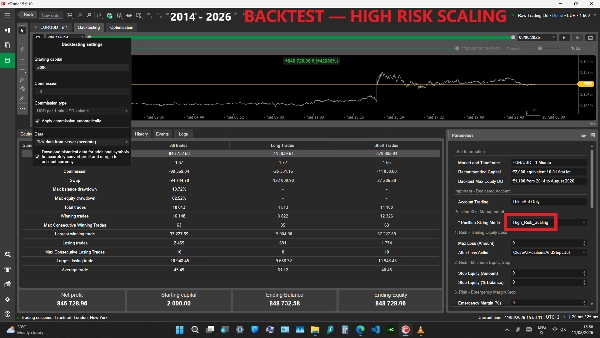
TARİHSEL GERİYE DÖNÜK TEST - HIGH_RISK_SCALING
Ürün videosu, PRO sürümünün High_Risk_Scaling kullanmasını gösterir.
Geriye dönük test koşulları:
• Test dönemi: 20 Ocak 2014 - 8 Ağustos 2026
• Tarihsel veri: Sunucudan Tick Verisi (doğru)
• Broker ortamı: Raw Trading Ltd demo
• Sembol: EURUSD
• Zaman dilimi: M1
• Hesap para birimi: EUR
• Başlangıç sermayesi: €2.000
• Başlangıç sermayesinde ilk pozisyon boyutu: 0.01 lot
• Pozisyon Boyutlandırma Modu: High_Risk_Scaling
• Kaldıraç: 1:500
• Komisyon: 1 milyon USD hacim başına 30 USD, otomatik uygulanır
• Hesap para birimi dönüşümü için ek semboller için tarihsel veri: Etkin
• Genel parametreler: Pozisyon Boyutlandırma Modu = High_Risk_Scaling hariç varsayılan değerler
• İsteğe bağlı hesap koruma eşikleri: 0 (Devre Dışı)
GERİYE DÖNÜK TEST SONUÇLARI
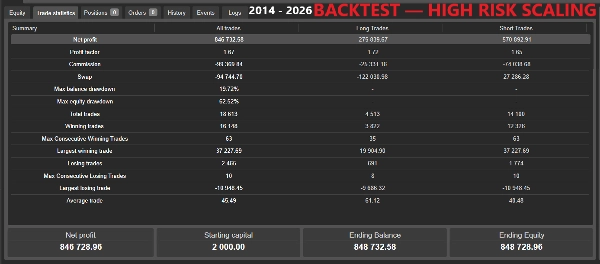
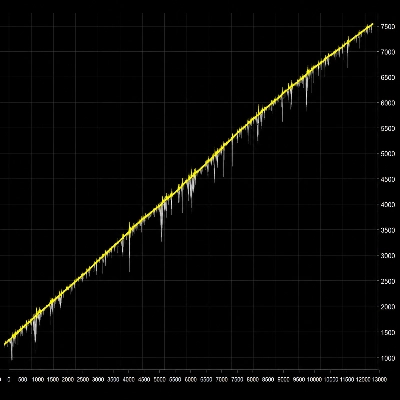
• Ticaret İstatistiklerinde Gösterilen Net Kar: €846.732,58
• Bitiş Bakiyesi: €848.732,58
• Bitiş Öz Sermayesi: €848.728,96
• Kar Faktörü: 1.67
• Maksimum Bakiye Zarar: %19.72
• Maksimum Öz Sermaye Zarar: %62.52
• Toplam İşlemler: 18.613
• Kazanan İşlemler: 16.148
• Kaybeden İşlemler: 2.465
• En Büyük Kazanan İşlem: €37.227,69
• En Büyük Kaybeden İşlem: -€10.948,45
cTrader, Ticaret İstatistiklerinde €846.732,58 ve alt kısımda Net Kar / Bitiş Öz Sermayesi alanında €846.728,96 gösterir. Her iki değer de kayıtta gösterildiği gibi tam olarak çoğaltılmıştır; gösterilen fark €3,62'dir.
Bu tarihsel geriye dönük testte tüm isteğe bağlı hesap koruma eşikleri devre dışı bırakılmıştır. Sonuç bu nedenle Maksimum Zarar, Durdurma Öz Sermayesi, Acil Marjin, Duraklatma Öz Sermayesi veya Duraklatma Marjini tarafından zorunlu tasfiye veya giriş duraklatma müdahalesini içermez.
Bu tarihsel geriye dönük testin tam kaydı ürün videosunda mevcuttur.
HIGH_RISK_SCALING GERİYE DÖNÜK TESTİ HAKKINDA ÖNEMLİ
High_Risk_Scaling, bu PRO sürümünde mevcut en agresif Pozisyon Boyutlandırma Modudur.
Test, €2.000 ve başlangıçta 0.01-lot ilk pozisyon ile başlar, ancak sonraki yeni sepetlerin ilk pozisyon boyutu uygun hesap sermayesi arttıkça otomatik olarak artabilir.
Bu nedenle tarihsel sonuç, kalıcı olarak sabit bir 0.01-lot stratejisinin performansı olarak yorumlanmamalıdır.
Bu geriye dönük testte gösterilen %62.52 Maksimum Öz Sermaye Zarar, bu yapılandırmanın agresif risk profilini gösterir.
Önerilen Sermaye ve Geriye Dönük Maksimum Öz Sermaye Zarar bilgisi, Fixed_First_0_01_Lot referans yapılandırmasına atıfta bulunur. Otomatik ölçeklendirme modları önemli ölçüde daha büyük pozisyonlar ve zararlar üretebilir.
RİSK BİLGİSİ
M-Algo EURUSD M1 PRO, ilerleyici pozisyon boyutlandırmalı bir kurtarma/grid stratejisi kullanır.
Güçlü veya uzun süreli olumsuz piyasa hareketleri sırasında, cBot aynı anda birden fazla pozisyon tutabilir. Kurtarma pozisyon boyutları artabilir ve önemli yüzen zarar, yüksek marjin kullanımı, marjin tükenmesi, broker stop-out ve tüm ticaret hesabının kaybına yol açabilir.
Otomatik Pozisyon Boyutlandırma Modları, Fixed_First_0_01_Lot'tan önemli ölçüde daha büyük pozisyonlar üretebilir.
Maksimum Alış Lot Boyutu ve Maksimum Satış Lot Boyutu ayarları uygun şekilde yapılandırıldığında bireysel pozisyon boyutunu azaltır, ancak toplam birleşik maruziyeti sınırlandırmaz ve ticaret riskini ortadan kaldırmaz.
İsteğe bağlı hesap korumaları riski azaltabilir ancak belirli bir fiyatta yürütmeyi garanti edemez veya zararların seçilen eşik altında kalacağını garanti edemez.
Geriye dönük test ve canlı sonuçlar spread, komisyon, swap, kayma, likidite, yürütme, piyasa boşlukları, broker koşulları ve tarihsel veri farklılıkları nedeniyle farklı olabilir.
Canlı ticaretten önce demo hesapta test yapmak şiddetle önerilir.
Prop-firm uyumluluğu iddia edilmez.
Ticaret risk içerir. Geçmiş performans gelecekteki sonuçları garanti etmez.
GELİŞTİRİCİ
M-Algo Systems tarafından geliştirilmiştir.
M-Algo Systems bağımsız bir geliştiricidir ve cTrader Ltd veya Spotware ile bağlantılı değildir.
Özet
Key functionalities include automatic buy and sell basket management, shared take profit across positions, restart and open-position continuity, and advanced risk controls such as trailing equity loss protection, minimum equity stop, emergency margin stop, and entry pause controls based on equity and margin levels. The system supports configurable maximum lot sizes per position and includes a maximum spread filter to prevent trading under unfavorable conditions.
The cBot requires a hedging account and is optimized for use with leverage of 1:500 and a recommended capital of approximately €2,000 for the fixed-lot configuration. It supports multiple account currencies with cTrader’s currency conversion. The strategy manages up to 25 buy and 25 sell positions simultaneously, with a total maximum of 50 open positions.
M-Algo EURUSD M1 PRO includes a custom optimization fitness function for backtesting, emphasizing drawdown reduction alongside profit. It is intended for use on dedicated trading accounts without manual interference or other cBots running concurrently.
Tartışma
Müşteri değerlendirmeleri
5 | 0 % | |
4 | 100 % | |
3 | 0 % | |
2 | 0 % | |
1 | 0 % |
SSS
Bu oluşturanın diğer ürünleri









Fiyat