

Market BIAS AI
Индикатор
Версия 1.0, Aug 2025
Windows, Mac


С 29/05/2025
3.05M
Торгуемый объем
68.12K
Выигранные пипы
29
Продажи
886
Бесплатные установки
Описание
Индикатор Market BIAS AI — это инструмент технического анализа, созданный для cTrader, который помогает трейдерам быстро определять направленную предвзятость рынка с помощью простой и эффективной стратегии согласования.
Этот инструмент предназначен для трейдеров, которые хотят упростить обнаружение тренда и сосредоточиться на сделках, соответствующих общему направлению рынка.
🔹 Как он отображается на графике?
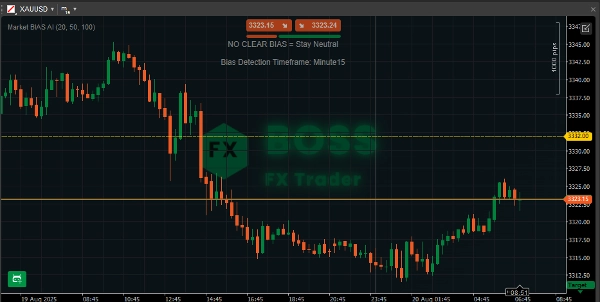
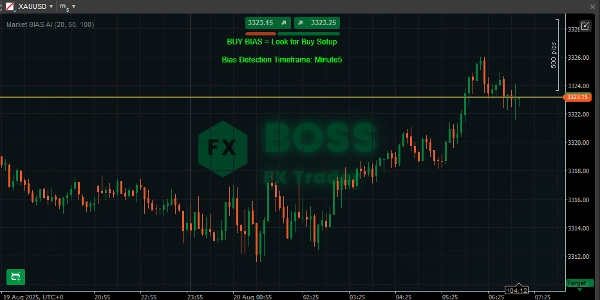
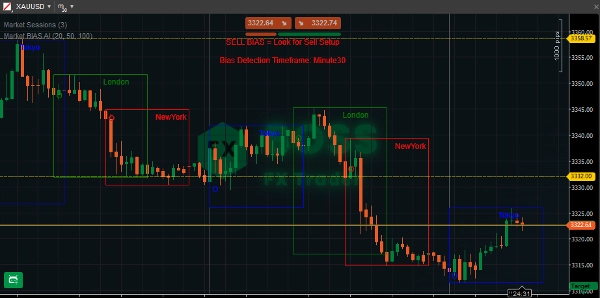
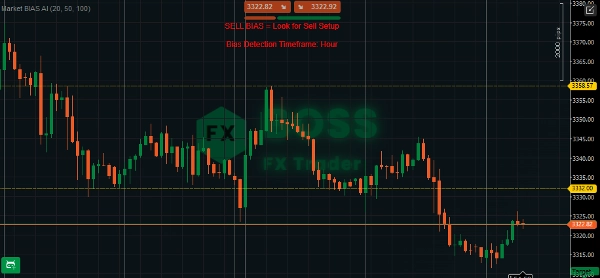
- Отображает одно из трёх сообщений в центре вверху графика:
-
- ✅ BUY BIAS = Ищите сигналы на покупку (Зелёный)
- ✅ SELL BIAS = Ищите сигналы на продажу (Красный)
- ⚪ NO CLEAR BIAS = Оставайтесь нейтральными (Серый)
- Под сообщением также отображается временной интервал определения предвзятости (таймфрейм графика).
Пример: «Временной интервал определения предвзятости: H1»
Это гарантирует, что вы всегда знаете, с каким таймфреймом предвзятости вы торгуете.
🔹 Как использовать
- Подключите индикатор
-
- Откройте cTrader → перейдите к вашему графику.
- Щёлкните правой кнопкой → «Индикаторы» → выберите Market BIAS AI.
- Или перетащите его на график.
- Выберите таймфрейм
-
- Индикатор работает на любом таймфрейме.
- Если хотите торговать внутридневно, используйте M15 / H1.
- Для свинг-трейдинга используйте H4 / D1.
- Интерпретируйте сигнал
-
- 🟢 BUY BIAS → Ищите только возможности для покупки (например, бычьи ценовые модели, откаты к поддержке).
- 🔴 SELL BIAS → Ищите только возможности для продажи (например, медвежьи ценовые модели, ралли к сопротивлению).
- ⚪ NO CLEAR BIAS → Избегайте торговли или ждите более чёткого тренда.
- Комбинируйте с триггерами входа
-
- Индикатор даёт направленную предвзятость, а не точные сигналы входа.
- Лучший подход: комбинируйте с моделями свечей, уровнями поддержки/сопротивления или другими подтверждениями входа.
«Наслаждайтесь тем, что вы один из прибыльных трейдеров.»
Сводка
ИИ-сводка
Market BIAS AI Indicator is a technical analysis tool designed for the cTrader platform that identifies market direction bias using AI integration and a straightforward alignment strategy. It displays one of three bias signals at the center-top of the chart: "BUY BIAS" (green) indicating a preference for buy setups, "SELL BIAS" (red) indicating sell setups, or "NO CLEAR BIAS" (gray) suggesting a neutral stance. Below the bias message, it shows the bias detection timeframe corresponding to the chart’s timeframe (e.g., H1), ensuring clarity on the timeframe context.
The indicator works on any timeframe, supporting intraday trading (e.g., M15, H1) and swing trading (e.g., H4, D1). It provides directional bias rather than exact entry points, so users are advised to combine it with other entry triggers such as candlestick patterns or support/resistance levels. Installation involves attaching the indicator to a cTrader chart via the indicators menu or drag-and-drop. This tool aims to simplify trend detection by focusing on setups aligned with the overall market direction.
The indicator works on any timeframe, supporting intraday trading (e.g., M15, H1) and swing trading (e.g., H4, D1). It provides directional bias rather than exact entry points, so users are advised to combine it with other entry triggers such as candlestick patterns or support/resistance levels. Installation involves attaching the indicator to a cTrader chart via the indicators menu or drag-and-drop. This tool aims to simplify trend detection by focusing on setups aligned with the overall market direction.
Профиль индикатора
Обсуждение
Отзывы покупателей
0.0
Отзывы: 0
Отзывы покупателей
У этого продукта еще нет отзывов. Уже попробовали его? Поделитесь впечатлениями!
Частые вопросы
Продукты, доступные в cTrader Store, включая торговых ботов, индикаторы и плагины, предоставляются сторонними разработчиками и доступны исключительно в информационных и технических целях. cTrader Store не является брокером и не предоставляет инвестиционные консультации, персональные рекомендации или какие-либо гарантии будущей доходности.








![Логотип продукта "Wyckoff Toolkit [Iridio Capital]"](https://cdn.ctrader.com/image/webp/5318c788-91ef-4297-bca6-4ce73b1516a8_61556)







Цена
С 29/05/2025
3.05M
Торгуемый объем
68.12K
Выигранные пипы
29
Продажи
886
Бесплатные установки