

Description
Deep Mood Distribution (DMD) 📊🧠
Aperçu
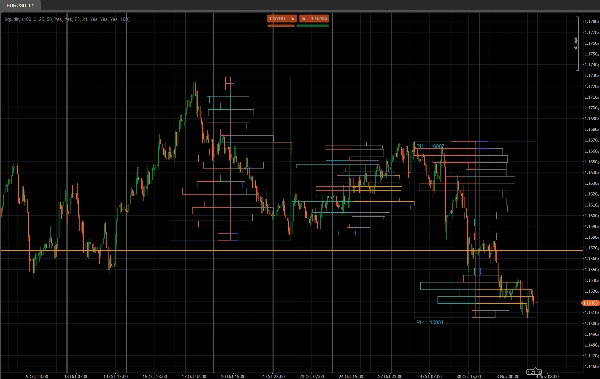
Deep Mood Distribution (DMD) est un outil de profil de volume segmenté et de sentiment qui analyse l'action des prix dans des blocs de barres fixes et montre :
- Où l'activité de trading est concentrée ⚖️
- Où la liquidité est faible ou réactive (zones potentielles S&D / liquidité) 💧
- Quel côté domine à chaque zone de prix (acheteurs vs vendeurs) 🐂🐻
Au lieu d'un profil glissant unique, DMD divise le graphique en blocs répétitifs de X barres et construit une carte distincte de liquidité et de sentiment pour chaque bloc.
Cela facilite la comparaison visuelle de la façon dont la distribution du volume et l'humeur du marché changent d'un segment à l'autre.
Comment ça marche 🧩
Pour chaque bloc de Bars In Profile chandeliers :
- L'indicateur trouve le prix le plus haut et le plus bas de ce bloc.
- La plage de prix est divisée en
Number of Rowsbins de prix verticaux. - Pour chaque chandelier dans le bloc :
-
- Le volume tick est réparti sur chaque bin de prix touché par la plage du chandelier.
- Deux volumes sont accumulés pour chaque ligne :
-
- Volume total à cette ligne de prix
- Volume haussier (seulement les barres où Close > Open)
- À partir de cela, DMD construit :
-
- Profil de liquidité (côté droit)
-
- Longueur de la ligne ∝ volume relatif par rapport au volume maximal de ligne du bloc
- La couleur montre nœuds échangés élevés / moyens / faibles
- Profil de sentiment (côté gauche)
-
- Sentiment par ligne =
2 × BullishVolume − TotalVolume - Positif = dominance des acheteurs (humeur haussière)
- Négatif = dominance des vendeurs (humeur baissière)
- Sentiment par ligne =
- Le processus est répété pour les N derniers blocs, afin que vous puissiez comparer plusieurs segments côte à côte.
Côté droit – Profil de liquidité (Volume) 📊
Les barres du côté droit montrent combien d'activité de trading (volume) a eu lieu à chaque niveau de prix dans ce bloc, indépendamment de qui achetait ou vendait.
- Nœuds à volume élevé (HVN) – par ex. barres orange
-
- Une ligne dont le volume est ≥
Seuil de volume élevé %du volume maximal de ligne dans le bloc - Représentent des zones de valeur, zones de trading intense, zones de consolidation.
- Une ligne dont le volume est ≥
- Nœuds à faible volume (LVN) – par ex. barres bleues
-
- Une ligne dont le volume est ≤
Seuil de volume faible %du volume maximal de ligne - Représentent des zones de liquidité faible, zones possibles de rejet ou zones de mouvement rapide.
- Une ligne dont le volume est ≤
- Nœuds à volume moyen – par ex. barres grises
-
- Tout ce qui se trouve entre les seuils haut et bas
- Niveaux échangés “normaux”, pas extrêmes.
🧠 Longueur de la barre (côté droit)
→ Proportionnelle au volume total échangé à cette ligne de prix comparé au volume maximal du bloc.
Plus de volume → barre plus longue.
Paramètres clés :
Seuil de volume élevé %Seuil de volume faible %
Côté gauche – Profil de sentiment (Humeur du marché) 🧠📉📈
Les barres du côté gauche montrent le sentiment / domination à chaque niveau de prix : si les acheteurs ou les vendeurs étaient plus forts à cette ligne.
Pour chaque ligne :
Sentiment=2×BullishVolume−TotalVolume\text{Sentiment} = 2 \times \text{BullishVolume} - \text{TotalVolume}Sentiment=2×BullishVolume−TotalVolume
- Barre haussière (acheteurs aux commandes) – par ex. barres bleu sarcelle/vertes
-
- Sentiment > 0
- Plus de volume provient des chandeliers haussiers (Close > Open) à ce prix.
- Indique une domination des acheteurs à cette ligne de prix.
- Barre baissière (vendeurs aux commandes) – par ex. barres rouges
-
- Sentiment < 0
- Plus de volume provient des chandeliers baissiers (Close < Open).
- Indique une domination des vendeurs.
🧠 Longueur de la barre (côté gauche)
→ Proportionnelle à la valeur absolue du sentiment (|Sentiment|) par rapport à la ligne la plus forte du bloc.
Domination plus forte (grand déséquilibre entre acheteurs et vendeurs) → barre plus longue.
Paramètre clé :
Afficher le profil de sentiment(activé/désactivé)
Détails des paramètres ⚙️
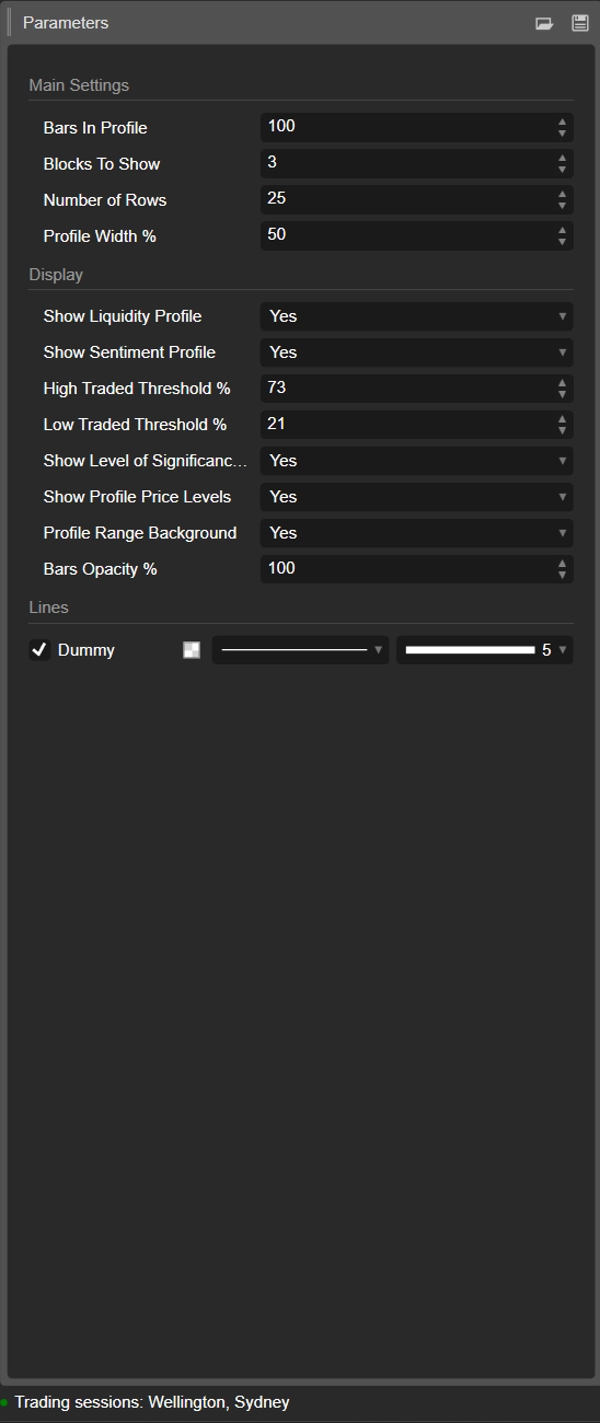
1. Bars In Profile
Groupe : Paramètres principaux
Nombre de chandeliers contenus dans chaque bloc.
- Exemple :
Bars In Profile = 100 -
- Bloc 0 → 100 dernières barres
- Bloc 1 → 100 barres précédentes
- Bloc 2 → 100 barres précédentes, etc.
Utilisez-le pour faire correspondre les blocs à :
- des sessions approximatives,
- votre plage swing / intraday typique,
- ou toute fenêtre personnalisée que vous souhaitez analyser.
Valeur plus petite = plus réactif, plus granulaire.
Valeur plus grande = structure plus lisse, plus “macro”.
2. Blocks To Show
Groupe : Paramètres principaux
Combien de blocs consécutifs seront affichés sur le graphique.
1→ seulement le bloc le plus récent2–3→ très pratique pour la comparaison sans encombrement- Valeurs plus élevées → plus d'historique, mais plus d'objets sur le graphique
Les blocs plus anciens au-delà de cette valeur sont automatiquement nettoyés pour maintenir la stabilité.
3. Number of Rows
Groupe : Paramètres principaux
Résolution verticale du profil de chaque bloc.
La plage de prix du bloc est divisée en autant de lignes (niveaux de prix).
- Valeur plus élevée → plus de détails, lignes plus fines, plus de rectangles
- Valeur plus basse → structure plus lisse, plus facile à lire
Plages typiques :
15–25pour une utilisation intraday normale30–40+uniquement si vous souhaitez une résolution très fine et que votre plateforme est assez puissante
4. Profile Width %
Groupe : Paramètres principaux
Contrôle jusqu'où le profil s'étend horizontalement à partir du centre du bloc, en pourcentage de la largeur du bloc.
- Affecte à la fois la liquidité (côté droit) et le sentiment (côté gauche).
- Pourcentage plus élevé → les profils s'étendent plus loin dans les barres environnantes
- Pourcentage plus bas → profil compact proche du centre du bloc
Bonnes valeurs de départ : 35–50%.
5. Show Liquidity Profile
Groupe : Affichage
Active ou désactive la distribution du volume (profil de liquidité) (côté droit de chaque bloc).
- Activé ✅
-
- La longueur de chaque ligne reflète le volume échangé relatif à ce niveau de prix.
- La couleur encode les nœuds échangés élevés / moyens / faibles.
- Désactivé ❌
-
- Seul le sentiment (si activé) est affiché, pas de barres de volume à droite.
6. Show Sentiment Profile
Groupe : Affichage
Active ou désactive le profil de sentiment (côté gauche de chaque bloc).
- Activé ✅
-
- Les lignes sont colorées :
-
- Haussier (acheteurs dominants) – par ex. aqua/vert
- Baissier (vendeurs dominants) – par ex. rouge
- La longueur de la ligne reflète la force de la domination.
- Désactivé ❌
-
- Seule la distribution pure de liquidité/volume est affichée.
Utilisez ceci si vous voulez voir non seulement où le volume a été échangé, mais qui était plus actif à ces niveaux.
7. High Traded Threshold %
Groupe : Affichage
Définit le seuil pour les nœuds à volume élevé (HVN) à l'intérieur de chaque bloc.
- Exprimé en % du volume maximal de ligne du bloc.
- Exemple : volume maximal de ligne = 10 000 ; seuil = 70 % → les lignes ≥ 7 000 sont considérées comme HVN.
Les HVN marquent souvent :
- des zones de valeur,
- des zones de consolidation,
- des zones de positionnement fort / juste valeur.
8. Low Traded Threshold %
Groupe : Affichage
Définit le seuil pour les nœuds à faible volume (LVN) par rapport au volume maximal du bloc.
- Les lignes avec un volume inférieur à ce pourcentage sont traitées comme des zones de faible activité.
- Celles-ci peuvent agir comme :
-
- poches de liquidité faible,
- niveaux potentiels de rejet,
- ou zones où le prix a tendance à se déplacer rapidement.
Utilisation typique : 15–30%.
9. Show Level of Significance (POC)
Groupe : Affichage
Affiche ou masque le Point de Contrôle (POC) pour le bloc le plus récent.
- POC = ligne de prix avec le volume échangé le plus élevé dans ce bloc.
- Affiché comme une ligne horizontale à ce prix. 🎯
Utile comme :
- référence pour la réversion à la moyenne,
- ancre de “juste prix” intraday,
- ou niveau clé pour la gestion des trades.
10. Show Profile Price Levels
Groupe : Affichage
Affiche les étiquettes de texte pour :
- Profil Haut (PH) – prix le plus haut atteint dans le bloc
- Profil Bas (PL) – prix le plus bas atteint dans le bloc
Les étiquettes sont affichées pour le bloc le plus récent et incluent les valeurs exactes des prix.
Idéal pour :
- lire rapidement la plage actuelle,
- placer des stops/objectifs autour de PH/PL,
- contexte pour les cassures ou rotations.
11. Profile Range Background
Groupe : Affichage
Dessine un rectangle de fond semi-transparent couvrant :
- la plage temporelle (barre de début à fin)
- la plage de prix (bas à haut)
Cela sépare visuellement les blocs et fait ressortir chaque plage.
Désactivez-le si vous préférez un visuel plus épuré et minimaliste.
12. Bars Opacity %
Groupe : Affichage
Contrôle à quel point les rectangles sont solides ou subtils (barres de liquidité et de sentiment).
- 20–40% → très léger, style en arrière-plan
- 50–70% → visibilité équilibrée, chandeliers toujours faciles à voir
- 80–100% → blocs forts, presque complètement opaques
Cette valeur est convertie en canal alpha (0–255) pour les couleurs des barres.
Modèle de départ suggéré ⭐
Pour indices / futures intraday (M5–M15) :
- Bars In Profile : 80–120
- Blocks To Show : 2–3
- Number of Rows : ~20
- Profile Width % : 35–45
- Show Liquidity Profile : true
- Show Sentiment Profile : true
- Bars Opacity % : 50–65
Résumé
Key features include:
- Liquidity Profile (right side): Displays trading volume concentration at each price level within a block, highlighting high-volume nodes (HVNs), low-volume nodes (LVNs), and average-volume nodes. Bar length corresponds to relative traded volume, and colors indicate volume intensity.
- Sentiment Profile (left side): Shows buyer vs. seller dominance per price level, calculated as twice the bullish volume minus total volume. Positive values indicate buy-side control; negative values indicate sell-side control. Bar length reflects the strength of dominance, with color coding for bullish (green/teal) and bearish (red) sentiment.
- Configurable parameters: number of bars per profile block, number of blocks displayed, vertical resolution (rows), profile width, opacity, and thresholds for defining HVNs and LVNs.
- Additional display options: Point of Control (POC) line for highest volume price in the latest block, profile high/low price labels, and background shading for block ranges.
DMD supports analysis across various markets including indices, commodities, forex, and cryptocurrencies, facilitating identification of trading activity concentration, liquidity zones, and market sentiment shifts within customizable timeframes.
Avis clients
5 | 33 % | |
4 | 67 % | |
3 | 0 % | |
2 | 0 % | |
1 | 0 % |