Description
================================================================================
PullbackEntryPro
================================================================================
DESCRIPTION COURTE (pour la fiche du cTrader Store) :
Bot d'entrée en pullback multi-groupes : configurations illimitées, entrée sur retracement après cassure. Ctrl+Clic pour ajouter.
================================================================================
DESCRIPTION COMPLÈTE :
================================================================================
PULLBACK ENTRY PRO : TRADING DE CASSURE PLUS INTELLIGENT
---------------------------------------------
Ne courez pas après les cassures - laissez le prix venir à vous ! Maintenant avec des groupes d'ordres illimités.
Ce bot automatise la stratégie classique "cassure + pullback" utilisée par les traders professionnels :
1. Attendre que le prix casse un niveau clé (confirmation de la dynamique)
2. Entrer sur le pullback/retracement (meilleur prix, stop plus serré)
Pourquoi Pullback Entry ?
- Évitez les fausses cassures en attendant la confirmation
- Obtenez de meilleurs prix d'entrée que de courir après la cassure
- Stops plus serrés = meilleur ratio risque/rendement
- Pas besoin de surveiller les graphiques 24h/24 - le bot gère l'exécution
Comment il diffère du stop-limit natif :
Stop-limit de cTrader :
- Déclenche un ordre limite lorsque le prix atteint le niveau stop
- Entrée au prix du déclenchement ou proche
PullbackEntryPro :
- Attend la confirmation de cassure (ligne BK)
- Lorsque BK est atteint, soumet un ordre LIMIT en attente à EN (avec SL/TP)
- Avant que BK soit atteint, il n'y a pas d'ordre en attente côté serveur pour ce groupe
- Capture le retracement pour une entrée optimale
- Supporte des configurations MULTIPLES simultanées !
GROUPES D'ORDRES MULTIPLES
---------------------
PullbackEntryPro offre une capacité multi-groupes complète - gérez un nombre illimité de configurations d'entrée en pullback simultanées sur un seul graphique !
Pourquoi le multi-groupe est important :
- Stratégies d'échelonnement : définissez plusieurs points d'entrée à différents niveaux
- Ordres en fourchette : placez des ordres de cassure au-dessus ET en dessous des niveaux clés
- Trading d'actualités : pré-définissez plusieurs scénarios avant des événements à fort impact
- Configurations multi-échelles temporelles : combinez des signaux de différentes analyses
- Pyramiding : ajoutez aux positions gagnantes à des niveaux prédéterminés
FONCTIONNALITÉS CLÉS
------------
[Planification Visuelle Puissante]
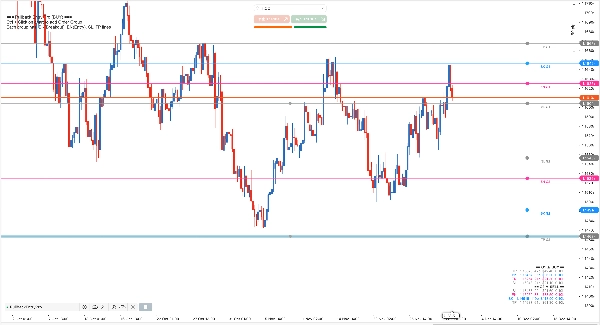
- Glissez-déposez les lignes directement sur le graphique : BK, EN, SL, TP pour chaque groupe
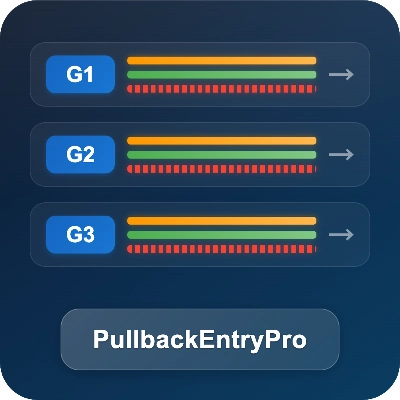
- Identification visuelle des groupes avec lignes étiquetées (G1, G2, G3...) et connecteurs
- Panneau d'aperçu en temps réel affichant les pips, dollars et tailles de lots des groupes verrouillés
- Verrouillage/déverrouillage par groupe : seuls les groupes verrouillés sont actifs (ordres en attente + tags + persistance) ; déverrouiller annule l'ordre en attente du groupe ; les groupes déverrouillés sont des brouillons éditables
- Contraintes intelligentes empêchant des positions de lignes illogiques
- Ajout rapide : Ctrl+Clic n'importe où pour ajouter un nouveau groupe au prix cliqué
- Couleurs auto-adaptatives pour fonds de graphiques clairs/sombres
- Conservation de l'état des groupes verrouillés lors du changement d'échelle temporelle
[Gestion Complète des Positions & Risques]
Trois modes professionnels de dimensionnement de position :
- Lots fixes : tradez une taille de lot constante pour tous les groupes
- % d'équité : taille basée sur un pourcentage de l'équité du compte
- % de risque : calcule les lots selon la distance du stop loss de chaque groupe
Combiné avec un Stop Loss et Take Profit personnalisables par groupe, vous obtenez un contrôle complet sur le dimensionnement des positions et la protection du risque sur toutes vos configurations.
[Direction Flexible]
- Chaque groupe fonctionne indépendamment avec sa propre direction
- Ctrl+Clic crée un groupe basé sur la position du clic :
- Clic au-dessus du prix actuel → configuration d'achat
- Clic en dessous du prix actuel → configuration de vente
- La direction est déterminée par le positionnement des lignes BK vs EN, et vous pouvez la changer en déplaçant les lignes
POURQUOI CHOISIR CE BOT ?
--------------------
Contrairement aux outils basiques d'ordre limite, ce bot offre :
- Planification visuelle par glisser-déposer (pas seulement des champs de saisie)
- Logique déclenchée par cassure (différente du stop-limit natif de cTrader)
- 3 modes de dimensionnement de position dans UN seul outil
- Aperçu P&L en temps réel avant le déclenchement du trade
- Multiples groupes d'ordres pour des stratégies avancées
- SL/TP intégrés avec contraintes intelligentes
Solution tout-en-un. Pas besoin de plusieurs outils séparés.
COMMENT ÇA FONCTIONNE
------------
1. Ctrl+Clic sur le graphique pour ajouter un groupe au prix cliqué (cela définit BK et choisit la direction : au-dessus du prix → Achat, en dessous → Vente). Un indice adapté au thème s'affiche en haut à gauche.
2. Faites glisser les lignes pour ajuster les niveaux de chaque groupe (étiquetés G1, G2, etc.), puis verrouillez le groupe pour l'activer.
- Seuls les groupes verrouillés sont actifs : ils peuvent placer/synchroniser des ordres en attente, apparaître dans les tags, et être persistés/restaurés.
- Les groupes déverrouillés sont des brouillons pour planification/édition.
3. Lorsqu'un groupe est verrouillé, le bot surveille le prix ; une fois BK atteint, il soumet un ordre LIMIT en attente à EN avec SL/TP.
4. Supprimez la ligne BK ou EN pour retirer un groupe spécifique.
EXIGENCES
------------
- Fonctionne sur tous les symboles et toutes les échelles temporelles
- Aucune dépendance externe
- AccessRights : Aucun (sûr, pas d'accès externe)
Résumé
Key features include a visual drag-and-drop interface for setting breakout (BK), entry (EN), stop loss (SL), and take profit (TP) levels per group, with real-time preview of potential profit and loss. Users can lock groups to activate orders or keep them as editable drafts. The bot offers three position sizing modes: fixed lots, equity percentage, and risk percentage based on stop loss distance. Each group operates independently with customizable direction (buy or sell) determined by line placement.
PullbackEntryPro differs from native stop-limit orders by submitting limit orders only after breakout confirmation, avoiding premature order placement and optimizing entry on retracements. It works on all symbols and timeframes without external dependencies or special access rights.