说明
M-ALGO EURUSD M1 PRO
M-Algo EURUSD M1 PRO is the advanced subscription edition of the M-Algo Systems EURUSD recovery/grid trading system.
It is designed and optimized primarily for EURUSD on the 1-minute timeframe and supports M1, M2, M3, M4 and M5 charts. The PRO edition is intended for users who want multiple Position Sizing Modes, configurable account-risk controls and advanced optimization controls while keeping the main private strategy logic protected and preconfigured.
Strategy type: Recovery / grid with progressive position sizing
Target symbol: EURUSD
Optimized timeframe: M1
Supported chart periods: M1-M5
Trading use case: Automated EURUSD basket/recovery trading with configurable sizing and account protection
Suggested leverage: 1:500
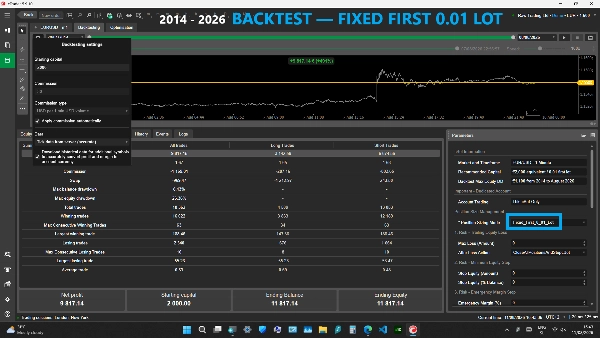
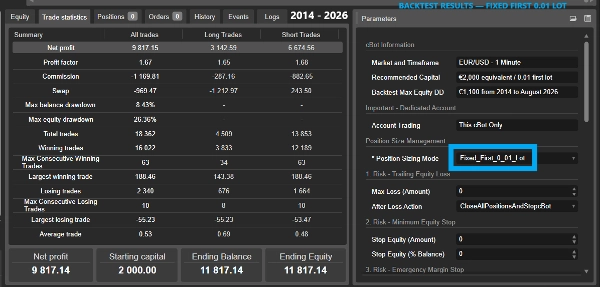
Recommended capital: €2,000 equivalent for the Fixed_First_0_01_Lot reference configuration
Account type: Hedging required
Access rights: AccessRights.None - Full Access is not required
PRO EDITION
• Four Position Sizing Modes
• Automatic Buy and Sell basket management
• Progressive recovery position sizing
• Shared Take Profit management
• Restart and open-position continuity
• Trailing-equity account protection
• Minimum-equity protection by money and percentage
• Emergency Margin protection
• Equity and Margin entry-pause controls
• Configurable maximum Buy and Sell position sizes
• Trading Direction control
• Maximum spread filter
• Optimizer 1-9 controls for advanced backtesting
• Custom cTrader Optimization Criteria through the cBot's GetFitness method
• Different account deposit currencies supported when the required cTrader currency conversion is available
• Main private strategy parameters remain fixed and hidden
POSITION SIZING MODES
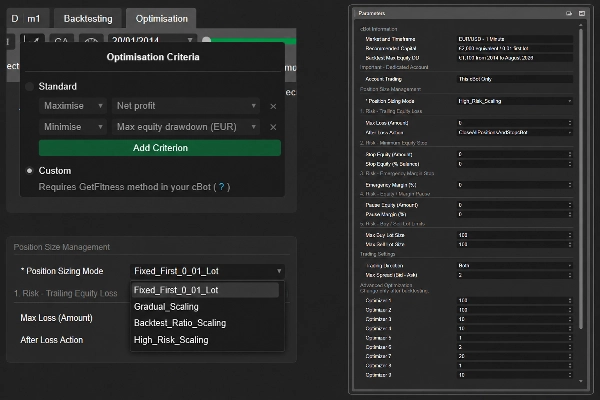
The PRO edition includes four Position Sizing Modes:
• Fixed_First_0_01_Lot
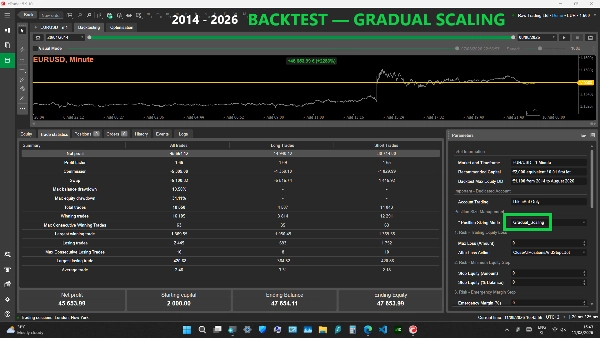
• Gradual_Scaling
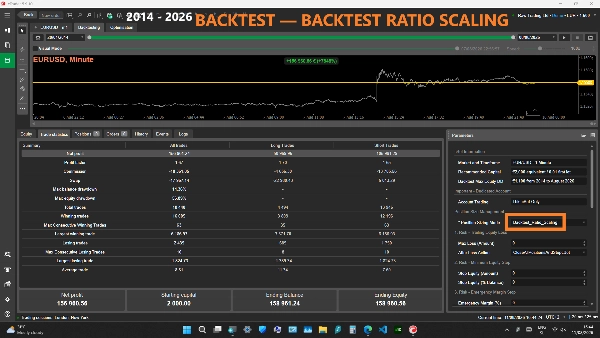
• Backtest_Ratio_Scaling
• High_Risk_Scaling
Fixed_First_0_01_Lot:
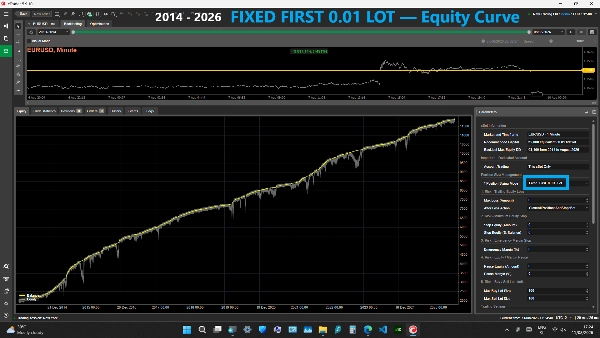
Uses a fixed 0.01-lot first position for every new directional basket. It does not automatically increase the first-position size when account capital grows. Recovery positions still use the normal progressive recovery sizing.
Gradual_Scaling:
The slowest and most conservative of the three automatic scaling modes. The first-position size of new baskets increases gradually as eligible account capital grows. It is intended for users who want automatic scaling but slower first-position growth than Backtest_Ratio_Scaling or High_Risk_Scaling.
Backtest_Ratio_Scaling:
The medium automatic scaling mode. It is designed to keep the first-position sizing of new baskets aligned with the capital relationship used by the fixed-lot historical backtest reference. It scales faster than Gradual_Scaling and slower than High_Risk_Scaling.
High_Risk_Scaling:
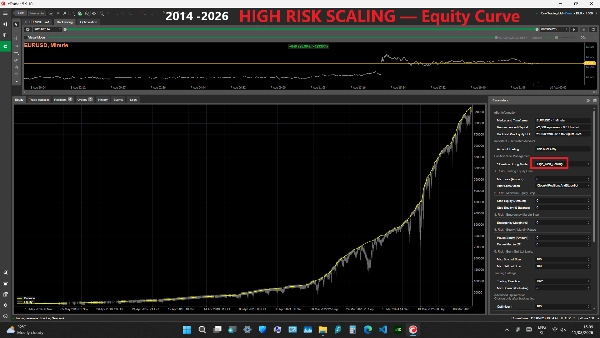
The fastest and most aggressive automatic scaling mode. The first-position size of new baskets can increase more quickly as eligible account capital grows. This can increase profit potential, but it can also increase recovery position sizes, floating drawdown, margin usage and the risk of account loss. The historical PRO product video uses this mode.
Gradual_Scaling, Backtest_Ratio_Scaling and High_Risk_Scaling calculate the first-position size separately for each NEW Buy or Sell basket from eligible EUR-equivalent account capital.
For automatic modes, eligible capital is based on the lower of current account Balance and Equity, converted to EUR at the confirmed first-entry signal. Floating profit cannot increase the sizing base above Balance, while floating loss can reduce the base used for the next new basket.
Automatic modes may still use a 0.01-lot first position below their first scaling threshold.
The automatic first-position size is limited to a maximum of 10.00 lots per Buy/Sell direction. This 10.00-lot limit applies only to the FIRST position of a new automatically sized basket.
Recovery positions are not limited by the 10.00-lot automatic first-position ceiling. Recovery positions may become larger according to the recovery progression, but each individual order remains subject to the selected Max Buy Lot Size / Max Sell Lot Size and the broker's permitted volume limits.
No Position Sizing Mode guarantees safety.
IMPORTANT - CHANGING POSITION SIZING MODE WITH OPEN POSITIONS
Changing Position Sizing Mode does not convert or resize an already-open basket.
An existing Buy or Sell basket keeps the Position Sizing Mode and locked first-position base with which it was created until that direction becomes completely flat.
The newly selected Position Sizing Mode is used only for a NEW basket in that direction.
Buy and Sell baskets are independent. For example, an existing Buy basket may continue under its original sizing mode while a new Sell basket, if the Sell direction is flat and otherwise allowed, can use the newly selected sizing mode.
STRATEGY AND POSITION MANAGEMENT
The cBot uses a recovery/grid strategy with progressive position sizing.
When the market moves against an active directional basket and the strategy conditions are satisfied, additional recovery positions may be opened in the same direction.
Recovery position sizes can increase progressively.
Positions in the same direction are managed with a shared Take Profit.
The strategy permits:
• Maximum Buy positions: 25
• Maximum Sell positions: 25
• Maximum theoretical simultaneous positions: 50
A fixed broker-side Stop Loss is not enabled by default.
Max Spread (Bid - Ask) prevents both first and recovery entries while the current spread is above the selected value. Existing-position management and protection logic continue to operate.
RISK MANAGEMENT
IMPORTANT: Most protection thresholds default to 0, which means Disabled. Review and configure the risk-management parameters before using the cBot with live funds.
1. RISK - TRAILING EQUITY LOSS
Max Loss (Amount) tracks the highest account equity reached since the cBot was started or since the most recent protection reset.
If account equity falls from that peak by more than the selected Max Loss amount, the cBot starts an account-wide close-all process.
0 = Disabled.
After Loss Action determines what happens only after the cBot has completed the account-wide close process.
Available actions:
• Close all positions and stop the cBot
• Close all positions and continue trading
• Close all positions and pause for 12 hours
• Close all positions and pause for 24 hours
• Close all positions and pause for 3 days
• Close all positions and pause for 7 days
If a close attempt fails, the cBot continues retrying the account-wide close process until no open positions remain. The selected Stop / Continue / Pause action is applied only after the account is confirmed flat.
When Continue is selected, the equity baseline is reset after all positions are closed.
When a timed Pause is selected, the equity baseline is reset after liquidation and new trading remains paused for the selected period.
Restarting the cBot cancels an active timed pause.
2. RISK - MINIMUM EQUITY STOP
Two independent minimum-equity controls are available:
• Stop Equity (Amount)
• Stop Equity (% Balance)
Stop Equity (Amount) triggers if current account equity falls below the selected money value.
Stop Equity (% Balance) triggers if current account equity falls below the selected percentage of the current account balance.
0 = Disabled.
If either enabled condition is triggered, the cBot starts the account-wide close-all process and stops after all account positions have been closed.
3. RISK - EMERGENCY MARGIN STOP
Emergency Margin (%) is evaluated when positions are open.
If the available account Margin Level is less than or equal to the selected percentage, the cBot starts an account-wide close-all process and stops after all account positions have been closed.
0 = Disabled.
This protection is intended as an emergency account-level safeguard. It does not guarantee that broker stop-out or losses can always be avoided during fast markets, gaps, execution delays or extreme volatility.
4. RISK - EQUITY / MARGIN PAUSE
Two entry-pause controls are available:
• Pause Equity (Amount)
• Pause Margin (%)
Pause Equity stops all NEW first and recovery entries while current account equity is below the selected amount.
Pause Margin stops all NEW first and recovery entries while Margin Level is below the selected percentage.
0 = Disabled.
IMPORTANT: These are entry pauses, not liquidation controls.
Existing positions remain open and continue to be managed. Trading resumes automatically when all enabled pause conditions are safe again.
Because recovery entries are also paused, users should understand that activating these controls can change the normal recovery path of an already-open basket.
5. RISK - BUY / SELL LOT LIMITS
Max Buy Lot Size and Max Sell Lot Size are independent maximum sizes for each individual Buy or Sell position.
These limits apply to:
• First positions
• Automatically calculated first positions
• Recovery positions
If an automatically calculated first position is larger than the selected directional limit, it is reduced to the permitted maximum.
Recovery positions are also capped by the selected directional maximum and the broker's maximum permitted volume.
These values are per-position limits. They are NOT limits on total combined account exposure.
The default Max Buy Lot Size and Max Sell Lot Size are 100 lots. Users should reduce these values according to their own account size, leverage and risk tolerance.
ACCOUNT-WIDE PROTECTION - IMPORTANT
Max Loss, Stop Equity and Emergency Margin protections operate on the entire trading account.
When one of these account-wide liquidation protections is triggered, the cBot may close EVERY open position on the account, including:
• Positions opened by this cBot
• Manually opened positions
• Positions opened by other cBots
For this reason, use M-Algo EURUSD M1 PRO on a dedicated trading account and do not run other cBots or place manual trades on the same account.
LOW-CAPITAL WARNING
The cBot provides an informational warning when eligible account capital is below €1,500 equivalent.
This warning does not block trading.
The Recommended Capital value of €2,000 equivalent refers to the Fixed_First_0_01_Lot reference configuration. Lower capital can substantially increase drawdown, margin exhaustion and stop-out risk.
TRADING DIRECTION - IMPORTANT WITH OPEN BASKETS
Trading Direction can be set to:
• Both
• BuyOnly
• SellOnly
This setting controls whether new entries in each direction are allowed.
IMPORTANT: If Trading Direction is changed while a basket is open, disabling that direction also prevents NEW recovery entries in that direction.
For example, changing from Both to SellOnly while a Buy basket is open prevents additional Buy recovery entries.
Existing positions in the disabled direction remain managed by the applicable shared Take Profit, profit-closing and account-protection logic.
Do not change Trading Direction with open positions unless you understand the effect on the active recovery basket.
CHANGING OTHER PARAMETERS WITH OPEN POSITIONS
Position Sizing Mode has special persistence behavior as described above: an existing basket retains its original sizing mode and locked base until that direction is flat.
Other parameters can affect the ongoing behaviour of an open basket.
Avoid changing strategy, Optimizer, Trading Direction, spread or position-limit settings while positions are open unless the change has been tested and its effect is understood.
Risk-protection settings may take effect immediately.
Optimizer 1-9 are advanced controls intended for backtesting and optimization. Incorrect values can materially increase risk. Change them only after backtesting.
CUSTOM OPTIMIZATION CRITERIA
M-Algo EURUSD M1 PRO includes its own custom cTrader optimization fitness function through the cBot's GetFitness method.
In cTrader Optimisation, users can select Custom under Optimization Criteria to evaluate optimization passes with the cBot's built-in fitness score instead of relying only on Standard criteria.
The custom fitness score combines:
• Net Profit: 13% positive weight
• Maximum Equity Drawdown: 77% penalty weight
• Maximum Balance Drawdown: 10% penalty weight
The strongest emphasis is therefore placed on penalizing equity drawdown rather than simply maximizing profit.
The Custom criterion is optional. Users can still use cTrader's Standard Optimization Criteria when they prefer to maximize or minimize individual statistics directly.
As with every optimization method, a higher fitness score or a better historical optimization result does not guarantee future performance. Parameters should be validated with out-of-sample testing and realistic trading conditions.
RESTART AND OPEN-POSITION CONTINUITY
M-Algo EURUSD M1 PRO is designed to recognize its own open positions after cTrader, the cBot or the computer is restarted.
For each open Buy or Sell basket, the cBot restores the saved basket-management state, including the basket's original Position Sizing Mode and locked first-position base, and continues managing recovery and shared Take Profit from that restored state.
An existing basket therefore does not switch to a newly selected Position Sizing Mode after restart.
For reliable continuation:
• Use a dedicated trading account
• Run only one M-Algo Systems EURUSD cBot on that account
• Do not manually alter cBot-managed positions or their saved basket information
RESTART SAFETY / INVALID SAVED BASKET DATA
If the cBot cannot validate the saved management information of an existing directional basket after a restart, it does not guess the original recovery base.
For that affected direction:
• New recovery entries are blocked
• Original-profit closure is blocked
• Shared Take Profit management remains active
• Other directional closing logic remains available
• Account-protection functions remain active
This fail-closed behaviour is intended to prevent the cBot from inventing an unknown recovery base.
TRADING REQUIREMENTS
• Required symbol name: EURUSD
• Recommended and optimized timeframe: M1
• Supported chart periods: M1, M2, M3, M4 and M5
• Hedging account required
• Netting accounts are not supported
• Recommended capital for Fixed_First_0_01_Lot: €2,000 equivalent
• Suggested / backtested leverage: 1:500
• Run only one M-Algo Systems EURUSD cBot on each trading account
• Dedicated trading account strongly recommended
• AccessRights.None - Full Access is not required
• Different account currencies are supported when the required cTrader currency conversion is available
• Prop-firm compliance is not claimed
The cBot requires the symbol name EURUSD. Broker symbols with suffixes or a different symbol name may not be supported.
Execution, spread, commission, swap, slippage, liquidity, leverage, broker limits and available historical data can differ between brokers.
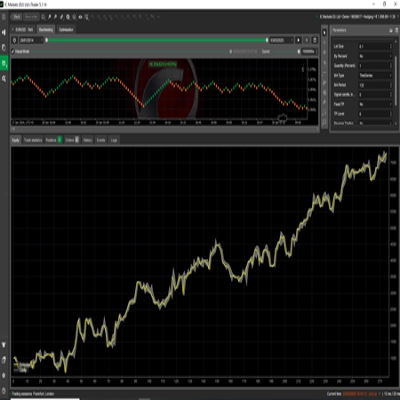
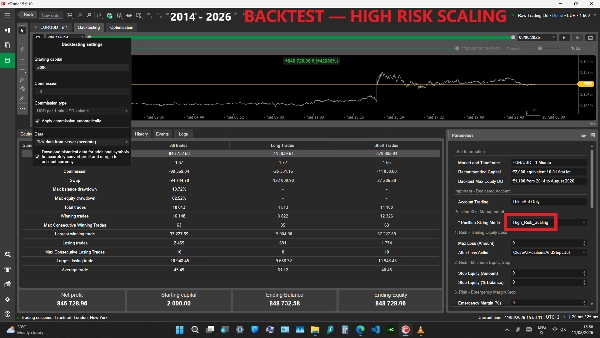
HISTORICAL BACKTEST - HIGH_RISK_SCALING
The product video shows the PRO edition using High_Risk_Scaling.
Backtest conditions:
• Testing period: 20 January 2014 - 8 August 2026
• Historical data: Tick Data from Server (accurate)
• Broker environment: Raw Trading Ltd demo
• Symbol: EURUSD
• Timeframe: M1
• Account currency: EUR
• Starting capital: €2,000
• Initial first-position size at the starting capital: 0.01 lot
• Position Sizing Mode: High_Risk_Scaling
• Leverage: 1:500
• Commission: 30 USD per 1 million USD volume, applied automatically
• Historical data for additional symbols used for account-currency conversion: Enabled
• Public parameters: Default values except Position Sizing Mode = High_Risk_Scaling
• Optional account-protection thresholds: 0 (Disabled)
BACKTEST RESULTS
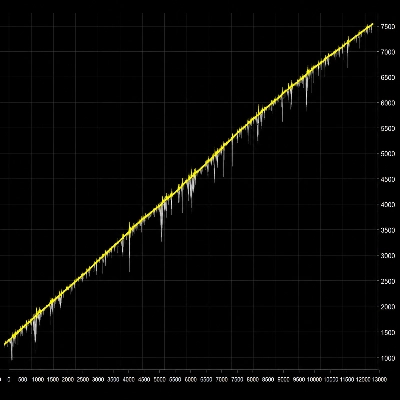
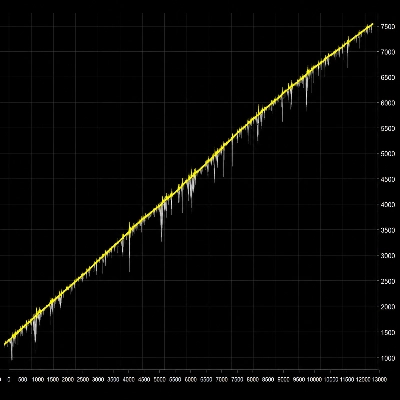
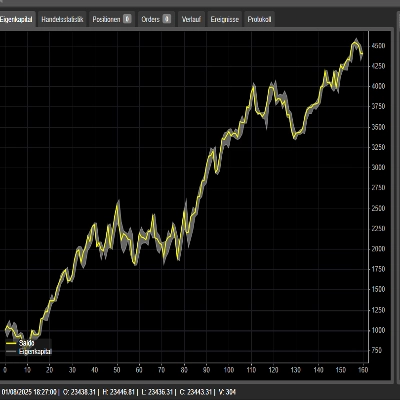
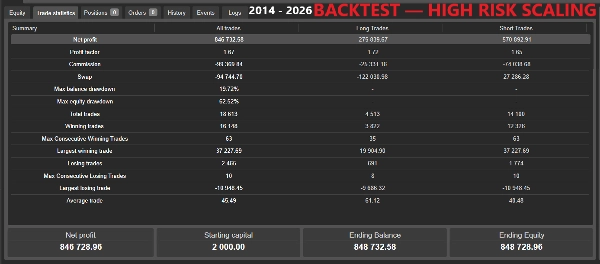
• Net Profit shown in Trade Statistics: €846,732.58
• Ending Balance: €848,732.58
• Ending Equity: €848,728.96
• Profit Factor: 1.67
• Maximum Balance Drawdown: 19.72%
• Maximum Equity Drawdown: 62.52%
• Total Trades: 18,613
• Winning Trades: 16,148
• Losing Trades: 2,465
• Largest Winning Trade: €37,227.69
• Largest Losing Trade: -€10,948.45
cTrader displays €846,732.58 in Trade Statistics and €846,728.96 in the lower Net Profit / Ending Equity area. Both values are reproduced exactly as shown in the recording; the displayed difference is €3.62.
All optional account-protection thresholds were disabled in this historical backtest. The result therefore does not include forced liquidation or entry-pause intervention from Max Loss, Stop Equity, Emergency Margin, Pause Equity or Pause Margin.
A complete recording of this historical backtest is available in the product video.
IMPORTANT ABOUT THE HIGH_RISK_SCALING BACKTEST
High_Risk_Scaling is the most aggressive Position Sizing Mode available in this PRO edition.
The test begins with €2,000 and an initial 0.01-lot first position, but the first-position size of later new baskets can increase automatically as eligible account capital increases.
The historical result therefore must not be interpreted as the performance of a permanently fixed 0.01-lot strategy.
The 62.52% Maximum Equity Drawdown shown in this backtest demonstrates the aggressive risk profile of this configuration.
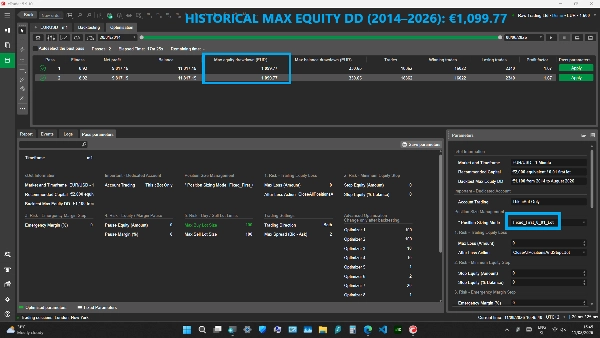
The Recommended Capital and Backtest Max Equity DD information displayed in the cBot refer to the Fixed_First_0_01_Lot reference configuration. Automatic scaling modes can produce substantially larger positions and drawdowns.
RISK INFORMATION
M-Algo EURUSD M1 PRO uses a recovery/grid strategy with progressive position sizing.
During strong or prolonged adverse market movements, the cBot may hold multiple positions simultaneously. Recovery position sizes may increase and can create substantial floating drawdown, high margin usage, margin exhaustion, broker stop-out and the possible loss of the entire trading account.
The automatic Position Sizing Modes can produce substantially larger positions than Fixed_First_0_01_Lot.
The Max Buy Lot Size and Max Sell Lot Size settings reduce individual-position size when configured appropriately, but they do not cap total combined exposure and do not eliminate trading risk.
The optional account protections can reduce risk but cannot guarantee execution at a specific price or guarantee that losses will remain below a selected threshold.
Backtest and live results may differ because of spread, commission, swap, slippage, liquidity, execution, market gaps, broker conditions and historical-data differences.
Testing on a demo account before live trading is strongly recommended.
Prop-firm compliance is not claimed.
Trading involves risk. Past performance does not guarantee future results.
DEVELOPER
Developed by M-Algo Systems.
M-Algo Systems is an independent developer and is not affiliated with cTrader Ltd or Spotware.
摘要
Key functionalities include automatic buy and sell basket management, shared take profit across positions, restart and open-position continuity, and advanced risk controls such as trailing equity loss protection, minimum equity stop, emergency margin stop, and entry pause controls based on equity and margin levels. The system supports configurable maximum lot sizes per position and includes a maximum spread filter to prevent trading under unfavorable conditions.
The cBot requires a hedging account and is optimized for use with leverage of 1:500 and a recommended capital of approximately €2,000 for the fixed-lot configuration. It supports multiple account currencies with cTrader’s currency conversion. The strategy manages up to 25 buy and 25 sell positions simultaneously, with a total maximum of 50 open positions.
M-Algo EURUSD M1 PRO includes a custom optimization fitness function for backtesting, emphasizing drawdown reduction alongside profit. It is intended for use on dedicated trading accounts without manual interference or other cBots running concurrently.