

Description
Keeps your cTrader account inside the loss limits you set — and never opens a trade itself.
What it does
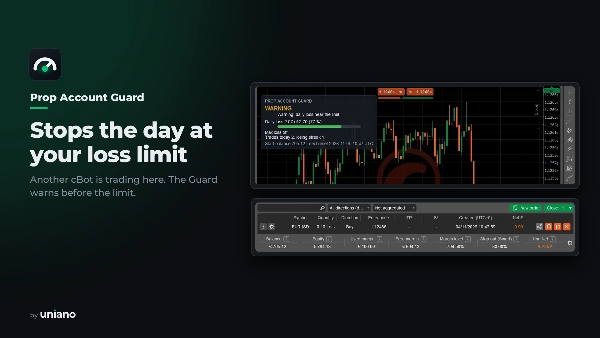
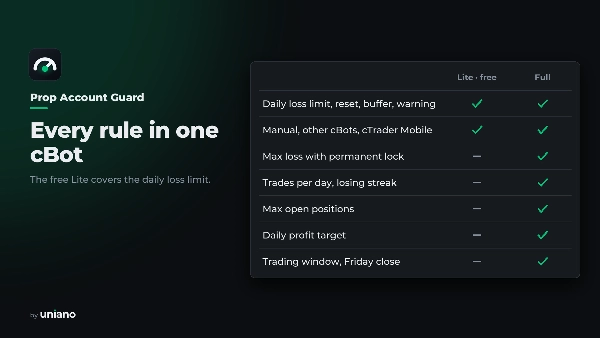
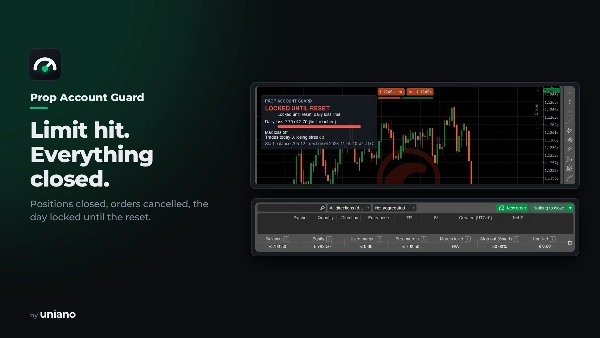
- Daily loss limit. As a % of the start balance, a % of the day base, or a fixed amount, with open P&L counted. At the limit it closes every position, cancels pending orders and blocks new trades until the day resets.
- Max loss with a permanent lock. Static, or trailing by equity or balance. A breach flattens the account and keeps it locked until you clear the lock yourself.
- Discipline rules. Max trades per day, max losing trades in a row, max open positions, a daily profit target, a trading window and a Friday close.
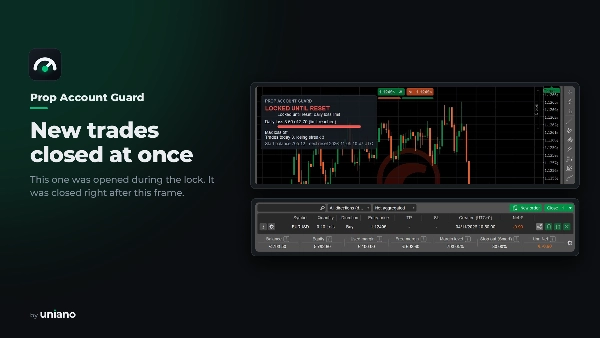
- The whole account. Manual trades, other cBots and trades from cTrader Mobile all count; anything opened during a lock is closed at once.
- Clear status. A chart panel with the daily loss against the limit, trades, streak and next reset, plus one log line for every state change.
What it does not do
- It does not trade, predict the market or improve results; it only limits losses according to your settings.
- It cannot act while it is stopped. Run it on a computer or VPS that stays on.
- Gaps, slippage, closed markets and lost connections can make a loss larger than the limit. The safety buffer reduces this risk; it cannot remove it.
- It does not know your prop firm's rules. Check how your firm measures daily loss and drawdown and set the inputs to match.
FAQ
- Does one instance protect all symbols? Yes. Add it to any chart of the account; it watches every position and order.
- When does the trading day reset? At the time and zone you choose: UTC, Central European or US Eastern time, with daylight saving handled.
- What happens after a restart during the day? Saved state is restored; without it, the day start is rebuilt from the account history and the stricter value is used.
- Can I undo a max-loss lock? Only on purpose: set "Clear permanent lock" and restart the cBot.
- Does it work in cTrader Cloud? It is not tested there by the developer; Cloud has no chart, so status is in the log only.
Compatibility
cTrader Desktop (Windows), any broker, hedging and netting accounts, any symbol and timeframe. The cBot needs no access rights.
Trading involves risk. Past performance does not guarantee future results.
Русский
Держит счёт cTrader в рамках заданных вами лимитов убытка. Сам при этом не открывает ни одной сделки.
Что делает
- Дневной лимит убытка. В процентах от стартового баланса, от базы дня или фиксированной суммой; плавающий результат учитывается. На лимите закрывает все позиции, снимает отложенные ордера и запрещает новые сделки до сброса дня.
- Максимальный убыток с постоянной блокировкой. Статичный или следящий за эквити либо балансом. При нарушении счёт закрывается и остаётся заблокированным, пока вы сами не снимете блокировку.
- Правила дисциплины. Максимум сделок в день, убыточных сделок подряд и открытых позиций, дневная цель по прибыли, торговое окно и закрытие в пятницу.
- Весь счёт. Учитываются ручные сделки, другие cBots и сделки из cTrader Mobile; всё, что открыто во время блокировки, закрывается сразу.
- Понятный статус. Панель на графике показывает дневной убыток относительно лимита, число сделок, серию и время сброса; каждое изменение состояния пишется в лог отдельной строкой.
Чего не делает
- Не торгует, не прогнозирует рынок и не улучшает результаты — только ограничивает убытки по вашим настройкам.
- Не работает, когда остановлен. Держите его на компьютере или VPS, который не выключается.
- Гэпы, проскальзывание, закрытый рынок и обрыв связи могут сделать убыток больше лимита. Запас безопасности снижает этот риск, но не убирает его.
- Не знает правил вашей prop-фирмы. Уточните, как фирма считает дневной убыток и просадку, и настройте параметры под них.
Вопросы и ответы
- Один экземпляр защищает все символы? Да. Добавьте его на любой график счёта — он следит за всеми позициями и ордерами.
- Когда сбрасывается торговый день? Во время и в зоне, которые вы выбрали: UTC, центральноевропейское или восточное время США, с учётом летнего времени.
- Что будет после перезапуска в течение дня? Сохранённое состояние восстанавливается; если его нет, начало дня вычисляется по истории счёта, и берётся более строгое значение.
- Можно ли снять блокировку по максимальному убытку? Только намеренно: включите «Clear permanent lock» и перезапустите cBot.
- Работает ли в cTrader Cloud? Разработчик там не проверял; в Cloud нет графика, поэтому статус виден только в логе.
Совместимость
cTrader Desktop (Windows), любой брокер, счета hedging и netting, любой символ и таймфрейм. cBot не требует прав доступа.
Торговля связана с риском. Прошлые результаты не гарантируют будущих.
Summary
AI summary
PropAccountGuard is a risk management cBot for cTrader designed to keep your trading account within predefined loss limits without opening any trades itself. It monitors the entire account, including manual trades, other cBots, and trades from cTrader Mobile.
Key features include:
- Daily loss limit configurable as a percentage of the start balance, day base, or a fixed amount. Upon reaching the limit, it closes all positions, cancels pending orders, and blocks new trades until the daily reset.
- Maximum loss limit with a permanent lock that can be static or trailing based on equity or balance. Breaching this limit flattens the account and locks trading until manually cleared.
- Discipline rules such as maximum trades per day, maximum consecutive losing trades, maximum open positions, daily profit target, trading window, and automatic Friday close.
- Clear status display via a chart panel showing daily loss relative to limits, trade count, losing streak, and next reset time, along with detailed logging of state changes.
The cBot operates on cTrader Desktop (Windows) with any broker, supporting hedging and netting accounts, all symbols, and timeframes. It requires continuous operation on a computer or VPS to enforce limits effectively. Losses exceeding limits may occur due to gaps, slippage, or connectivity issues. Settings should be tested on a demo account before live use.
Key features include:
- Daily loss limit configurable as a percentage of the start balance, day base, or a fixed amount. Upon reaching the limit, it closes all positions, cancels pending orders, and blocks new trades until the daily reset.
- Maximum loss limit with a permanent lock that can be static or trailing based on equity or balance. Breaching this limit flattens the account and locks trading until manually cleared.
- Discipline rules such as maximum trades per day, maximum consecutive losing trades, maximum open positions, daily profit target, trading window, and automatic Friday close.
- Clear status display via a chart panel showing daily loss relative to limits, trade count, losing streak, and next reset time, along with detailed logging of state changes.
The cBot operates on cTrader Desktop (Windows) with any broker, supporting hedging and netting accounts, all symbols, and timeframes. It requires continuous operation on a computer or VPS to enforce limits effectively. Losses exceeding limits may occur due to gaps, slippage, or connectivity issues. Settings should be tested on a demo account before live use.
Trading profile
Discussion
Customer reviews
0.0
Reviews: 0
Customer reviews
No reviews for this product yet. Already tried it? Be the first to tell others!
FAQ
Prop Firm Fit
Drawdown Guard
Daily Loss Limit
VPS Recommended
Max Drawdown Guard
Products available through cTrader Store, including trading bots, indicators and plugins, are provided by third-party developers and made available for informational and technical access purposes only. cTrader Store is not a broker and does not provide investment advice, personal recommendations or any guarantee of future performance.
More from this author
















Price
Since 03/11/2026