

الوصف
الإصدار الكامل! https://ctrader.com/products/2705
قيود النسخة التجريبية:
- مجموعة مختارة من الأدوات
- 4 أطر زمنية (M1, M10, M30, H2)
- حد زمني لمدة سنتين لبيانات الاختبار الخلفي
- 4 اختبارات خلفية متزامنة
للحصول على النسخة الكاملة، يرجى الرجوع إلى الرابط أعلاه!
----------------
لماذا OmniSim؟
يستهلك الاختبار الخلفي التقليدي في cTrader موارد نظام كبيرة لعرض منحنيات الأسهم والرصيد في الوقت الحقيقي، مما يبطئ جهاز الكمبيوتر ويحد من كفاءة الاختبار. يقوم OmniSim بتبسيط العملية بأكملها عن طريق جلب بيانات التيك من الخادم مباشرة وتشغيل اختبارات خلفية خفيفة ومركزة عبر الأدوات والأطر الزمنية التي تختارها دون العبء البصري، ولكن دون فقدانه.
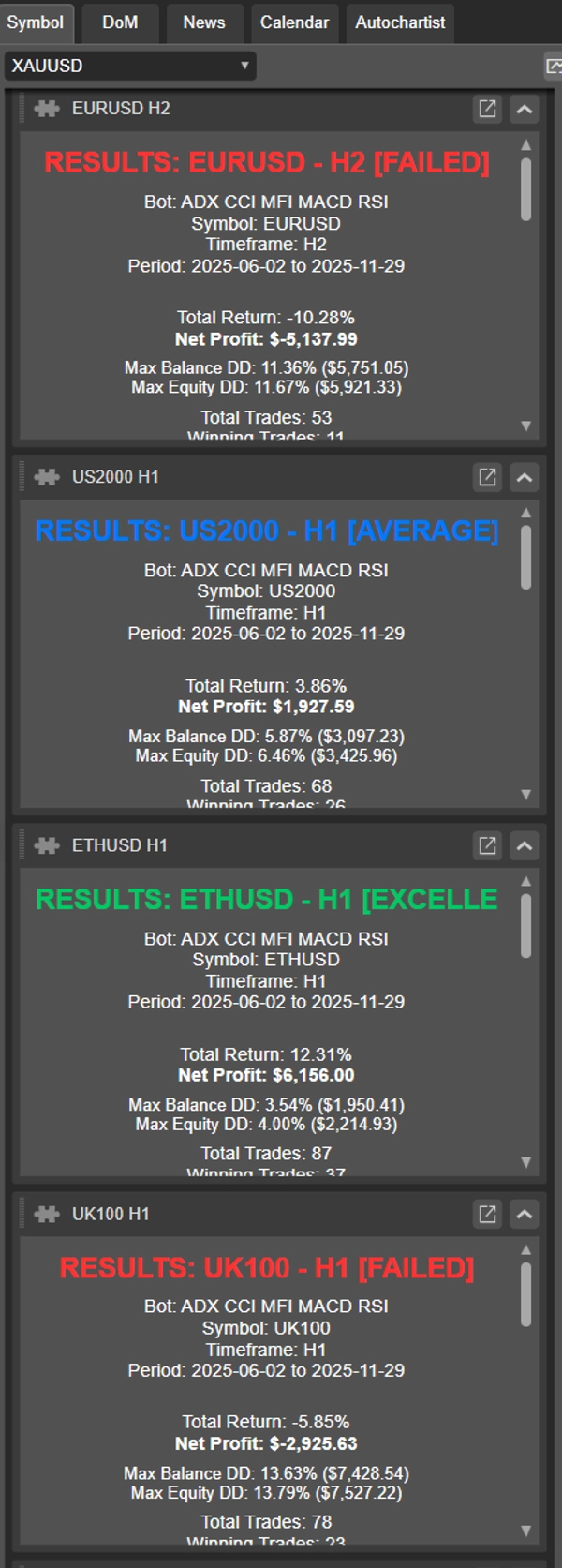
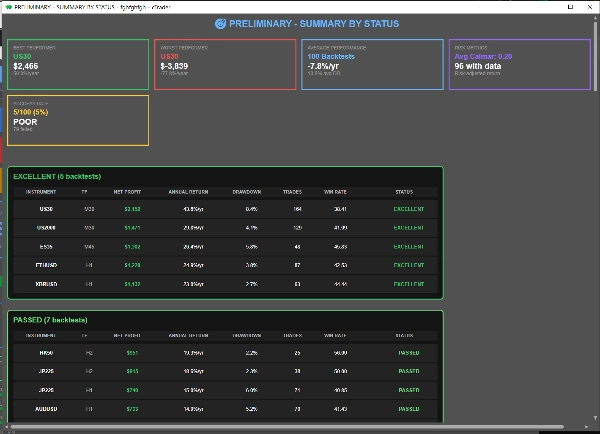
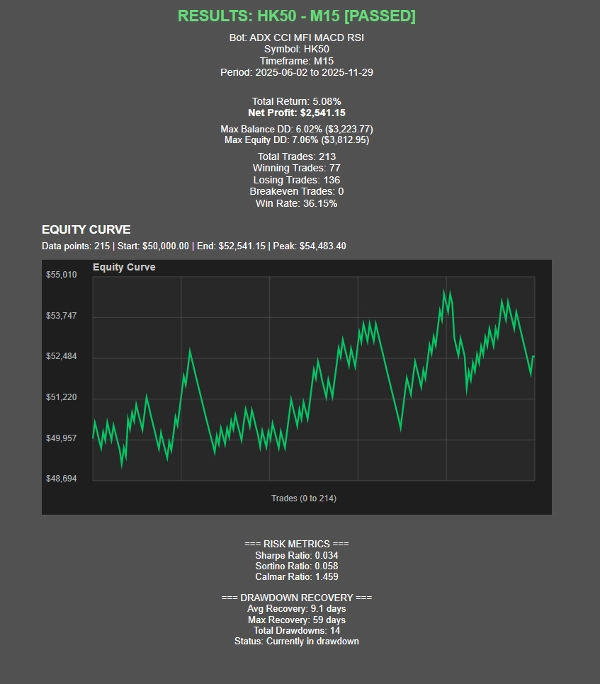
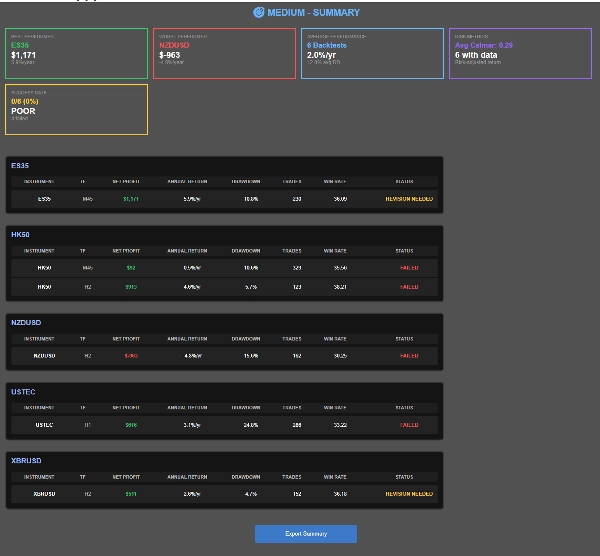
عند اكتمال الاختبارات، يقوم OmniSim تلقائيًا بإنشاء تقارير فردية لكل اختبار خلفي بالإضافة إلى تقرير ملخص شامل، مما يمنحك نظرة كاملة على الأداء بنظرة واحدة.
كيف يعمل؟
تم تصميم واجهة OmniSim مع مراعاة البساطة والحدس.
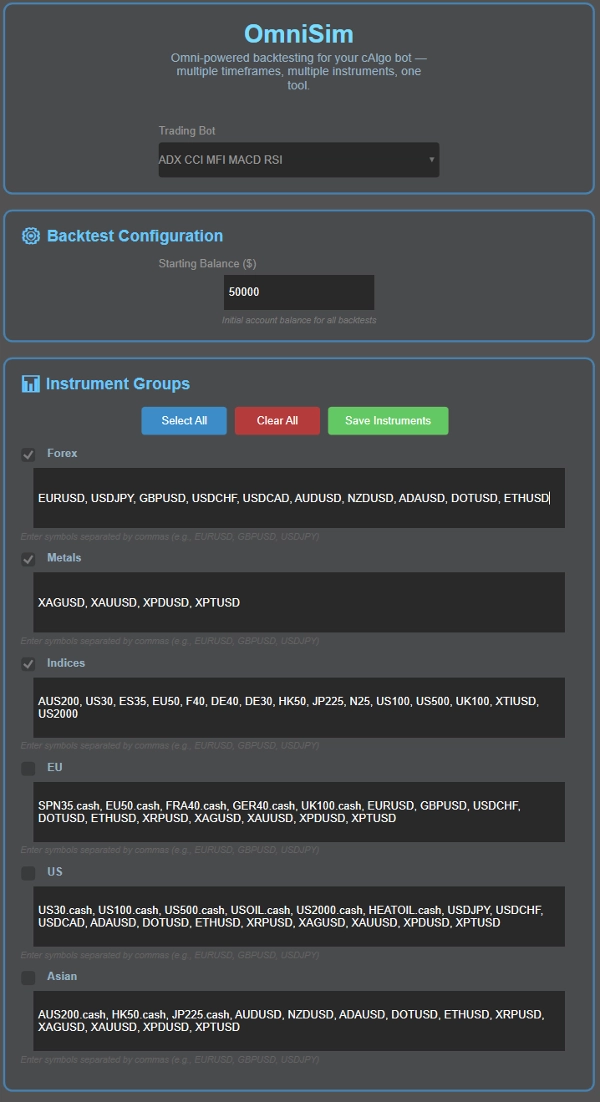
- اختر الروبوت الخاص بك: يقوم Omni بتحميل جميع الروبوتات المثبتة تلقائيًا ويعرضها في قائمة منسدلة في أعلى الواجهة
- اختر رأس المال الخاص بك
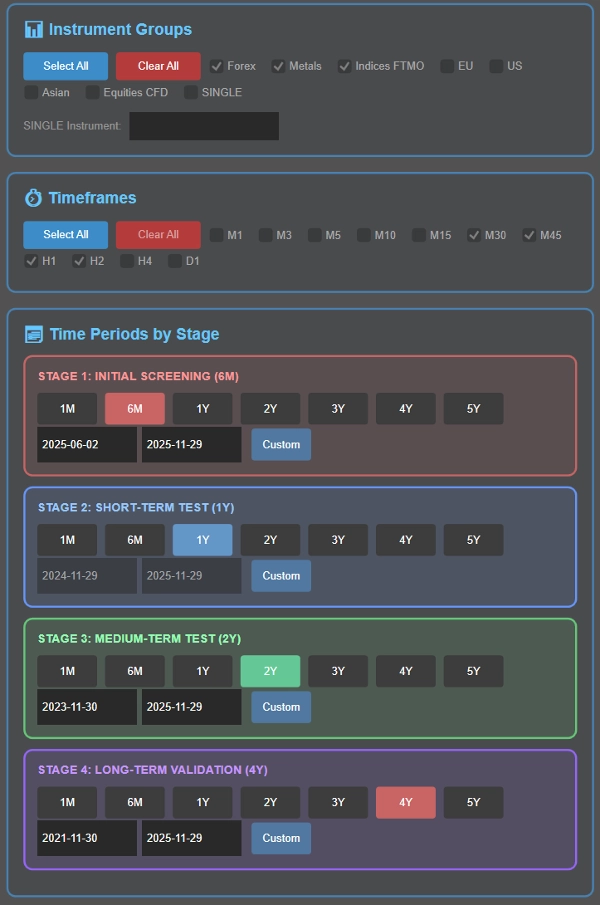
- اختر أداتك (أدواتك): هنا، ستجد 5 مجموعات (الفوركس، المعادن، المؤشرات، الاتحاد الأوروبي، الولايات المتحدة، آسيا) وأدواتها قابلة للتخصيص لراحتك. قبل الاختبار الخلفي، يمكنك اختيار مجموعة الأدوات التي ترغب في اختبارها
- اختر الإطارات الزمنية الخاصة بك: اختر الأطر الزمنية للاختبار: M1, M3, M5, M10, M15, M30, M45, H1, H2, H4, D1
- حدد فترات الاختبار الخلفي كجزء من العملية الذكية المتتابعة (المفصلة أدناه)، أو اختر فترة محددة واحدة إذا رغبت.
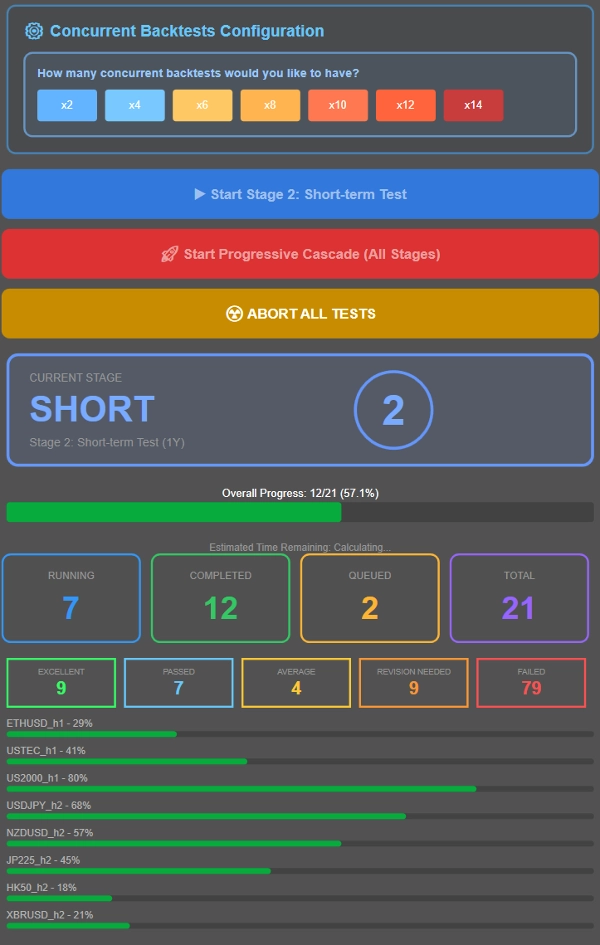
- تحكم في عدد الاختبارات التي تعمل في نفس الوقت بناءً على مواصفات نظامك. للمرجعية، نظام بذاكرة 16 جيجابايت وRyzen 7 5800X3D يتعامل بسهولة مع 8 اختبارات خلفية متزامنة، مع بقاء الأداء سلسًا حتى 12-14 اختبارًا متزامنًا. اضبط بما يتناسب مع جهازك.
- قم بتشغيل اختبار خلفي متتابع (تصفية تدريجية عبر فترات زمنية متعددة) أو اختبر جميع التركيبات مقابل فترة زمنية محددة واحدة باستخدام قيم المعلمات الافتراضية للـ cbot.
ما هي عملية الاختبار الخلفي المتتابع؟
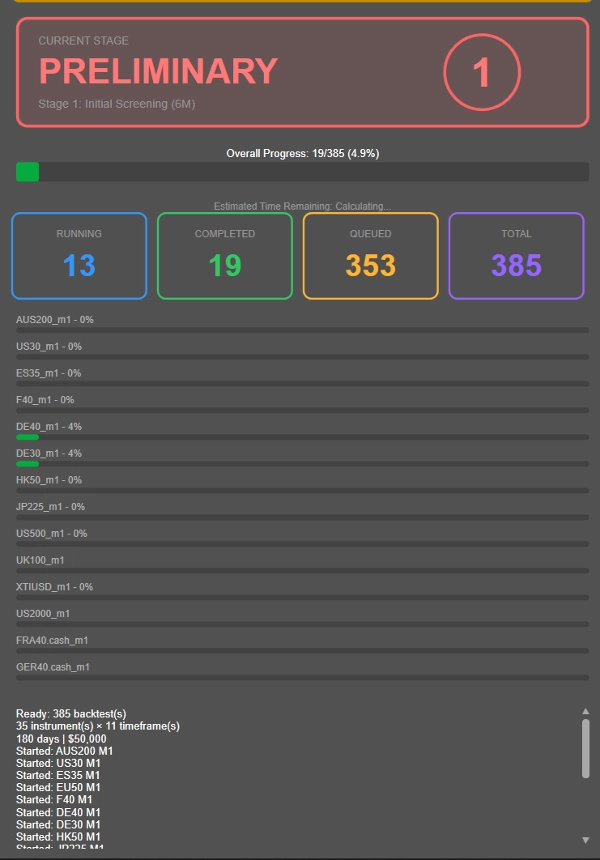
بدلاً من تشغيل اختبارات خلفية طويلة لمدة 4 سنوات على كل تركيبة أداة-إطار زمني (بما في ذلك غير المربحة)، يستخدم OmniSim منهجية التتابع التدريجي التي تقوم بذكاء بتصفية الأدوات ذات الأداء الضعيف مبكرًا:
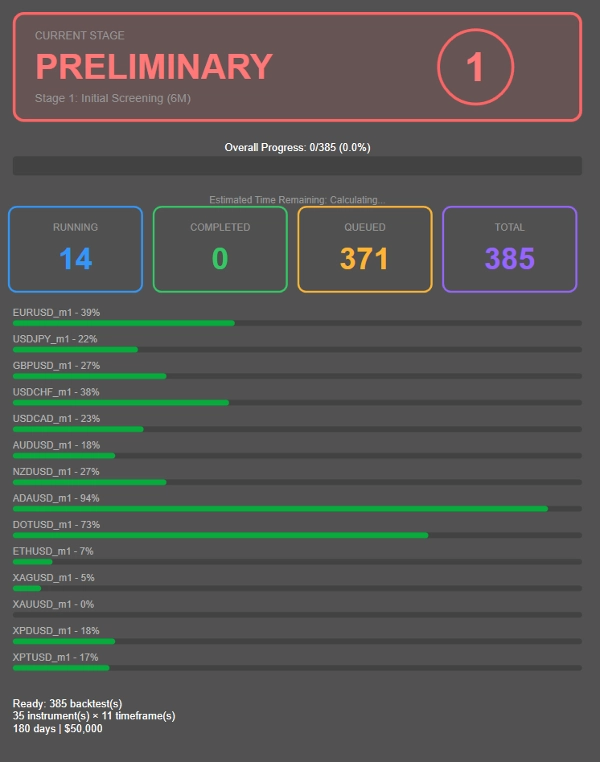
- المرحلة 1: فحص أولي لمدة 6 أشهر
- المرحلة 2: ينتقل الناجون إلى اختبار لمدة سنة واحدة
- المرحلة 3: ينتقل المؤدون بثبات إلى التحقق لمدة سنتين
- المرحلة 4: فقط التركيبات الأكثر صلابة تواجه الاختبار الكامل لمدة 4 سنوات
---------------
- تم اختيار مدة كل مرحلة أعلاه من قبلي لما أعتقد أنه مدة اختبار خلفي مناسبة ومريحة. يمكنك تعديل مدة الوقت كما تشاء، بدلاً من 6 أشهر → سنة → سنتين → 4 سنوات، يمكنك اختيار 1 شهر → سنتين → 4 سنوات → 8 سنوات! قابل للتخصيص بالكامل.
---------------
تقلل هذه الطريقة بشكل كبير من الحسابات المهدرة على التركيبات غير المربحة، مما يتيح لك تركيز الموارد على الاستراتيجيات التي تظهر فعلاً وعدًا.
هل ترغب في اختبار كل شيء مقابل فترة واحدة بدلاً من ذلك؟ ببساطة قم بتكوين الإطار الزمني المطلوب في المرحلة 2 وقم بتشغيل جميع التركيبات مقابل تلك الفترة المحددة بالنقر على الزر الأزرق.
تصنيف الأداء، يمكن تعديله عند الطلب بعد الشراء!
- ممتاز: ≤10% متوسط السحب، ≥20% ربح سنوي
- ناجح: ≤10% متوسط السحب، 10-20% ربح سنوي
- متوسط: ≤10% متوسط السحب، 5-10% ربح سنوي
- يحتاج مراجعة: سحب 10-20% مع ربح >5% أو سحب ≤5% مع ربح 0-5%
- فشل: كل شيء آخر
تم تصميم هذه الإضافة مع معايير النجاح والفشل لشركات التداول الشهيرة (سحب استبعاد 10%). اعتمادًا على مقدار المخاطرة في كل صفقة، قد يكون من الصعب معرفة الأداء الحقيقي، ومن هنا جاءت الفئات الأخرى مثل الحاجة للمراجعة والمتوسط، وكلها ضمن مقاييس أداء معقولة. الفشل مخصص للعوائد المتوسطة، السحب غير الموجود أو السحب الكبير.
مقاييس الأداء:
- نسبة شارب، نسبة سورتينو، نسبة كالمار (قيد التطوير)
- إحصائيات استرداد السحب
- تصوير منحنى الأسهم
- تتبع التقدم في الوقت الحقيقي مع الوقت المتوقع للانتهاء
عرض النتائج
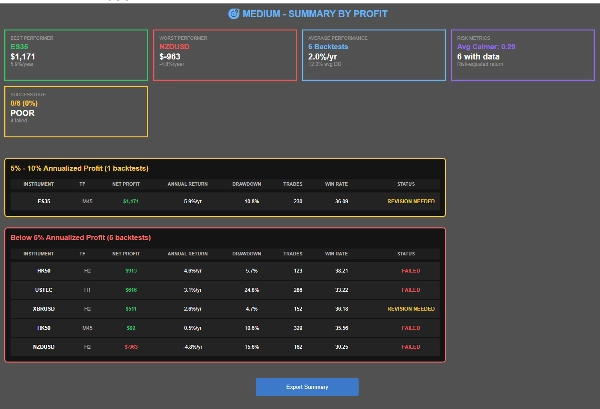
- ثلاثة عروض ملخصة: حسب الأداة، حسب الحالة، حسب الربح
- تنقل قابل للنقر بين النتائج
- وظيفة تصدير CSV
- بطاقات حالة بصرية ومؤشرات تقدم
الملخص
تقييمات العملاء
مناقشة
الأسئلة الشائعة
المزيد من هذا المؤلف








السعر