الوصف
G.A.S - منطقة الدخول الذكية هو مؤشر حركة السعر لـ US500 (عقد الفروقات لمؤشر S&P 500) الذي يساعد
المتداولين على تحديد نقاط دخول ذات احتمالية عالية حول منطقة سعرية محددة يدويًا.
--- ما الذي يحلله ---
يراقب المؤشر سلوك السعر حول مستويين أفقيين محددين من قبل المستخدم - الحدود العليا والسفلى لمنطقة الدخول الذكية. يتتبع كيف يقترب السعر،
ويخترق، ويتفاعل مع هذه المستويات على أساس كل شريط، باحثًا عن أنماط تأكيد محددة قبل إصدار إشارة.
--- كيفية تفسير الإشارات والعناصر المرئية ---
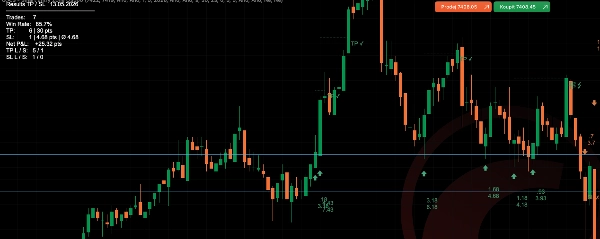
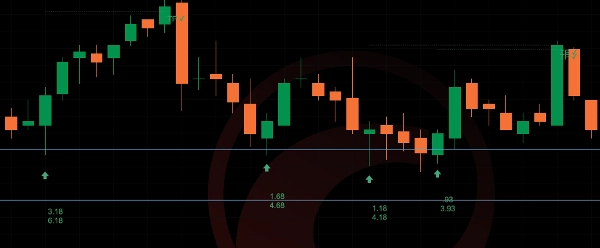
تحدد خطوط المنطقة الحدود العليا والسفلى لمنطقة الدخول لليوم التداولي المحدد. يتم اكتشاف ثلاثة أنواع من الإشارات:
- الحالة أ - يخترق السعر المنطقة ثم يغلق مرة أخرى خارجها. شمعة متابعة تغلق في اتجاه الاختراق تُفعّل الإشارة. إشارة واحدة لكل حدث اختراق (مرة واحدة).
- الحالة ب - الشمعة السابقة أغلقت خارج المنطقة، والشمعة الحالية تخترقها ثم تغلق مرة أخرى خارجها. يؤكد إعادة اختبار حدود المنطقة.
- الحالة ج - عند فتح نافذة وقت الإشارة بالضبط، يكون السعر بالفعل خارج المنطقة. أول شمعة تأكيد في ذلك الاتجاه تُفعّل الإشارة.
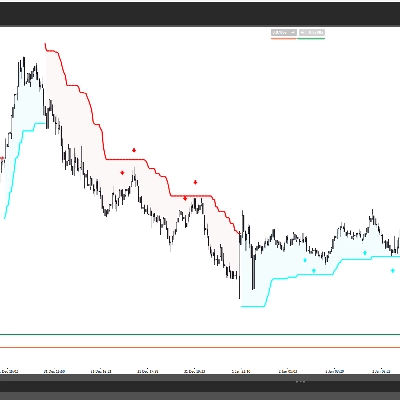
تُعرض الإشارات كأسهم أسفل (صعودية) أو أعلى (هبوطية) شريط الإشارة. عند تفعيل عرض TP/SL، تظهر خطوط منقطة توضح مستويات جني الأرباح ووقف الخسارة من شريط الدخول. تسمية TP أو SL تشير إلى النتيجة عند الوصول إلى المستوى.
تُظهر تسمية مسافة وقف الخسارة الاختيارية في الوقت الحقيقي مدى بعد السعر الحالي عن حدود منطقة وقف الخسارة.
--- الإعدادات والمعلمات الرئيسية ---
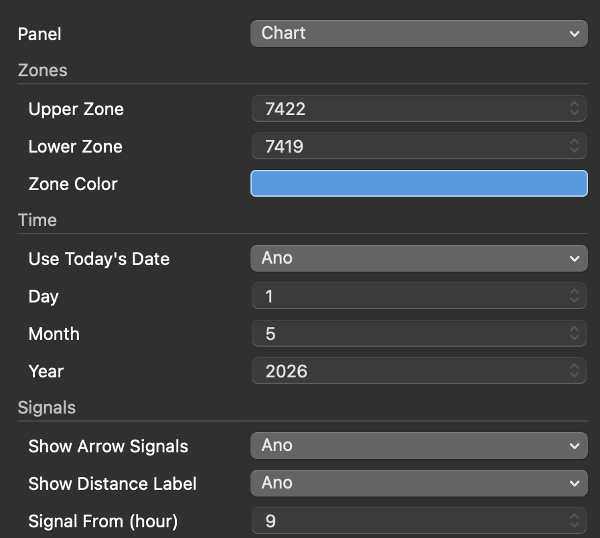
- المناطق: مستوى السعر العلوي والسفلي، لون الخط، إظهار/إخفاء
- التاريخ: استخدام تاريخ اليوم تلقائيًا أو تعيين تاريخ محدد يدويًا
- الإشارات: تفعيل الأسهم، ضبط نافذة الوقت (مثلاً 15:30 / 23:00)، فترة النظر للخلف بعد الاختراق (كم عدد الأشرطة التي تظل فيها الإشارة صالحة)، تشغيل/إيقاف تسميات المسافة
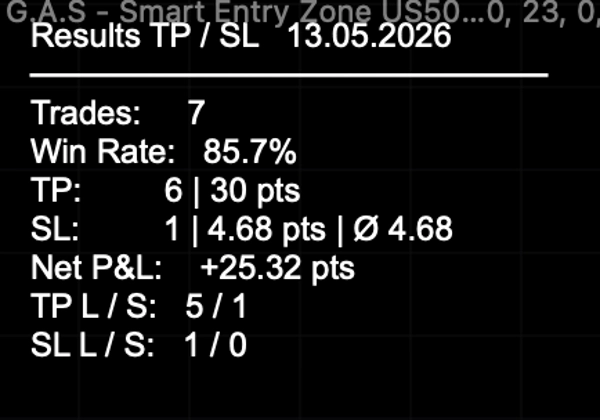
- TP/SL: جني الأرباح بالنقاط، عرض الخطوط والتسميات، جدول النتائج تشغيل/إيقاف، وضع التداول الفردي (صفقة مفتوحة واحدة في الوقت نفسه)، ألوان مخصصة
- مسافة وقف الخسارة: تفعيل التسمية، لون مخصص
--- حالات الاستخدام النموذجية وسيناريوهات التداول ---
تم تصميم المؤشر للتداول اليومي لمؤشر US500 على مخطط 5 دقائق. سير العمل النموذجي هو: قبل فتح سوق الولايات المتحدة، يحدد المتداول مستويات المنطقة العليا والسفلى لليوم. بمجرد فتح نافذة الإشارة (الافتراضية 15:30 براغ / 09:30 نيويورك)، يراقب المؤشر إعدادات الحالة أ، ب، أو ج ويحدد نقاط الدخول الصالحة بالأسهم. يقوم متتبع TP/SL بتسجيل النتائج تلقائيًا خلال الجلسة.
--- لمن هذا المؤشر مناسب بشكل أفضل ---
المتداولون المتوسطون إلى المتقدمون الذين لديهم منهجية تداول يومي محددة ويستخدمون مناطق سعرية ثابتة كجزء من عملية اتخاذ القرار. لا يقوم المؤشر بإنشاء المناطق تلقائيًا - يجب على المتداول تحديد وإدخال المستويات يدويًا كل يوم. غير مناسب للمبتدئين الذين يبحثون عن نظام إشارات آلي بالكامل.
--- القيود المهمة وملاحظات الاستخدام ---
- يجب إدخال مستويات المنطقة يدويًا كل يوم تداول - لا يحسبها المؤشر تلقائيًا.
- مصمم ومختبر لـ US500 على مخطط 5 دقائق. السلوك على أدوات أو أطر زمنية أخرى غير مضمون.
- إحصائيات الإشارات السابقة المعروضة في جدول النتائج هي للرجوع إليها فقط ولا تمثل ضمانًا للأداء المستقبلي.
- تستخدم نافذة وقت الإشارة توقيت براغ (CET/CEST) داخليًا. قم بضبط إعدادات ساعة البداية/النهاية إذا كان وسيطك يستخدم توقيت خادم مختلف.
الملخص
Signals appear as arrows indicating bullish or bearish entries, with optional automatic tracking and display of take profit (TP) and stop loss (SL) levels, including real-time SL distance labels. Users can customize zone levels, signal time windows, TP/SL parameters, and visual elements. The indicator logs trade statistics throughout the session for performance reference.
Intended for intermediate to advanced traders who incorporate fixed price zones into their intraday strategies, it requires manual input of zone levels daily and is specifically tailored for the US500 instrument. The indicator does not generate zones automatically and is not designed for other instruments or timeframes. Time settings use Prague time internally and should be adjusted if needed.