present
ลงทะเบียนและรับส่วนลด $50 สำหรับการซื้อครั้งแรกของคุณ
Trading product for RiskRewardTools ปลั๊กอินเดสก์ท็อป, image 1
RiskRewardTools
ปลั๊กอินเดสก์ท็อป
3 การซื้อ
เวอร์ชัน 1.0, Feb 2025
Windows, Mac
รีวิว: 1
Trading product for RiskRewardTools ปลั๊กอินเดสก์ท็อป, image 2
Trading product for RiskRewardTools ปลั๊กอินเดสก์ท็อป, image 3
Trading product for RiskRewardTools ปลั๊กอินเดสก์ท็อป, image 4
Trading product for RiskRewardTools ปลั๊กอินเดสก์ท็อป, image 5
Trading product for RiskRewardTools ปลั๊กอินเดสก์ท็อป, image 6
Trading product for RiskRewardTools ปลั๊กอินเดสก์ท็อป, image 7
ตั้งแต่ 30/09/2024
44
การขาย

คำอธิบาย

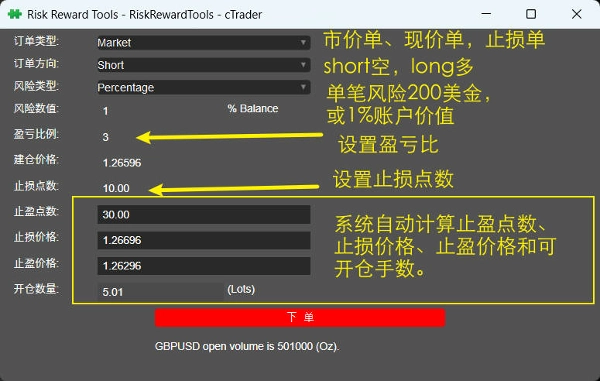
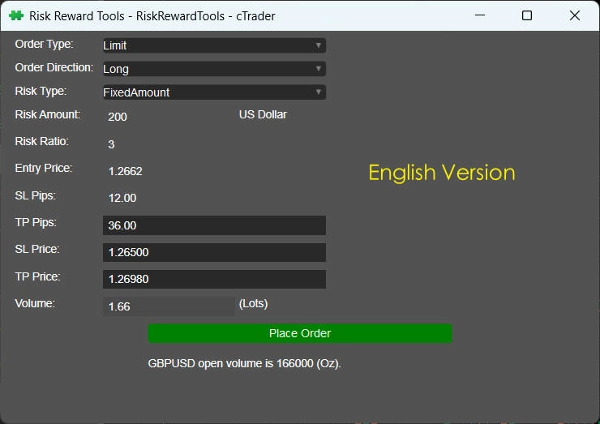
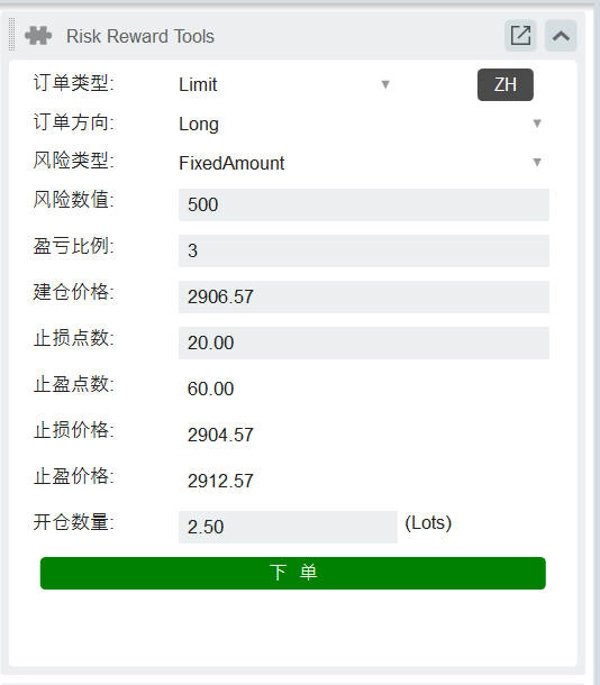
อันดับแรก ตัวบ่งชี้นี้เป็นเครื่องมือจัดการความเสี่ยง ส่วนติดต่อผู้ใช้มีตัวควบคุมการป้อนข้อมูลต่างๆ เช่น เมนูแบบเลื่อนลง กล่องข้อความ และปุ่ม สำหรับคำนวณพารามิเตอร์ เช่น ขนาดล็อตคำสั่ง หยุดขาดทุน และทำกำไร ผู้ใช้สามารถเลือกประเภทคำสั่ง (ลิมิต, ตลาด, หยุด), ทิศทาง (ยาวหรือสั้น), ประเภทความเสี่ยง (จำนวนคงที่หรือเปอร์เซ็นต์), ป้อนค่าความเสี่ยง อัตราส่วนความเสี่ยง-ผลตอบแทน และราคาที่เข้าซื้อ จากนั้นเครื่องมือจะคำนวณพิปส์/ราคาหยุดขาดทุน พิปส์/ราคาทำกำไร และขนาดล็อตที่สอดคล้องกัน และมีฟังก์ชันการวางคำสั่ง รายละเอียดดังนี้:

1) ประเภทคำสั่ง: คำสั่งลิมิต, คำสั่งตลาด, คำสั่งหยุด;
2) วิธีการจัดการความเสี่ยง: จำนวนคงที่ (เช่น $200 ผู้ใช้สามารถป้อน), เปอร์เซ็นต์ของยอดเงินในบัญชี (เช่น 1% ผู้ใช้สามารถป้อน);
3) อัตราส่วนความเสี่ยง-ผลตอบแทน: ผู้ใช้สามารถป้อนค่านี้ เช่น 3 เท่า ระบบจะคำนวณขนาดล็อตที่สามารถเทรดได้ ราคาที่เข้าซื้อ พิปส์และราคาหยุดขาดทุน และพิปส์และราคาทำกำไรโดยอัตโนมัติตามค่าที่ตั้งไว้;
4) ราคาที่เข้าซื้อ: ค่าเริ่มต้นเป็นราคาปัจจุบันของเครื่องมือปัจจุบัน ผู้ใช้สามารถแก้ไขและป้อนด้วยตนเอง;

5) พิปส์หยุดขาดทุน: ค่าเริ่มต้นเป็น 10 * สเปรดสัญลักษณ์ (ผู้ใช้สามารถแก้ไขและป้อนด้วยตนเอง);
6) ขนาดล็อต: คำนวณโดยอัตโนมัติ;
7) ทำกำไร: คำนวณโดยอัตโนมัติ (รวมทั้งพิปส์และราคา);
8) หยุดขาดทุน: คำนวณโดยอัตโนมัติ (รวมทั้งพิปส์และราคา).

ที่ด้านล่างของอินเทอร์เฟซมีปุ่ม "วางคำสั่ง" เพื่อดำเนินการวางคำสั่งตามการตั้งค่าพารามิเตอร์ข้างต้น

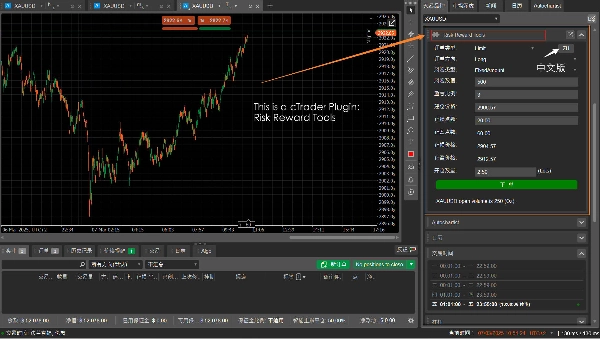
นี่คือปลั๊กอิน cTrader หากคุณชอบ คุณสามารถเลือกตัวบ่งชี้ได้ที่: https://ctrader.com/zh/products/646

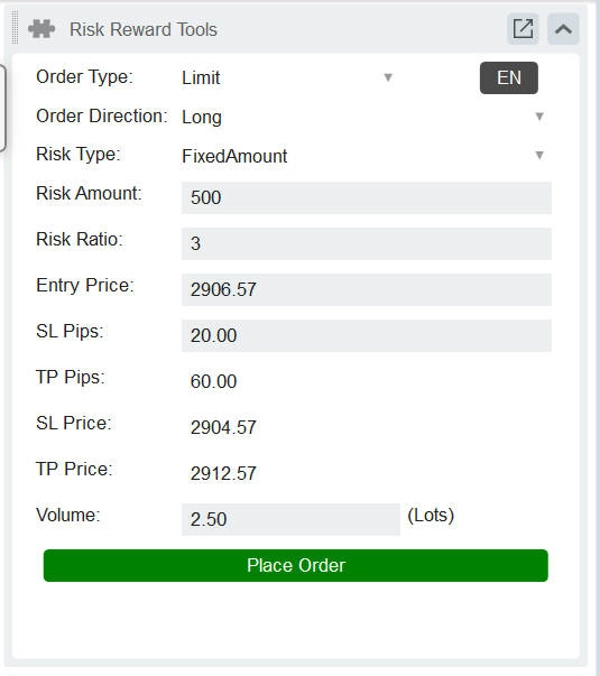
อันดับแรก ตัวบ่งชี้นี้เป็นเครื่องมือจัดการความเสี่ยง ส่วนติดต่อผู้ใช้มีตัวควบคุมการป้อนข้อมูลต่างๆ เช่น เมนูแบบเลื่อนลง กล่องข้อความ และปุ่ม สำหรับคำนวณพารามิเตอร์ เช่น ขนาดล็อตคำสั่ง หยุดขาดทุน และทำกำไร ผู้ใช้สามารถเลือกประเภทคำสั่ง (ลิมิต, ตลาด, หยุด), ทิศทาง (ยาวหรือสั้น), ประเภทความเสี่ยง (จำนวนคงที่หรือเปอร์เซ็นต์), ป้อนค่าความเสี่ยง อัตราส่วนความเสี่ยง-ผลตอบแทน และราคาที่เข้าซื้อ จากนั้นเครื่องมือจะคำนวณพิปส์/ราคาหยุดขาดทุน พิปส์/ราคาทำกำไร และขนาดล็อตที่สอดคล้องกัน และมีฟังก์ชันการวางคำสั่ง รายละเอียดดังนี้:

1) ประเภทคำสั่ง: คำสั่งลิมิต, คำสั่งตลาด, คำสั่งหยุด:

2) วิธีการจัดการความเสี่ยง: จำนวนคงที่ (เช่น 200 ดอลลาร์ ผู้ใช้สามารถป้อน), เปอร์เซ็นต์ของยอดเงินในบัญชี (เช่น 1% ผู้ใช้สามารถป้อน);

3) อัตราส่วนกำไรขาดทุน: ผู้ใช้สามารถป้อนเอง เช่น 3 เท่า ระบบจะคำนวณขนาดล็อตที่เปิดได้ ราคาที่เปิดคำสั่ง พิปส์และราคาหยุดขาดทุน พิปส์และราคาทำกำไรโดยอัตโนมัติตามค่าที่ตั้งไว้;

4) ราคาที่เปิดคำสั่ง: ค่าเริ่มต้นเป็นราคาปัจจุบันของสินทรัพย์ปัจจุบัน ผู้ใช้สามารถแก้ไขและป้อนเอง;

5) พิปส์หยุดขาดทุน: ป้อนพิปส์หยุดขาดทุน ระบบจะคำนวณขนาดล็อตที่เปิดคำสั่ง ราคาหยุดขาดทุน ราคาทำกำไร และข้อมูลอื่นๆ โดยอัตโนมัติ และสามารถดูข้อมูลตำแหน่งที่เกี่ยวข้องบนกราฟผ่านฟังก์ชันวาดเส้น;

6) ขนาดล็อตที่เปิดคำสั่ง: คำนวณโดยอัตโนมัติ;

6) ทำกำไร: คำนวณโดยอัตโนมัติ (รวมทั้งพิปส์และราคา);

7) หยุดขาดทุน: คำนวณโดยอัตโนมัติ (รวมทั้งพิปส์และราคา).

ที่ด้านล่างสุดของอินเทอร์เฟซมีปุ่ม “วางคำสั่ง” เพื่อดำเนินการวางคำสั่งตามการตั้งค่าพารามิเตอร์ข้างต้น โปรดดูวิดีโอแนะนำ:


เครื่องมือจัดการความเสี่ยงและผลตอบแทนที่ทรงพลังยิ่งขึ้น: https://ctrader.com/zh/products/646 (แนะนำ

สรุป

สรุปโดย AI
RiskRewardTools is a risk management plugin for the cTrader platform designed to assist traders in calculating and managing trade parameters. The user interface includes dropdown menus, text boxes, and buttons that allow users to input and select key variables such as order type (limit, market, stop), trade direction (long or short), risk method (fixed amount or percentage of account balance), risk value, risk-reward ratio, and entry price.

Based on these inputs, the tool automatically calculates the appropriate lot size, stop-loss pips and price, and take-profit pips and price. The default stop-loss pips value is set to ten times the symbol’s spread but can be adjusted manually. The entry price defaults to the current instrument price but is also editable. The interface includes a "Place Order" button to execute trades directly with the calculated parameters.

This plugin supports multiple order types and provides automated calculations to streamline risk-reward management, helping traders set precise stop-loss and take-profit levels aligned with their risk preferences.
โปรไฟล์ปลั๊กอิน

รีวิวจากลูกค้า

1.0
รีวิว: 1
5
0 %
4
0 %
3
0 %
2
0 %
1
100 %
รีวิวจากลูกค้า
June 8, 2025
Doesnt work, do not buy!

การสนทนา

คำถามที่พบบ่อย

ผลิตภัณฑ์ที่มีให้บริการผ่าน cTrader Store รวมถึงบอทการเทรด อินดิเคเตอร์ และปลั๊กอิน มีให้บริการโดยนักพัฒนาบุคคลที่สามและมีไว้เพื่อวัตถุประสงค์ในการเข้าถึงข้อมูลและทางเทคนิคเท่านั้น cTrader Store ไม่ใช่โบรกเกอร์และไม่ได้ให้คำแนะนำการลงทุน คำแนะนำส่วนบุคคล หรือการรับประกันผลการดำเนินงานในอนาคต

นอกจากนี้คุณยังอาจชอบ

"BatchTPSL" โลโก้
ยอดนิยม
4.5
(2)
$40
/
$60
ปลั๊กอินเดสก์ท็อป
Forex
Crypto
+4
Apply Stop Loss and Take Profit to all positions and pending orders in one click.
ปลั๊กอินเดสก์ท็อป
Trade Journal
AI Integration
+1
#1 Trade Journal, PnL analytics, bot monitoring and strategy statistics.
ปลั๊กอินเดสก์ท็อป
AI
ATR
+27
Turn your cTrader trade history into a visual performance dashboard to see trading patterns and strategy strength
ปลั๊กอินเดสก์ท็อป
Break Even
Fixed Risk %
+5
Chart-based risk sizing, Entry/SL/TP planning and user-confirmed market or pending orders for cTrader Desktop.
"TradeGuard" โลโก้
ยอดนิยม
4.6
(3)
$25
ปลั๊กอินเดสก์ท็อป
ATR
Prop
+5
cTrader risk management plugin with daily & total drawdown limits, CBot control, and risk-based order execution.
ปลั๊กอินเดสก์ท็อป
Risk/Reward
Chart UI Tools
+3
Visual cTrader backtesting tool with trade drawing, risk sizing, stats, and automatic trade simulation.
ปลั๊กอินเดสก์ท็อป
AI
ATR
+27
Trade Analytics delivers advanced trading insights and heatmaps directly inside TradeWatch.
"PnL Calendar" โลโก้
ยอดนิยม
5.0
(4)
$50
/
$70
ปลั๊กอินเดสก์ท็อป
Prop
Forex
+3
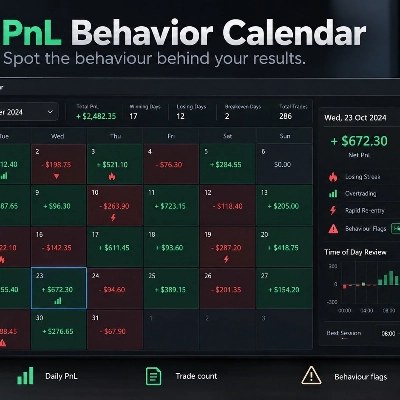
Visual calendar with daily PnL, trades, win rate, profit factor, and performance insights.
"wt.UNiRENKO" โลโก้
ยอดนิยม
5.0
(2)
$35
ปลั๊กอินเดสก์ท็อป
Forex
Signal
+2
Adaptive Renko chart builder for precise, flexible trading - ideal for both scalping and trend analysis.
ปลั๊กอินเดสก์ท็อป
Prop
Forex
+5
Place professional OCO & OSO orders in cTrader — visually, instantly, and without execution mistakes.
"RiskManagement - Full" โลโก้
ยอดนิยม
4.5
(4)
$45
/
$55
ปลั๊กอินเดสก์ท็อป
Prop
Forex
+4
Professional risk management plugin with automatic lot calculation, chart panels, and R:R automation. Version 1.4.2.
ปลั๊กอินเดสก์ท็อป
Forex
Crypto
+3
Build custom second and tick charts using adjustable bar sampling intervals.
ปลั๊กอินเดสก์ท็อป
Forex
Crypto
+2
Get TradingView charts & heatmaps directly in cTrader!
ปลั๊กอินเดสก์ท็อป
Market Scanner
An 8-currency strength ranking, multi-TF heatmap & impulse tracker — read the real driver at a glance. Read-only.
"Risk Manager Pro" โลโก้
ยอดนิยม
4.0
(4)
$45
/
$90
ปลั๊กอินเดสก์ท็อป
SMC
Grid
+5
The all-in-one trade management plugin that automates your risk, execution, and position management.
ปลั๊กอินเดสก์ท็อป
Trade Journal
AI Integration
+1
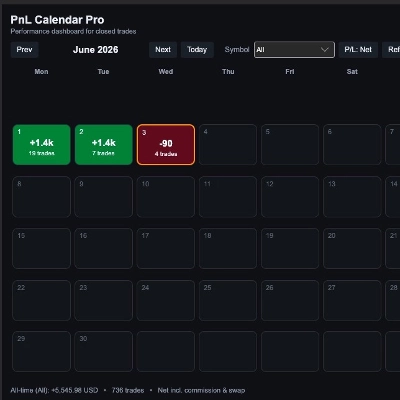
Turn your closed-trade history into an at-a-glance monthly calendar and a deep performance dashboard.
"Performance Calendar" โลโก้
ยอดนิยม
4.0
(1)
$29
/
$49
ปลั๊กอินเดสก์ท็อป
Prop
Forex
+4
Visual monthly trading journal that displays your performance day-by-day in a calendar view.

ราคา

ตั้งแต่ 30/09/2024
44
การขาย