Deskripsi
Peringatan Garis Tren
Indikator yang memantau garis tren yang digambar tangan pada grafik harga dan mengirimkan peringatan multi-saluran — dan opsional melakukan perdagangan — saat harga melintasi garis tren.
Apa yang Dilakukan
Anda menggambar garis tren pada grafik Anda. Indikator mengawasinya. Saat harga melintasi garis, indikator:
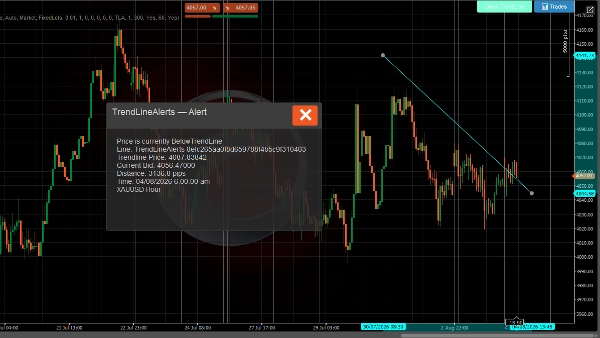
- Menampilkan popup di grafik dengan detail crossover
- Memainkan suara notifikasi
- Mengirim email (opsional)
- Mengirim pesan Telegram melalui bot (opsional)
- Melakukan perdagangan (opsional — pasar, limit, stop, atau order stop-limit)
Sistem Peringatan
- Deteksi crossover garis tren — aktif pada setiap tick saat harga melintasi garis tren yang dipantau ke atas atau ke bawah
- Pesan kaya — mencakup harga garis tren, bid saat ini, jarak dalam pips, instrumen, dan kerangka waktu
- Pembatasan laju — pendinginan yang dapat dikonfigurasi per garis tren mencegah peringatan duplikat
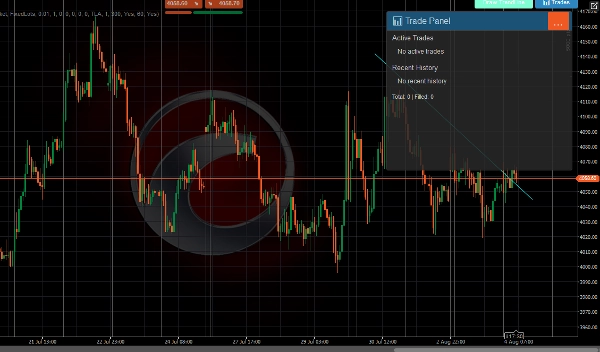
- Riwayat peringatan — 500 peringatan terakhir disimpan dan dapat dilihat di Panel Perdagangan
- Pengiriman multi-saluran — popup, suara, email, dan Telegram secara bersamaan
Sistem Perdagangan
Saat perdagangan diaktifkan, peristiwa crossover juga dapat melakukan perdagangan:
- Semua jenis order C-Trader — pasar, limit beli/jual, stop beli/jual, stop-limit beli/jual
- Arah otomatis — harga melintasi ke bawah → jual, melintasi ke atas → beli (atau atur manual per garis)
- Stop loss dan take profit — ditentukan dalam pips, otomatis dikonversi ke level harga
- Dua mode volume — lot tetap atau berbasis risiko (% dari saldo akun)
- Override per garis tren — setiap garis tren dapat memiliki pengaturan perdagangan sendiri (arah, volume, SL / TP, jenis order)
- Manajemen perdagangan — maksimal perdagangan per garis, pendinginan antar perdagangan, pembatalan order pending otomatis saat garis tren dihapus
- Pemantauan siklus hidup perdagangan — melacak pengisian, SL/TP tercapai, penolakan, dan pembatalan dengan notifikasi untuk setiap peristiwa
UI
Toolbar muncul di grafik (posisi dapat dikonfigurasi) dengan:
- Gambar Garis Tren — menempatkan garis tren interaktif baru di grafik
- 📊 Perdagangan — membuka panel yang menampilkan perdagangan aktif, riwayat terbaru, dan statistik
Notifikasi
Saluran Deskripsi
Popup Dialog di dalam grafik dengan header berwarna (hijau = TP tercapai, merah = SL/ditolak, biru = order ditempatkan)
Suara suara pengumuman cTrader
Email Dikirim melalui sistem email bawaan cTrader
Telegram Dikirim melalui Telegram Bot API ke saluran yang dikonfigurasi
Semua saluran menerima format pesan kaya yang sama termasuk instrumen, kerangka waktu, harga saat ini, detail garis tren, dan informasi perdagangan jika berlaku.
PENGGUNAAN
Menggambar Garis Tren
Menggunakan tombol toolbar
- Klik Gambar Garis Tren di toolbar
- Garis tren horizontal berwarna sian muncul di grafik
- Seret titik akhir untuk menempatkannya pada level harga yang diinginkan
- Indikator secara otomatis mulai memantau untuk crossover
Menggambar secara manual
- Gambar garis tren apa pun menggunakan alat gambar cTrader
- Beri nama dengan awalan
TrendLineAlertsdiikuti oleh spasi (misalnya,TrendLineAlerts support1) - Indikator akan mengenalinya dan mulai melacak
Mengonfigurasi Peringatan
Penempatan Tombol
- Penempatan Tombol grup → pilih sudut mana toolbar muncul (KiriAtas, KananAtas, KiriBawah, KananBawah)
Notifikasi Telegram
- Atur Gunakan Notifikasi Telegram ke
true - Masukkan Kunci Bot Telegram (dari @BotFather)
- Masukkan Nama Saluran atau ID Obrolan (kosongkan untuk auto-discover dari interaksi bot)
Notifikasi Email
- Atur Gunakan Notifikasi Email ke
true(default) - Masukkan Alamat Email
- Email dikirim melalui sistem notifikasi bawaan cTrader
Pendinginan Peringatan
- Pendinginan Peringatan (detik) — waktu minimum antara peringatan duplikat untuk garis tren yang sama (default: 60 detik)
- Aktifkan Riwayat Peringatan — menyimpan 500 peringatan terakhir (default: true)
Mengonfigurasi Perdagangan
Aktifkan Perdagangan
- Atur Aktifkan Perdagangan ke
true(default: false) - Konfigurasikan default global di bawah ini
Jenis Order
- Jenis Order Default — jenis order yang ditempatkan saat crossover:
-
Market— dieksekusi segera pada harga saat iniLimit— menempatkan order limit pending pada harga garis tren ± offsetStop— menempatkan order stop pending pada harga garis tren ± offsetStopLimit— menempatkan order stop-limit pending
Arah
- Arah Default:
-
Auto— harga melintasi garis tren ke bawah → Jual, melintasi ke atas → BeliBeli— selalu beli saat crossoverJual— selalu jual saat crossover
Volume
- Mode Volume:
-
FixedLots— menggunakan nilai Volume (lot) secara langsung (misalnya 0.01)RiskPercent— menghitung ukuran lot dari saldo akun, persentase risiko, dan jarak stop loss
- Volume (lot) — ukuran lot tetap saat menggunakan mode FixedLots
- Persentase Risiko — persentase saldo akun yang dipertaruhkan per perdagangan (misalnya, 1.0 = 1%)
Stop Loss / Take Profit
- Stop Loss (pips) — jarak dari entri dalam pips (0 = tanpa SL)
- Take Profit (pips) — jarak dari entri dalam pips (0 = tanpa TP)
Pengaturan Order Pending
Hanya relevan untuk jenis order Limit, Stop, dan StopLimit:
- Offset Harga Limit (pips) — jarak dari harga garis tren untuk order limit
- Offset Harga Stop (pips) — jarak dari harga garis tren untuk order stop
- Kadaluarsa (menit) — saat order pending kedaluwarsa (0 = Good-Til-Cancelled)
Manajemen Perdagangan
- Label Order — awalan untuk label posisi (default:
TLA) - Maksimal Perdagangan Per Garis — maksimum perdagangan bersamaan per garis tren (default: 1)
- Pendinginan (detik) — waktu minimum antara perdagangan pada garis tren yang sama (default: 300)
Notifikasi Hasil Perdagangan
- Notifikasi Hasil Perdagangan — mengirim peringatan saat perdagangan terisi, SL/TP tercapai, atau ditolak (default: true)
Override Per-Garis Tren
Secara default, semua garis tren menggunakan pengaturan perdagangan global di atas.
Melihat Perdagangan
Klik tombol 📊 Perdagangan di toolbar untuk membuka Panel Perdagangan:
- Perdagangan Aktif — menampilkan semua posisi terbuka dan order pending yang terkait dengan garis tren
- Riwayat Terbaru — 5 perdagangan terakhir yang ditutup/dibatalkan/ditolak dengan ikon status:
-
- 🛑 Stop Loss tercapai
- 🎯 Take Profit tercapai
- ❌ Ditolak
- ⚠️ Dibatalkan
- Statistik — total perdagangan dan jumlah pengisian
Siklus Hidup Garis Tren
Peristiwa Apa yang Terjadi
Garis digambar/diperbarui Indikator menghitung status harga, mengatur ulang peringatan ke Pending
Harga melintasi garis Peringatan aktif (popup + suara + email + Telegram), perdagangan dilakukan jika diaktifkan
Garis dihapus Data pelacakan dihapus, semua order pending untuk garis tersebut dibatalkan
Panduan Warna Popup
Warna Makna
Abu-abu gelap Peringatan crossover harga
Biru Order ditempatkan
Hijau (teal) Perdagangan terisi
Hijau Take profit tercapai
Merah Stop loss tercapai atau perdagangan ditolak
Kuning Perdagangan dibatalkan
Perdagangan melibatkan risiko. Kinerja masa lalu tidak menjamin hasil di masa depan.
Ringkasan
Key features include:
- Real-time detection of price crossing above or below tracked trend lines on every tick.
- Rich alert messages containing trend line price, current bid, distance in pips, instrument, and timeframe.
- Configurable alert cooldowns to prevent duplicate notifications.
- Storage and display of the last 500 alerts in a Trade Panel.
- Multi-channel alert delivery: popup, sound, email, and Telegram simultaneously.
When trading is enabled, the indicator supports all cTrader order types (market, limit, stop, stop-limit) with automatic direction setting based on price crossing (buy above, sell below) or manual configuration per trend line. It includes stop loss and take profit settings, two volume modes (fixed lots or risk-based), and per-trend line trade overrides. Trade management features include limits on concurrent trades per line, cooldowns between trades, and automatic cancellation of pending orders when a trend line is deleted. Trade lifecycle events such as fills, SL/TP hits, rejections, and cancellations generate notifications.
The user interface provides a configurable toolbar for drawing trend lines and accessing a Trade Panel that displays active trades, recent history, and statistics. Alerts use color-coded popups to indicate event types (e.g., order placed, trade filled, stop loss hit).