present
Regístrese y obtenga 50 $ de descuento en su primera compra
Trading product for Backtest-OHLC-Exporter cBot Key Levels Volume, image 1
Backtest-OHLC-Exporter
cBot
Versión 1.0, Jun 2026
Windows, Mac, Web
Trading product for Backtest-OHLC-Exporter cBot Key Levels Volume, image 2
Trading product for Backtest-OHLC-Exporter cBot Key Levels Volume, image 3
Trading product for Backtest-OHLC-Exporter cBot Key Levels Volume, image 4
Trading product for Backtest-OHLC-Exporter cBot Key Levels Volume, image 5
Trading product for Backtest-OHLC-Exporter cBot Key Levels Volume, image 6
Trading product for Backtest-OHLC-Exporter cBot Key Levels Volume, image 7
Trading product for Backtest-OHLC-Exporter cBot Key Levels Volume, image 8
Trading product for Backtest-OHLC-Exporter cBot Key Levels Volume, image 9
Trading product for Backtest-OHLC-Exporter cBot Key Levels Volume, image 10
6
Ventas
68
Instalaciones gratis

Descripción

# Exportador de OHLC para Backtest


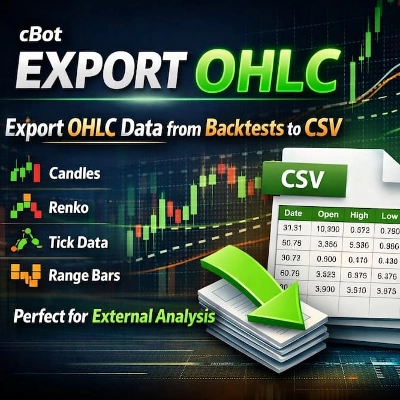
**Exporta datos OHLC de cualquier backtest a CSV.** Analiza los resultados de tu backtest externamente con Excel, Python, R o cualquier otra herramienta de análisis.


## 🔹 QUÉ HACE


Este cBot exporta datos de Apertura, Máximo, Mínimo, Cierre (OHLC) y Volumen de tu backtest directamente a un archivo CSV. No más copias manuales ni exportaciones de datos limitadas.


## 🔹 CARACTERÍSTICAS PRINCIPALES


✔ **Exportación de datos OHLC** – Marca de tiempo, Apertura, Máximo, Mínimo, Cierre, Volumen

✔ **Funciona en CUALQUIER tipo de gráfico** – Velas (M1 a Mensual), Renko (cualquier tamaño de ladrillo), Tick, Rango, Volumen, Punto y Figura, Kagi

✔ **Configuración personalizable** – Prefijo de archivo, separador (coma o punto y coma), formato decimal

✔ **Nombrado automático de archivos** – Nombres únicos con símbolo y marca de tiempo

✔ **Guardado periódico** – Guarda cada 1000 barras (previene pérdida de datos)

✔ **Formato CSV limpio** – Listo para análisis externo

✔ **No requiere permisos especiales** – Seguro de usar, sin acceso al sistema


## 🔹 POR QUÉ LO NECESITAS


• cTrader no exporta datos OHLC de forma nativa – esto lo soluciona

• Analiza datos de backtest en Excel, Python, R o MATLAB

• Realiza análisis estadísticos personalizados en tu estrategia

• Mantén un registro permanente de tus datos de backtest

• Valida tu estrategia con herramientas externas


## 🔹 CÓMO USARLO


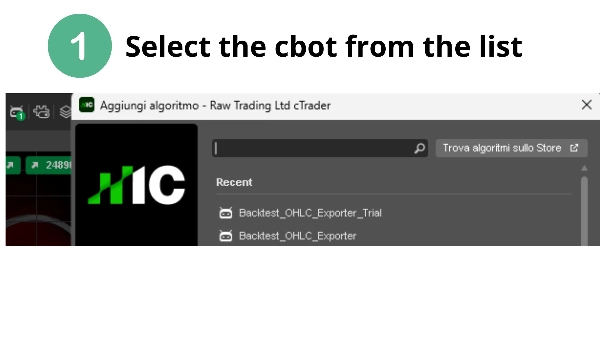
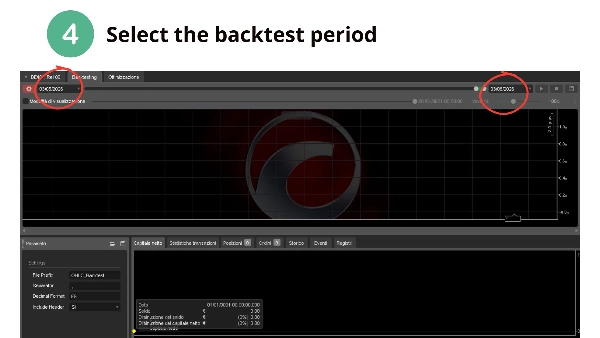
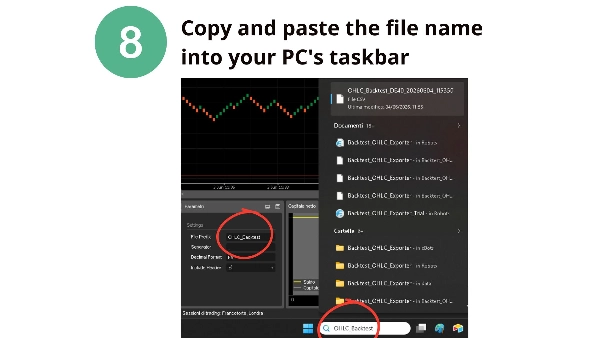
1. Añade este cBot a cualquier gráfico

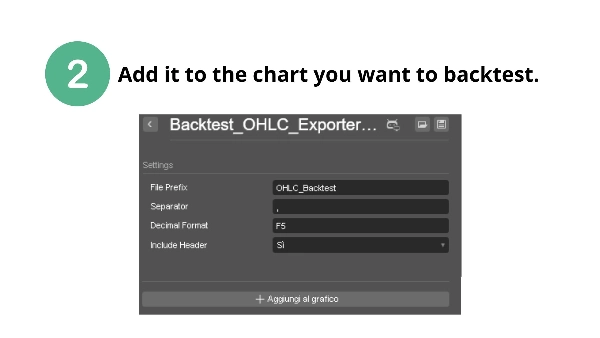
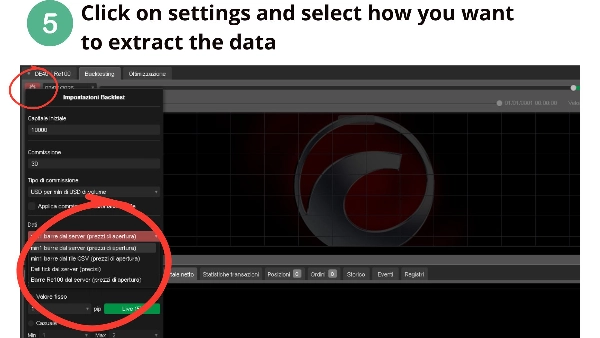
2. Configura el prefijo del archivo y el separador (opcional)

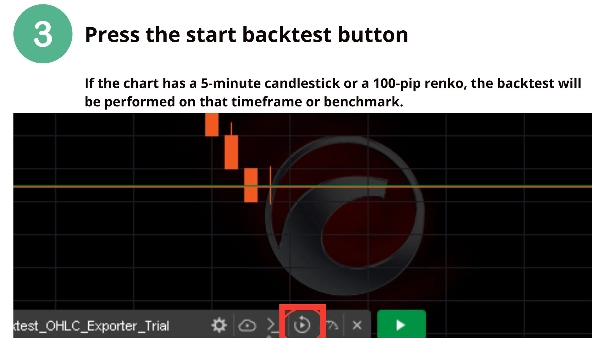
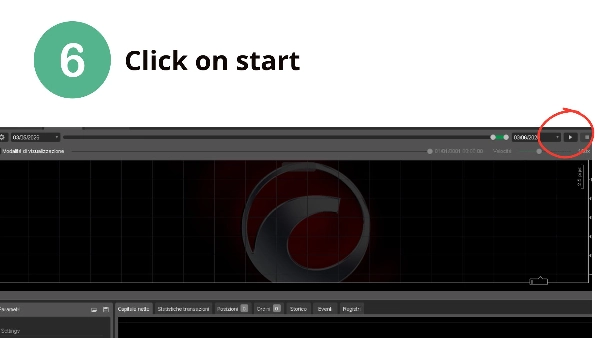
3. Ejecuta tu backtest normalmente

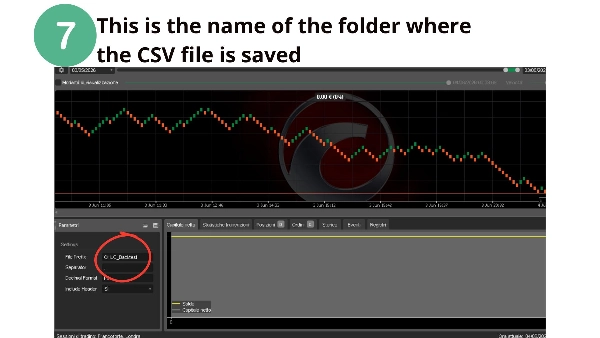
4. Encuentra tu archivo CSV en la carpeta de datos del cBot:

`Documents\cAlgo\Data\cBots\BacktestOHLCExporter\`


## 🔹 FORMATO DE SALIDA


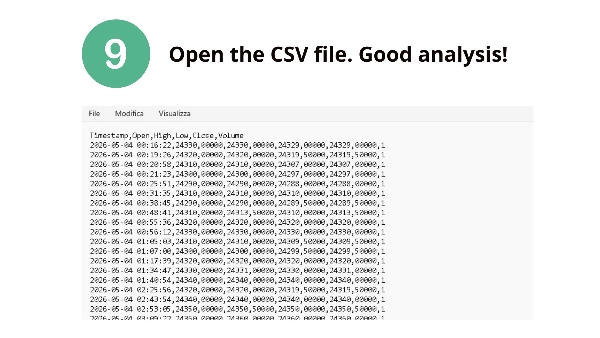
```csv

Timestamp,Open,High,Low,Close,Volume

2025-06-01 00:00:00,1.08950,1.08960,1.08940,1.08955,1245

...


## 🔹 CONFIGURACIÓN


| Parámetro | Predeterminado | Descripción |

|-----------|---------|-------------|

| Prefijo de archivo | OHLC_Backtest | Prefijo para los nombres de archivo |

| Separador | , | Separador CSV (coma o punto y coma) |

| Formato decimal | F5 | Número de decimales |

| Incluir encabezado | True | Incluir encabezados de columna |


⚠️ **AVISO LEGAL**: El trading implica riesgo de pérdida. Esta herramienta exporta datos para análisis externo. El rendimiento pasado no garantiza resultados futuros.


📌 **¿Preguntas o solicitudes de funciones?** Contáctame a través de la tienda cTrader.


**¡Feliz backtesting! – CapitalMente**

Resumen

Resumen de IA
Backtest-OHLC-Exporter is a cBot designed to export Open, High, Low, Close (OHLC) and Volume data from any backtest into a CSV file for external analysis. It supports all chart types including Candles (from 1 minute to Monthly), Renko (any brick size), Tick, Range, Volume, Point & Figure, and Kagi charts. The exported CSV includes timestamped OHLC and volume data, formatted cleanly for use in tools like Excel, Python, R, or MATLAB.

Key features include configurable file prefix, CSV separator (comma or semicolon), decimal formatting, and automatic unique file naming with symbol and timestamp. The bot saves data periodically every 1000 bars to prevent data loss. It operates without requiring special system permissions, ensuring safe usage.

To use, add the cBot to any chart, optionally configure settings, run the backtest, and retrieve the CSV file from the designated cBot data folder. This tool addresses the lack of native OHLC export in cTrader, enabling users to keep permanent backtest records and perform custom statistical or validation analyses externally.

Perfil de operaciones

Valoraciones de clientes

0.0
Valoraciones: 0
Valoraciones de clientes
Este producto todavía no se ha valorado. ¿Ya lo ha probado? Sea el primero en informar a otros.

Conversación

Preguntas frecuentes

Key Levels
Volume
Los productos disponibles a través de cTrader Store, incluidos bots, indicadores y plugins para operar, son proporcionados por desarrolladores de terceros y están disponibles únicamente con fines informativos y de acceso técnico. cTrader Store no es un bróker, por lo que no proporciona asesoramiento de inversión, recomendaciones personales ni ninguna garantía de rentabilidad futura.

Más de este autor

Indicador
Key Levels
Support & Resistance
Renko Multi-Level Grid Overlay draws configurable horizontal grid lines on any chart type, for multi-timeframe analysis.
Indicador
ADX
ATR
+5
Signal Quality Score - 0-100 filter combining RSI, Volume, ATR, Trend Strength & Alignment. Works on ANY chart type.
Indicador
Volume
Key Levels
+4
Session & Kill Zone Highlighter - Visual tool for London, NY, Tokyo, Sydney sessions plus ICT Kill Zones.
Indicador
ADX
ATR
+5
Identifies TRENDING, RANGING and VOLATILE markets with pullback detection. Anti-noise filter. Works on ANY chart.
Indicador
Market Structure
Support & Resistance
Auto-centers price when it moves beyond threshold. Adjustable zoom. Works on any chart type. Never lose price again.

Puede interesarle

cBot
AI
SMC
+9
AutoBreakeven Pro – Smart automatic breakeven tool by Stop Loss Ratio
0.01
Factor de beneficio
cBot
AI
ATR
+5
No guessing — just confirmed breakouts, smart risk management, and disciplined execution. Less noise. More direction.
28.5%
ROI
4.44
Factor de beneficio
cBot
RSI
MACD
+7
XAU Session Trend Sniper ⚡️Gold M1 scalper with smart trend filter, ATR SL/TP & session logic – no grid, no martingale
cBot
Prop
Forex
+11
Risk On Trade Lite | Auto Position Size Calculator for cTrader | Risk & Reward Tool | Auto Lot Size Calculator
cBot
ATR
EMA
+5
Incorporate EMA, RSI, and ATR to detect strong trends and execute precise entries
cBot
AI
ATR
+8
Breakout scalping with prop-firm grade equity control.
cBot
// EUR/USD 4H TIMEFRAME // 5 YEARS BACKTEST, PROFIT 176 USD, MAX DRAWDOWN 55 USD
cBot
Prop
Forex
+5
Quantum Queen Ctrader Cbot
cBot
MACD
Signal
+3
Dominate gold markets with Supertrend Gold – Backtested with +962% ROI!
cBot
Break Even
Equity Stop
+5
Manage your trades with auto lot sizing, breakeven, trailing stops, prop firm drawdown limits, and max spread guards.
cBot
Bollinger Bands
Bande de Bollinger à configurer soi-même
cBot
AI
Stocks
+1
Advanced Automated SPX Algorithmic Trading System
4
Factor de beneficio
cBot
Fibonacci
TP Manager
+2
Harmonic Patterns Bots and Indicator: Automation and Precision
14.4%
ROI
2.5
Factor de beneficio
cBot
AI
Forex
+4
A Trend Master AI, Suitable for more advance pro trader with fully customisation and risk control PLEASE ENJOY!!
10.9%
ROI
4
Factor de beneficio
cBot
AI Trading
AI Integration
Export cTrader market data to CSV or JSON for Python, AI, backtesting and quantitative research.
cBot
ATR
Grid
+3
QuantumLimit - XAUUSD/BTCUSD - up to 100 000 %+ cumulative ROI
cBot
AI
ATR
+13
Multi-indicator scalping bot with concurrent trade management, and adaptive risk controls for professional forex trading

Precio

6
Ventas
68
Instalaciones gratis