"Volume Profile Suite v1.1" 로고
지표
3 구매
버전 1.0, Oct 2025
Windows, Mac
"Volume Profile Suite v1.1" 업로드된 이미지
42.1M
거래량
6.13M
핍 수익
150
판매
6.1K
무료 설치

VolumeProfileSuite is an advanced and flexible Volume Profile indicator for cTrader.

Its primary purpose is to analyze volume distribution (i.e., where trading activity occurred) at different price levels to identify areas of "value" (high volume) and "rejection" (low volume). This helps you find the most significant support and resistance levels based on real market activity.

Its unique feature is that it combines two powerful analysis modes into a single tool, selectable via the Profile Mode parameter:

  1. FixedRange Mode: Perfect for macro analysis. It allows you to analyze a single, large block of your choice (like the last 1000 bars or a specific date range, e.g., "all of last week"). It is ideal for finding major, long-term support/resistance levels.
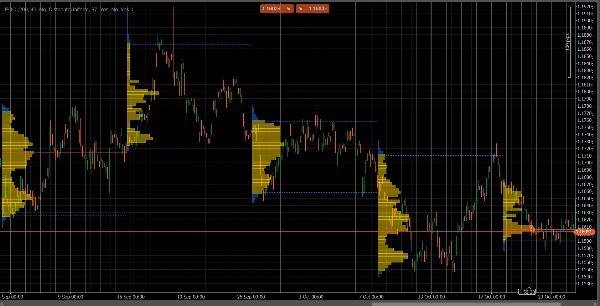
  2. Periodic Mode: Perfect for micro and behavioral analysis. It automatically draws a new profile every "N" bars (e.g., every 100 bars). This allows you to see how the POC and Value Area evolve over time and to study the market's repetitive patterns.
  3. Parameter Guide (English)


Here is the updated guide for your new unified VolumeProfileSuite indicator. This guide is crucial as it explains which parameters to use (and which to ignore) based on your selected mode.


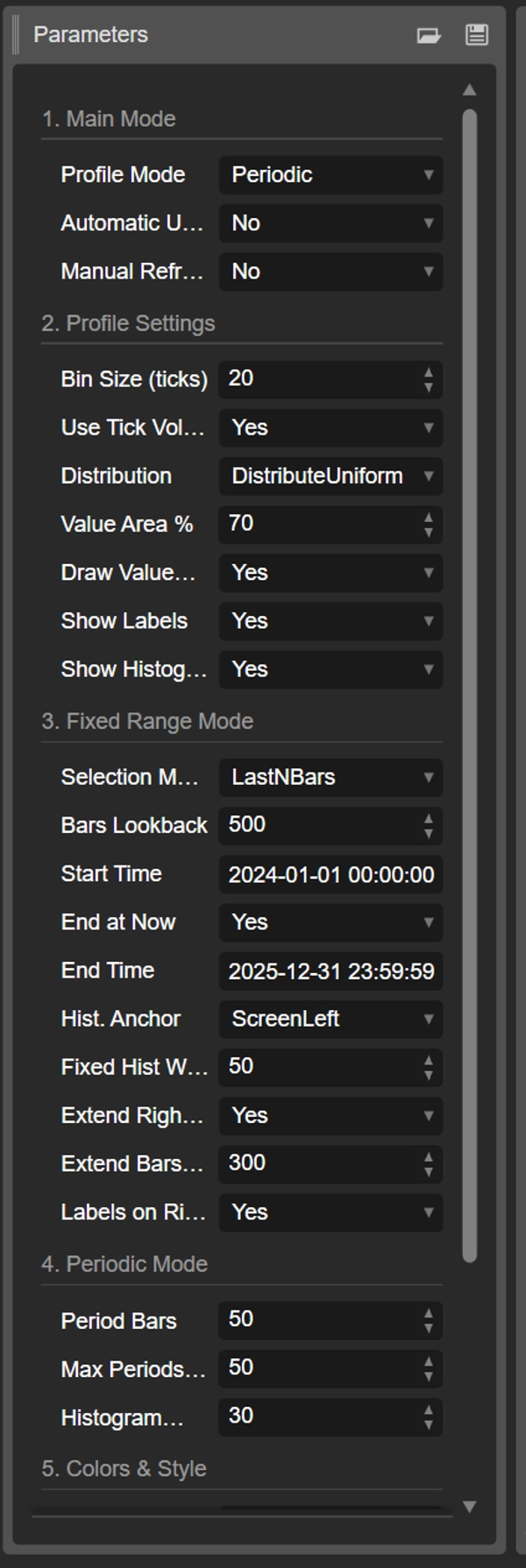
Group 1: Main Mode


  • Profile Mode: This is the most important parameter and acts as the master switch.
    • FixedRange: Activates the "single block" mode. The indicator will analyze only one interval specified by you (using the settings in Group 3).
    • Periodic: Activates the "cyclical" mode. The indicator will automatically analyze the entire chart in blocks (based on the settings in Group 4).

IMPORTANT: When in FixedRange mode, you must ignore all parameters in "Group 4: Periodic Mode". When in Periodic mode, you must ignore all parameters in "Group 3: Fixed Range Mode".


Group 2: Profile Settings


These parameters are common and apply to both modes (FixedRange and Periodic).

  • Bin Size (ticks): Controls the vertical "resolution" of the profile. A low value (e.g., 1) creates many thin price rows (very detailed). A high value (e.g., 10) groups prices into thicker rows (less detailed, "smoother").
  • Use Tick Volume: If true (recommended), the profile uses real tick volume, which is very accurate. If false, it simply counts "1" for each bar.
  • Distribution: Defines how a bar's volume is distributed.
    • DistributeUniform (default): "Smears" the bar's volume across all price levels it touched, from its low to its high.
    • CloseOnly: Assigns all of the bar's volume only to its closing price.
  • Value Area %: Sets the percentage of volume that constitutes the "Value Area" (the area of highest trade activity). A value of 70 (70%) is the market standard.
  • Draw Value Area (VAH/VAL): If true, draws the horizontal lines for the Value Area High (VAH) and Value Area Low (VAL).
  • Show Labels: If true, shows text labels ("POC", "VAH", "VAL"). (Be careful: in Periodic mode, this can clutter the chart).
  • Show Histogram: If true, draws the volume histogram (the horizontal bars).


Group 3: Fixed Range Mode


⚠️ Use these parameters ONLY if "Profile Mode" is set to FixedRange.

  • Selection Mode: Chooses how to define your single block.
    • DateRange: Uses a specific start and end date/time.
    • LastNBars: Uses the last N bars.
  • Bars Lookback: (For LastNBars only) How many bars back to analyze (e.g., 500).
  • Start Time / End at Now / End Time: (For DateRange only) Define the start and end of your interval.
  • Hist. Anchor: (For FixedRange only) Defines where to anchor the histogram.
    • DateRangeStart: At the start of your interval (can be off-screen).
    • ScreenLeft: To the left edge of the visible window.
    • ScreenRight: To the right edge of the visible window (in the empty space).
  • Fixed Hist Width (bars): The width of the histogram (in bars) for the FixedRange mode.
  • Extend Right Only: If true, the POC/VAH/VAL lines are extended into the future.
  • Extend Bars: (Only if Extend Right Only is true) How many bars to extend the lines by.
  • Labels on Right: If true, places price labels at the right end of the extended lines.


Group 4: Periodic Mode


⚠️ Use these parameters ONLY if "Profile Mode" is set to Periodic.

  • Period Bars: This is the key parameter for this mode. It defines how many bars to include in each cyclical block (e.g., 100).
  • Max Periods to Draw: 🌟 SAFETY PARAMETER! This limits the number of cyclical profiles drawn to prevent cTrader from crashing. 50 means it will only draw the most recent 50 profiles, even if the history has more. Do not set this too high (e.g., > 200) or cTrader may freeze!
  • Histogram Width (bars): The width of the histogram (in bars) for each cyclical block.


Group 5: Colors & Style


These parameters are common and apply to both modes.

  • POC Color: The color of the Point of Control line.
  • VA Color: The color of the VAH and VAL lines.
  • Line Thickness: The thickness of the POC, VAH, and VAL lines.
  • VA Histogram Color: The color of histogram bars inside the Value Area (default: Yellow).
  • Outside Hist Color: The color of histogram bars outside the Value Area (default: Blue).
  • Histogram Opacity %: The transparency (opacity) of the entire histogram.
지표 프로필
0.0
리뷰: 0
고객 리뷰
이 상품에 대한 리뷰가 아직 없습니다. 이미 사용해 보셨나요? 다른 사람들에게 가장 먼저 소개해 주세요!
Signal
Indices
Commodities
GBPUSD
RSI
Bollinger
Fibonacci
Scalping
AI
XAUUSD
NAS100
MACD
BTCUSD
Forex
Breakout
EURUSD
NZDUSD
Martingale
Prop
ZigZag
Supertrend
Fair Value Gap
SMC
Crypto
Grid
Stocks
ATR
USDJPY
VWAP
트레이딩 봇, 지표, 플러그인 등 cTrader Store에서 제공되는 상품은 제3자 개발자에 의해 제공되며, 이는 단순히 정보 및 기술적 접근을 목적으로 제공된 것입니다. cTrader Store는 중개인이 아니며, 투자 조언, 개인별 추천 또는 향후 성과에 대한 어떠한 보장도 제공하지 않습니다.

이 작성자의 상품 더 보기

지표
AI
ATR
+27
Read aggressive flow in real time. Flexible resets (Day/Week/Month), optional EMA smoothing, and non-repainting cumulati
cBot
AI
ATR
+27
The Prop-Ready Bot The Definitive Automaton for Challenges 🛡️ V2.0
지표
AI
Grid
+17
Editions: Free (core VWAP + bands) · Pro (multi‑VWAP, click‑to‑anchor, alerts).
cBot
AI
ATR
+21
A price-action-first algorithm to trade Breakout, Approach, and Return around prior High/Low levels—with Prop-style risk
지표
AI
ATR
+27
Volume Bubbles is a lightweight yet powerful visual indicator for cTrader
cBot
AI
ATR
+27
The Elliott Wave Pro Bot is a sophisticated and highly configurable algorithmic trading system
cBot
AI
ATR
+27
N.B.: Results with an initial invested capital of 100 euros.
"AI Level Trader" 로고
인기
무료 체험
4.3
(3)
$ 129
/
$159
cBot
AI
ATR
+27
AILevelTrader — Multi-AI Consensus Trading Bot 11 AI providers. One consensus. Prop Firm Ready.
1.9
손익비
4%
최대 낙폭
지표
AI
ATR
+27
Want a cBot based on this indicator? Contact us!
cBot
AI
ATR
+27
✅ Buy 3 prop accounts and manage just 1: cut management effort by 66% with a professional tool.
지표
Prop
Forex
+15
ZigZag Free is a clean swing-detection tool that marks significant pivot highs/lows
cBot
AI
ATR
+8
Breakout scalping with prop-firm grade equity control.

좋아하실 만한 다른 항목

지표
ATR
RSI
+7
Automatically map professional market structure and get a real-time "Bias Score" based on institutional breakout logic.
지표
Forex
Crypto
+3
Detect powerful 2-candle reversal patterns at key highs/lows. Boost entries with real-time alerts and visual signals.
지표
Forex
Crypto
+5
Experience a new approach with amplitude-based momentum analysis. Smart Trend Detection That Adapts to Market Volatility
지표
MACD
Forex
+6
Auto Signal BUY SELL is a professional decision-making tool designed to help you follow the trend and capture high-proba
지표
AI
RSI
+18
Session boxes with UTC offset, OR logic, adjustable opacity, and multi-day lookback.
지표
Prop
Forex
+14
Auto-detect support and resistance & trendlines, highlight pullbacks/BOS retests, and filter with candle confirmation.
지표
ATR
RSI
+8
Detects bullish and bearish divergences
지표
Forex
Signal
Market Session BT
지표
Grid
Forex
+4
indicator showing the Daily Open Line and instantly shading bullish and bearish zones.
지표
Forex
⏱ Candle Time Remaining – Real-Time Candle Countdown Indicator
지표
AI Quantum Trading Edge: Your Intelligent Trading Assistant
지표
Boost your trading with Candlestick Patterns for cTrader – auto-detect key signals for smarter, faster decisions!
지표
VWAP
VWAP indicator
지표
ATR
BOS
+5
Smart SMC + Fibonacci engine with ATR filtering, dynamic levels, and precision entry signals.
지표
Forex
Crypto
+5
Universal Renko Overlay. Tick-Accurate Renko Bars Aligned with Futures Contract Specifications.
지표
RSI
VWAP
+10
Turtle Soup ICT Strategy – Detect liquidity traps & trade smart money moves with precision on cTrader.
지표
AI
ATR
+21
Market Spirit Market Extremes Detector
지표
RSI
Forex
+4
😎Read the description before purchasing💩
42.1M
거래량
6.13M
핍 수익
150
판매
6.1K
무료 설치