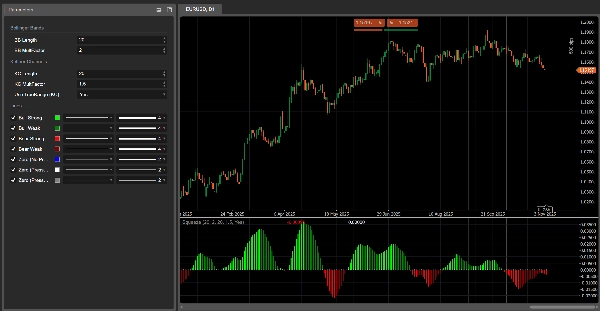

Descrizione
Pressure Scanner 🔍📊
1. Cosa fa Pressure Scanner
Pressure Scanner è uno strumento di volatilità e direzione che:
- rileva quando il mercato è sotto pressione/compressione di volatilità ✅
- mostra quando quella pressione viene rilasciata in espansione 💥
- misura la direzione e la forza della spinta di prezzo risultante tramite un valore scanner rappresentato come un istogramma.
Combina:
- una banda di prezzo in stile Bollinger,
- un canale di volatilità in stile Keltner,
- e una linea scanner basata su regressione lineare,
per mostrare sia gli stati di pressione (attiva / rilasciata / neutra) sia l’impulso direzionale (su o giù).
2. Come funziona (logica)
- Fonte
L’indicatore usa il prezzo di chiusura come input principale. - Banda di volatilità esterna (stile BB)
-
- Base = SMA(close,
BB Length) - Deviazione =
KC MultFactor× deviazione standard di close - Banda superiore = base + deviazione
- Banda inferiore = base − deviazione
- Base = SMA(close,
- Canale di volatilità interno (stile KC)
-
- Centro = SMA(close,
KC Length) - Intervallo = o True Range o High−Low (impostato da
Use TrueRange) - Media intervallo = SMA(intervallo,
KC Length) - Canale superiore = centro + mediaIntervallo ×
KC MultFactor - Canale inferiore = centro − mediaIntervallo ×
KC MultFactor
- Centro = SMA(close,
- Stati di pressione
Confrontando la banda esterna e il canale interno: -
- Pressione ATTIVA – punti neri a zero
-
- Banda inferiore > canale inferiore e banda superiore < canale superiore
- La banda è completamente all’interno del canale → la volatilità è compressa, alta pressione.
- Pressione RILASCIATA – punti grigi a zero
-
- Banda inferiore < canale inferiore e banda superiore > canale superiore
- La banda è completamente all’esterno del canale → la volatilità è in espansione dopo la pressione.
- Pressione neutra – punti blu a zero
-
- Qualsiasi altra configurazione.
- Valore scanner (
val)
L’istogramma mostra un valore scanner calcolato tramite regressione lineare: -
- Negli ultimi
KC Lengthbarre, l’indicatore trova: -
- massimo più alto,
- minimo più basso,
- SMA di close.
- Costruisce una linea mediana dinamica:
-
- rangeMid = (massimo + minimo) / 2
- combinedMid = media(rangeMid, SMA(close))
- Poi definisce:
scannerInput=close−combinedMid\text{scannerInput} = \text{close} - \text{combinedMid}scannerInput=close−combinedMid - Viene eseguita una regressione lineare su
KC Lengthbarre su questoscannerInput, e il valore finale all’ultima barra è il valore scannerval.
- Negli ultimi
Interpretazione:
val > 0→ il prezzo preme sopra la linea mediana → pressione rialzistaval < 0→ il prezzo preme sotto la linea mediana → pressione ribassista- cambiamenti in
valbarra dopo barra → aumento o diminuzione di quella pressione direzionale.
3. Come leggere i colori
Istogramma – pressione direzionale (valore scanner)
Ogni barra dell’istogramma corrisponde a val ed è colorata come:
- Lime –
val > 0e in aumento (val > previous val)
→ forte pressione rialzista, valore scanner che si rafforza verso l’alto. - Verde –
val > 0ma in calo (val ≤ previous val)
→ ancora rialzista, ma la pressione sta diminuendo. - Rosso –
val < 0e in ulteriore calo (val < previous val)
→ forte pressione ribassista, spinta verso il basso che si intensifica. - Marrone scuro –
val < 0ma in aumento (val ≥ previous val)
→ ancora ribassista, ma la pressione sta perdendo forza.
Quindi:
- Sopra 0 → regime di pressione rialzista
- Sotto 0 → regime di pressione ribassista
- Cambio di colore sullo stesso lato di 0 = pressione che accelera o rallenta.
Linea zero – stati di pressione
I punti tracciati a zero mostrano lo stato di pressione:
- Blu – pressione neutra (volatilità normale)
- Nero – Pressione ATTIVA (compressione attiva)
- Grigio – Pressione RILASCIATA (espansione dopo compressione)
4. Riferimento parametri (Inglese)
BB Length
Periodo per la SMA e la deviazione standard usati nella banda di volatilità esterna.
- Più corto → banda più reattiva, cambi di pressione più frequenti.
- Più lungo → banda più morbida, segnali meno frequenti ma più “macro”.
BB MultFactor
Moltiplicatore per la deviazione della banda esterna (mantenuto come parametro utente per flessibilità).
In questa versione, il comportamento della deviazione è legato a KC MultFactor come nella formula originale, ma puoi adattarlo se vuoi uno stile di banda diverso.
KC Length
Periodo per:
- la linea centrale del canale di volatilità,
- la levigatura dell’intervallo,
- la finestra high/low e la regressione scanner.
Definisce quanto indietro Pressure Scanner guarda per stimare la struttura della volatilità e la pressione direzionale.
KC MultFactor
Controlla la larghezza del canale di volatilità e della banda esterna.
- Valore più grande → canale più ampio, meno stati di Pressione ATTIVA.
- Valore più piccolo → canale più stretto, segnali di pressione più frequenti.
Use TrueRange (KC)
- true → l’intervallo del canale usa True Range (cattura gap e movimenti bruschi).
- false → l’intervallo è semplicemente High − Low.
Riepilogo
Key features include:
- Visualization of pressure states via colored dots at zero: black for compression (pressure on), gray for expansion (pressure released), and blue for neutral.
- A histogram representing directional pressure through a scanner value calculated by linear regression over recent bars. Positive values indicate bullish pressure, negative values indicate bearish pressure, with color-coded bars showing strength and acceleration of pressure (lime and green for bullish, red and maroon for bearish).
- Adjustable parameters such as BB Length and KC Length control the sensitivity and lookback period for volatility and directional pressure estimation.
- Option to use True Range or High-Low for volatility range calculation.
The indicator combines Bollinger Bands, Keltner Channels, and linear regression to provide a comprehensive view of market volatility structure and directional momentum, aiding in the identification of breakout and trend continuation opportunities.
Recensioni dei clienti
5 | 33 % | |
4 | 67 % | |
3 | 0 % | |
2 | 0 % | |
1 | 0 % |