Penerangan
QX SmartStructure (QX SS)
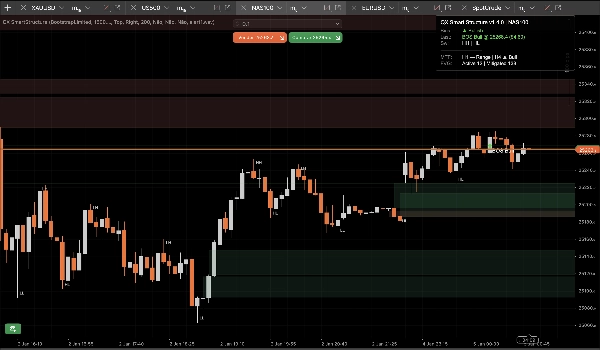
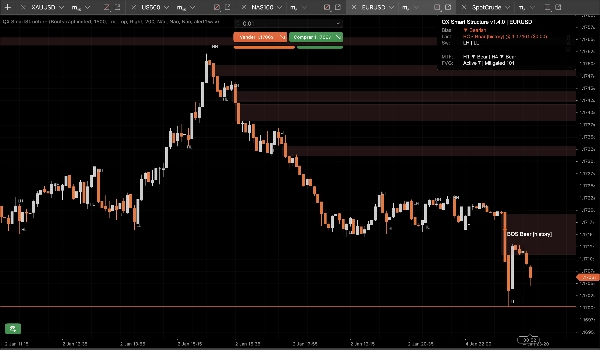
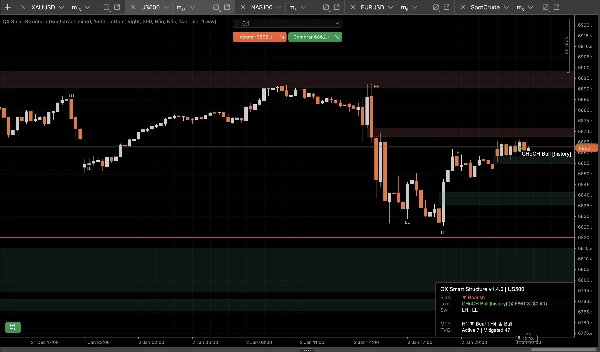
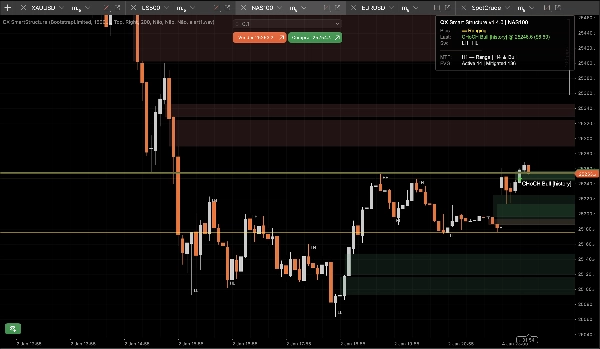
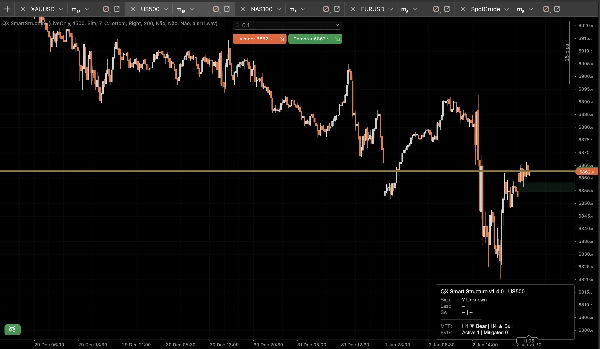
QX SmartStructure (QX SS) adalah lapisan SMC ringan dengan tepi kanan keras untuk cTrader. Ia menunjukkan struktur semasa, pecahan BOS/CHoCH, zon FVG yang ditapis + diurus secara automatik, dan panel bias MTF H1/H4 yang padat supaya anda berhenti menukar jangka masa.
Alat visualisasi sahaja. Ia tidak membuat perdagangan.
Apa Yang Ditunjukkan
1) Struktur Pasaran Bersih (Tepi Kanan Keras)
- Label ayunan: HH / HL / LH / LL
- Tahap utama: ayunan tinggi yang disahkan terakhir dan ayunan rendah yang disahkan terakhir
- Peristiwa pecahan: BOS / CHoCH dengan kekuatan (Kuat vs Lemah)
- Mod paparan:
-
- ActiveOnly (minimum)
- RecentSwings (konteks terkawal)
2) Zon FVG yang kekal terkawal
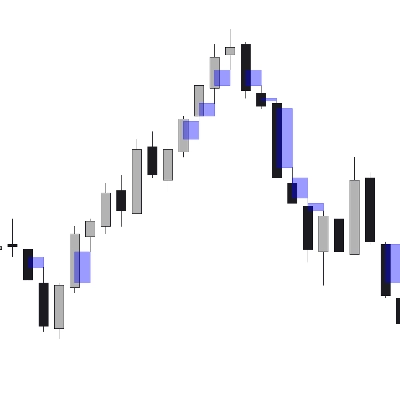
- Segi empat FVG bullish dan bearish
- Saiz Min FVG (langkah) penapis membuang jurang mikro secara automatik
- Peraturan mitigasi 50% (berdasarkan wick): zon menjadi dimitigasi apabila harga mencapai tahap separuhnya
- Kitar hayat:
-
- Auto-Hide Mitigated = ON untuk carta yang paling bersih
- OFF mengekalkan zon yang dimitigasi sebagai konteks “hantu” (ketelusan lebih rendah)
- Had keras mengelakkan spam objek sepanjang sesi panjang (disimpan/dilukis/dilanjutkan ke kanan)
3) Panel Bias MTF (H1 / H4)
Panel padat memaparkan:
- Bias jangka masa semasa: Bullish / Bearish / Ranging / Tidak diketahui
- Peristiwa terakhir: BOS/CHoCH, arah, kekuatan
- Snapshot pilihan: bias H1 dan bias H4
4) Amaran bunyi pilihan
Amaran hanya bunyi untuk pecahan, dengan:
- Pilihan amaran pada pecahan lemah
- Nama fail bunyi tersuai
Kelebihan StepSize (FX, Emas, Indeks)
Kebanyakan alat struktur rosak apabila anda menukar simbol kerana mereka menganggap “pips” bermaksud perkara yang sama di mana-mana.
QX SS menggunakan StepSize sebagai unit universal: TickSize → PipSize → Digits fallback
Tukar mana-mana jarak kepada langkah
langkah = jarak_harga ÷ TickSize
Contoh (saiz tick biasa):
- EURUSD TickSize 0.00001: 1 pip (0.00010) = 10 langkah
- XAUUSD TickSize 0.01: $0.10 = 10 langkah, $1.00 = 100 langkah
- Indeks berbeza mengikut broker:
Di mana untuk mencari TickSize
- Dalam cTrader Automate: Symbol.TickSize (QX SS membacanya dengan selamat)
- Dalam UI platform: panel spesifikasi simbol (info simbol Market Watch)
Saiz Min FVG yang Disyorkan (langkah)
Ini adalah julat permulaan praktikal, bukan kebenaran sejagat. Volatiliti dan sesi adalah penting.
M15 (aliran kerja lalai)
- EURUSD: 20–40 langkah (≈ 2–4 pip jika TickSize = 0.00001)
- XAUUSD: 30–120 langkah (≈ $0.30–$1.20 jika TickSize = 0.01)
- US500 / NAS100: pilih pergerakan bermakna dalam mata, kemudian tukar:
M5 (ya, ia berubah)
M5 mencetak lebih banyak jurang mikro. Jika anda mengekalkan MinFVGSteps yang sama anda akan menapis terlalu banyak.
Penyesuaian biasa: kurangkan MinFVGSteps sebanyak ~30–50% berbanding nilai M15 anda, kemudian laraskan semula.
“Ranging” bukan pepijat!
Bias menjadi Ranging apabila ayunan tinggi/rendah terkini tidak selari dengan jelas sebagai HH+HL atau LH+LL.
Dalam keadaan chop, alat yang kekal “Bullish” selama-lamanya adalah menipu. QX SS adalah konservatif secara reka bentuk.
Pra tetapan (titik permulaan)
Pra tetapan A: “M15 Seimbang” (lalai disyorkan)
- Kekuatan Ayunan (M15=7): 7
- Jenis Pecahan: Tutup
- Disahkan Sahaja: benar
- Mod Paparan: RecentSwings
- Kiraan Ayunan Terkini: 30
- Saiz Min FVG (langkah): EURUSD 25 | XAUUSD 60 | Indeks 15 (kemudian laraskan)
- Auto-Sembunyi Mitigated: benar
- Max FVG Dilukis: 30
- Lanjutkan Bar Kanan: 50
- Tunjukkan MTF H1: benar
- Tunjukkan MTF H4: benar
Pra tetapan B: “Carta Bersih M15”
- Mod Paparan: ActiveOnly
- Tunjukkan Label Ayunan: palsu
- Auto-Sembunyi Mitigated: benar
- Max FVG Dilukis: 15–20
- (Kekalkan selebihnya dari Pra tetapan A)
Pra tetapan C: “Konteks Scalp M5”
- Kekuatan Ayunan: 5–6
- Jenis Pecahan: Mana-mana
- Disahkan Sahaja: benar (mula ketat)
- Tunjukkan Pecahan Lemah: palsu
- Saiz Min FVG (langkah): ~50–70% daripada nilai M15 anda
- Kiraan Ayunan Terkini: 20–30
- Lanjutkan Bar Kanan: 30–50
Integrasi cBot / automasi (apa yang QX SS dedahkan)
QX SmartStructure mendedahkan 3 siri dalaman untuk cBots:
- BiasSeries: 1 bullish, -1 bearish, 0 sebaliknya
- BreakSignalSeries: 1 pecahan bull, -1 pecahan bear, 0 sebaliknya
- BreakLevelSeries: tahap harga pada bar peristiwa, NaN sebaliknya (penanda bersih)
Kestabilan dan prestasi (v1.5.1+)
Direka untuk tetapan multi-carta dan sesi panjang:
- Memproses hanya pada bar tertutup baru
- Kemas kini UI dikawal oleh UI Throttle (ms) untuk mengekalkan CPU rendah
- Kiraan objek terkawal dan had pemangkasan mengelakkan spam carta
- Mengesan “muat semula keras” sebenar dengan selamat (muat semula jangka masa/simbol/sejarah) dan membina semula keadaan tanpa pergeseran
Pilihan keselamatan baru (v1.5.1+)
Nyah Sah Pada Lompatan Jurang (lalai ON)
Jika harga melompat dan melompat melepasi zon FVG tanpa menyentuhnya (buka hujung minggu/berita), zon itu ditandakan Tidak Sah Oleh Jurang daripada kekal aktif.
Ini mengelakkan zon lapuk kekal pada carta selepas pembukaan ganas.
Pembersihan Penuh Siri Pada Pembinaan Semula (lalai OFF)
Pada pembinaan semula keras, secara pilihan membersihkan seluruh sejarah siri output yang didedahkan untuk konsistensi ujian balik/eksport maksimum.
Kekalkan OFF untuk prestasi terbaik pada sejarah besar. Hidupkan ON hanya untuk aliran kerja ujian balik mendalam yang memerlukan integriti sejarah penuh.
Lalai Disyorkan
- Nyah Sah Pada Lompatan Jurang: Ya (ON)
- Pembersihan Penuh Siri Pada Pembinaan Semula: Tidak (OFF)
Penafian
Alat ini hanya untuk visualisasi dan sokongan keputusan sahaja. Perdagangan adalah berisiko. Sentiasa gunakan pengurusan risiko anda sendiri.
Ringkasan
It automatically detects and manages Fair Value Gap (FVG) zones, filtering out micro-gaps based on a configurable minimum size measured in steps, a universal unit derived from the symbol’s TickSize. The indicator applies a 50% mitigation rule to mark zones as mitigated when price reaches their midpoint, with options to auto-hide or display mitigated zones as ghosted.
QX SmartStructure includes a compact multi-timeframe (MTF) bias panel showing current timeframe bias (Bullish, Bearish, Ranging, or Unknown) and recent break events for H1 and H4 timeframes. Optional sound alerts notify users of break events, including weak breaks.
The tool supports various markets such as Forex, commodities (e.g., gold), indices, and cryptocurrencies by adapting to symbol-specific TickSize values. It exposes internal data series for integration with cBots and is optimized for performance with controlled object counts and throttled updates. The indicator does not place trades and is intended for decision support only.
Ulasan pelanggan
5 | 75 % | |
4 | 25 % | |
3 | 0 % | |
2 | 0 % | |
1 | 0 % |