present
Sign up and get $50 off your first purchase
Trading product for LookPosOrderIndicator Indicator Signal Indices, image 1
LookPosOrderIndicator
Indicator
1 purchases
Version 1.0, Oct 2025
Windows, Mac
4.3
Reviews: 3
Trading product for LookPosOrderIndicator Indicator Signal Indices, image 2
Trading product for LookPosOrderIndicator Indicator Signal Indices, image 3
Trading product for LookPosOrderIndicator Indicator Signal Indices, image 4
1
Sales

Description


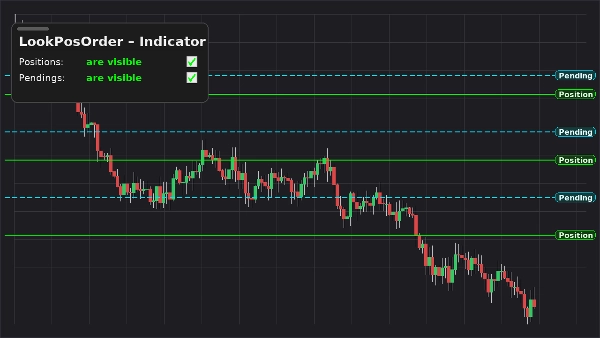
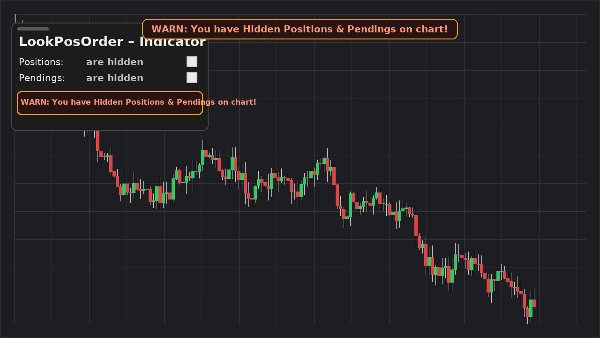
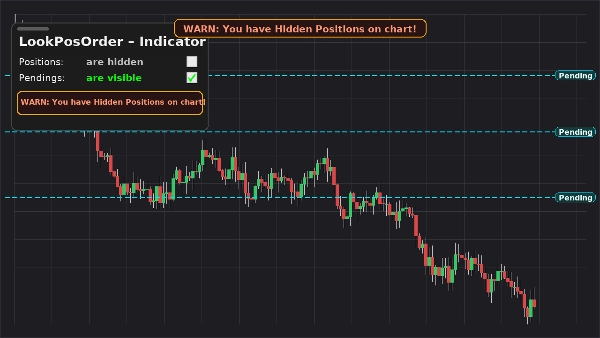
LookPosOrder (Indicator) keeps you safe and fast: it adds a floating, draggable panel on your chart to show or hide Positions and Pending Orders—and raises a fixed, top-center warning banner whenever hidden items exist for the current symbol.

What it does

  • On-chart panel with two toggles:
    • Positions: are visible / are hidden
    • Pendings: are visible / are hidden
  • Fixed on-chart warning (does not move when you pan/zoom) if hidden items exist.
  • Same inline warning inside the panel.
  • Per-symbol awareness: only warns when the active symbol actually has items hidden.
  • Remembers your preferences per symbol.

Why traders love it

  • Avoid mistakes: don’t forget you’ve hidden orders/positions.
  • Instant toggling: no more drilling into chart menus.
  • Clean overlay: draggable, compact, and responsive.

Key Features

  • On-chart, draggable control panel
  • One-click toggles for Positions and Pending Orders
  • Fixed warning banner when hidden items exist
  • Inline warning inside the panel
  • Per-symbol awareness
  • Works alongside native Display Settings (auto-syncs if you change them elsewhere)

Requirements

  • cTrader 5.4.9 or later recommended
  • Desktop platform

Installation

  1. Download the indicator file.
  2. Open cTrader → AutomateIndicatorsImport.
  3. Add LookPosOrder – Indicator to your chart (overlay).
  4. Drag the panel where you like; use the two checkboxes to manage visibility.

How to Use

  • Toggle Positions and Pendings from the floating panel.
  • If something is hidden and exists for the current symbol, warnings appear:
    • WARN: You have Hidden Positions on chart!
    • WARN: You have Hidden Pendings on chart!
    • WARN: You have Hidden Positions & Pendings on chart!
  • The warning banner is fixed to the top center. Use the indicator parameter “Y offset Warning Text” to move it down if needed.

FAQ

Q: Does it modify my orders/positions?
A: No. It only toggles chart visibility (native Display Settings).

Q: Will it warn me for other symbols?
A: No. Warnings only appear when the current symbol has hidden items.

Q: What if I change visibility from the chart’s menu?
A: The indicator auto-syncs the panel and warnings.

Q: Performance impact?
A: Minimal—lightweight overlay and checks per symbol.


Support & Refund

  • 14-day money-back guarantee if it doesn’t work as described for you.

Summary

AI summary
LookPosOrderIndicator is an on-chart tool for the cTrader desktop platform (version 5.4.9 or later) that provides a draggable control panel to toggle the visibility of open Positions and Pending Orders per trading symbol. It features two one-click toggles within a floating panel to show or hide these items directly on the chart. When any Positions or Pending Orders are hidden for the active symbol, a fixed warning banner appears at the top center of the chart, accompanied by inline warnings inside the panel, alerting the user to hidden items. The indicator remembers visibility preferences individually for each symbol and automatically syncs with native chart display settings if changed elsewhere. This lightweight overlay helps traders avoid overlooking hidden orders or positions by providing instant visual cues without modifying any orders or positions themselves. Installation involves importing the indicator into cTrader’s Automate section and adding it as an overlay on the chart, where the panel can be repositioned as needed. The indicator supports all symbols available in cTrader and integrates seamlessly with native display controls.
Indicator profile

Customer reviews

4.3
Reviews: 3
5
33 %
4
67 %
3
0 %
2
0 %
1
0 %
Customer reviews
October 15, 2025
It is easier to trust when it helps avoid forced entries. Wrong settings can feel safe.
October 15, 2025
October 5, 2025

Discussion

FAQ

Signal
Indices
Commodities
GBPUSD
RSI
Bollinger
Fibonacci
Scalping
AI
XAUUSD
NAS100
MACD
BTCUSD
Forex
Breakout
EURUSD
NZDUSD
Martingale
ZigZag
Supertrend
Fair Value Gap
Crypto
Grid
Stocks
ATR
USDJPY
VWAP
Products available through cTrader Store, including trading bots, indicators and plugins, are provided by third-party developers and made available for informational and technical access purposes only. cTrader Store is not a broker and does not provide investment advice, personal recommendations or any guarantee of future performance.

More from this author

Desktop plugin
ATR
RSI
+24
One-click toggle for Positions / Pending Orders on cTrader charts with fixed on-chart warnings and an ASP control panel

You may also like

Indicator
Prop
VWAP
+5
Multi-anchor VWAP indicator for cTrader. Plots two VWAP lines (red and blue) with selectable anchors.
Indicator
RSI
Forex
+6
What Constance Brown did with the RSI was to input a momentum calculation within the RSI itself. This the Composite RSI.
Indicator
EMA
AI-assisted
+1
Multi EMA Timeframes lets you stay on your chart and see the exact EMA from any timeframe you choose — up to 5 at once.
Indicator
Forex
Crypto
+3
Perfect Trend
Indicator
MACD
Key Levels
+2
Trend indicator with multi-timeframe filters, generating signals only on fully completed bricks & candles. No Repaint.
Indicator
EMA
RSI
+5
MACD Colour Histogram with 11 Moving Average Types, Multi-timeframe confirmation and Sound Signal Alert.
Indicator
ATR
Volume
+5
Order blocks with measured hold-rate stats and confidence scoring — not just zones on a chart.
Indicator
RSI
VegaXLR's cTrader StochRSI identifies overbought/oversold RSI levels for precise trade entries.
Indicator
ATR
EMA
+5
The indicator displays potential reversal zones (support/resistance) on the chart based on the average range (High–Low)
Indicator
MACD
Forex
+6
Auto Signal BUY SELL is a professional decision-making tool designed to help you follow the trend and capture high-proba
Indicator
Forex
GBPUSD
+5
Visual warning zones for high-impact news so you can manage risk before volatility hits.
Indicator
Key Levels
Spots key hourly ranges and signals breakouts using arrows & colored background zones. Ideal for Gold.
Indicator
Plot higher-timeframe Bollinger Bands for clearer structure, pullback zones, and breakout signals—without switching char
Indicator
Forex
BTCUSD
+13
Sniper Zone Pro: High-precision institutional zones and candle strength for identifying key market tests.
Indicator
BOS
Volume
+5
20/40/60-day IPDA lookback ranges, Premium/Discount/Equilibrium zones, and quarterly shift alerts — anchored to true dai
Indicator
Prop
Forex
+14
Stochastic Momentum Index (SMI) for cTrader optional higher-timeframe source, and clear overbought/oversold levels.
Indicator
Prop
Forex
+14
Automatically plots Fibonacci retracement levels using the highest and lowest points of a customizable time range
Indicator
AI
SMC
+15
Multi-Timeframe Swing Points Indicator for cTrader that identifies swing highs and lows on both the current timeframe.

Price

1
Sales