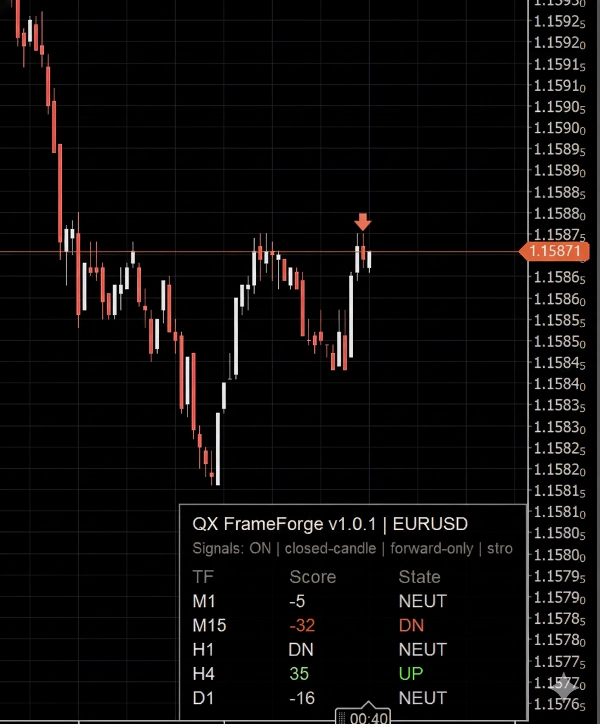
Penerangan
QX FrameForge adalah papan pemuka keadaan pasaran berbilang jangka masa bertindih untuk cTrader. Ia memampatkan apa yang berlaku merentasi beberapa jangka masa ke dalam panel yang pantas dan mudah dibaca, supaya anda boleh berdagang dengan konteks dan bukannya meneka.
Untuk setiap jangka masa yang dipilih, panel menunjukkan:
- TF (jangka masa)
- Skor (-100 hingga +100) untuk menyatakan arah dan kekuatan
- Keadaan: NAIK / NEUT / TURUN untuk keputusan cepat
Anak panah pilihan boleh diaktifkan untuk menandakan pengesahan menggunakan lilin tertutup sahaja, yang mengekalkan carta stabil dan mengelakkan kelipan intrabar.
Cara membacanya (mesra pemula)
Fikirkan panel sebagai meter arah:
- Skor Positif dan NAIK bermaksud keadaan bullish pada jangka masa itu
- Skor Negatif dan TURUN bermaksud keadaan bearish pada jangka masa itu
- NEUT bermaksud keadaan bercampur, berkisar, atau tidak cukup kuat untuk menjadi arah
Tetapan Zon Neutral mengawal betapa mudahnya penunjuk beralih ke NEUT. Zon neutral yang lebih luas menghasilkan keadaan arah yang lebih sedikit (lebih konservatif).
Apa yang terkandung dalam Skor (peringkat tinggi)
Skor menggabungkan:
- komponen trend (kelakuan arah dan cerun)
- komponen momentum (kekuatan kesinambungan berbanding keraguan)
- penapis volatiliti pilihan untuk mengurangkan tempoh bising
Hasilnya adalah skor terhad yang direka untuk penyelarasan berbilang jangka masa, bukan untuk “entri ajaib”.
Bagaimana pedagang biasanya menggunakan FrameForge
1) Penyelarasan berbilang jangka masa
- Utamakan perdagangan apabila jangka masa yang lebih tinggi bersetuju (contoh: H1 + H4 kedua-duanya NAIK)
- Gunakan jangka masa lebih rendah (contoh: M5) untuk penentuan masa
2) Penapisan rejim
- Terlalu banyak NEUT biasanya bermaksud keadaan bergegar dan kualiti rendah
- Arah TF lebih tinggi yang bercampur mencadangkan berhati-hati atau pendedahan lebih kecil
3) Lapisan pengesahan
- Gunakan FrameForge untuk mengesahkan bahawa tetapan anda selaras sebelum anda membuat komitmen
Anak panah pilihan (isyarat)
Anak panah adalah pembantu visual pilihan. Ia dinilai pada lilin tertutup terakhir sahaja.
Anda boleh memilih bagaimana anak panah dicetuskan:
- hanya apabila kekuatan melepasi ambang,
- hanya apabila keadaan arah berubah,
- atau lebih kerap apabila keadaan kekal kuat.
Kawalan disertakan untuk:
- ambang kekuatan
- tempoh rehat (minimum bar antara anak panah)
- satu isyarat setiap ayunan (mengurangkan anak panah berulang dalam arah yang sama)
- had ikon (mengelakkan kekacauan carta)
Penting: anak panah direka untuk maju sahaja dari saat anda mengaktifkannya, untuk mengelakkan spam objek sejarah dan visual retroaktif yang mengelirukan.
Keserasian
- Berfungsi pada mana-mana simbol cTrader dan mana-mana jangka masa carta
- Hanya penunjuk. Tiada pesanan diletakkan.
- Kemas kini UI dioptimumkan untuk memastikan carta responsif.
Penafian risiko
Perdagangan melibatkan risiko. Prestasi lalu tidak menjamin keputusan masa depan.
Ringkasan
The Score integrates trend direction and slope, momentum strength, and an optional volatility filter to reduce noise, producing a bounded metric aimed at multi-timeframe alignment rather than precise entry signals. Traders typically use FrameForge for aligning trades across timeframes (e.g., confirming higher timeframe trends before timing entries on lower timeframes), filtering market regimes by identifying choppy or mixed conditions, and adding a confirmation layer to their setups.
Arrow signals can be customized by strength thresholds, directional changes, cooldown periods, and icon limits to avoid chart clutter. The indicator works on any cTrader symbol and timeframe, updating efficiently to maintain chart responsiveness. It does not place orders and serves solely as a visual analytical tool.
Ulasan pelanggan
5 | 100 % | |
4 | 0 % | |
3 | 0 % | |
2 | 0 % | |
1 | 0 % |