Opis
QX SmartStructure (QX SS)
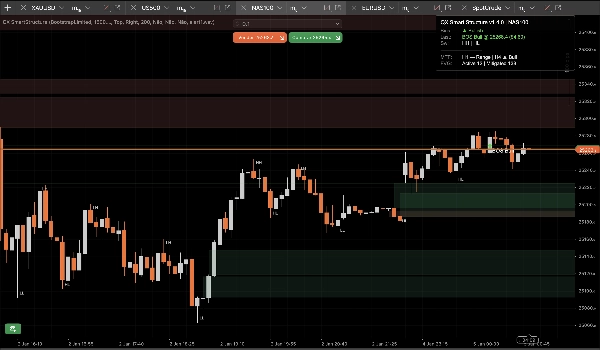
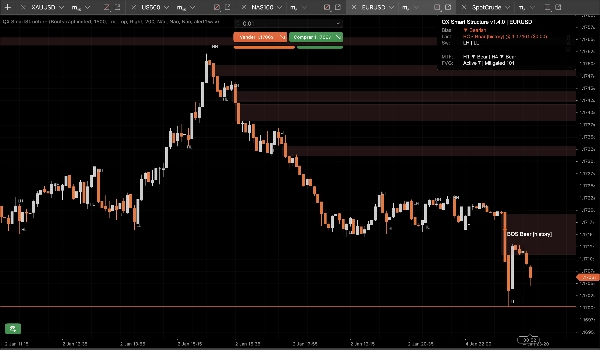
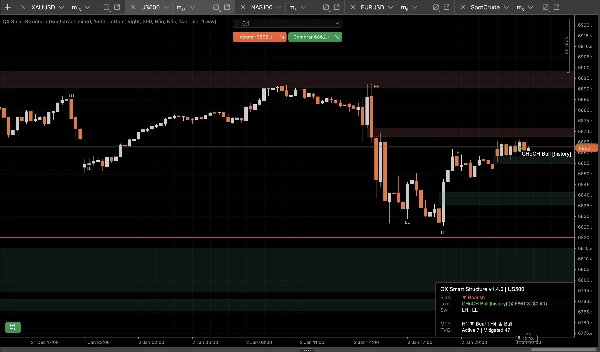
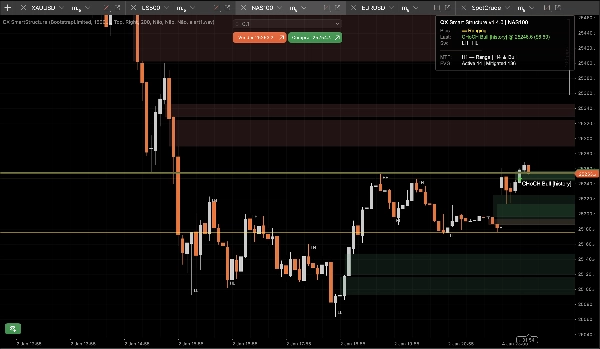
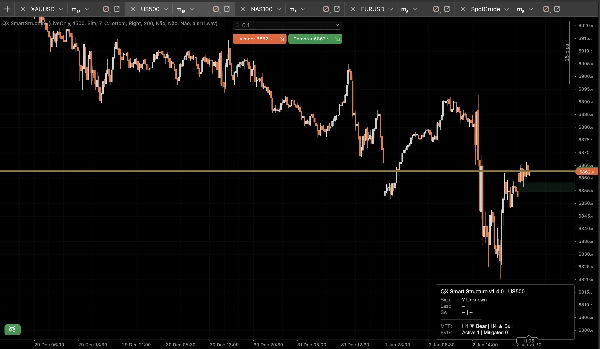
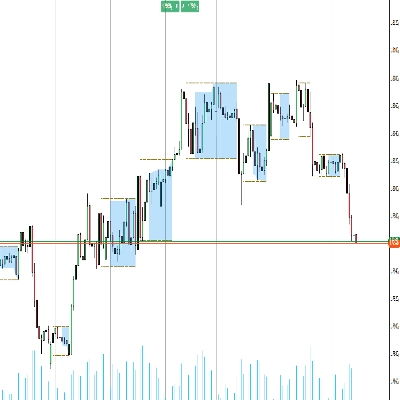
QX SmartStructure (QX SS) to lekka nakładka SMC z ostrą prawą krawędzią dla cTrader. Pokazuje aktualną strukturę, przełamania BOS/CHoCH, filtrowane i automatycznie zarządzane strefy FVG oraz kompaktowy panel bias MTF H1/H4, aby przestać zmieniać interwały czasowe.
Narzędzie wizualizacyjne tylko. Nie wykonuje transakcji.
Co pokazuje
1) Czysta struktura rynku (ostra prawa krawędź)
- Etykiety swingów: HH / HL / LH / LL
- Kluczowe poziomy: ostatni potwierdzony swing high i ostatni potwierdzony swing low
- Wydarzenia przełamań: BOS / CHoCH z siłą (Silne vs Słabe)
- Tryby wyświetlania:
-
- ActiveOnly (minimalny)
- RecentSwings (kontrolowany kontekst)
2) Strefy FVG pod kontrolą
- Bycze i niedźwiedzie prostokąty FVG
- Minimalny rozmiar FVG (kroki) filtr automatycznie usuwa mikroszczeliny
- Zasada łagodzenia 50% (oparta na knotach): strefa jest łagodzona, gdy cena osiąga jej połowę
- Cykl życia:
-
- Auto-Hide Mitigated = WŁ. dla najczystszego wykresu
- WYŁ. utrzymuje łagodzone strefy jako „duchowy” kontekst (niższa przezroczystość)
- Twarde ograniczenia zapobiegają spamowi obiektów podczas długich sesji (przechowywane/rysowane/rozciągane w prawo)
3) Panel bias MTF (H1 / H4)
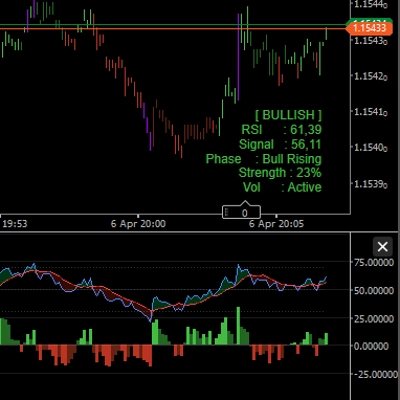
Kompaktowy panel wyświetla:
- Aktualny bias interwału czasowego: Byczy / Niedźwiedzi / Konsolidacja / Nieznany
- Ostatnie zdarzenie: BOS/CHoCH, kierunek, siła
- Opcjonalne migawki: bias H1 i bias H4
4) Opcjonalne alerty dźwiękowe
Alerty dźwiękowe tylko dla przełamań, z:
- Opcjonalny alert na słabe przełamania
- Niestandardowa nazwa pliku dźwiękowego
Zaleta StepSize (FX, Złoto, Indeksy)
Większość narzędzi strukturalnych zawodzi przy zmianie symboli, ponieważ zakładają, że „pipsy” znaczą to samo wszędzie.
QX SS używa StepSize jako uniwersalnej jednostki: TickSize → PipSize → fallback na cyfry
Konwertuj dowolną odległość na kroki
kroki = price_distance ÷ TickSize
Przykłady (typowe rozmiary ticków):
- EURUSD TickSize 0.00001: 1 pip (0.00010) = 10 kroków
- XAUUSD TickSize 0.01: $0.10 = 10 kroków, $1.00 = 100 kroków
- Indeksy różnią się w zależności od brokera:
Gdzie znaleźć TickSize
- W cTrader Automate: Symbol.TickSize (QX SS odczytuje to bezpiecznie)
- W interfejsie platformy: panel specyfikacji symbolu (informacje o symbolu w Market Watch)
Zalecany minimalny rozmiar FVG (kroki)
To praktyczne zakresy startowe, a nie uniwersalna prawda. Ważna jest zmienność i sesja.
M15 (domyślny workflow)
- EURUSD: 20–40 kroków (≈ 2–4 pipsy jeśli TickSize = 0.00001)
- XAUUSD: 30–120 kroków (≈ $0.30–$1.20 jeśli TickSize = 0.01)
- US500 / NAS100: wybierz znaczący ruch w punktach, a następnie przelicz:
M5 (tak, to się zmienia)
M5 generuje więcej mikroszczelin. Jeśli utrzymasz ten sam MinFVGSteps, przefiltrujesz zbyt wiele.
Typowa korekta: zmniejsz MinFVGSteps o około 30–50% w stosunku do wartości M15, a następnie dostrój ponownie.
„Konsolidacja” to nie błąd!
Bias staje się Konsolidacją kiedy ostatnie swing high/low nie układają się wyraźnie jako HH+HL lub LH+LL.
W ruchu bocznym narzędzie, które pozostaje „Bycze” na zawsze, kłamie. QX SS jest z natury konserwatywne.
Presety (punkty startowe)
Preset A: „M15 Zrównoważony” (zalecany domyślny)
- Siła swingów (M15=7): 7
- Typ przełamania: Zamknięcie
- Tylko potwierdzone: prawda
- Tryb wyświetlania: RecentSwings
- Liczba ostatnich swingów: 30
- Minimalny rozmiar FVG (kroki): EURUSD 25 | XAUUSD 60 | Indeksy 15 (następnie dostrój)
- Auto-Hide Mitigated: prawda
- Maksymalna liczba rysowanych FVG: 30
- Rozciągnięcie świec w prawo: 50
- Pokaż MTF H1: prawda
- Pokaż MTF H4: prawda
Preset B: „M15 Czysty wykres”
- Tryb wyświetlania: ActiveOnly
- Pokaż etykiety swingów: fałsz
- Auto-Hide Mitigated: prawda
- Maksymalna liczba rysowanych FVG: 15–20
- (Pozostałe ustawienia z Presetu A)
Preset C: „M5 Scalp Context”
- Siła swingów: 5–6
- Typ przełamania: Dowolny
- Tylko potwierdzone: prawda (zacznij surowo)
- Pokaż słabe przełamania: fałsz
- Minimalny rozmiar FVG (kroki): ~50–70% twojej wartości M15
- Liczba ostatnich swingów: 20–30
- Rozciągnięcie świec w prawo: 30–50
Integracja cBot / automatyzacja (co udostępnia QX SS)
QX SmartStructure udostępnia 3 wewnętrzne serie dla cBotów:
- BiasSeries: 1 byczy, -1 niedźwiedzi, 0 w przeciwnym razie
- BreakSignalSeries: 1 bycze przełamanie, -1 niedźwiedzie przełamanie, 0 w przeciwnym razie
- BreakLevelSeries: poziom ceny na świecy zdarzenia, NaN w przeciwnym razie (czysty sentinel)
Stabilność i wydajność (v1.5.1+)
Zaprojektowane dla konfiguracji wielowyświetlaczowych i długich sesji:
- Przetwarza tylko na nowych zamkniętych świecach
- Aktualizacje UI ograniczone przez UI Throttle (ms) aby utrzymać niskie zużycie CPU
- Kontrolowana liczba obiektów i ograniczenia przycinania zapobiegają spamowi na wykresie
- Bezpiecznie wykrywa prawdziwe „twarde przeładowania” (przeładowanie interwału/symbolu/historii) i odbudowuje stan bez dryfu
Nowe opcje bezpieczeństwa (v1.5.1+)
Unieważnij przy skoku luki (domyślnie WŁ.)
Jeśli cena robi lukę i przeskakuje strefę FVG bez jej dotknięcia (otwarcie weekendowe/po wiadomościach), strefa jest oznaczana jako Unieważniona przez lukę zamiast pozostawać aktywna.
Zapobiega to pozostawaniu przestarzałych stref na wykresie po gwałtownych otwarciach.
Pełne czyszczenie serii przy odbudowie (domyślnie WYŁ.)
Przy twardej odbudowie opcjonalnie czyści całą historię udostępnionych serii wyjściowych dla maksymalnej spójności testów historycznych/eksportu.
Zachowaj WYŁ. dla najlepszej wydajności przy dużych historiach. Włącz WŁ. tylko dla głębokich workflow testów historycznych wymagających pełnej integralności danych.
Zalecane ustawienia domyślne
- Unieważnij przy skoku luki: Tak (WŁ.)
- Pełne czyszczenie serii przy odbudowie: Nie (WYŁ.)
Zastrzeżenie
To narzędzie służy wyłącznie do wizualizacji i wsparcia decyzji. Handel jest ryzykowny. Zawsze stosuj własne zarządzanie ryzykiem.
Podsumowanie
It automatically detects and manages Fair Value Gap (FVG) zones, filtering out micro-gaps based on a configurable minimum size measured in steps, a universal unit derived from the symbol’s TickSize. The indicator applies a 50% mitigation rule to mark zones as mitigated when price reaches their midpoint, with options to auto-hide or display mitigated zones as ghosted.
QX SmartStructure includes a compact multi-timeframe (MTF) bias panel showing current timeframe bias (Bullish, Bearish, Ranging, or Unknown) and recent break events for H1 and H4 timeframes. Optional sound alerts notify users of break events, including weak breaks.
The tool supports various markets such as Forex, commodities (e.g., gold), indices, and cryptocurrencies by adapting to symbol-specific TickSize values. It exposes internal data series for integration with cBots and is optimized for performance with controlled object counts and throttled updates. The indicator does not place trades and is intended for decision support only.
Opinie klientów
5 | 75 % | |
4 | 25 % | |
3 | 0 % | |
2 | 0 % | |
1 | 0 % |


















![Logo „[Hamster-Coder] Bollinger Bands”](https://cdn.ctrader.com/image/webp/21d8e5d6-fb11-4bac-b9ee-cd05c2b76804_30327)