Description
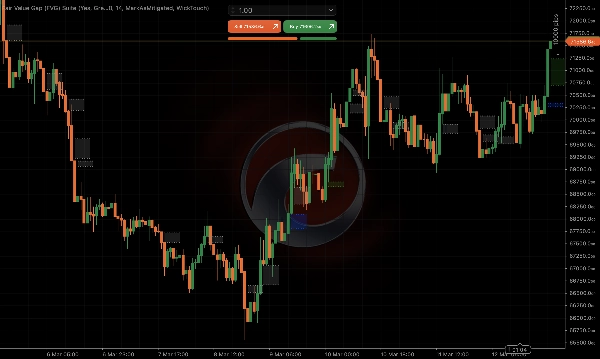
Fair Value Gap (FVG) Suite is a professional-grade Fair Value Gap (FVG) indicator built specifically for ICT and Smart Money Concepts (SMC) traders. It goes beyond standard FVG detection by introducing Breakaway Gap (BAG)classification - a distinction no other FVG indicator on the cTrader store offers.
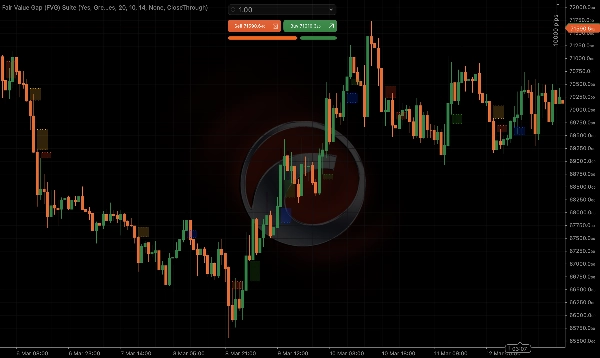
A Fair Value Gap forms when three consecutive candles leave an unfilled price imbalance. A Breakaway Gap is a stronger variant where the third candle closes beyond the range of the middle candle, signaling increased momentum and conviction behind the move. Fair Value Gap (FVG) Suite identifies and color-codes both, giving you instant visual clarity on the strength of every gap.
Built to work cleanly across all asset classes - forex, indices, commodities, equities, and 24/7 instruments like crypto - the indicator handles session breaks, weekend gaps, and different timeframes automatically with no manual configuration required.
Whether you are a seasoned ICT trader hunting high-probability entry zones or a beginner learning to read price action through the lens of Smart Money, Fair Value Gap (FVG) Suite gives you the tools to do it with precision.
Key Features
Gap Detection
- Detects bullish and bearish Fair Value Gaps using the standard 3-candle pattern
- Classifies gaps as FVG or Breakaway Gap (BAG) based on candle 3 closing beyond candle 2's range
- FVG vs BAG distinction can be toggled on or off - when off, all gaps are displayed uniformly
- Automatically filters weekend session gaps and Friday last-candle gaps on instruments that do not trade on weekends, keeping the chart clean and relevant
Gap Size Filter
- ATR-based minimum gap size filter removes insignificant micro-gaps
- Fully adaptive to current market volatility - no manual pip threshold required
- Configurable ATR period and minimum gap percentage
Extension Options
- Fixed bar extension - gaps extend a configurable number of real trading bars
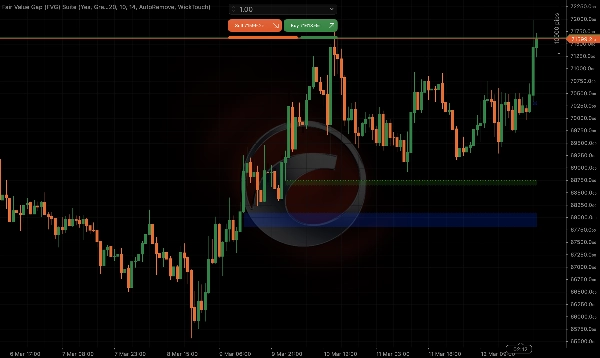
- Extend Until Filled - gaps extend dynamically until price first enters the zone, then freeze at the point of contact
- Weekend gaps are skipped when counting extension bars so the length is always accurate
Mitigation Tracking
- Three mitigation modes: None (gaps persist), Mark as Mitigated (gaps turn grey when filled), Auto Remove (gaps disappear when filled)
- Three fill conditions: Wick Touch, Close Inside, Close Through - choose the definition that matches your trading style
- Mitigated gaps are tracked historically so the chart reflects accurate fill status on load
Visual Customization
- Separate configurable colors for bullish FVG, bearish FVG, bullish BAG, and bearish BAG
- Toggle shaded gap zones on or off with configurable opacity
- Line style dropdown: Solid or Dotted
- Configurable line thickness
Compatibility
- Works on all timeframes from 1 minute to monthly
- Compatible with all cTrader instruments including forex, indices, commodities, equities, and crypto
- No repainting
How to Use
- Add the indicator to any chart
- Set your preferred colors for FVG and BAG zones
- Choose your Mitigation Mode - start with Mark as Mitigated to see how price respects historical gaps
- Enable Extend Until Filled to dynamically track active gap zones
- Adjust the ATR filter to control how many gaps appear - higher values show only the most significant gaps
Settings Reference
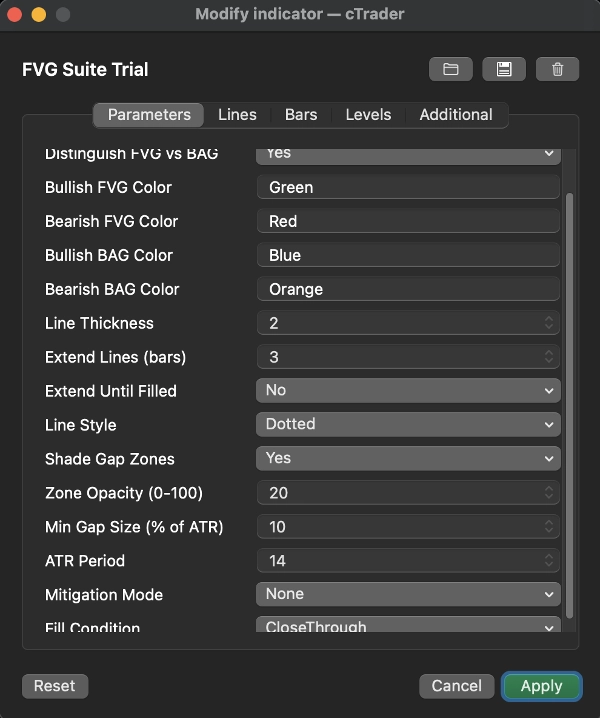
Distinguish FVG vs BAG - Color-code BAGs separately from FVGs - Default: On
Bullish FVG Color - Color for bullish fair value gaps - Default: Green
Bearish FVG Color - Color for bearish fair value gaps - Default: Red
Bullish BAG Color - Color for bullish breakaway gaps - Default: Blue
Bearish BAG Color - Color for bearish breakaway gaps - Default: Orange
Line Thickness - Thickness of gap boundary lines - Default: 2
Extend Lines (bars) - Number of bars to extend gap lines - Default: 3
Extend Until Filled - Extend gaps dynamically until price enters the zone - Default: Off
Line Style - Solid or Dotted boundary lines - Default: Dotted
Shade Gap Zones - Fill gap area with transparent color - Default: On
Zone Opacity - Transparency of shaded zone (0-100) - Default: 20
Min Gap Size (% of ATR) - Minimum gap size relative to ATR - Default: 10%
ATR Period - Lookback period for ATR calculation - Default: 14
Mitigation Mode - None / Mark as Mitigated / Auto Remove - Default: None
Fill Condition - Wick Touch / Close Inside / Close Through - Default: Close Through
Note
FVG and BAG zones mark theoretical price levels based on historical candle data. When trading near these levels in live markets, please account for spread and slippage - actual entry and exit prices may differ from the displayed zone boundaries, particularly on lower timeframes or during high volatility periods. Always use appropriate risk management.
Summary
Compatible with all asset classes—including forex, indices, commodities, equities, and cryptocurrencies—and all timeframes from 1 minute to monthly, the suite automatically manages session breaks and weekend gaps without manual setup. It features an ATR-based adaptive filter to exclude insignificant gaps based on current market volatility.
Users can customize gap extensions either by a fixed number of bars or dynamically until the gap is filled by price action. Mitigation tracking offers three modes to mark or remove filled gaps, with configurable fill conditions such as wick touch or close inside the gap zone. Visual settings allow adjustment of colors, opacity, line style, and thickness.
The indicator provides non-repainting signals and supports multi-asset, multi-timeframe analysis to assist traders in identifying high-probability entry zones and understanding price imbalances across markets.
Discussion
Customer reviews
5 | 0 % | |
4 | 100 % | |
3 | 0 % | |
2 | 0 % | |
1 | 0 % |