Description
https://mintara.ae/ctrader/plugin/MTF_Trends_Documentation.html
Trends Heatmap
Multi
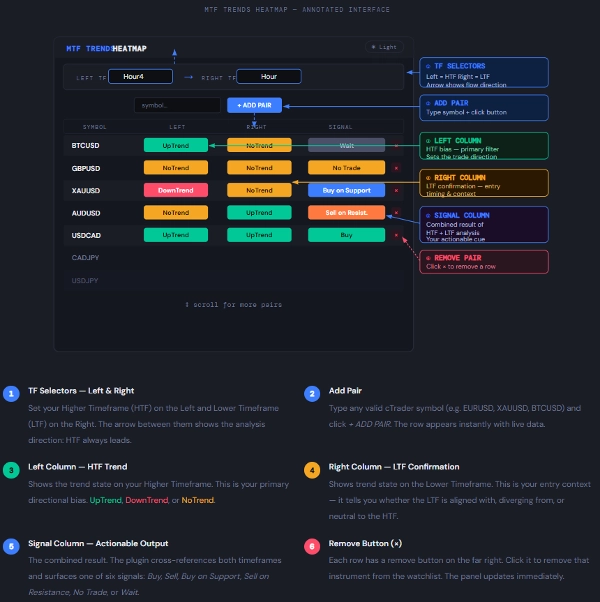
A real-time market scanner that evaluates trend direction across two user-selected timeframes simultaneously — giving you an at-a-glance actionable signal for every instrument in your watchlist.
What It Does
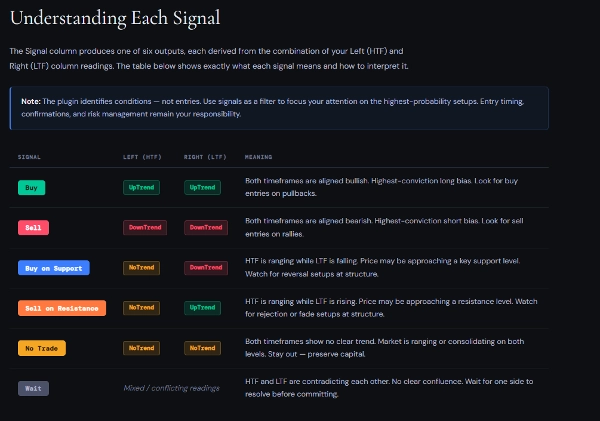
The MTF Trends Heatmap plugin monitors multiple instruments simultaneously and assesses trend conditions on two timeframes of your choice. The Left TF is your Higher Timeframe (HTF) and the Right TF is your Lower Timeframe (LTF). The plugin compares both and produces a Signal in the final column.
Rather than switching charts manually, you get a consolidated view of up to any number of instruments — colour-coded, live-updating, scrollable — all in a single resizable panel inside cTrader.
Key principle: The Left TF (HTF) sets the directional bias. The Right TF (LTF) confirms or contradicts it. The Signal column tells you what to look for — you decide when to act.
Recommended combinations:
Day Trader → Left: H4 / Right: H1 — bias on H4, entry timing on H1
Swing Trader → Left: Daily / Right: H4 — direction on Daily, setup on H4
Position Trader → Left: Weekly / Right: Daily — macro on Weekly, trigger on Daily
Important: Never set the Left TF lower than the Right TF. The plugin weights the Left as the higher authority. Swapping them inverts the Signal logic and produces misleading outputs.