Description
Easy Trade Magnitud What it does:
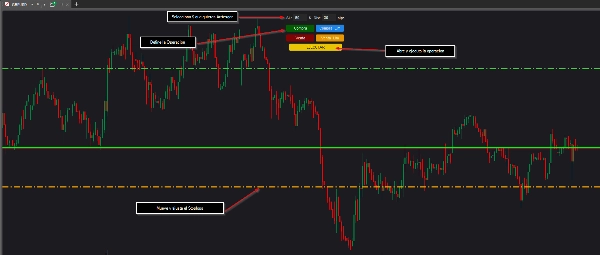
This is a visual trading panel that adds floating buttons directly on your cTrader chart. It lets you execute both market and limit orders with a fixed dollar risk amount. You don't need to calculate lot sizes or worry about pip distances because the robot handles all the math automatically. Just tell it how much money you're willing to risk and it figures out the right position size.
How it works:
First, you adjust two simple settings: your stop loss in dollars (how much you want to risk) and the distance in pips for limit orders. Then you pick one of four buttons - Buy, Sell, Buy Limit, or Sell Limit. The robot instantly draws colored lines on your chart showing exactly where your entry, stop loss, and take profit will be. The stop loss line is interactive, so you can drag it with your mouse and everything updates automatically, including your position size and take profit level. The take profit is always set at twice your stop loss distance (a fixed 1:2 ratio). When you're happy with the setup, just click Execute and your order goes to the market.
Who it's for:
This tool is perfect for traders who want strict control over their risk without wasting time on manual calculations. It's great for anyone who uses limit orders regularly or wants to visualize their trades before entering. If you struggle with keeping a consistent risk-reward ratio or find yourself making math mistakes when calculating position sizes, this panel solves both problems completely. It also works really well for traders who like to drag and adjust their stop loss levels before committing to a trade.