
Description
GoldScalperPro XAU M15 – Premium Scalping Robot for cTrader
Specifically engineered for XAU/USD on the 15‑minute chart.
Precision entries, multi‑timeframe confluence, institutional‑grade risk management, and fully configurable filters.
Overview
GoldScalperPro XAU M15 is a high‑performance automated scalping strategy built exclusively for Gold (XAU/USD) on the cTrader platform. It fuses trend‑following logic, oscillators, volatility gauges, and advanced pattern recognition to exploit the unique rhythm of the gold market. The robot operates only during your chosen trading session, uses a higher‑timeframe directional bias, and enforces strict money management to protect capital while maximizing reward‑to‑risk ratios.
Every aspect – from entry conditions to exit management – can be tuned through an extensive parameter set. Whether you’re a conservative day trader or an aggressive scalper, GoldScalperPro adapts to your risk appetite without altering the core edge.
Key Features
FeatureBenefit
Dual‑Timeframe EMA Structure: Fast (50) / Slow (200) EMAs on both M15 and H1 (configurable) ensure you only trade with the dominant trend.
Multi‑Indicator Confluence: RSI, Stochastic, ADX, and ATR work together to filter out low‑probability setups.
Advanced Candle Pattern Recognition: Optional engulfing patterns or strength‑biased bullish/bearish candles that close in the top/bottom 55% of their range.
ATR‑Based Volatility Normalisation: Dynamic stop‑loss, take‑profit, and trailing distances scale with market volatility, avoiding arbitrary pip values.
Session & Time Filters: Define a UTC trading window (e.g., London & New York overlaps) to avoid low‑volume Asian sessions.
Daily Risk Controls: Max trades per day, daily drawdown limit (equity‑based), and optional cooldown after a losing trade.
Break‑Even & Trailing Stop: Moves stop‑loss to entry + buffer once price reaches a configurable R‑multiple, then trails with ATR.
Partial Profit Booking: Secures a percentage of the position at a defined R‑target, reducing exposure while the remainder runs.
Scaling / Pyramiding: Adds to winners at predefined ATR intervals (configurable number of positions).
Opening Range & Structural Filters: Optionally trade only above/below the Opening Range, after a Break of Structure (BOS), or after a liquidity sweep.
HTF Fallback: If the chosen higher timeframe data is unavailable, the robot automatically uses the LTF EMA200 as a directional proxy.
Full Protection: Trades are opened with a market order and immediately protected with a stop‑loss and take‑profit in a two‑step process, respecting broker minimum stop‑distance rules.
Optimised for Gold: Default parameters are fine‑tuned for the typical ATR, spread, and microstructure of XAU/USD on M15.
How It Works
1. Directional Bias (Higher Timeframe)
The robot first determines the macro trend using two EMAs on the configured higher timeframe (default H1). A bullish bias requires:
- Fast EMA > Slow EMA
- Price > Fast EMA
A bearish bias is the opposite. If the HTF is unavailable, the M15 EMA200 serves as fallback.
2. Local Trend & Momentum (Trading Timeframe)
On M15, the fast EMA must be above the slow EMA and sloping correctly (configurable slope lookback). ADX must be above a minimum threshold (default 20) to avoid choppy markets.
3. Entry Triggers
A signal is generated only when all of the following align:
- Stochastic crossover in the designated zone (e.g., K crosses above D while K < 40 for buys).
- RSI rising and above a minimum (buy) / below a maximum (sell) level.
- Candle pattern:
- Engulfing mode: the current bar engulfs the previous bar with a larger real body.
- Strength mode: the candle closes in the top/bottom 55% of its range.
- Minimum real body (as a fraction of ATR) filters out doji‑like bars.
- Volatility band: ATR must be above a minimum (to avoid dead market) and below a multiple of its 20‑period SMA (to avoid news‑like explosions).
- Opening Range filter (optional): only trade above the high of the opening range (buys) or below its low (sells).
- Break of Structure (BOS) (optional): requires price to have closed above the last swing high (buys) or below the last swing low (sells).
- Liquidity Sweep (optional): confirms a recent break and reclaim of a swing level.
All entry logic is executed at bar close, ensuring no repainting.
4. Trade Execution & Risk Management
- Position sizing: Based on a fixed percentage of account balance, using cTrader’s built‑in volume‑for‑fixed‑risk calculation.
- Initial Stop‑Loss & Take‑Profit:
SL = ATR × ATR SL Multiplier
TP = ATR × ATR TP Multiplier - Trades are opened without SL/TP first, then immediately modified to set protection, respecting the broker’s minimum stop distance.
- Scaling: If enabled, additional positions are taken when price pulls back by a defined ATR distance from the most extreme entry, up to a maximum number of positions.
- Break‑Even: Once price moves R‑multiple × initial risk in profit, the stop‑loss is moved to the entry price plus a small buffer (in pips).
- Partial Close: At a second R‑multiple, a percentage of the position is closed to lock in profit.
- Trailing Stop: After break‑even, the stop‑loss trails the price by a fixed ATR distance.
- Daily Limits: The robot tracks daily drawdown (equity‑based) and maximum number of trades, resetting at midnight UTC.
- Cooldown: After a losing trade, the robot can skip a configurable number of bars to avoid revenge trading.
All modifications are performed on every tick, with throttled debug logging available.
Parameter List
Risk
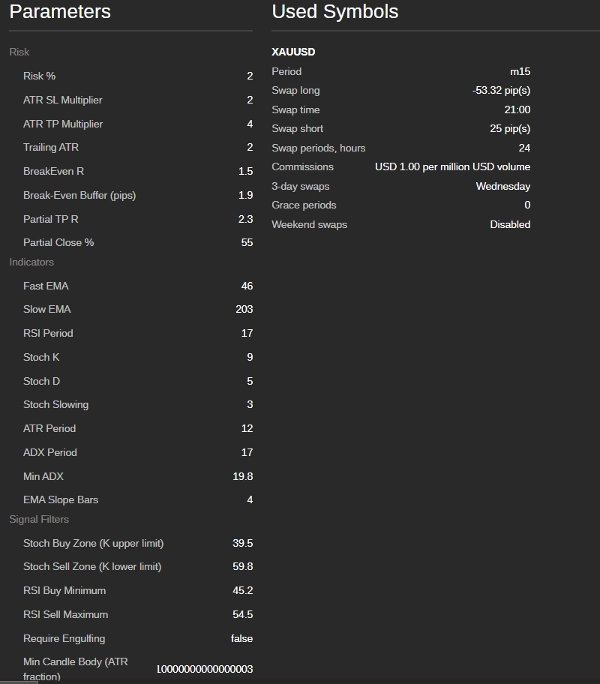
- Risk % – Fixed percentage of account balance risked per trade (default 1.0%).
- ATR SL Multiplier – Stop‑loss distance as multiple of ATR (default 2.0).
- ATR TP Multiplier – Take‑profit distance as multiple of ATR (default 3.0).
- Trailing ATR – Distance for trailing stop after break‑even (default 1.5).
- BreakEven R – R‑multiple at which stop‑loss moves to entry (default 1.0).
- Break‑Even Buffer (pips) – Extra pips added to the break‑even level (default 2.0).
- Partial TP R – R‑multiple at which partial profit is taken (default 2.0).
- Partial Close % – Percentage of position closed (default 50%).
Indicators
- Fast EMA – Fast EMA period (default 50).
- Slow EMA – Slow EMA period (default 200).
- RSI Period (14).
- Stoch K / D / Slowing (14, 3, 3).
- ATR Period (14).
- ADX Period (14).
- Min ADX – Minimum ADX value for a valid signal (default 20).
- EMA Slope Bars – Number of bars to confirm EMA direction (default 3).
Signal Filters
- Stoch Buy Zone (K upper limit) – Maximum K value for a buy crossover (default 40).
- Stoch Sell Zone (K lower limit) – Minimum K value for a sell crossover (default 60).
- RSI Buy Minimum – Minimum RSI for buy entries (default 45).
- RSI Sell Maximum – Maximum RSI for sell entries (default 55).
- Require Engulfing – If true, only engulfing patterns are taken; otherwise uses the strength candle logic.
- Min Candle Body (ATR fraction) – Minimum candle body as fraction of ATR (default 0.20).
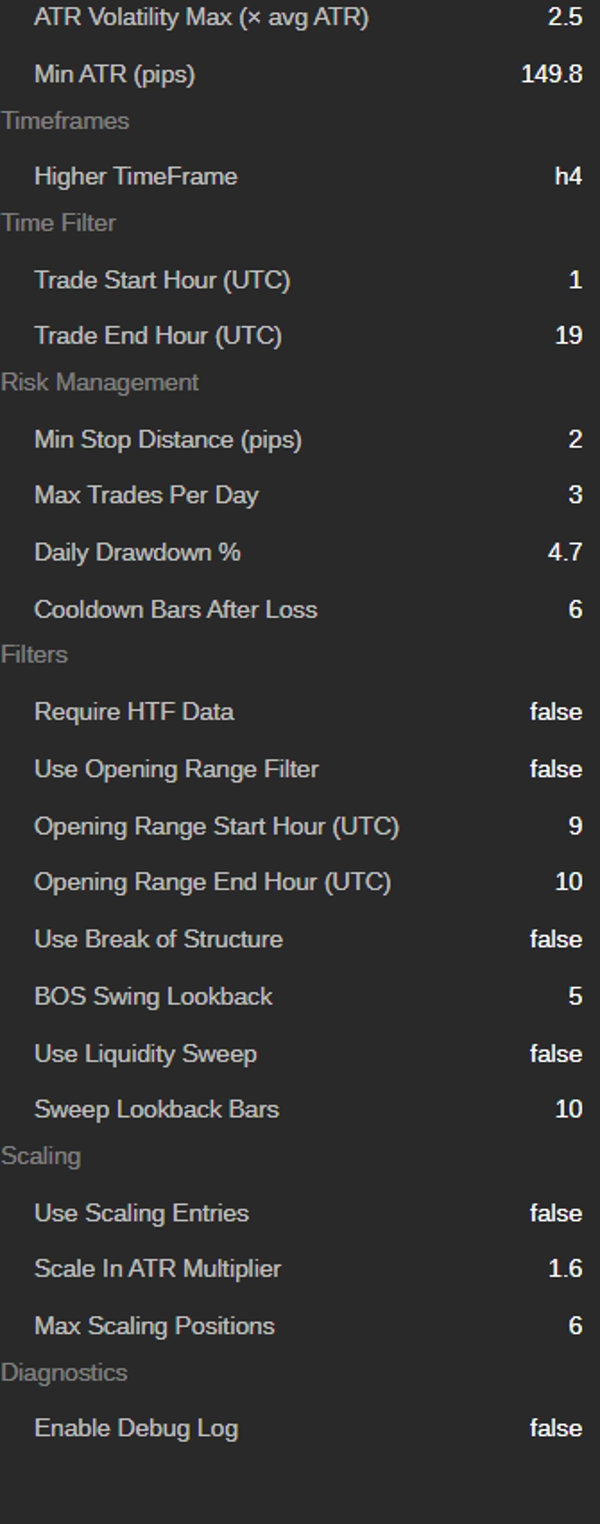
- ATR Volatility Max (× avg ATR) – Maximum ATR relative to its 20‑period SMA (default 2.5).
- Min ATR (pips) – Minimum ATR in pips; trades below this are skipped (default 300 pips for Gold).
Timeframes & Session
- Higher TimeFrame – Timeframe for HTF bias (default H1).
- Trade Start Hour (UTC) – Start of trading window (default 7).
- Trade End Hour (UTC) – End of trading window (default 20).
Risk Management
- Min Stop Distance (pips) – Minimum allowed stop distance (default 2.0).
- Max Trades Per Day (5).
- Daily Drawdown % – Stop trading if equity drops by this percentage from the day’s start (5%).
- Cooldown Bars After Loss – Bars to skip after a losing trade (3).
Advanced Filters
- Require HTF Data – If true, the robot stops if HTF data is unavailable (otherwise falls back to LTF EMA200).
- Use Opening Range Filter – Enables opening range logic.
- Opening Range Start Hour / End Hour – UTC hours for the opening range (default 9–10).
- Use Break of Structure – Requires BOS for entries.
- BOS Swing Lookback – Number of bars to define swing highs/lows (5).
- Use Liquidity Sweep – Requires a sweep of a swing point before entry.
- Sweep Lookback Bars – Bars to look for the sweep (10).
Scaling
- Use Scaling Entries – Enable pyramiding.
- Scale In ATR Multiplier – Pullback distance to add a new position (1.0 × ATR).
- Max Scaling Positions – Maximum concurrent positions in the same direction (2).
Diagnostics
- Enable Debug Log – Output detailed logging to the cTrader journal.
Usage Recommendations
- Instrument: XAU/USD (Gold) – M15 chart only.
- Broker & Account: Works with any cTrader broker. Ensure tight spreads (ideally below 25‑30 cents) and low commission.
- Timeframe: Always attach to a 15‑minute chart. The robot uses H1 (or your chosen HTF) internally; you do not need to open a separate chart.
- Capital: Suggested minimum $500 for a cent account or $5,000 for a standard account, adhering to the 1% risk rule.
- Optimisation: The default values are already optimised for gold from 2022–2025 data. You may adjust the trading session hours to match your time zone (all times are UTC).
- VPS: For 24/5 unattended execution, a low‑latency VPS is recommended.
Important Notes & Disclaimer
- Past performance does not guarantee future results. Trading gold involves substantial risk of loss. Only trade with capital you can afford to lose.
- The robot respects cTrader’s protection mechanisms (stop‑distance, volume rounding) and will skip trades that cannot be properly protected.
- Always test the robot in a demo account first. Use the debug log to understand why trades are taken or rejected.
- The robot does not use martingale, grid, or any high‑risk money management. Risk per trade is fixed and position sizing is based on real ATR.
- A full parameter reset occurs daily (trades count, drawdown, opening range), ensuring each new trading day starts fresh.
GoldScalperPro XAU M15 combines years of scalping experience with institutional‑grade logic – a robust, transparent, and highly configurable tool for serious gold traders.
Summary
The robot operates within user-defined trading sessions, supporting session filters to avoid low-volume periods. It enforces institutional-grade risk management with fixed percentage risk per trade, daily drawdown limits, maximum trades per day, and cooldown periods after losses. Trade execution involves market orders with immediate stop-loss and take-profit placement respecting broker constraints. Features include break-even stop adjustments, trailing stops, partial profit booking, and scaling/pyramiding with configurable parameters.
Additional filters include optional opening range, break of structure, and liquidity sweep conditions. The robot adapts to unavailable higher timeframe data by falling back to lower timeframe EMA. It is optimized for typical gold market conditions, requiring attachment to a 15-minute chart and recommending a minimum capital aligned with risk settings. Debug logging is available for detailed trade analysis. GoldScalperPro supports fixed and dynamic risk models and is suitable for prop firm trading.