
Description
Full documentation and every setting are on the realbacktesting website.
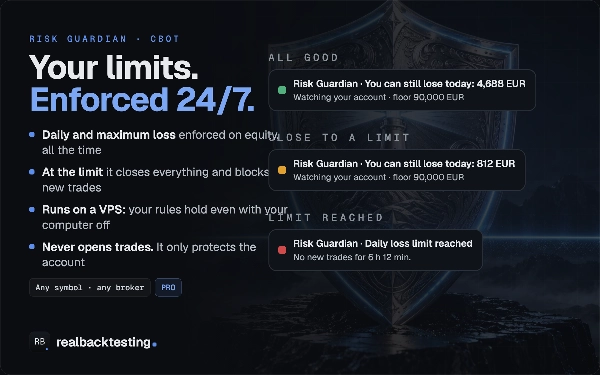
A cBot that enforces your account limits around the clock. Leave it on a VPS and your daily loss, maximum loss and the rest of your rules keep being applied with your own computer switched off. It also runs the break-even, partial closes and trailing stop that the realbacktesting Tools Risk Manager writes into each order.
It does not open trades and does not calculate sizes. It watches the account, closes and blocks when a limit is crossed, manages what is already open, and tells you.
YOUR LIMITS, ACROSS THE WHOLE ACCOUNT
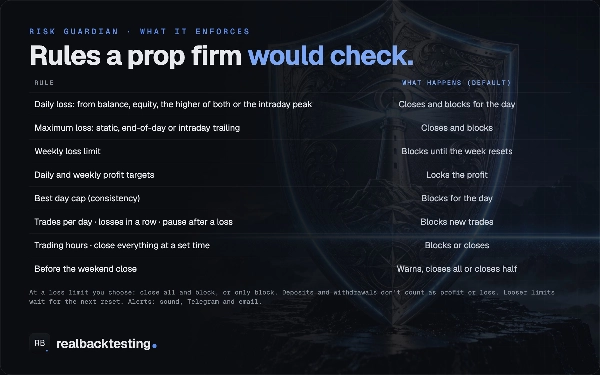
- Daily loss as an amount or %, counting open trades, measured from the balance at the reset, the equity at the reset, the higher of both, or the day's equity peak
- Maximum loss: static, trailing at end of day or trailing intraday, optionally frozen at the starting balance
- Weekly loss. Daily and weekly profit targets that lock your gains.
- Best-day cap for consistency rules
- Max trades per day, max losses in a row, a pause after a loss
- Trading hours. Close everything at a set time.
- Protect all trades of the account, manual trades only, the Risk Manager's orders only, or trades whose label contains a text
- Account templates: two for personal accounts, two for funded accounts (static and trailing), or your own settings
WHEN A LIMIT IS HIT
- Close everything and cancel pending orders, then block - or only block new trades
- Act before the limit (for example at 90%) to leave room for slippage, and warn earlier (for example at 70%)
- Trades opened while you are blocked are closed. If the same label keeps reopening, you get an alert to stop that cBot.
- Tighter limits apply now. By default, looser limits wait for the next reset, so editing the settings does not unblock the day.
- The day resets at midnight UTC, midnight Central European time, 17:00 New York, 17:00 Chicago or an hour you choose, with daylight saving handled
- The state is saved: restarting the cBot, or removing it and adding it again, does not unblock the day
- Deposits and withdrawals are not counted as profit or loss
TRADE MANAGEMENT FROM THE RISK MANAGER
Every order sent from the Risk Manager panel carries, in its own comment, the management rules chosen for it, its initial size and its initial risk. The Guardian reads them from the order, on any computer, and applies them:
- Break-even at a chosen R, with an offset
- Partial closes at chosen R levels. A partial already done is not repeated, even if the panel also manages that trade.
- Trailing stop in pips or ATR, from a chosen R. Or the broker's own trailing stop: once the Guardian switches it on, it runs on your broker's server.
- It only ever tightens a stop. A stop you moved by hand is respected.
BEFORE THE WEEKEND
A warning, close everything, or close half - a chosen number of minutes before the Friday close.
ALERTS
A small status plate on the chart (green, amber, red, grey) with the room left today. Sound alerts. Telegram to your own bot, and email through cTrader's email settings: when you get close to a limit, when one is hit, and when the Guardian is stopped.
Languages: English, Spanish, French, Portuguese and Italian.
WITH THE RISK MANAGER PANEL (sold separately)
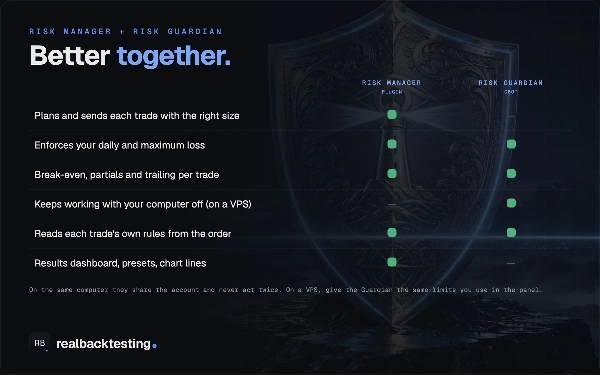
- On the same computer they share the account state, and only one acts. While the panel is open, the panel enforces and the Guardian waits. Close the panel and the Guardian takes over, with the same day already counted.
- On a VPS, the Guardian keeps its own record and applies the limits you set in its parameters. Set the same limits in both.
- Run it on several charts if you like: one instance enforces, the others show the same state.
WHAT IT CANNOT DO - AND WE SAY SO
- A cBot cannot stop an order before it opens. Orders placed while you are blocked are closed after they open, and each forced close costs spread and commission. The check before sending is a feature of the Risk Manager panel.
- A cBot cannot stop another cBot running on a different chart.
- It manages only trades opened from the Risk Manager panel with rules. If you change a trade's rules later in the panel, that change stays on that computer; a Guardian on another computer keeps the rules the order was opened with.
- If the VPS or the computer running it is off, nothing is enforced. A stop does not protect you from a price gap: a limit can be exceeded when price jumps past it.
PROP FIRMS
The rules are generic: you set them to match your firm's daily limit base, reset time and static or trailing maximum loss. Check your firm's current rules and enter them yourself. There are no functions to hide anything from a broker or a prop firm, and nothing is randomised.
Price: 39 USD, one-time. Updates are free.
Support: use the contact page on the realbacktesting website.
Trading involves substantial risk of loss and is not suitable for every investor. This is software that applies the rules you set; it does not give investment advice and does not guarantee that a loss limit is never exceeded - prices can gap and orders can slip.