Logo "AWTradesPnLStudio"
Plugin desktop
Versi 1.0, Nov 2025
Windows, Mac
Gambar unggahan "AWTradesPnLStudio"
182.36M
Volume trading
368.54K
Pip dimenangkan
67
Penjualan
279
Instal gratis

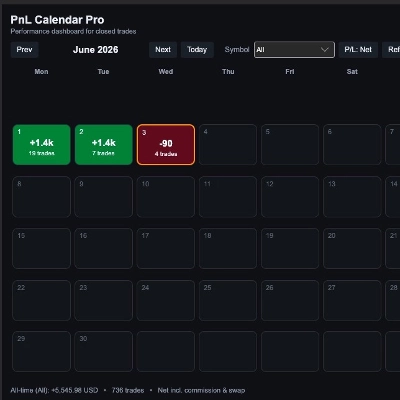
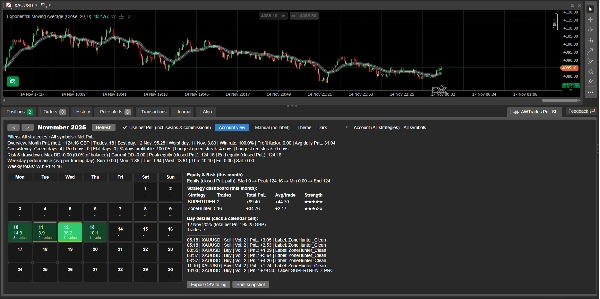
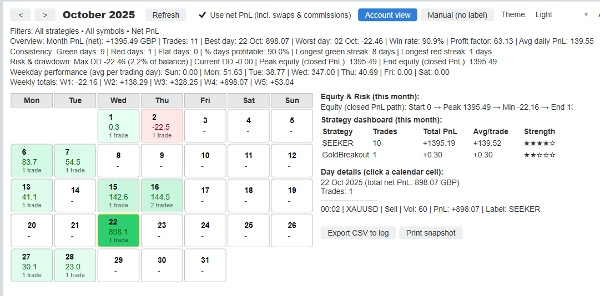
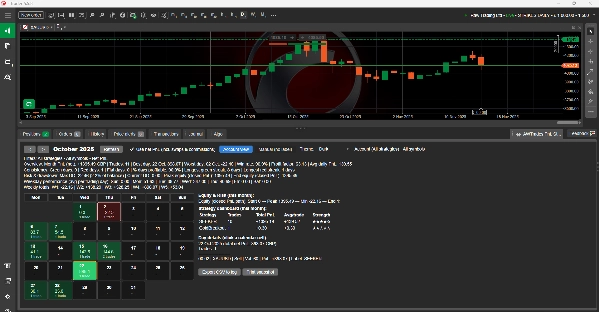
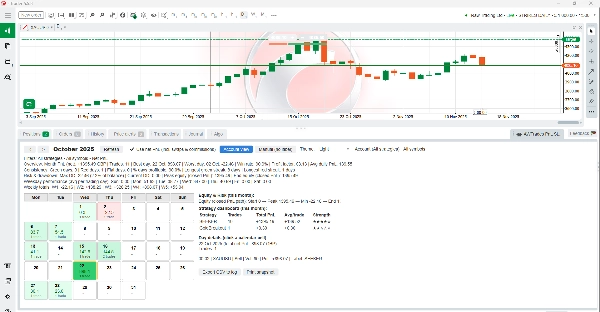
AWTrades PnL Studio is a powerful performance-tracking plugin that turns your cTrader history into a clean, colour-coded PnL calendar – with strategy analytics, risk stats and equity insights, all inside the TradeWatch panel.

Instead of digging through raw history, you get an instant visual of how your month is going: green and red calendar tiles for each day, strategy breakdowns, weekly totals, and max drawdown / equity path – all filterable by symbol, label (strategy) and net vs gross PnL.

Use it to monitor a single bot, a cluster of strategies, or your entire account at a glance.

Key Features

PnL Calendar in TradeWatch
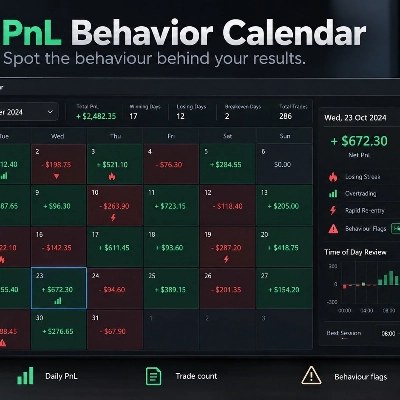
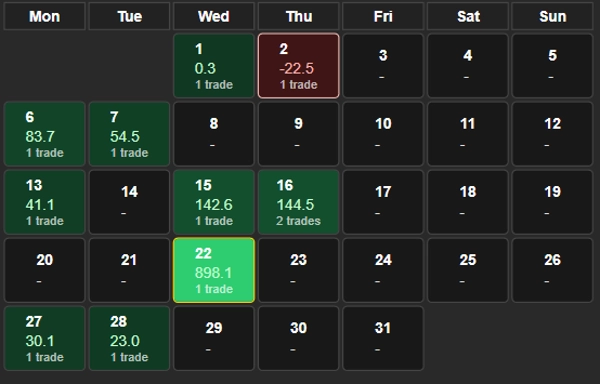
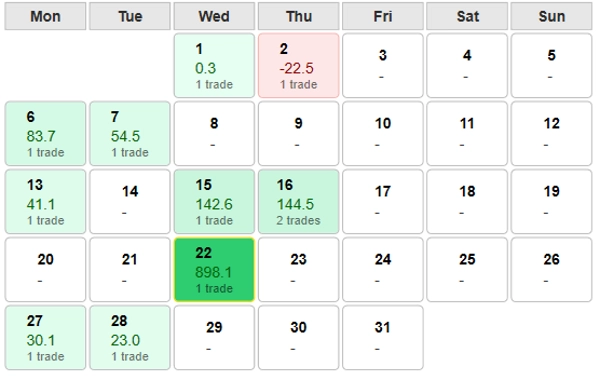
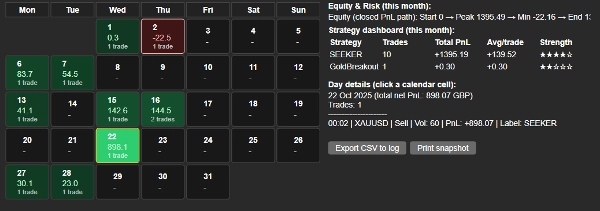
See your monthly performance as a calendar grid – each day shows PnL and trade count, with best and worst days highlighted for quick review.

Strategy Dashboard (per month)
Automatic breakdown by label (strategy): total PnL, number of trades, average PnL per trade and a 1–5 ★ “strength” rating so you can instantly see which bots are carrying the account.

Built-in Equity & Drawdown Stats
Closed-PnL equity path summary (start → peak → min → end) plus max drawdown, current drawdown and DD as % of balance – perfect for risk monitoring and investor reporting.

Weekday & Weekly Insights
Average PnL by weekday and weekly totals, so you can see which days and weeks are driving or dragging performance.

Fast Filters & Presets
Filter by:

  • Account (all strategies)
  • Manual only (no label)
  • Any specific label / strategy
  • Any symbol or all symbols
    Switch between gross and net (incl. swaps & commissions) with one checkbox.

Light & Dark-Mode Friendly
Optimised for both dark and light cTrader themes: colours, borders and text contrast are tuned so the calendar stays readable in any scheme.

Trade-Level Drilldown
Click any calendar day to see every trade for that day: time, symbol, direction, volume, PnL and label – ideal for quick review or journaling.

Export & Snapshot Tools
Export the current view to CSV in the log, or print a concise performance snapshot line you can paste into reports, chat, or your trading journal.


How to Use

  1. Add AWTrades PnL Studio as a plugin in cTrader.
  2. Open the TradeWatch panel and select the “AWTrades PnL Studio” tab.
  3. Use the month arrows and Account view / Manual (no label) presets to switch perspectives.
  4. Filter by symbol or strategy label to analyse individual bots or portfolios.
  5. Click calendar days for trade lists; use Export CSV or Print snapshot for journaling or investor updates.

AWTrades PnL Studio is built by AWTrades, a systematic trader focused on clear, practical tools that help you understand what your strategies are really doing – day by day, week by week, month by month.

Profil plugin
0.0
Ulasan: 0
Ulasan pelanggan
Belum ada ulasan untuk produk ini. Sudah mencobanya? Jadilah pemberi ulasan pertama!
Signal
Indices
Commodities
GBPUSD
RSI
Bollinger
Fibonacci
Scalping
AI
XAUUSD
NAS100
MACD
BTCUSD
Forex
Breakout
EURUSD
NZDUSD
Martingale
Prop
ZigZag
Supertrend
Fair Value Gap
SMC
Crypto
Grid
Stocks
ATR
USDJPY
VWAP
Produk-produk yang tersedia melalui cTrader Store, termasuk bot trading, indikator, dan plugin, disediakan oleh pengembang pihak ketiga serta hanya ditujukan untuk akses teknis dan informasi. cTrader Store bukan broker dan tidak menyediakan saran investasi, rekomendasi pribadi, atau jaminan apa pun tentang kinerja di masa mendatang.

Anda mungkin juga suka

Plugin desktop
Prop
Forex
+1
Multiple timeframes, multiple instruments, one cBot, one go! OmniSimulation
Plugin desktop
This plugin is a demo includeing a TradingView Chart Widget, a business TV and a news plugin...
Plugin desktop
Forex
Crypto
+2
This plugin allows you to jump to a specific data on a chart.
Plugin desktop
Prop
Forex
+4
Visual monthly trading journal that displays your performance day-by-day in a calendar view.
Plugin desktop
Prop
Forex
+4
Professional risk management plugin with automatic lot size calculation based on risk percentage. Intuitive interface in
Plugin desktop
Prop
Forex
+2
This free plugin allows you to display any website directly inside cTrader, in any UI area.
Plugin desktop
Signal
Breakout
The Risk-Reward plugin is a tool to visualize a trading idea based on other analysis tools,
Plugin desktop
AI
ChatGPT Plugin for cTrader
Plugin desktop
Prop
Forex
+3
Visual calendar with daily PnL, trades, win rate, profit factor, and performance insights.
Plugin desktop
Prop
Forex
+11
Build custom second and tick charts using adjustable bar sampling intervals.
Plugin desktop
AI
ChatGPT Plugin for cTrader
Plugin desktop
Forex
Indices
+1
Deriv Calculator Plugin for cTrader
Plugin desktop
RSI
Prop
+5
RSI Scanner - Fully Adjustable
Plugin desktop
Prop
Forex
+5
This plugin creates bars that reflect actual market activity rather than arbitrary time divisions.
Plugin desktop
AI
ATR
+27
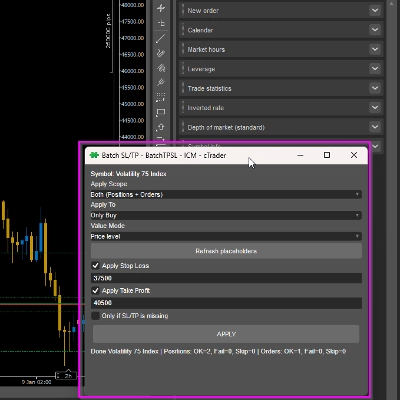
Apply Stop Loss and Take Profit to all positions and pending orders in one click.
Plugin desktop
Forex
Signal
+2
Adaptive Renko chart builder for precise, flexible trading - ideal for both scalping and trend analysis.
Plugin desktop
ATR
Prop
+5
cTrader risk management plugin with daily & total drawdown limits, CBot control, and risk-based order execution.
Plugin desktop
Stocks
Indices
+1
Build custom charts based on specific trading sessions.
182.36M
Volume trading
368.54K
Pip dimenangkan
67
Penjualan
279
Instal gratis