
Deskripsi
━━━━━━━━━━━━━━━━━━━━━━━━━━━━━━━━━━━━━━━━
Panel Bias HTF — Bias
━━━━━━━━━━━━━━━━━━━━━━━━━━━━━━━━━━━━━━━━
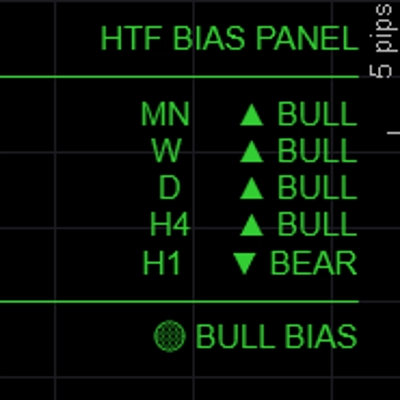
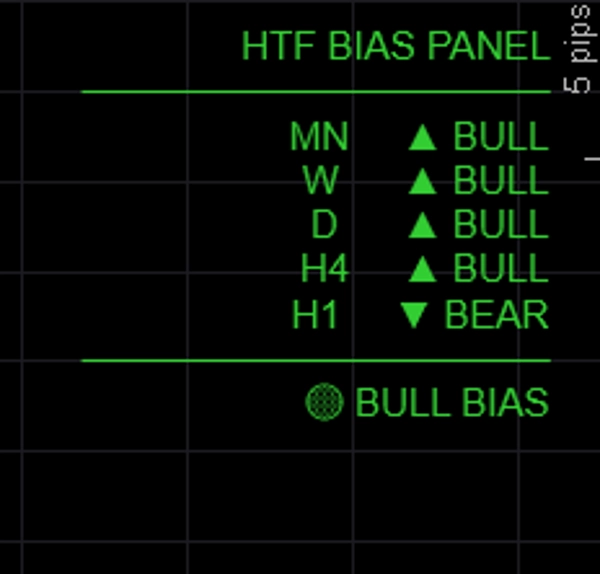
Menampilkan bias arah untuk hingga lima kerangka waktu secara bersamaan dalam panel bersih di grafik — sehingga Anda selalu tahu apakah kerangka waktu yang lebih tinggi sedang bullish, bearish, atau campuran sebelum memasuki perdagangan.
─────────────────────────────
FITUR UTAMA
► 5 kerangka waktu yang sepenuhnya dapat dikonfigurasi — default MN / W / D / H4 / H1, semua label dan TF dapat disesuaikan
► Tiga metode bias — pilih bagaimana bias ditentukan per sesi:
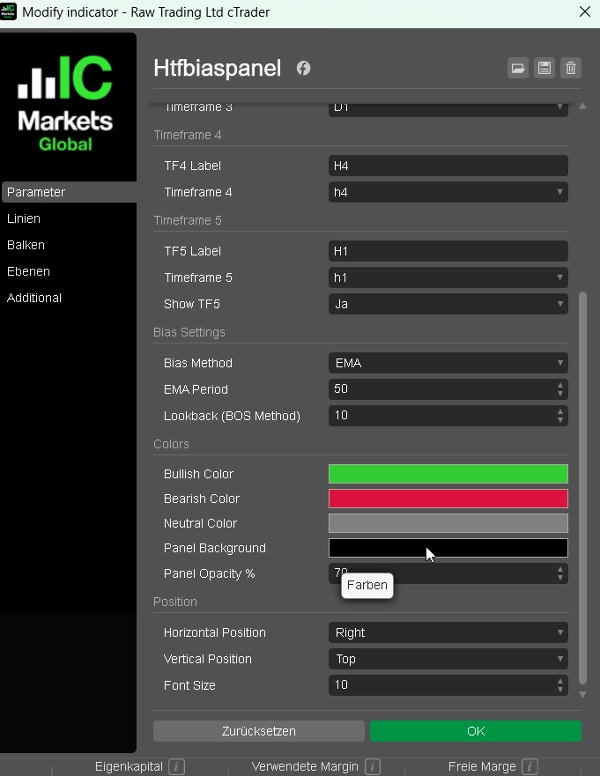
• EMA: penutupan di atas/bawah EMA(50) → paling andal untuk mengikuti tren
• Harga vs Penutupan Terakhir: penutupan saat ini vs penutupan sebelumnya → reaktif, berbasis momentum
• BOS: rentang terbaru vs rentang sebelumnya → bias berbasis struktur
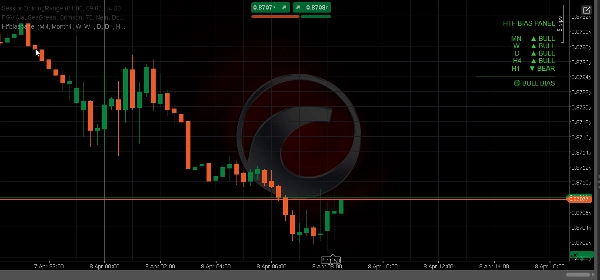
► Ringkasan penyelarasan — BULL PENUH / BEAR PENUH / BIAS BULL / BIAS BEAR / NETRAL ditampilkan di bagian bawah panel
► Output berwarna — hijau untuk bullish, merah untuk bearish, abu-abu untuk netral
► Posisi panel — tempatkan kiri atas, kanan atas, tengah atas, kiri bawah, atau kanan bawah
► Warna yang sepenuhnya dapat disesuaikan untuk keadaan bullish, bearish, dan netral
► Ringan — tanpa gambar grafik, tanpa persegi panjang, tanpa beban berlebih
─────────────────────────────
METODE BIAS DIJELASKAN
→ EMA (default): Bullish jika penutupan > EMA(period). Paling stabil, mengabaikan noise jangka pendek.
→ Harga vs Penutupan Terakhir: Bullish jika penutupan bar saat ini > penutupan bar sebelumnya. Cepat dan reaktif.
→ BOS: Membandingkan rentang N-bar terbaru dengan rentang N-bar sebelumnya. Bullish jika harga tertinggi dan terendah lebih tinggi.
─────────────────────────────
PENGATURAN DEFAULT
→ TF1 Bulanan (MN)
→ TF2 Mingguan (W)
→ TF3 Harian (D)
→ TF4 H4
→ TF5 H1 (dapat diaktifkan/dinonaktifkan)
→ Metode Bias EMA
→ Periode EMA 50
→ Warna Bull LimeGreen
→ Warna Bear Crimson
→ Posisi Kiri Atas
─────────────────────────────
CARA MENGGUNAKAN
1. Tambahkan panel ke grafik mana pun
2. Pilih metode bias yang Anda sukai (EMA direkomendasikan untuk pemula)
3. Periksa ringkasan penyelarasan sebelum memasuki perdagangan — hanya lakukan long saat BIAS BULL atau BULL PENUH
4. Gunakan bias HTF untuk memfilter sinyal dari indikator BOS/CHoCH atau FVG Anda — hanya berdagang sesuai arah yang dikonfirmasi oleh panel
5. Sesuaikan kerangka waktu agar sesuai dengan gaya trading Anda (misalnya D / H4 / H1 / M15 / M5 untuk scalper)
─────────────────────────────
IDEAL UNTUK
✔ Trader ICT dan Smart Money Concepts yang membutuhkan analisis top-down cepat
✔ Trader multi-kerangka waktu yang menginginkan pemeriksaan bias visual cepat
✔ Trader FTMO dan prop firm yang perlu berdagang dengan konfluensi
✔ Trader mana pun yang ingin menghindari berdagang melawan tren kerangka waktu yang lebih tinggi
✔ Trader Forex, Emas, Indeks, dan Crypto CFD
─────────────────────────────
KOMPATIBILITAS
→ Platform cTrader (Desktop & Web)
→ Kelas aset Forex, Indeks, Komoditas, Crypto CFDs
→ Kerangka waktu Semua (M1 sampai MN)
→ Hak akses Tidak diperlukan
→ Jenis akun Live & Demo
━━━━━━━━━━━━━━━━━━━━━━━━━━━━━━━━━━━━━━━━
Ringkasan
Ulasan pelanggan
5 | 67 % | |
4 | 33 % | |
3 | 0 % | |
2 | 0 % | |
1 | 0 % |