Açıklama
Superior cTrader to Discord Bildirici
Superior cTrader to Discord Bildirici, cTrader masaüstü terminalini doğrudan Discord uygulamasına bağlamak için tasarlanmış bir yardımcı programdır. cAlgo API'sini kullanarak ticaret faaliyetlerini izler ve webhook entegrasyonları kullanarak biçimlendirilmiş metin güncellemelerini Discord kanallarına, sunucularına veya gruplarına yayınlar.
Temel Kullanım Alanları
1. Sinyal Sağlayıcıları ve Topluluklar
Bu araç, genel veya özel Discord sunucularını yöneten Sinyal Sağlayıcılarına yardımcı olmak için oluşturulmuştur. Bot, ticaret girişlerini, değişikliklerini ve çıkışlarını otomatik olarak doğrudan Discord'a yayınlar. Mesaj formatları özelleştirilebilir olduğundan (örneğin, lot büyüklüklerini veya bilet numaralarını gizlemek), sağlayıcılar özel hesap bilgilerini açığa çıkarmadan VIP kanallarına veya ücretsiz topluluk alanlarına temiz, profesyonel ticaret sinyalleri yayınlayabilirler.
2. Kişisel Uzaktan İzleme
Perakende yatırımcılar botu kişisel Discord sunucularına bağlayabilirler. Bu, ticaret masasından uzaktayken mobil cihazınızdan cTrader hesabınızın performansını, açık pozisyonları, yüzen karı ve risk seviyelerini izlemenizi sağlar.
Teknik Özellikler
Gerçek Zamanlı Ticaret İzleme
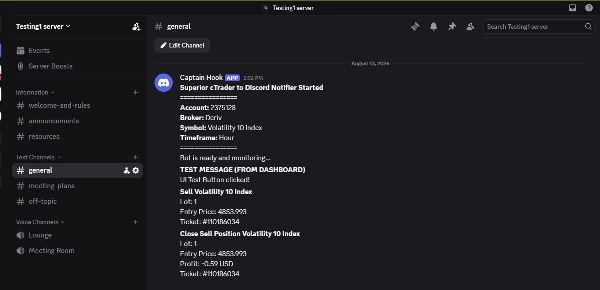
Pozisyonlardaki ve bekleyen emirlerdeki değişiklikleri izler, aşağıdaki durumlar için gerçek zamanlı bildirimler tetikler:
- Piyasa Emirleri: Pozisyon Açıldı, Pozisyon Kapatıldı, Pozisyon Kısmen Kapatıldı ve Pozisyon Değiştirildi (SL/TP ayarlandı).
- Bekleyen Emirler: Limit/Durdurma Emri Verildi, Emir Değiştirildi ve Emir Silindi.
Etkileşimli Grafik Üzerinde Kontrol Paneli
cTrader grafiği üzerinde doğrudan oluşturulmuş, sürüklenebilir özel bir GUI kontrol paneli içerir. Kontrol paneli, kullanıcıların cBot'u yeniden başlatmadan veya parametreler menüsünü açmadan ayarları anında değiştirmesine olanak tanır.
- Sekmeler: Kategorize edilmiş sekmeler (Ticaretler, Emirler, Format, İşlemler) içerir.
- Açma/Kapama Anahtarları: Belirli olay bildirimlerini anında etkinleştirmek/devre dışı bırakmak için onay kutuları (örneğin, emir değişikliklerini kapatmak veya kısmi kapanış uyarılarını açmak).
- Manuel Tetikleyiciler: Günlük Raporu tetiklemek veya Test Bağlantısı mesajı göndermek için düğmeler.
- UI Yönetimi: Kontrol paneli, grafik alanını korumak için ince bir başlık çubuğuna küçültülebilir.
Özelleştirilebilir Mesaj Formatlama
Discord yayınında hangi verilerin dahil edileceği üzerinde sıkı kontrol sağlar. Kullanıcılar gizliliği korumak veya sinyal formatlarını temizlemek için aşağıdaki değişkenlerin görünürlüğünü açıp kapatabilirler:
- Bilet Numaralarını Göster/Gizle
- Lot Büyüklüklerini (Hacim) Göster/Gizle
- Stop Loss ve Take Profit fiyatlarını Göster/Gizle
- Kapanan işlemlerde Net Karı Göster/Gizle
Otomatik Raporlama ve Risk Uyarıları
- Gelişmiş Günlük Rapor: Kullanıcı tarafından belirlenen saatte, cBot günün performansının kapsamlı bir özetini oluşturur. Bu, toplam kapanan işlemler, net günlük kar, mevcut yüzen kar/zarar ve tüm aktif/kapanan işlemlerin listesini içerir.
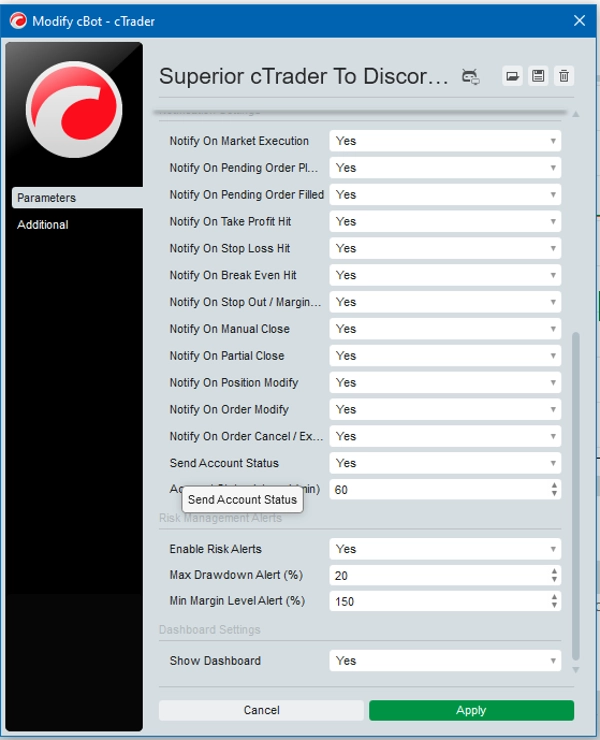
- Hesap Durumu Güncellemeleri: Belirli aralıklarla (örneğin, her 60 dakikada bir) mevcut Bakiye, Öz Sermaye ve Serbest Marjı içeren periyodik güncellemeler gönderir.
- Risk Yönetimi Uyarıları: Hesap sağlığını izler ve Yüzen Zarar belirli bir yüzdesi aşarsa veya Marj Seviyesi tanımlı güvenlik eşiğinin altına düşerse acil uyarılar gönderir.
Kurulum Gereksinimleri ve Webhook Entegrasyonu
cTrader terminalinizi sunucunuza başarıyla bağlamak için özel bir Discord Webhook URL'sine ihtiyacınız olacak.
Doğru Webhook URL'si nasıl alınır:
1. Discord'da, mesajların gönderilmesini istediğiniz belirli sunucu kanalına gidin (örneğin, #signals, #alerts veya özel bir kanal).
2. Kanal adının yanındaki dişli simgesine tıklayarak Kanal Ayarları'nı açın → Entegrasyonlar'ı seçin.
3. Webhook'lara tıklayın ve Yeni Webhook'u seçin (veya mevcut birini yönetin).
4. İsterseniz bot adınızı özelleştirin, ardından Webhook URL'sini Kopyala'ya tıklayın.
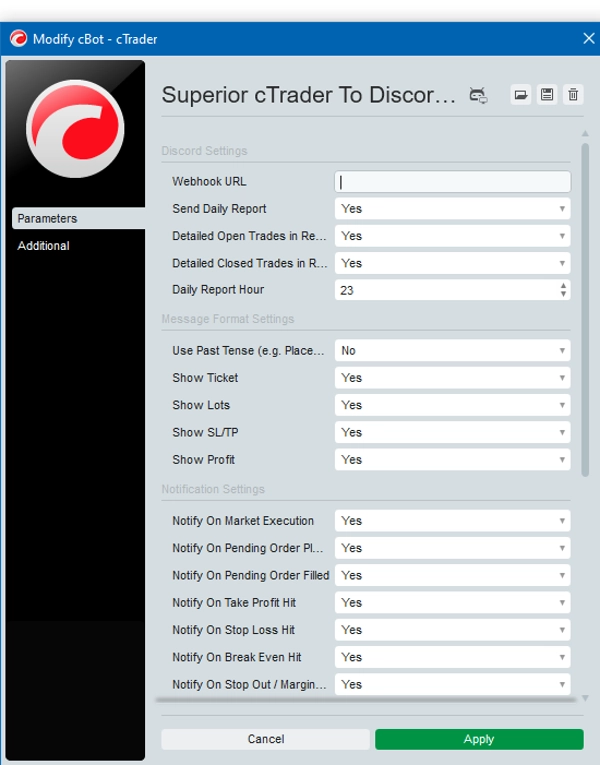
5. cTrader platformunuzu açın, cBot'u başlatın ve parametreleri bulun.
6. Kopyaladığınız bağlantıyı doğrudan cBot'taki Webhook URL parametre alanına yapıştırın (herhangi bir davet bağlantısını veya eski metni değiştirdiğinizden emin olun).
7. Uygula'ya tıklayın, ardından kurulumunuzun aktif olduğunu doğrulamak için grafik üzerindeki kontrol panelinden Test Mesajı Gönder'e basın.
Özet
An interactive, draggable on-chart dashboard within cTrader enables users to adjust settings dynamically without restarting the bot. The dashboard includes categorized tabs, toggle switches for enabling/disabling specific notifications, manual triggers for daily reports and test messages, and can be minimized to save chart space.
Additional functionality includes automated daily performance reports, periodic account status updates (balance, equity, free margin), and risk management alerts based on floating drawdown and margin level thresholds. This notifier is suitable for signal providers managing Discord communities and retail traders seeking remote monitoring of their cTrader accounts. Setup requires a Discord webhook URL configured in the cBot parameters.