

Описание
Отлично, приятель — изображение только с символом успешно загружено. Ниже приведён текст, который вы можете использовать для списка cTrader.
Я основывался на вашей обычной локальной сборке Warden R2 cTrader 2.007 исходного кода. На вашем Mac есть несколько старых и «Видео» сборок, поэтому выбранная сборка из Магазина должна совпадать перед публикацией.
Краткое описание — менее 120 символов
Трёхдвигательный cBot для XAUUSD, сочетающий стратегии прорыва, сессий и портфеля с настраиваемым управлением рисками.
Подробное описание — готово к вставке
ECFX XAU Warden — Автоматизированная торговля золотом для cTrader
ECFX XAU Warden — это многостратегический cBot, предназначенный для торговли золотом XAUUSD. Он объединяет три независимо управляемых торговых движка в одном приложении, сочетая прорывы уровней цен, торговлю по расписанию сессий и портфель технических стратегий.
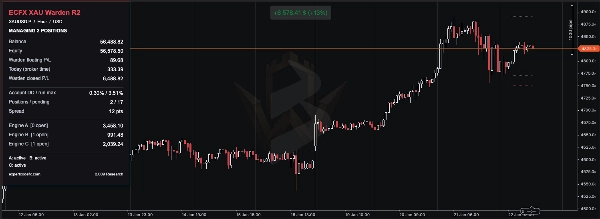
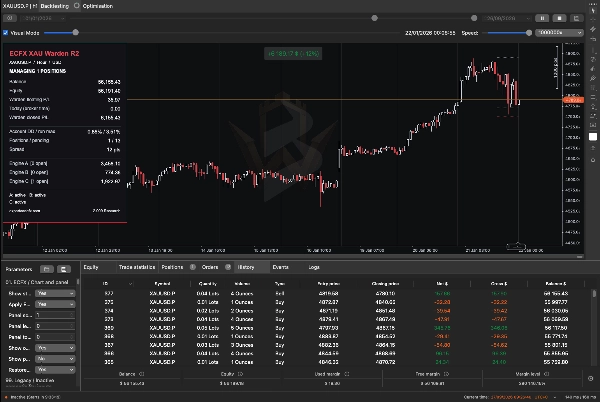
Общая панель отображает баланс счёта, капитал, плавающую прибыль и убыток, просадку, открытые позиции, отложенные ордера и результаты каждого движка.
Warden предназначен для работы на графике золота H1 с использованием хеджингового счёта. Его стратегии также анализируют другие таймфреймы внутри. Каждый движок можно включать или отключать, позволяя пользователям тестировать отдельные компоненты или объединённую систему.
Как торгует Warden
Движок A — стратегии прорыва уровней цен
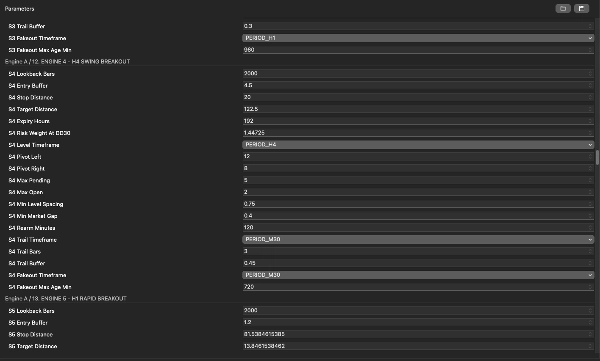
Движок A определяет подтверждённые максимумы и минимумы колебаний на нескольких таймфреймах и использует эти уровни для подготовки ордеров buy-stop и sell-stop.
Входы размещаются за пределами квалифицирующих уровней цен с учётом буфера входа выбранной стратегии, минимального расстояния, правил интервала ордеров и лимитов экспозиции. Отложенные ордера могут истекать или обновляться по мере изменения рыночной структуры.
Движок содержит девять настраиваемых слотов стратегий. Количество используемых зависит от выбранного режима частоты торговли, правил автоматического выбора или ручного переключения стратегий. Включение движка не обязательно активирует каждый слот.
Управление сделками включает:
- Стоп-лоссы и тейк-профиты, специфичные для каждой стратегии.
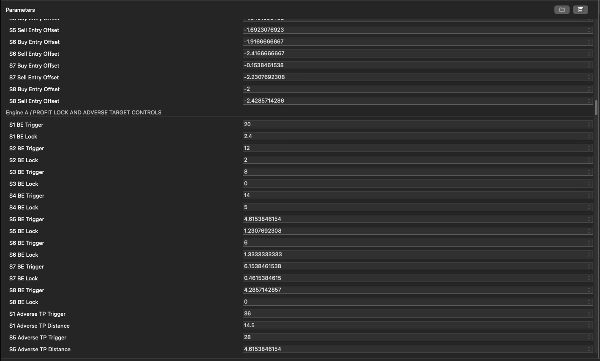
- Настраиваемое поведение блокировки прибыли и трейлинг-стопа на основе колебаний.
- Фильтр выхода при ложном прорыве.
- Опциональная динамическая корректировка тейк-профита для выбранных стратегий.
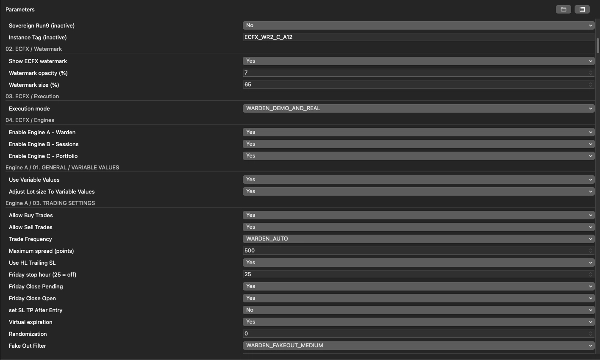
- Настраиваемые ограничения по спреду, пятнице и NFP для входов.
Динамическая корректировка цели может приблизить выход после неблагоприятного движения цены. Сделка, закрытая на скорректированном уровне тейк-профита, может всё ещё привести к убытку.
Движок B — торговля на основе сессий
Движок B объединяет отдельные правила сессий с использованием настроенных часов брокера.
Доступные компоненты включают:
- Прорыв диапазона: формирует диапазон максимум–минимум за указанный период и проверяет последующий прорыв выше или ниже. Также применяется фильтр тела свечи предыдущего дня.
- Запланированная покупка: ищет вход на покупку в определённом временном окне в подходящие дни недели, затем управляет сделкой по правилу времени удержания.
- Опциональный прорыв с импульсом: проверяет максимум или минимум за несколько дней вместе с недавним порогом импульса цены.
Компоненты прорыва диапазона и запланированной покупки включены в исходных настройках; опциональный компонент импульса отключён.
Позиции используют защитные стопы и выходы по времени. Движок также может закрыть позицию запланированной покупки до срабатывания противоположного сигнала продажи, в зависимости от настроек.
Доступна опциональная повторяемая вариация времени, уровней и размеров. Сохраняйте случайное зерно и связанные настройки без изменений при воспроизведении бэктеста.
Метки сессий A, B и C внутри этого движка — это его собственные подстратегии, отдельные от трёх основных движков Warden.
Движок C — портфель технических стратегий
Движок C объединяет три внутренних группы:
- Технический портфель: содержит двенадцать семейств сигналов, включая условия скользящих средних и RSI, прорывы структуры, сжатия волатильности, откаты, ликвидностные прогоны и паттерны разворота.
- Дополнение тренда: использует направление скользящей средней, волатильность ATR и уровни прорыва 48- и 72-бара для подготовки условных входов.
- Суверенные стратегии: используют отдельные настройки отложенных ордеров с расстояниями входа, стопа и цели на основе ATR.
Переключатели стратегий, фильтры разрешённых направлений, правила сессий, лимиты спреда, периоды охлаждения и лимиты экспозиции определяют, какие сигналы могут стать ордерами. Наличие двенадцати семейств сигналов не означает, что все двенадцать будут торговать при каждой конфигурации.
В зависимости от группы управление включает стоп-лоссы, цели прибыли, корректировки безубыточности, трейлинг-стопы ATR, истечение отложенных ордеров и максимальные периоды удержания.
Как движки работают вместе
Каждый движок идентифицирует и управляет своими сделками через выделенные идентификаторы и метки. Более одной позиции может быть открыто одновременно, и разные стратегии могут удерживать противоположные позиции.
Все движки используют один и тот же капитал счёта и доступную маржу. Их совокупная экспозиция важна: процент риска, назначенный одной стратегии, не является максимальным процентом риска для всего cBot.
Избегайте запуска дублирующих экземпляров Warden с одинаковыми настройками владения на одном счёте и символе. Не меняйте идентификаторы сделок или настройки, связанные с владением, пока открыты существующие сделки Warden.
Настройки риска и важные различия
Warden предоставляет несколько методов определения размера и защитных контролей, но их поведение различается между движками.
Движок A поддерживает фиксированные стартовые лоты и определение размера на основе риска. Его ссылка на размер просадки (%) влияет на размер позиции; это не автоматически применяемый потолок убытков. В проверенных настройках дневной лимит просадки отключён, а отдельный переключатель общего контроля просадки выключен.
Движок B поддерживает автоматическое, процентное и фиксированное определение размера. Ноль в неактивном поле размера не обязательно отключает торговлю. Опция закрытия по просадке капитала отключена в проверенных настройках.
Движок C предоставляет контроль дневных убытков, блокировки просадки, лимиты позиций и дополнительные групповые защиты. Его Backtest Bypass Permanent Max Drawdown Lock настройка включена в проверенных настройках. Это может привести к отличиям поведения при историческом тестировании от работы с включённой блокировкой. Перед интерпретацией теста как представительного для реальной работы внимательно проверьте эту настройку.
Некоторые контролы отслеживают капитал счёта в целом, но действуют только на позиции, принадлежащие их движку. Их не следует рассматривать как единую гарантию убытков по всему счёту. Движок B также имеет опцию закрытия всех позиций счёта, которая при включении может повлиять на несвязанные сделки.
Стоп-лоссы и программные защиты не могут гарантировать точный максимальный убыток при гэпах, проскальзывании, отключениях или отклонённых торговых запросах.
Начальная настройка
- Установите Warden через cTrader Store и откройте cTrader для Windows или Mac.
- Выберите демо-хеджинговый счёт для начальной настройки.
- Откройте cTrader Algo, найдите Warden и создайте экземпляр.
- Выберите символ золота вашего брокера, например XAUUSD или соответствующий с суффиксом.
- Установите таймфрейм графика экземпляра на H1.
- Начните с настроек по умолчанию для вашей версии или предустановки, поставляемой с этой версией.
- Проверьте переключатели трёх основных движков и настройки риска в каждом движке.
- Проверьте режим исполнения. Проверенный исходный код поддерживает только бэктестинг, демо плюс бэктестинг или демо/живой плюс бэктестинг. По умолчанию разрешены демо и живая торговля.
- Проверьте часы стратегии, единицы спреда и спецификации символа брокера перед запуском.
- Начните с демо и проверьте журнал на предмет успешной инициализации, сообщений о загрузке истории и ошибок ордеров.
Нет универсального минимального депозита или настройки кредитного плеча, подходящих для каждой конфигурации. Размер счёта, минимальный объём сделки, расстояние стопа, одновременные позиции и требования маржи брокера должны оцениваться вместе.
Время брокера, пункты и пипсы
Время сессии напрямую влияет на стратегию.
Настройка MT5 смещение UTC брокера (минуты) определяет эталонные часы стратегии внутри реализации cTrader. Это фиксированное смещение и не учитывает автоматически переход на летнее время. Движок C также содержит отдельные настройки смещения времени, поэтому их нужно проверять последовательно.
Настройка MT5 размер пункта управляет ценностью пункта стратегии. Значение ноль берётся из количества знаков символа. Это может отличаться от нативного размера пипса cTrader.
Движок C сохраняет стратегический пипс в размере 0.01 единиц цены. Не копируйте значения спреда или расстояний между по-разному котируемыми символами золота без проверки их единиц.
Как проводить бэктест Warden
- Откройте раздел Backtesting экземпляра Warden в cTrader для Windows или Mac.
- Выберите нужный символ золота и таймфрейм H1.
- Выберите даты теста и начальный капитал. Запишите валюту счёта, кредитное плечо и точную предустановку.
- Выберите Данные тиков с сервера для детальной оценки отложенных ордеров и управления внутри бара.
- Настройте предположения по спреду и комиссиям в соответствии с брокером. Подтвердите единицы, отображаемые cTrader.
- Проверьте смещения времени стратегии, отображение размера пункта и настройки блокировки риска.
- Сначала выполните короткий визуальный тест для проверки панели, входов, выходов и поведения ордеров.
- По возможности выполните полный тест без визуального режима.
- Дождитесь выбранной даты окончания теста, прежде чем считать результаты окончательными.
- Сохраните отчёт и настройки параметров для воспроизведения запуска.
Warden требует исторические данные для внутренних таймфреймов и ретроспектив. Отсутствие предыстории может задержать сигналы или помешать торговле некоторых стратегий. Проверьте журнал и обеспечьте достаточную историю до периода оценки.
Для управления бэктестингом платформы обратитесь к официальному руководству по бэктестингу cTrader.
Что проверять в результатах
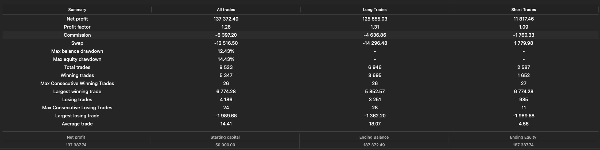
Оценивайте не только итоговую прибыль:
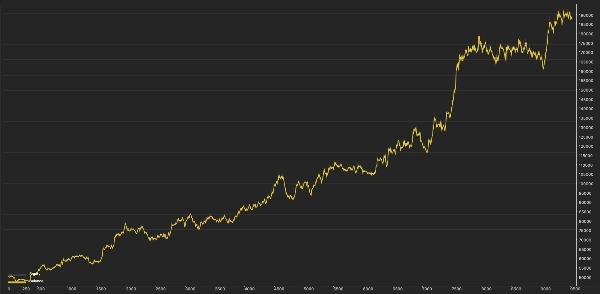
- Максимальная просадка капитала и баланса.
- Реализованная прибыль против плавающей прибыли или убытка на конец.
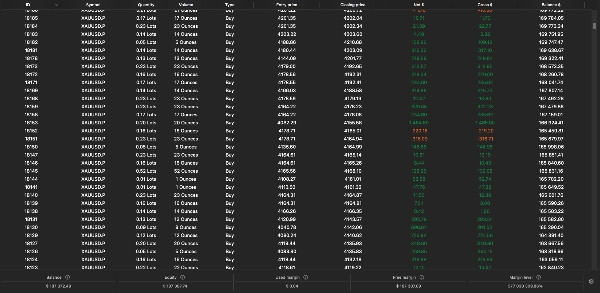
- Количество сделок, серии проигрышей и периоды удержания.
- Максимальное количество одновременных позиций и использование маржи.
- Чувствительность к спреду и комиссиям.
- Отклонения ордеров, предупреждения об отсутствии истории и события блокировки риска.
- Результаты за разные рыночные периоды.
Тестируйте каждый движок отдельно, а также комбинированную конфигурацию. Результаты изолированных движков не обязательно суммируются до комбинированного результата, так как капитал счёта, размер, маржа и защиты взаимодействуют.
При оптимизации сохраняйте отдельный период, не использованный для выбора настроек. Избегайте выбора конфигурации только потому, что она дала наибольшую историческую прибыль.
Панель и операционные проверки
Общая панель помогает отличить состояние счёта от собственных торговых результатов Warden. На счёте с другой торговой активностью баланс и капитал будут включать эту активность.
Перед расследованием отсутствия сделок проверьте:
- Счёт использует хеджирование, а не неттинг.
- Режим исполнения разрешает текущую среду.
- Включены нужные движки и подстратегии.
- Загружены необходимые исторические данные.
- Торговая сессия открыта.
- Требования по спреду, марже и минимальному объёму выполнены.
- Дневная или просадочная блокировка не препятствует дальнейшей активности.
- Существующие ордера или позиции не достигли лимита экспозиции.
Остановка cBot не обязательно закрывает его позиции или отменяет все отложенные ордера во всех движках. Проверьте счёт после остановки. Динамический трейлинг, выходы по времени и другие управляемые программно действия требуют, чтобы cBot оставался запущенным.
Различия платформ
Реализация Warden для cTrader использует системы исполнения, рыночных данных и счёта cTrader. Идентичные сделки или производительность MT5 и cTrader не установлены.
Экономический календарь MQL5 недоступен в этой реализации. Применимый фильтр NFP основан на предоставленных временных метках или приблизительном запасном варианте; его не следует рассматривать как полноценный фильтр новостей в реальном времени.
Входы, помеченные неактивными или устаревшими сохраняются для совместимости и не обеспечивают активной функциональности в этой сборке.
Раскрытие рисков
Торговля связана с риском. Прошлые результаты не гарантируют будущие. Исторические симуляции могут существенно отличаться от реальной торговли из-за ценообразования, спреда, комиссии, проскальзывания, качества данных, требований маржи и условий исполнения. Warden не гарантирует прибыль, фиксированный лимит просадки или успешное выполнение задачи проп-фирмы.
Сводка
- Engine A employs price-level breakout strategies by identifying swing highs and lows across multiple timeframes to place buy-stop and sell-stop orders with configurable stop-loss, take-profit, trailing stops, and filters for false breakouts and news events.
- Engine B uses session-based trading rules based on broker time, including range breakouts, scheduled buys, and optional momentum breakouts, with time-based exits and protective stops.
- Engine C combines a portfolio of technical strategies, including moving averages, RSI, volatility squeezes, pullbacks, and reversal patterns, with trend complements and sovereign strategies, all managed with risk controls like stop losses, profit targets, and drawdown locks.
A shared dashboard displays account metrics, open positions, pending orders, and individual engine results. The cBot supports multiple sizing methods and risk controls that vary by engine. It allows enabling or disabling each engine independently for testing or combined operation. The system requires careful setup of broker symbol, time offsets, and risk parameters. Backtesting is supported with detailed configuration options. The cBot uses market and account data from cTrader and does not guarantee profits or fixed drawdown limits.