
present
ลงทะเบียนและรับส่วนลด $50 สำหรับการซื้อครั้งแรกของคุณ
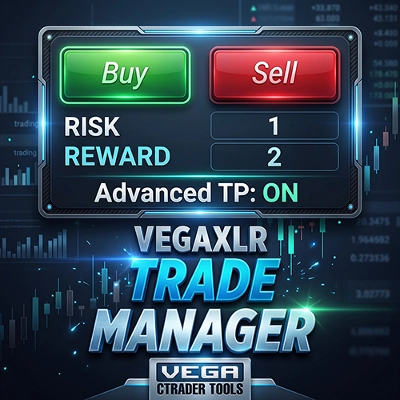
Trading product for wt.TradeFlow ปลั๊กอินเดสก์ท็อป Stop Loss (SL) Manager One-click Trading, image 1
wt.TradeFlow
ปลั๊กอินเดสก์ท็อป
เวอร์ชัน 1.0, Oct 2026
Windows, Mac
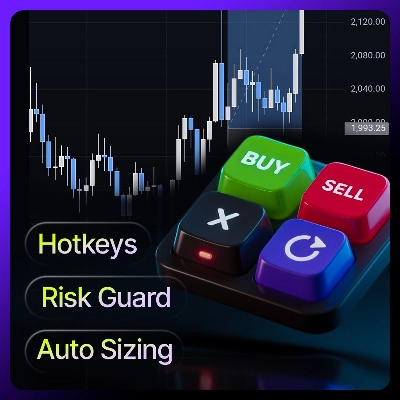
Trading product for wt.TradeFlow ปลั๊กอินเดสก์ท็อป Stop Loss (SL) Manager One-click Trading, image 2
98.17M
ปริมาณการเทรด
147.13K
Pips ที่ได้กำไร
89
การขาย
523
ติดตั้งฟรี

คำอธิบาย


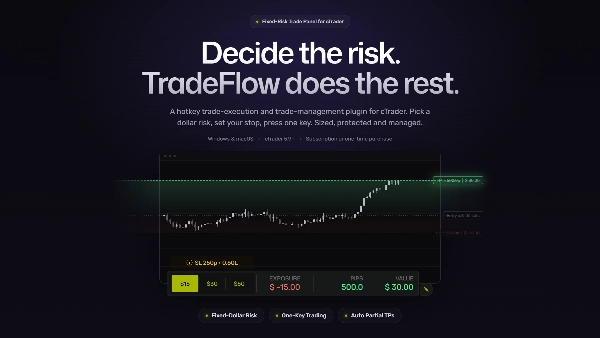
TradeFlow™ is a premium trading assistant plugin for cTrader Desktop on Windows and macOS, built for active traders who need fast, risk-based manual execution and direct control over their positions.

It combines automatic position sizing, rapid order execution, chart-based trade management, customizable hotkeys, and account-level risk protection into a single workflow.

Instead of interrupting your trading with repeated order configuration, TradeFlow™ keeps execution and management close to the chart—so you can act on your strategy with minimal friction.


╭─────────╮
🟆 TL;DR 🟆
╰─────────╯

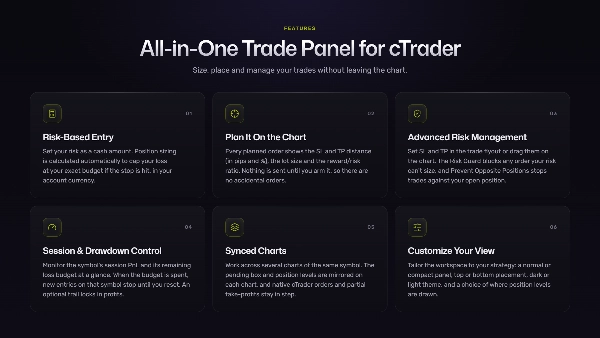
🟆 Risk-based sizing.

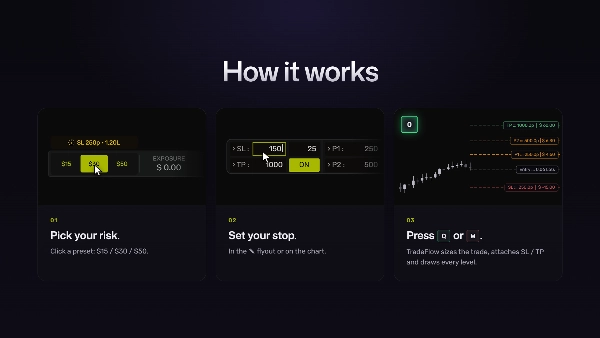
Define the amount you are willing to risk and let TradeFlow calculate the appropriate position size from your stop-loss distance.

🟆 Fast execution.

Place trades, modify positions, take partials, reverse, or close positions using customizable hotkeys.

🟆 Chart-first workflow.

Define and manage entries, stop-losses, and take-profit levels directly on the chart.

🟆 Single-position model.

Built specifically around Netting mode, with one net position per symbol and integrated scale-in functionality. Netting combines multiple trades on the same instrument into a single combined position, whereas hedging keeps every trade separate so you can hold simultaneous opposite positions.

🟆 Account protection.

Prevent oversized trades and block new entries when your configured account drawdown limit has been reached.

🟆 Multi-chart workflow.

Shared risk settings and synchronized tools allow you to work across multiple charts and symbols without maintaining separate configurations.


╭──────────────╮
🟆 Main Features 🟆
╰──────────────╯

🟆 Fixed-Dollar Risk & Automatic Position Sizing

  • Define your desired trade risk directly in Your Account Currency—for example, $50 or $100.
  • TradeFlow™ calculates the required position size from the distance between your entry and stop-loss, then executes the trade using the calculated size.
Risk values are based directly on the account's native currency, eliminating the need for manual currency conversion. The plugin supports the account currency types available through cTrader.


🟆 Risk Guard

  • TradeFlow™ can prevent a market entry when the requested risk cannot be accommodated by the current stop-loss parameters.
  • This provides an additional layer of protection against accidental over-sizing and excessive leverage, particularly when market conditions or stop distances change quickly.


🟆 Visual Entry & Risk Tool

  • Use the on-chart sizing tool to define a potential entry trigger and stop-loss level based on price structure.
  • The tool provides a visual representation of the planned trade and its risk. Once armed, it waits for price to reach the defined trigger level and then executes the appropriately sized market entry.
This allows the complete risk calculation and execution setup to be established directly from the chart.


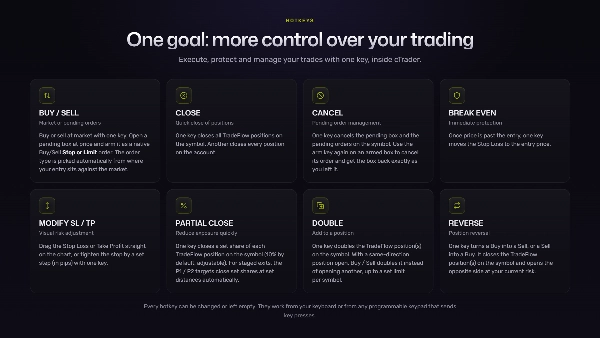
🟆 One-Key Trade Management

Customizable hotkeys give you immediate control over active positions.
Depending on your configuration, a single key can be used to:

  • Move the stop-loss to breakeven
  • Tighten or modify the stop-loss
  • Take partial profits
  • Scale into an existing position
  • Reverse a position
  • Close a position
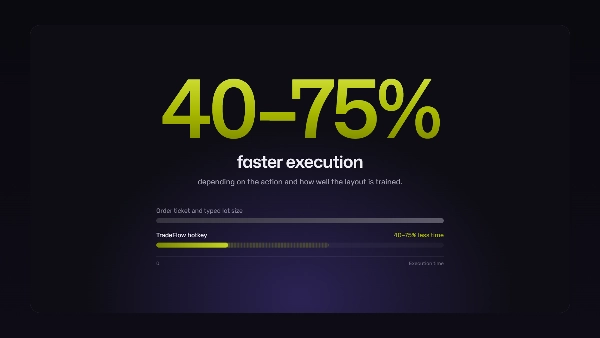
The goal is simple: reduce the number of actions required between decision and execution.


🟆 Drag-to-Manage Positions

  • Adjust Stop-Loss and Take-Profit levels directly on the chart by dragging their respective price levels.
  • TradeFlow™ updates the associated risk and exposure values in real time, while position labels provide immediate visibility into the trade's exposure in pips and account-currency value.


🟆 Automated Scale-Out Targets

  • Define Partial 1 and Partial 2 profit targets and let TradeFlow automatically close the configured portion of the position when those levels are reached.
  • Optional follow-up actions can also be configured, including moving the remaining stop-loss to Half-distance or Breakeven.
  • This allows common trade-management sequences to be handled automatically without requiring constant manual intervention.


🟆 Account Drawdown Protection

  • Set a maximum account-wide loss limit.
  • Once the configured threshold is breached, TradeFlow™ blocks new trade entries until the protection is manually reset.
  • This operates as an additional account-level guardrail, helping prevent new exposure after a predefined loss threshold has already been reached.


🟆 Multi-Chart Synchronization

  • TradeFlow™ works across your open cTrader charts rather than treating each chart as an isolated setup.
  • Hotkeys act on the chart that was interacted with most recently, while risk presets and configuration are shared globally.
  • Chart-based tools can also synchronize across multiple timeframes of the same symbol, keeping your execution environment consistent as you move between views.


╭───────────────────────╮
🟆 Designed for Active Traders 🟆
╰───────────────────────╯

TradeFlow™ is built for traders who actively make and manage execution decisions and want those decisions translated into action with as little friction as possible.

It is particularly suited for traders who:

  • Trade scalping, day trading, and discretionary swing setups where execution speed matters.
  • Prefer to scale into a single position, adjust risk dynamically, and take partial profits as the trade develops.
  • Manage entries, exits, stop-losses, and partial profits across one or multiple symbols within a consistent workflow.
  • Prefer or require hotkey-driven execution and direct interaction with price levels on the chart.
  • Want to preserve maximum chart space without sacrificing execution speed.
  • Prefer one streamlined execution workflow instead of repeatedly configuring complex order panels or separate setups for each trade.
  • Already have a defined trading strategy and want a tool that executes and manages their decisions rather than generating the strategy for them.


🟆 Position Model & Scaling

  • TradeFlow™ is designed exclusively for Netting Position mode.
  • Each symbol is managed as one net position, allowing you to build, reduce, and manage that position throughout its lifecycle.
  • This keeps exposure consolidated and makes position management predictable.


🟆 Scaling In

  • When additional exposure is required, the Double feature allows you to scale into the existing position without creating separate positions for the same symbol.
  • The result is a single consolidated position that can continue to be managed through the same stop-loss, take-profit, and scaling workflow.


What TradeFlow™ Does Not Support

  • The plugin intentionally does not support workflows based on:
  • Multiple independent positions on the same symbol
  • Grid-style trading structures
  • Large numbers of scattered stop/limit orders across the chart
  • Fragmented multi-position management
This is a deliberate product decision. TradeFlow is built around clear, controlled execution of a single net position, rather than complex multi-order structures.


╭─────────────────────╮
🟆 UI & Chart Customization 🟆
╰─────────────────────╯

  • Customize the panel color theme to match your preferred trading environment and chart appearance.
  • Customize the colors used for entry, stop-loss, take-profit, and other relevant price levels, making important trade information easier to distinguish at a glance.
  • Custom TradeFlow position levels are designed to mirror the behavior and visual conventions of native cTrader position levels.
This keeps chart interaction familiar while extending the functionality available for execution and position management.


╭─────────────────────────╮
🟆 Technical & Operational Details 🟆
╰─────────────────────────╯

  • TradeFlow™ is built on .NET 10 and tested against the latest supported cTrader Desktop release.
  • The implementation is designed to remain lightweight while providing the performance and responsiveness required for active trading workflows.


╭─────────────────────────────╮
🟆 Descriptive Logging & Fault Tolerance 🟆
╰─────────────────────────────╯

  • TradeFlow™ maintains descriptive internal logs for plugin actions and execution events, providing useful information for troubleshooting and diagnostics.
  • Built-in fault-tolerance mechanisms are designed to handle unexpected conditions gracefully and reduce the impact of isolated errors on the overall trading workflow.


╭──────────────╮
🟆 Closing Notes 🟆
╰──────────────╯

TradeFlow™ is not a trading strategy, signal generator, or grid system.

It is an execution and position-management layer for cTrader, built for traders who already know what they want to do and need their platform to let them do it quickly, consistently, and with clearly defined risk.

The product is intentionally opinionated: fast manual execution, risk-based sizing, direct chart interaction, hotkey control, and one net position per symbol.

That focus keeps the workflow simple, reduces unnecessary interaction with the platform, and puts execution where it belongs—directly in the hands of the trader.


╭───────────────────╮
🟆 Support & Onboarding 🟆
╰───────────────────╯

Support is available before and after purchase.

For users who want help getting started, one-on-one onboarding is also available through a screen-sharing session, where we can walk through the plugin, settings, hotkeys, and workflow directly on your cTrader setup.

For questions or assistance, you can DM me via contact details on the product page, use the Discussion tab on the product page, or find my profile in the official cTrader Discord and post in the relevant product thread under Promote.


⚡ Trade faster. Manage easier. Stay within your risk. ⚡

สรุป

AI summary
TradeFlow™ is a trading assistant plugin for cTrader Desktop on Windows and macOS, designed for active traders who require fast, risk-based manual trade execution and direct position control. It integrates automatic position sizing based on fixed-dollar risk defined in the account’s native currency, rapid order execution via customizable hotkeys, and chart-based trade management tools into a streamlined workflow.

Key features include:
- Risk-based position sizing calculated from entry and stop-loss distances.
- Visual on-chart tools to set entries, stop-losses, and take-profit levels with real-time risk display.
- One-key trade management for stop-loss adjustments, partial profit-taking, scaling in, reversing, or closing positions.
- Automated scale-out profit targets with configurable follow-up actions.
- Account-level drawdown protection that blocks new trades when loss limits are reached.
- Multi-chart synchronization sharing risk settings and hotkeys across charts.
- Designed exclusively for Netting mode, managing one consolidated net position per symbol with integrated scaling.

TradeFlow™ emphasizes minimal friction by keeping execution and management close to the chart, supporting scalping, day trading, and discretionary swing trading. It does not generate trading signals or support multiple independent positions, grid trading, or fragmented multi-position management. The plugin offers customizable UI themes and maintains detailed logs for diagnostics. Support and onboarding via screen-sharing sessions are available.
โปรไฟล์ปลั๊กอิน
หมวดหมู่ปลั๊กอิน
การจัดการการเทรด
การเข้าถึงข้อมูล
โพสิชัน
คำสั่ง
บัญชี
ข้อมูลตลาด
กราฟ
เวิร์กสเปซ
ประเภทคำสั่งที่รองรับ
Market
Limit
Stop
Stop-limit
โมเดลความเสี่ยง
Fixed lot
Fixed risk percentage
Equity-based
Dynamic
การควบคุมความเสี่ยงที่รองรับ
Stop Loss
Take Profit
Trailing Stop Loss
จุดคุ้มทุน
Stop Loss อิควิตี้
ขีดจำกัดรายวัน
ขีดจำกัด Drawdown สูงสุด

รีวิวจากลูกค้า

0.0
รีวิว: 0
รีวิวจากลูกค้า
ยังไม่มีรีวิวสำหรับผลิตภัณฑ์นี้ หากเคยลองแล้ว ขอเชิญมาเป็นคนแรกที่บอกคนอื่น!

การสนทนา

คำถามที่พบบ่อย

Stop Loss (SL) Manager
One-click Trading
Fixed Risk %
Chart UI Tools
Risk/Reward
Trailing Stop
Take Profit (TP) Manager
ผลิตภัณฑ์ที่มีให้บริการผ่าน cTrader Store รวมถึงบอทการเทรด อินดิเคเตอร์ และปลั๊กอิน มีให้บริการโดยนักพัฒนาบุคคลที่สามและมีไว้เพื่อวัตถุประสงค์ในการเข้าถึงข้อมูลและทางเทคนิคเท่านั้น cTrader Store ไม่ใช่โบรกเกอร์และไม่ได้ให้คำแนะนำการลงทุน คำแนะนำส่วนบุคคล หรือการรับประกันผลการดำเนินงานในอนาคต

เพิ่มเติมจากผู้เขียนคนนี้

อินดิเคเตอร์
Prop
Forex
+12
Lightweight Risk-Reward Visualization Tool.
ปลั๊กอินเดสก์ท็อป
Forex
Crypto
+3
Build custom second and tick charts using adjustable bar sampling intervals.
ปลั๊กอินเดสก์ท็อป
Stocks
Indices
+1
Build custom charts based on specific trading sessions.
cBot
Fixed Risk %
No Overtrading
+5
Turn Your Keyboard into a Trading Console — Instant Entries, Exits, and Precision Risk Control.
อินดิเคเตอร์
Forex
Crypto
+5
Experience a new approach with amplitude-based momentum analysis. Smart Trend Detection That Adapts to Market Volatility
อินดิเคเตอร์
Key Levels
Supertrend
+1
A cTrader indicator for clear trend direction, entry timing, and on-chart risk visualization.
อินดิเคเตอร์
Imbalance
Key Levels
+2
A Next-Generation Adaptive Oscillator with Z-Score Regime Engine.
"wt.Z-Trend" โลโก้
เรตติ้งสูง
4.5
(4)
จาก $9
อินดิเคเตอร์
Forex
Crypto
+5
This indicator combines two independent analytical engines into a single overlay on your chart.
ปลั๊กอินเดสก์ท็อป
Chart UI Tools
Trend Reversal (TRev) charts plot candlesticks according to the distance price moves, not the passage of time.
อินดิเคเตอร์
Imbalance
Order Block
+5
Spot the moments when price and order flow disagree - across every timeframe, at a glance.
อินดิเคเตอร์
ATR
Supertrend
+5
Read price differently. Measure what the market actually does.
cBot
Fixed Lot
Supertrend
+5
Find the settings. Validate the strategy.
2.2
อัตราส่วน กำไรต่อขาดทุน

นอกจากนี้คุณยังอาจชอบ

ปลั๊กอินเดสก์ท็อป
Trade Journal
AI Integration
+1
Turn your closed-trade history into an at-a-glance monthly calendar and a deep performance dashboard.
"Risk Manager Pro" โลโก้
ยอดนิยม
4.0
(4)
$45
/
$90
ปลั๊กอินเดสก์ท็อป
SMC
Grid
+5
The all-in-one trade management plugin that automates your risk, execution, and position management.
ปลั๊กอินเดสก์ท็อป
Trade Journal
AI Integration
+1
#1 Trade Journal, PnL analytics, bot monitoring and strategy statistics.
ปลั๊กอินเดสก์ท็อป
Forex
Crypto
+2
Get TradingView charts & heatmaps directly in cTrader!
ปลั๊กอินเดสก์ท็อป
Risk/Reward
Chart UI Tools
+3
Visual cTrader backtesting tool with trade drawing, risk sizing, stats, and automatic trade simulation.
ปลั๊กอินเดสก์ท็อป
AI
ATR
+27
Trade Analytics delivers advanced trading insights and heatmaps directly inside TradeWatch.
ปลั๊กอินเดสก์ท็อป
Forex
Signal
+2
Adaptive Renko chart builder for precise, flexible trading - ideal for both scalping and trend analysis.
ปลั๊กอินเดสก์ท็อป
Risk Reward management tools (风险回报管理工具)
ปลั๊กอินเดสก์ท็อป
Risk/Reward
Trade Journal
+5
cTrader Journal - Automatic Trade Capture. Offline Reviews. No Subscription.
ปลั๊กอินเดสก์ท็อป
Chart UI Tools
Draw dynamic, angled Fibonacci retracements on cTrader charts. Fully customize up to 20 levels, colors, and styles.
"BatchTPSL" โลโก้
ยอดนิยม
4.5
(2)
$40
/
$60
ปลั๊กอินเดสก์ท็อป
Forex
Crypto
+4
Apply Stop Loss and Take Profit to all positions and pending orders in one click.
"RiskManagement - Full" โลโก้
ยอดนิยม
4.5
(4)
$45
/
$55
ปลั๊กอินเดสก์ท็อป
Prop
Forex
+4
Professional risk management plugin with automatic lot calculation, chart panels, and R:R automation. Version 1.4.2.
ปลั๊กอินเดสก์ท็อป
Prop
Forex
+4
Visual monthly trading journal that displays your performance day-by-day in a calendar view.
ปลั๊กอินเดสก์ท็อป
Market Scanner
An 8-currency strength ranking, multi-TF heatmap and impulse tracker. Read the real driver at a glance. Read-only.
ปลั๊กอินเดสก์ท็อป
ECN-friendly
Chart UI Tools
Any timeframe cTrader lacks: seconds, minutes, hours, tick & range bars, Heikin-Ashi in the timeframe menu.
"PnL Calendar" โลโก้
ยอดนิยม
5.0
(4)
$50
/
$70
ปลั๊กอินเดสก์ท็อป
Prop
Forex
+3
Visual calendar with daily PnL, trades, win rate, profit factor, and performance insights.
ปลั๊กอินเดสก์ท็อป
AI
ATR
+27
Turn your cTrader trade history into a visual performance dashboard to see trading patterns and strategy strength
ปลั๊กอินเดสก์ท็อป
Forex
Crypto
+3
Build custom second and tick charts using adjustable bar sampling intervals.

ราคา

98.17M
ปริมาณการเทรด
147.13K
Pips ที่ได้กำไร
89
การขาย
523
ติดตั้งฟรี