Açıklama
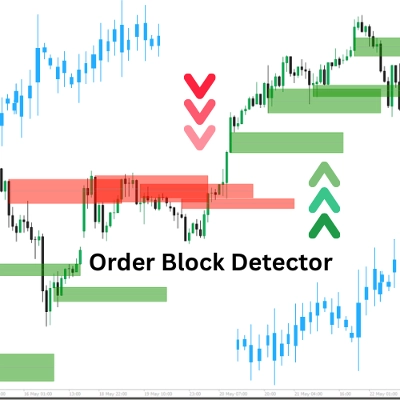
"Order Block Detector" göstergesi, fiyat grafiğinde Order Block'ları (OB'ler) tespit etmek ve göstermek için tasarlanmıştır—büyük oyuncuların (kurumların) önemli alım veya satım emirleri verdiği, genellikle güçlü fiyat tepkilerini tetikleyen anahtar bölgeler. Bu, tüccarların daha akıllıca işlem girişleri, stop-loss veya kar al noktaları için potansiyel destek/direnç bölgelerini belirlemelerine yardımcı olur.
Kavram
- Order Block'lar: Piyasanın ağır kurumsal emir akışı nedeniyle geri döndüğü veya durakladığı fiyat bölgeleridir. Gösterge, OB'leri hacim pivot zirvelerini ve piyasa durumunu (boğa/ayı) analiz ederek tespit eder.
- Nasıl çalışır:
-
- Yüksek/düşükleri bir geriye dönük dönemle (Length) karşılaştırarak piyasa durumunu (boğa/ayı) belirler.
- Anahtar fiyat seviyelerine bağlı hacim zirvelerinde OB'leri tanımlar.
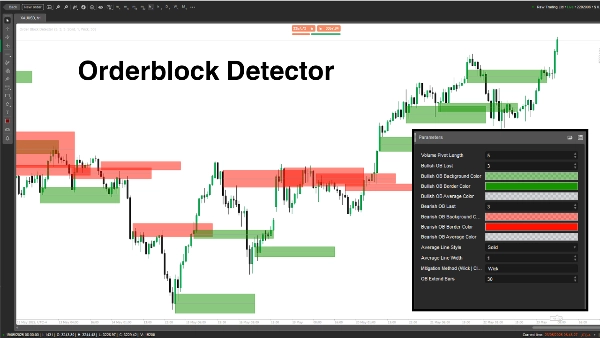
- OB'leri işaretlemek için dikdörtgenler ve ortalama çizgiler çizerken, fiyat kırıldığında azaltılmış OB'leri kontrol eder ve kaldırır.
- Kullanım alanı: Tüccarlar OB'leri işlem kurulumları, risk yönetimi veya kar hedefleri için yüksek olasılıklı bölgeler olarak kullanabilir.
Parametre Açıklaması
- Hacim Pivot Uzunluğu (Length, Varsayılan: 5, Min: 1)
-
- Ne yapar: Yüksek/düşükler ve hacim pivot zirvelerini hesaplamak için geriye dönük dönem (bar sayısı) belirler.
- Neden önemlidir: Daha uzun bir uzunluk doğruluğu artırır ancak OB sıklığını azaltır; daha kısa uzunluk daha fazla OB yakalar ancak gürültü içerebilir.
- Boğa OB Son (BullExtLast, Varsayılan: 3, Min: 1)
-
- Ne yapar: Saklanan ve takip edilen boğa OB sayısını sınırlar.
- Neden önemlidir: Gösterilen boğa OB sayısını sınırlandırarak grafiğin temiz kalmasını ve performansın optimize edilmesini sağlar.
- Boğa OB Arka Plan Rengi (BgBullCss, Varsayılan: #80169400)
-
- Ne yapar: Boğa OB dikdörtgenlerinin arka plan rengini ve şeffaflığını ayarlar.
- Neden önemlidir: Grafikte boğa OB'leri görsel olarak ayırt etmeye yardımcı olur.
- Boğa OB Kenarlık Rengi (BullCss, Varsayılan: #169400)
-
- Ne yapar: Boğa OB dikdörtgenlerinin kenarlık rengini tanımlar.
- Neden önemlidir: Boğa OB bölgelerinin görünürlüğünü artırır.
- Boğa OB Ortalama Rengi (BullAvgCss, Varsayılan: #609598A1)
-
- Ne yapar: Boğa OB'ler içindeki ortalama çizgiyi renklendirir.
- Neden önemlidir: OB'nin orta noktasını işaretler ve tüccarlar için önemli bir referans seviyesi olarak hizmet eder.
- Ayı OB Son (BearExtLast, Varsayılan: 3, Min: 1)
-
- Ne yapar: Saklanan ve takip edilen ayı OB sayısını sınırlar.
- Neden önemlidir: BullExtLast gibi, ayı OB'leri sınırlandırarak grafiğin dağınık olmasını engeller.
- Ayı OB Arka Plan Rengi (BgBearCss, Varsayılan: #80FF1100)
-
- Ne yapar: Ayı OB dikdörtgenlerinin arka plan rengini ve şeffaflığını ayarlar.
- Neden önemlidir: Ayı OB'leri boğa OB'lerden ayırır.
- Ayı OB Kenarlık Rengi (BearCss, Varsayılan: #FF1100)
-
- Ne yapar: Ayı OB dikdörtgenlerinin kenarlık rengini tanımlar.
- Neden önemlidir: Ayı OB'lerin hızlı tanımlanması için öne çıkmasını sağlar.
- Ayı OB Ortalama Rengi (BearAvgCss, Varsayılan: #609598A1)
-
- Ne yapar: Ayı OB'ler içindeki ortalama çizgiyi renklendirir.
- Neden önemlidir: İşlem planlaması için ayı OB'lerin merkezi fiyat seviyesini vurgular.
- Ortalama Çizgi Stili (LineStyle, Varsayılan: Solid)
-
- Ne yapar: OB ortalama çizgisinin stilini ayarlar (Düz, Kesikli, Noktalı).
- Neden önemlidir: Ortalama çizginin görünümünü tüccar tercihlerine göre özelleştirir.
- Ortalama Çizgi Genişliği (LineWidth, Varsayılan: 1, Min: 1)
-
- Ne yapar: OB ortalama çizgisinin kalınlığını ayarlar.
- Neden önemlidir: Ortalama çizginin grafikte ne kadar belirgin görüneceğini kontrol eder.
- Azaltma Yöntemi (Mitigation, Varsayılan: "Wick")
-
- Ne yapar: OB'lerin geçersiz sayılma şeklini tanımlar:
-
- Wick: Azaltmayı kontrol etmek için en düşük fiyatı (boğa OB) veya en yüksek fiyatı (ayı OB) kullanır.
- Close: Azaltmayı kontrol etmek için kapanış fiyatını kullanır.
- Neden önemlidir: Göstergeyi, fiyatın OB bölgelerini kırmasına karşı ne kadar hassas yapacağını etkiler ve OB'lerin ne zaman kaldırılacağını belirler.
Order Block Detector, hacim artışları ve fiyat hareketlerine dayalı kurumsal emir bölgelerini tespit etmek için güçlü bir araçtır. Net OB dikdörtgenleri ve ortalama çizgiler çizer ve geçersiz olanları dinamik olarak kaldırır. Tüccarlar, tespit, görüntüleme ve OB yönetimini işlem tarzlarına uyacak şekilde ince ayar yapmak için parametreleri değiştirebilir.
Özet
The indicator works by analyzing volume pivot highs and determining market state (bullish or bearish) based on highs and lows over a configurable lookback period. It marks OBs with rectangles and average lines, dynamically removing those invalidated when price breaks through the zones. Users can customize parameters such as the lookback length, the number of bullish and bearish OBs tracked, colors and styles of OB rectangles and average lines, and the method used to detect OB mitigation (using wick or close prices).
This flexibility allows traders to tailor the detection and visualization of Order Blocks to their trading style, aiding in identifying high-probability zones for trade setups, risk management, and profit targeting.
Müşteri değerlendirmeleri
5 | 100 % | |
4 | 0 % | |
3 | 0 % | |
2 | 0 % | |
1 | 0 % |