
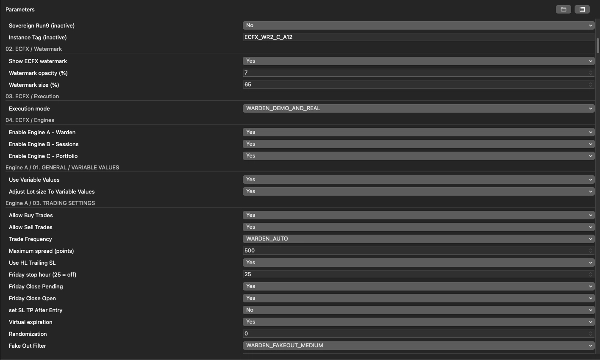
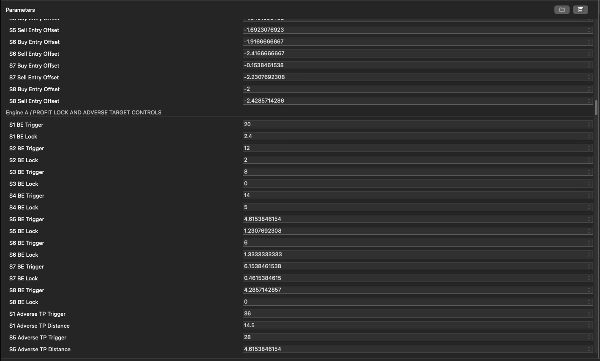
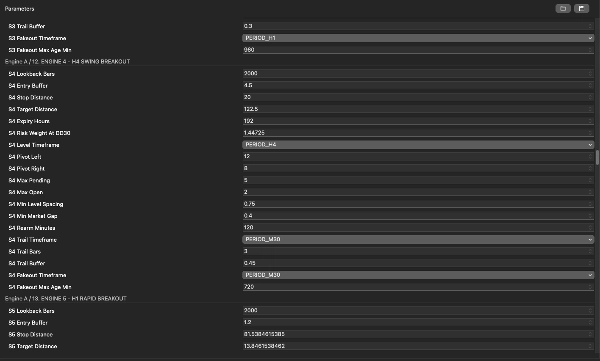

Açıklama
Harika dostum — sadece sembolden oluşan resim başarıyla yüklendi. Aşağıda cTrader listesi için kullanabileceğin metin yer almaktadır.
Bunu, düzenli yerel Warden R2 cTrader sürümünüz2.007 kaynağına dayandırdım. Mac'inizde birkaç eski ve “Video” sürüm bulunuyor, bu yüzden seçilen Store sürümü yayınlamadan önce eşleşmelidir.
Kısa açıklama — 120 karakterin altında
Üç motorlu XAUUSD cBot, çıkış, oturum ve portföy stratejilerini yapılandırılabilir risk kontrolleriyle birleştirir.
Detaylı açıklama — yapıştırmaya hazır
ECFX XAU Warden — cTrader için Otomatik Altın Ticareti
ECFX XAU Warden, XAUUSD altın ticareti için tasarlanmış çoklu stratejili bir cBot'tur. Fiyat seviyesi çıkışları, planlanmış oturum ticareti ve teknik strateji portföyünü bir araya getiren üç bağımsız kontrol edilen ticaret motorunu tek bir uygulamada birleştirir.
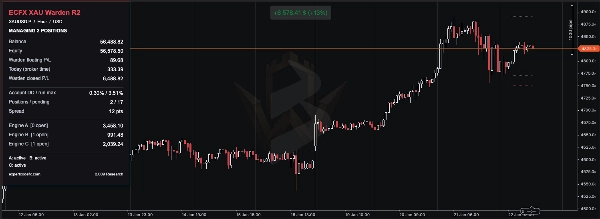
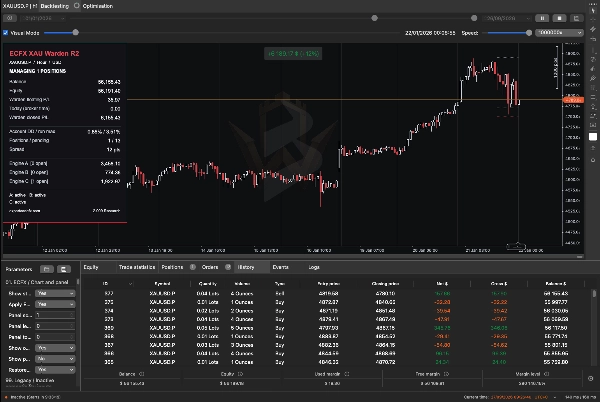
Ortak bir gösterge paneli, hesap bakiyesi, öz sermaye, açık kar ve zarar, düşüş, açık pozisyonlar, bekleyen emirler ve bireysel motor sonuçlarını gösterir.
Warden, bir H1 altın grafiğinde, koruma hesabı kullanarak çalışacak şekilde tasarlanmıştır. Stratejileri ayrıca dahili olarak diğer zaman dilimlerini analiz eder. Her motor etkinleştirilebilir veya devre dışı bırakılabilir, böylece kullanıcılar bireysel bileşenleri veya birleşik sistemi test edebilir.
Warden nasıl işlem yapar
Motor A — Fiyat seviyesi çıkış stratejileri
Motor A, birden fazla zaman diliminde onaylanmış salınım yüksek ve düşüklerini belirler ve bu seviyeleri alış-stop ve satış-stop emirleri hazırlamak için kullanır.
Girişler, seçilen stratejinin giriş tamponu, minimum mesafe, emir aralığı kuralları ve maruz kalma sınırlarına tabi olarak nitelikli fiyat seviyelerinin ötesine yerleştirilir. Bekleyen emirler piyasa yapısı değiştikçe süresi dolabilir veya yenilenebilir.
Motor, dokuz yapılandırılabilir strateji yuvası içerir. Kullanılan sayı, seçilen işlem sıklığı moduna, otomatik seçim kurallarına veya manuel strateji anahtarlarına bağlıdır. Motorun etkinleştirilmesi her yuvanın mutlaka aktif olacağı anlamına gelmez.
İşlem yönetimi şunları içerir:
- Stratejiye özgü stop-loss ve take-profit mesafeleri.
- Yapılandırılabilir kar kilitleme ve salınıma dayalı takip eden stop davranışı.
- Yanlış çıkış filtresi.
- Seçilen stratejilerde isteğe bağlı dinamik take-profit ayarı.
- Yapılandırılabilir spread, Cuma ve NFP ile ilgili giriş kontrolleri.
Dinamik hedef ayarı, olumsuz bir fiyat hareketinden sonra çıkışı yaklaştırabilir. Bu nedenle, ayarlanmış take-profit seviyesinde kapanan bir işlem yine de zarar edebilir.
Motor B — Oturum bazlı ticaret
Motor B, yapılandırılmış bir broker zamanı saati kullanarak ayrı oturum kurallarını birleştirir.
Mevcut bileşenleri şunları içerir:
- Aralık çıkışı: belirli bir dönemde yüksek-düşük aralığı oluşturur ve ardından bunun üzerinde veya altında bir kırılma olup olmadığını kontrol eder. Önceki gün mum gövdesi filtresi de uygulanır.
- Planlanmış alış: uygun haftanın günlerinde tanımlı bir zaman penceresinde alış girişi arar ve ardından tutma süresi kuralını kullanarak işlemi yönetir.
- İsteğe bağlı momentum çıkışı: çok günlük yüksek veya düşük ile yakın fiyat momentum eşiğini kontrol eder.
Aralık ve planlanmış alış bileşenleri incelenen kaynak varsayılanlarında etkinleştirilmiştir; isteğe bağlı momentum bileşeni devre dışıdır.
Pozisyonlar koruyucu stoplar ve zamana dayalı çıkışlar kullanır. Motor ayrıca ayarlara bağlı olarak karşıt satış sinyaline tepki vermeden önce planlanmış alış pozisyonunu kapatabilir.
İsteğe bağlı tekrarlanabilir zamanlama, seviye ve boyut varyasyonu mevcuttur. Bir geriye dönük testi çoğaltırken rastgele tohum ve ilgili ayarları değiştirmeyin.
Bu motor içindeki oturum etiketleri A, B ve C, Warden’ın üç ana motorundan ayrı kendi alt stratejileridir.
Motor C — Teknik strateji portföyü
Motor C, üç iç grup birleştirir:
- Teknik portföy: hareketli ortalama ve RSI koşulları, yapı kırılmaları, volatilite sıkışmaları, geri çekilmeler, likidite süpürmeleri ve dönüşüm desenleri dahil olmak üzere on iki sinyal ailesi içerir.
- Trend tamamlayıcı: hareketli ortalama yönü, ATR volatilitesi ve 48-bar/72-bar kırılma seviyelerini kullanarak koşullu girişler hazırlar.
- Egemen stratejiler: ATR tabanlı giriş, stop ve hedef mesafeleriyle ayrı bekleyen emir kurulumları kullanır.
Strateji anahtarları, izin verilen yön filtreleri, oturum kuralları, spread limitleri, soğuma süreleri ve maruz kalma sınırları hangi sinyallerin emir olabileceğini belirler. On iki sinyal ailesinin varlığı, her yapılandırmada tümünün işlem yapacağı anlamına gelmez.
Gruba bağlı olarak, yönetim stop loss, kar hedefleri, başa baş ayarlamalar, ATR takip eden stoplar, bekleyen emir süresi dolumu ve maksimum tutma sürelerini içerir.
Motorlar birlikte nasıl çalışır
Her motor, kendi işlemlerini özel tanımlayıcılar ve etiketler aracılığıyla tanımlar ve yönetir. Aynı anda birden fazla pozisyon açık olabilir ve farklı stratejiler karşıt pozisyonlar tutabilir.
Tüm motorlar aynı hesap öz sermayesi ve kullanılabilir marjı paylaşır. Bir stratejiye atanan risk yüzdesi, tüm cBot için maksimum risk yüzdesi değildir.
Aynı hesap ve sembolde aynı sahiplik ayarlarıyla çoğaltılmış Warden örneklerini çalıştırmaktan kaçının. Mevcut Warden işlemleri açıkken işlem tanımlayıcılarını veya sahiplikle ilgili ayarları değiştirmeyin.
Risk ayarları ve önemli farklar
Warden birkaç boyutlandırma yöntemi ve koruyucu kontrol sağlar, ancak davranışları motorlar arasında farklılık gösterir.
Motor A, sabit başlangıç lotlarını ve risk tabanlı boyutlandırmayı destekler. Onun Düşüş boyutlandırma referansı (%) pozisyon boyutlandırmasını etkiler; otomatik olarak zorunlu bir zarar tavanı değildir. İncelenen varsayılanlarda günlük düşüş limiti devre dışı ve ayrı toplam düşüş uygulama anahtarı kapalıdır.
Motor B, otomatik, yüzde risk ve sabit lot boyutlandırmayı destekler. Etkin olmayan bir boyutlandırma alanındaki sıfır, işlemi mutlaka devre dışı bırakmaz. İncelenen varsayılanlarda öz sermaye düşüşü kapatma seçeneği devre dışıdır.
Motor C, günlük zarar kontrolleri, düşüş kilitleri, pozisyon limitleri ve ek grup özgü korumalar sağlar. Onun Backtest Bypass Permanent Max Drawdown Lock ayarı incelenen varsayılanlarda etkinleştirilmiştir. Bu, tarihsel test davranışının bu kilit uygulanırken çalışmadan farklı olmasına neden olabilir. Bir testi canlı işlem temsilcisi olarak yorumlamadan önce bu ayarı açıkça gözden geçirin.
Bazı kontroller hesap genelindeki öz sermayeyi izler ancak yalnızca kendi motorlarının sahip olduğu pozisyonlarda işlem yapar. Bunlar tek bir hesap genelinde zarar garantisi olarak tanımlanmamalıdır. Motor B ayrıca etkinleştirildiğinde ilgisiz işlemleri etkileyebilen Tüm Hesap Pozisyonlarını Kapat seçeneğine sahiptir.
Stop loss ve yazılım korumaları, boşluklar, kayma, bağlantı kesilmeleri veya reddedilen işlem talepleri sırasında tam maksimum zararı garanti edemez.
İlk kurulum
- Warden'ı cTrader Store üzerinden kurun ve cTrader Windows veya Mac'i açın.
- İlk kurulum için bir demo koruma hesabı seçin.
- cTrader Algo'yu açın, Warden'ı bulun ve bir örnek oluşturun.
- Brokerinizin altın sembolünü, örneğin XAUUSD veya uygun ekli eşdeğerini seçin.
- Örnek grafik zaman dilimini H1 olarak ayarlayın.
- Tam sürümünüz için varsayılanlarla veya o sürüm için sağlanan ön ayarla başlayın.
- Üç ana motor anahtarını ve her motor içindeki risk ayarlarını gözden geçirin.
- İncelenen kaynak, yalnızca geriye dönük test, demo artı geriye dönük test veya demo/canlı artı geriye dönük testi destekler. Varsayılanı demo ve canlı yürütmeye izin verir.
- Başlamadan önce strateji saati, spread birimleri ve broker sembol özelliklerini kontrol edin.
- Demo üzerinde başlayın ve başarılı başlatma, geçmiş yükleme mesajları ve herhangi bir emir hatası için günlük kaydını inceleyin.
Her yapılandırma için uygun evrensel bir minimum depozito veya kaldıraç ayarı yoktur. Hesap büyüklüğü, minimum işlem hacmi, stop mesafesi, eşzamanlı pozisyonlar ve broker marj gereksinimleri birlikte değerlendirilmelidir.
Broker zamanı, puanlar ve pipler
Oturum zamanlaması stratejiyi doğrudan etkiler.
MT5 broker UTC ofseti (dakika), stratejinin cTrader uygulaması içindeki referans saatini tanımlar. Sabit bir ofsettir ve otomatik olarak yaz saati uygulamasını takip etmez. Motor C ayrıca ayrı zaman ofseti ayarları içerir, bu nedenle bunlar tutarlı şekilde kontrol edilmelidir.
MT5 puan boyutu, bir strateji puanının fiyat değerini kontrol eder. Sıfır değeri, sembolün basamaklarından türetilir. Bu, cTrader’ın yerel pip boyutundan farklı olabilir.
Motor C, strateji pipini 0.01 fiyat birimi olarak korur. Farklı altın sembolleri arasında spread veya mesafe değerlerini birimlerini kontrol etmeden kopyalamayın.
Warden nasıl geriye dönük test edilir
- Warden örneğinin Geriye Dönük Test bölümünü cTrader Windows veya Mac'te açın.
- İstenen altın sembolünü ve H1 zaman dilimini seçin.
- Test tarihlerini ve başlangıç sermayesini seçin. Hesap para birimini, kaldıraç oranını ve tam ön ayarı kaydedin.
- Bekleyen emirlerin ve bar içi yönetimin ayrıntılı değerlendirmesi için Sunucudan Tick verisi seçin.
- Spread ve komisyon varsayımlarını hedeflenen brokeri yansıtacak şekilde yapılandırın. cTrader tarafından gösterilen birimleri onaylayın.
- Strateji zaman ofsetlerini, puan boyutu eşlemesini ve risk kilidi ayarlarını kontrol edin.
- Gösterge panelini, girişleri, çıkışları ve emir davranışını incelemek için önce kısa görsel bir test yapın.
- Mümkün olduğunda görsel mod olmadan tam değerlendirmeyi çalıştırın.
- Sonuçları kesin olarak değerlendirmeden önce testin seçilen bitiş tarihine ulaşmasına izin verin.
- Raporu ve parametre ayarlarını kaydedin, böylece çalışma tekrarlanabilir.
Warden, dahili zaman dilimleri ve geriye dönük bakışlar için tarihsel verilere ihtiyaç duyar. Eksik geçmiş, sinyallerin gecikmesine veya bazı stratejilerin işlem yapamamasına neden olabilir. Günlüğü inceleyin ve değerlendirmeyi planladığınız dönemden önce yeterli geçmişe izin verin.
Platformun geriye dönük test kontrolleri için resmi cTrader geriye dönük test kılavuzuna başvurun.
Sonuçlarda neleri gözden geçirmeli
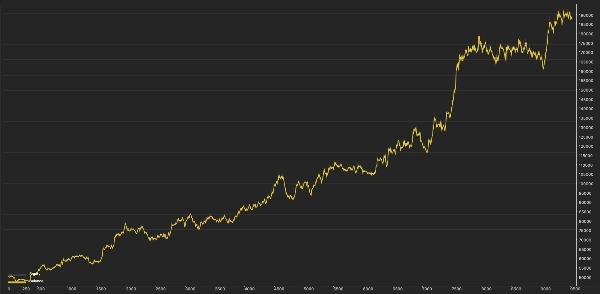
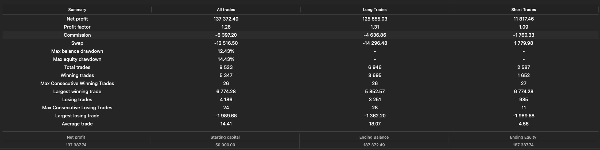
Son kar rakamından fazlasını değerlendirin:
- Maksimum öz sermaye düşüşü ve bakiye düşüşü.
- Gerçekleşmiş kar ile sonundaki açık kar veya zarar karşılaştırması.
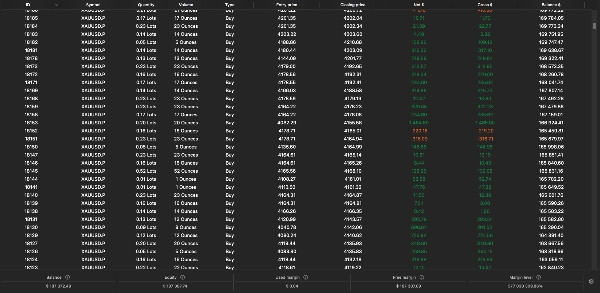
- İşlem sayısı, kayıp serileri ve tutma süreleri.
- Eşzamanlı maksimum pozisyonlar ve marj kullanımı.
- Spread ve komisyon duyarlılığı.
- Emir reddi, eksik geçmiş uyarıları ve risk kilidi olayları.
- Farklı piyasa dönemlerindeki sonuçlar.
Her motoru ayrı ayrı ve birleşik yapılandırmayı test edin. İzole motorlardan elde edilen sonuçlar, hesap öz sermayesi, boyutlandırma, marj ve hesap tabanlı korumalar etkileştiği için birleşik sonuçla mutlaka aynı olmayacaktır.
Optimizasyon yapıyorsanız, ayarları seçmek için kullanılmayan ayrı bir dönem tutun. Sadece en yüksek tarihsel karı ürettiği için bir yapılandırmayı seçmekten kaçının.
Gösterge paneli ve operasyonel kontroller
Ortak panel, hesap koşullarını Warden’ın kendi ticaret sonuçlarından ayırmaya yardımcı olur. Başka ticaret etkinliği olan bir hesapta, hesap bakiyesi ve öz sermaye bu etkinliği de içerir.
İşlem olmaması durumunu araştırmadan önce şunları kontrol edin:
- Hesabın netleştirme değil, koruma modunda olması.
- Yürütme modunun mevcut ortamı izin vermesi.
- Hedeflenen motorlar ve alt stratejilerin etkin olması.
- Gerekli tarihsel verilerin yüklenmiş olması.
- Ticaret oturumunun açık olması.
- Spread, marj ve minimum hacim gereksinimlerinin karşılanması.
- Günlük veya düşüş kilidinin daha fazla faaliyeti engellememesi.
- Mevcut emirlerin veya pozisyonların maruz kalma sınırına ulaşmamış olması.
cBot'u durdurmak, pozisyonlarını kapatmak veya tüm motorlardaki her bekleyen emri iptal etmek anlamına gelmez. Durdurduktan sonra hesabı inceleyin. Dinamik takip, zamanlı çıkışlar ve diğer yazılım yönetimli işlemler için cBot'un çalışmaya devam etmesi gerekir.
Platform farklılıkları
Warden’ın cTrader uygulaması, cTrader’ın yürütme, piyasa verisi ve hesap sistemlerini kullanır. MT5 ve cTrader işlemlerinin veya performansının birebir aynı olduğu kanıtlanmamıştır.
MQL5 ekonomik takvimi bu uygulamada mevcut değildir. Uygulanabilir NFP filtrelemesi sağlanan zaman damgalarına veya yaklaşık bir yedek yönteme dayanır; kapsamlı bir canlı haber filtresi olarak değerlendirilmemelidir.
etkin olmayan veya eski olarak işaretlenmiş girdiler uyumluluk için tutulur ve bu sürümde aktif işlevsellik sağlamaz.
Risk bildirimi
Ticaret risk içerir. Geçmiş performans gelecekteki sonuçları garanti etmez. Tarihsel simülasyonlar fiyatlandırma, spread, komisyon, kayma, veri kalitesi, marj ve yürütme koşulları nedeniyle canlı ticaretten önemli ölçüde farklı olabilir. Warden kar, sabit düşüş limiti veya başarılı bir prop-firma meydan okuması tamamlaması garanti etmez.
Özet
- Engine A employs price-level breakout strategies by identifying swing highs and lows across multiple timeframes to place buy-stop and sell-stop orders with configurable stop-loss, take-profit, trailing stops, and filters for false breakouts and news events.
- Engine B uses session-based trading rules based on broker time, including range breakouts, scheduled buys, and optional momentum breakouts, with time-based exits and protective stops.
- Engine C combines a portfolio of technical strategies, including moving averages, RSI, volatility squeezes, pullbacks, and reversal patterns, with trend complements and sovereign strategies, all managed with risk controls like stop losses, profit targets, and drawdown locks.
A shared dashboard displays account metrics, open positions, pending orders, and individual engine results. The cBot supports multiple sizing methods and risk controls that vary by engine. It allows enabling or disabling each engine independently for testing or combined operation. The system requires careful setup of broker symbol, time offsets, and risk parameters. Backtesting is supported with detailed configuration options. The cBot uses market and account data from cTrader and does not guarantee profits or fixed drawdown limits.