
Description
AILevelTrader Institutional – Multi-AI Trading with Institutional Data (Options Walls + COT)
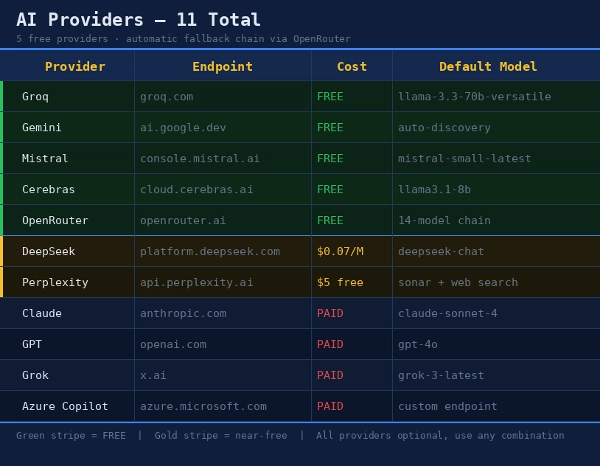
AILevelTrader Institutional is a cBot that queries up to 12 AI models at the same time (Claude, GPT, Gemini, Grok, Copilot, Groq, OpenRouter, Mistral, Cerebras, NVIDIA NIM, DeepSeek, Perplexity) to analyse the market. Each model proposes complete orders with entry, stop loss, take profit and confidence score.
How it works
- At regular intervals the bot builds a market briefing. It includes recent candles, support/resistance (swing high/low, pivots, daily and weekly extremes), ATR, spread and open positions.
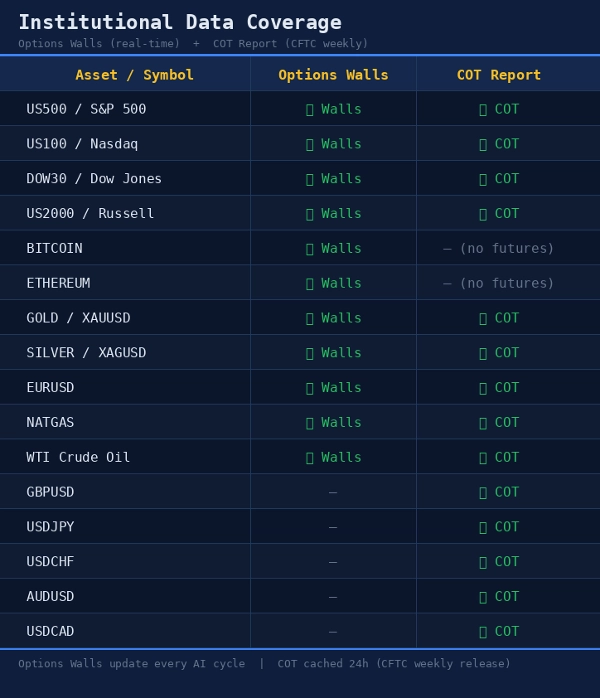
- It adds institutional data: real Options Walls (Gamma Wall, Put Wall, Call Wall) and the CFTC COT Report, for covered instruments (US indices, Gold, Silver, Bitcoin, Ethereum, EURUSD, Oil, Natural Gas and more).
- All AIs with a configured API key are queried in parallel. Each returns a bias plus Stop, Limit or Market orders.
- A consensus engine (Unanimous, Majority or Average Confidence) decides which orders go through. You can also require a minimum number of AIs to agree.
- Every order passes the bot’s safety filters before execution: SL/TP limits, max risk per trade, spread, sessions, ATR, higher-timeframe trend and maximum distance from price.
Key features
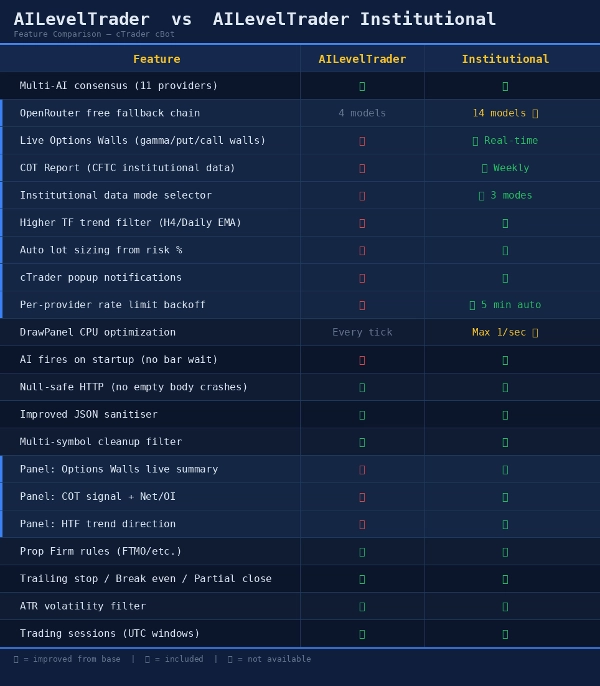
- 🤖 Multi-AI consensus, with automatic model fallback and provider backoff when a model is retired or unavailable
- 🏦 Institutional data: real-time Options Walls and weekly COT
- 🛡️ Risk management: max/min stop loss, min take profit, risk % per trade, total and per-direction order caps
- 📐 Automatic position sizing from account risk %
- 🎯 Break Even, Trailing Stop and Partial Close
- 📊 Filters: trading sessions, ATR, spread, H4/Daily/Weekly trend
- 🏢 Prop Firm mode: daily and total drawdown, daily profit target, weekend block, close before weekend
- 🧠 Self-correction: the bot remembers outcomes per direction and blocks BUY or SELL after consecutive losses
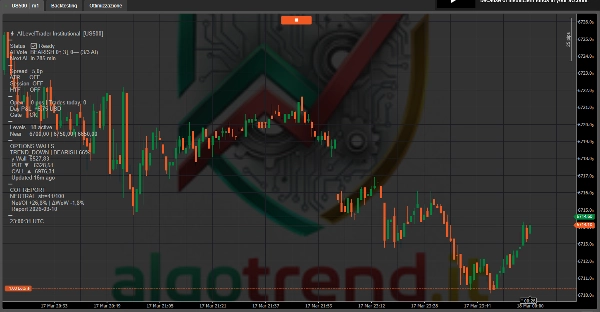
- 🔔 Popup notifications and an on-chart panel (status, AI votes, Walls, COT)
- 🆓 Works with free providers (Groq, OpenRouter, Mistral, Cerebras, NVIDIA)
Requirements: at least one AI provider API key (free ones work) and an internet connection. Metals, crypto and indices need wider pip values, so adjust SL/TP accordingly.
⚠️ Disclaimer: trading involves substantial risk. AI models can be wrong and past performance does not guarantee future results. Always test on a demo account first. AI API costs are paid by the user.
# 📘 PARAMETER GUIDE
## Risk Management
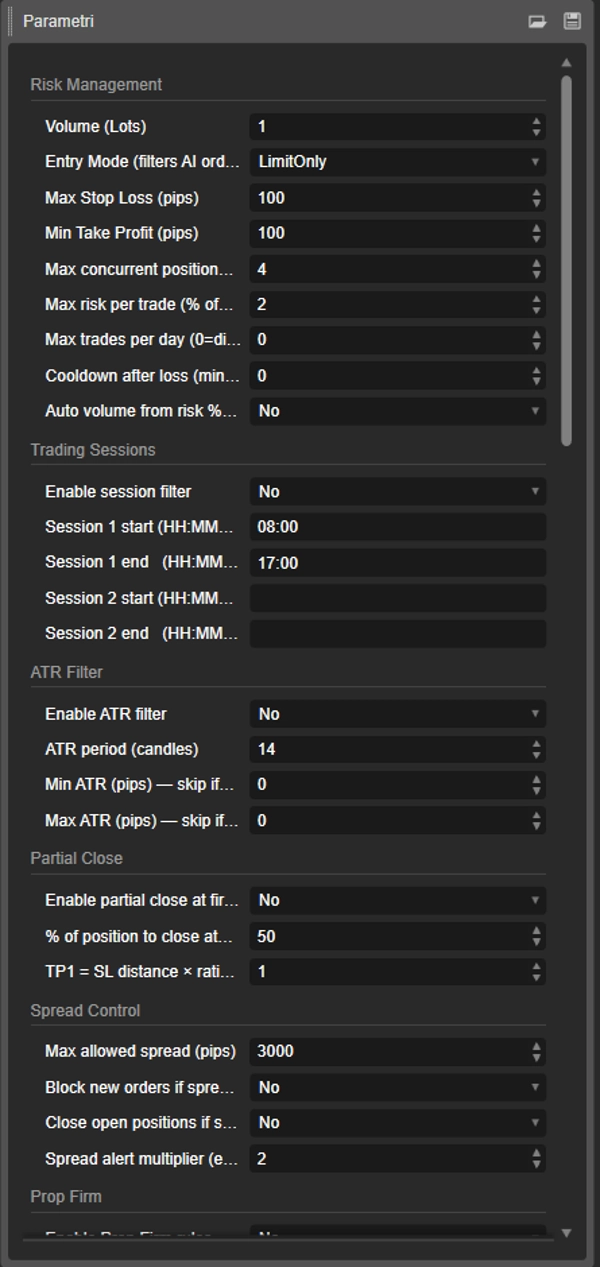
• **Volume (Lots)**: fixed lot size per order. If the risk exceeds "Max risk per trade" the order is skipped.
• **Entry Mode**: allowed order types. Any, StopOnly (breakout), LimitOnly (bounce), MarketOnly (immediate), StopOrMarket.
• **Max Stop Loss (pips)**: maximum SL. A wider stop is cut to this value. Use 500+ for XAUUSD/BTC.
• **Min Take Profit (pips)**: minimum accepted TP. Use 50+ for XAUUSD/BTC.
• **Min Stop Loss (pips)**: stops that are too tight get widened. 0 = off.
• **When take profit is below minimum**: RejectOrder discards the order (recommended). RaiseTp lifts the TP to the minimum and leaves the SL unchanged.
• **Max concurrent positions/orders**: maximum positions + pending orders on the symbol.
• **Max orders per direction**: maximum BUY and SELL separately. 0 = off.
• **Max risk per trade (%)**: maximum risk as % of balance. With Auto Volume it is also the risk used to size the lots.
• **Max trades per day**: daily limit of new trades. 0 = off.
• **Cooldown after loss (min)**: pause after a losing trade. 0 = off.
• **Auto volume from risk %**: sizes lots so the SL costs exactly the risk %. Overrides the fixed volume.
• **Cancel pending orders older than (min)**: cancels unfilled pending orders after N minutes. 0 = off.
## Trading Sessions
• **Enable session filter**: trades only inside the given time windows (UTC).
• **Session 1 start / end**: first session (HH:MM UTC).
• **Session 2 start / end**: optional second session. Empty = off.
## ATR Filter
• **Enable ATR filter**: skips the AI call when volatility is out of range.
• **ATR period**: period in candles.
• **Min ATR (pips)**: below this the market is too flat. 0 = off.
• **Max ATR (pips)**: above this the market is too volatile. 0 = off.
## Partial Close
• **Enable partial close**: closes part of the position at the first target and moves the SL to break even on the rest.
• **% of position to close**: percentage closed at TP1 (10–90).
• **TP1 = SL distance × ratio**: TP1 = SL distance × ratio (1.0 = 1:1).
## Spread Control
• **Max allowed spread (pips)**: maximum tolerated spread (30 for XAUUSD, 3 for forex).
• **Block new orders if spread > max**: blocks new orders on high spread.
• **Close open positions if spread > max**: also closes open positions (default off).
• **Spread alert multiplier**: logs an alert when the spread exceeds N times the baseline measured by the bot.
## Prop Firm
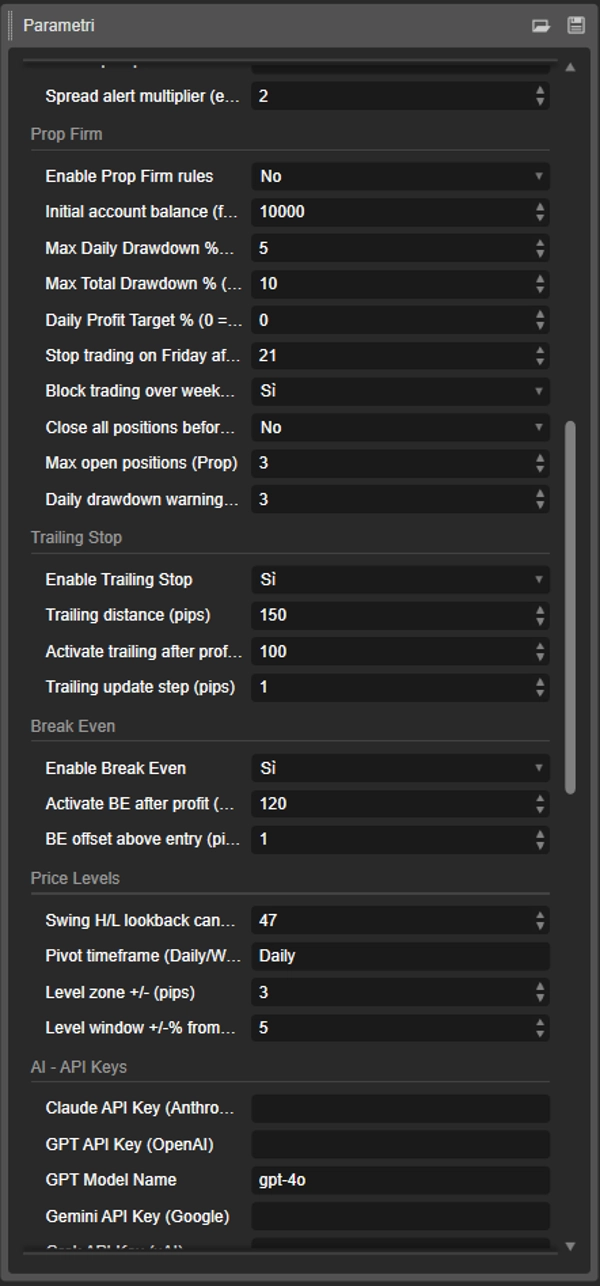
• **Enable Prop Firm rules**: enables all prop rules.
• **Initial account balance**: starting balance, base for drawdown.
• **Max Daily Drawdown %**: when hit, closes everything and blocks trading until the next day.
• **Max Total Drawdown %**: when hit, closes everything and **stops the bot**.
• **Daily Profit Target %**: once reached, no new orders today. 0 = off.
• **Stop trading on Friday after hour**: UTC hour after which no new trades open on Friday.
• **Block trading over weekend**: blocks trading from Friday (after the set hour) to Sunday.
• **Close all positions before weekend**: closes positions and pending orders before the weekend.
• **Max open positions (Prop)**: maximum open positions in Prop mode.
• **Daily drawdown warning %**: warning threshold below the limit.
## Trailing Stop
• **Enable Trailing Stop**: enables the dynamic stop.
• **Trailing distance (pips)**: SL distance from price.
• **Activate trailing after profit (pips)**: trailing starts after this profit.
• **Trailing update step (pips)**: minimum update step (the bot uses at least 2 pips).
## Break Even
• **Enable Break Even**: moves the SL to entry at the set profit.
• **Activate BE after profit (pips)**: profit required.
• **BE offset above entry (pips)**: pips beyond entry to cover costs.
## Price Levels
• **Swing H/L lookback candles**: candles used for swing high/low.
• **Pivot timeframe**: Daily, Weekly or Monthly.
• **Level zone ± (pips)**: if an order or position already exists within this zone, the bot won't open another nearby.
• **Level window ±% from bid**: levels farther than this % from price are discarded. Use 20+ for BTC/XAUUSD.
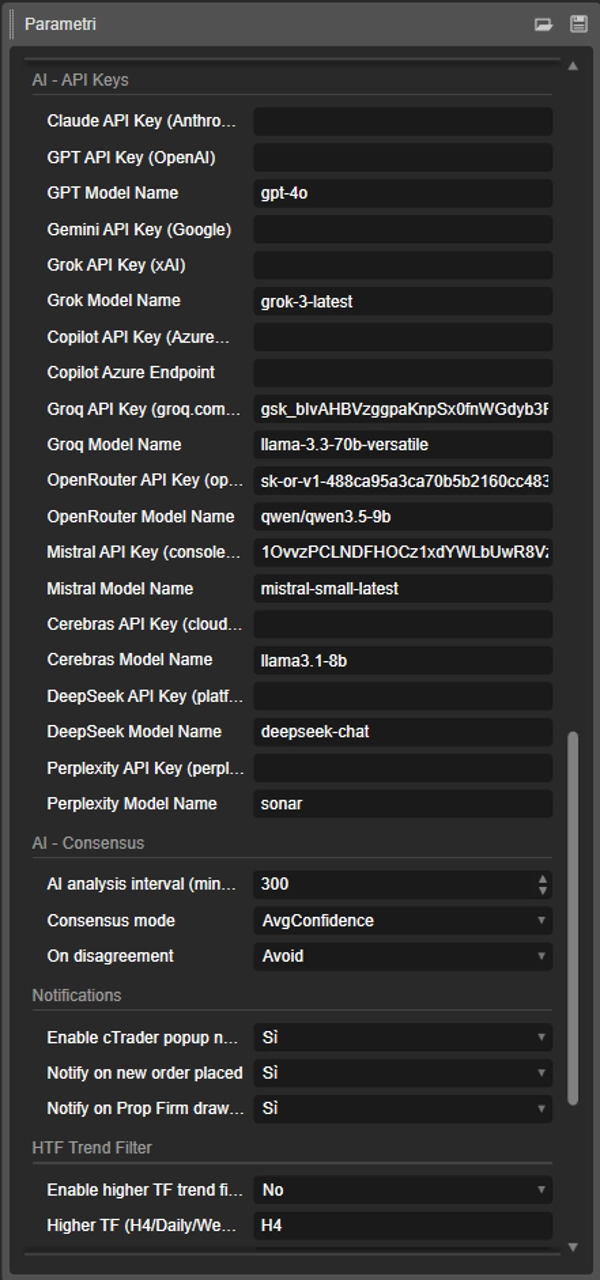
## AI – API Keys
• **API Key** (Claude, GPT, Gemini, Grok, Copilot, Groq, OpenRouter, Mistral, Cerebras, NVIDIA, DeepSeek, Perplexity): leave empty to exclude the provider. Groq, OpenRouter, Mistral, Cerebras and NVIDIA offer free tiers.
• **Model Name**: model to use. If unavailable the bot tries fallback models. OpenRouter empty = automatic discovery of free models. Gemini picks automatically.
• **Copilot Azure Endpoint**: full URL of your Azure OpenAI deployment.
## AI – Consensus
• **AI analysis interval (min)**: how often the bot queries the AIs (30 for active trading, 60 for free APIs).
• **Consensus mode**: Unanimous (all agree), Majority (more than half), AvgConfidence (average confidence ≥ 60%). With few AIs, Majority may block everything.
• **Min AIs that must back an order**: minimum AIs that must propose the same order.
• **On disagreement**: Avoid discards the order, UseMajority accepts it with at least one vote.
• **Retry unavailable AI models after (min)**: when to retry a failed model. Doubles on each consecutive failure.
## Institutional Data
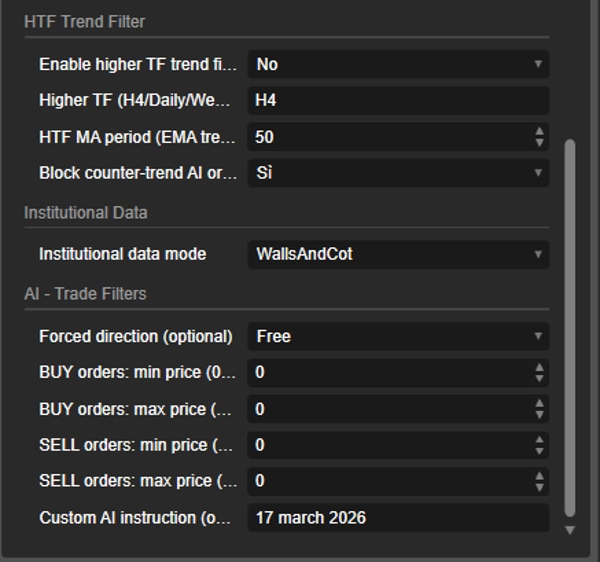
• **Institutional data mode**: WallsAndCot (Walls + COT), WallsOnly (Walls only), Disabled (classic technical analysis only).
## HTF Trend Filter
• **Enable higher TF trend filter**: uses an EMA on a higher timeframe to define the trend.
• **Higher TF**: H4, H8, Daily or Weekly.
• **HTF MA period**: EMA period.
• **Block counter-trend AI orders**: rejects BUYs in a downtrend and SELLs in an uptrend.
## AI – Trade Filters
• **Forced direction**: Free, BuyOnly or SellOnly.
• **BUY min / max price**: price range in which BUYs are allowed. 0 = off.
• **SELL min / max price**: price range in which SELLs are allowed. 0 = off.
• **Custom AI instruction**: free-text instruction added to the prompt (e.g. "avoid news").
• **Max entry distance from price %**: rejects orders whose entry is too far from price. 0 = off.
## Self Correction
• **Enable self correction**: the bot stores results per direction and feeds them back to the AIs.
• **Trades to remember**: how many recent trades to consider.
• **Block a direction after consecutive losses**: after N losses in a row, blocks BUY or SELL and cancels pending orders in that direction. 0 = off.
• **Direction block duration (min)**: block duration.
## Notifications
• **Enable cTrader popup notifications**: master switch.
• **Notify on new order placed**: alert on new orders and trade results.
• **Notify on Prop Firm drawdown warning**: alert on the drawdown threshold.
## 💡 Starting setups
• **Forex (EURUSD)**: Max SL 30–50, Min TP 10–15, max spread 3, trailing 15 / trigger 10
• **XAUUSD / BTC / indices**: Max SL 500+, Min TP 50+, max spread 30, Level window 20%
• **Prop firm (e.g. FTMO)**: Prop rules ON, real starting balance, daily DD 5%, total 10%, Max risk 0.5–1%, Auto volume ON, Block weekend ON
Summary
Key features include a higher timeframe trend filter (default H4 EMA) to align trades with macro trends, and auto risk-based position sizing that adjusts lot sizes dynamically based on stop loss distance and account risk percentage. The bot supports a fallback chain of 14 AI models to maintain reliable consensus despite rate limits or provider errors. It offers configurable institutional data modes (full options walls plus COT, walls only, or disabled for pure technical trading).
Supported assets for institutional data include major US indices (US500, US100, DOW30, US2000), commodities (WTI, Gold, Silver, NatGas), cryptocurrencies (BTC, ETH), and EURUSD. The bot provides cTrader popup notifications for trade events and risk alerts. It is compatible with cTrader Desktop and Web across all brokers and tested on multiple timeframes (M5 to H4). This bot is intended for traders seeking AI-driven trading aligned with institutional flow and professional risk management.
Discussion
Customer reviews
5 | 0 % | |
4 | 100 % | |
3 | 0 % | |
2 | 0 % | |
1 | 0 % |