
Description
Put the announcement under the microscope.
Midas EventLens is a research desk inside cTrader for inspecting price action around dated events. Bring your own verified event timestamps, select the analysis window and examine the broker's one-minute candles. Compare historical reactions, investigate range breaks and step through a reaction one minute at a time.
What you can do
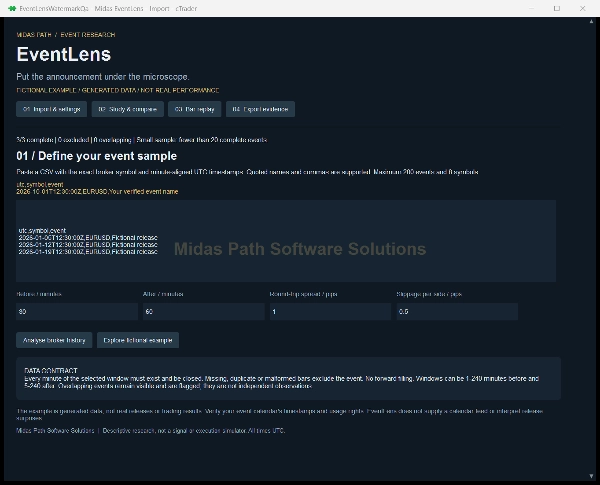
• Paste an event CSV with UTC timestamps, exact broker symbols and event names. Up to 200 events and eight symbols per study; quoted event names are supported.
• Set a pre-event window of 1-240 minutes and a post-event window of 5-240 minutes.
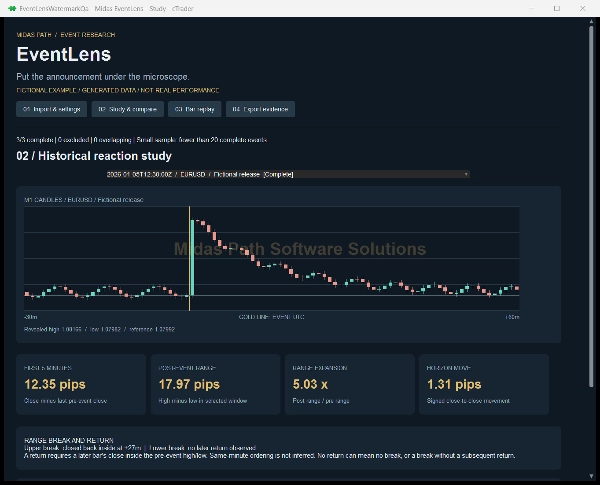
• Measure the first five-minute close move, final close move, pre-event and post-event ranges, and range expansion.
• Inspect upper and lower range breaches followed by a later candle closing inside the pre-event range.
• Compare complete-event counts and median ranges and moves separately for each symbol. Exclusions and overlapping event windows remain visible.
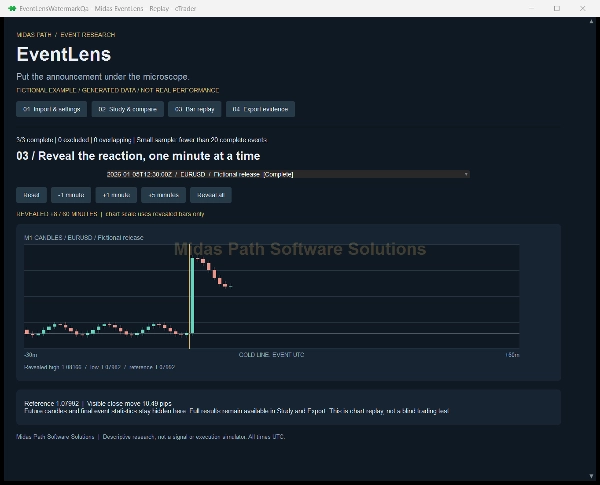
• Reveal candles incrementally in bar replay, with the chart scale based only on the bars revealed so far.
• Explore hypothetical long and short reference-to-horizon outcomes after your assumed spread and slippage costs.
• Copy a JSON evidence report containing the input digest, settings, event statuses, pip sizes, calculated results and exact candles used.
Clear data boundaries
An event is excluded if its full window has not closed or the selected history contains missing, duplicate, off-grid or invalid bars. EventLens never fills gaps with invented prices. Broker history requests are bounded; older data may be unavailable. Exact broker symbol names are required. Comparisons include all the event names you imported, so select a consistent sample if you want to compare one release type.
How to use it
Install the plugin, open its Midas EventLens Trade Watch tab and select Open EventLens research desk. Paste CSV text beginning with utc,symbol,event. Use timestamps such as 2026-10-01T12:30:00Z. Enter your windows and cost assumptions, then select Analyse broker history. Choose an event in Study or Bar replay. Export evidence provides selectable JSON you can copy and save locally. The plugin does not automatically save study inputs between sessions.
No calendar subscription
EventLens does not supply release dates, forecasts, actual release values or surprise calculations. Obtain event timestamps from a source you may lawfully use and verify time zones before importing. No paid calendar API, AI key or Midas gateway is required. The fictional example is generated demonstration data, clearly labelled throughout; it is not historical market performance. Store screenshots show this fictional example.
Interpretation and limitations
This is descriptive OHLC research, not a signal, prediction, causal analysis or a strategy backtest. Fewer than 20 complete events triggers a small-sample notice; larger samples do not imply statistical significance. Overlapping events share observations. One-minute bars cannot resolve the order of price changes within a candle, so a range return must occur on a later candle. No return may mean no breach or a breach without a later return. Range expansion is undefined when the pre-event range is zero.
The cost scenario subtracts one assumed round-trip spread plus two per-side slippage charges from the signed close-to-close move. It does not model commission, financing, bid/ask history, liquidity or whether a fill was available at the reference. It is not an executed trade or a claim about achievable returns. Full results remain accessible in Study and Export during replay, so replay is not a blind trading test.
Privacy and permissions
AccessRights.None. No trades, orders, positions, balances or account identifiers are used by the product. Market history is requested through cTrader. No study information is sent to an external service. Studies remain in memory until the plugin is stopped; export anything you want to retain. Desktop plugin; not a mobile, web or cloud trading robot.
Summary
Key features include measuring initial and final close moves, pre- and post-event ranges, and range expansions. It identifies range breaches and subsequent returns within the event window. Users can compare event counts, median ranges, and moves across symbols, with visibility into exclusions and overlapping events. The plugin supports incremental bar replay with dynamic chart scaling and simulates hypothetical long/short outcomes factoring in user-defined spread and slippage costs.
MidasEventLens exports a JSON evidence report containing input data, settings, event statuses, pip sizes, results, and exact candles used. It operates solely on broker history without filling data gaps or providing event calendars, forecasts, or surprise calculations. The plugin is intended for descriptive OHLC research, not for trading signals or backtesting, and maintains user privacy by not accessing account or trade data.
Discussion
Customer reviews
FAQ
More from this author

















Price
