Mô tả
# Chiến lược Midas Scalper: Chiến lược chính xác vàng thể chế (XAUUSD)
Được thiết kế riêng cho thị trường Vàng Giao ngay (XAUUSD) trên cTrader, **Chiến lược Midas** là một thuật toán scalping độ chính xác cao cấp thể chế. Được xây dựng dựa trên nguyên tắc bảo toàn vốn, hệ thống hoạt động như một động cơ hồi quy trung bình chọn lọc. Nó xác định các đợt giảm và tăng nhỏ trong điều kiện thị trường có kiểm soát, biên độ giới hạn, đảm bảo lợi nhuận cục bộ thông qua cơ chế khóa lợi nhuận thuật toán, và thực thi kiểm soát rủi ro nghiêm ngặt thông qua các công tắc ngắt biến động đa lớp.
---
## Hiệu suất & Chuẩn mực kiểm tra lịch sử
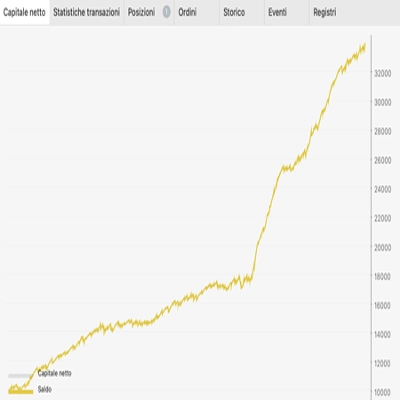
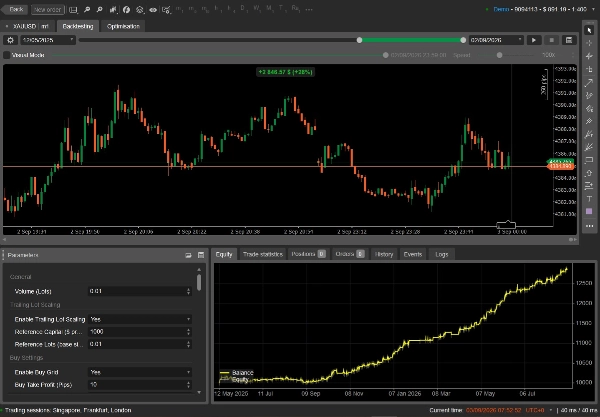
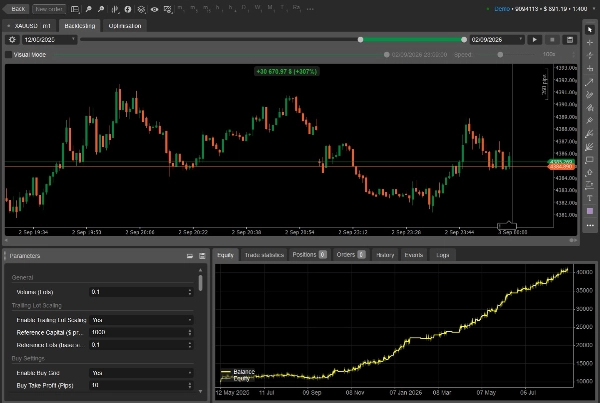
Chiến lược đã trải qua kiểm tra căng thẳng lịch sử rộng rãi trong cTrader sử dụng dữ liệu tick phát lại thể chế, bao gồm mô hình spread ngẫu nhiên thực tế và mô phỏng hoa hồng đầy đủ.
| Chỉ số | Kết quả Chuẩn mực Đã xác minh |
| --- | --- |
| **Ký hiệu giao dịch** | XAUUSD (Vàng Giao ngay) |
| **Khung thời gian biểu đồ** | M1 (1 phút) |
| **Thời gian thử nghiệm** | 1 Năm, 3 Tháng, 21 Ngày (12/05/2025 – 02/09/2026) |
| **Số dư ban đầu** | $10,000.00 USD |
| **Lợi nhuận ròng thực hiện** | +$2,846.58 USD |
| **Tỷ suất lợi nhuận đầu tư (ROI)** | **+28.47%** |
| **Vốn chủ sở hữu / Số dư cuối kỳ** | $12,846.58 USD |
| **Spread mô phỏng** | Spread ngẫu nhiên động (30 đến 50 pips) |
| **Khấu trừ hoa hồng** | $30.00 trên mỗi triệu USD khối lượng |
| **Đòn bẩy tài khoản** | 1:400 (Loại tài khoản Hedging) |
---
## Triết lý giao dịch cốt lõi & Logic thực thi
### 1. Thực thi hồi quy trung bình
Thuật toán theo dõi giá mua cao nhất và giá bán thấp nhất theo thời gian thực. Khi giá giảm lại theo ngưỡng cấu hình từ mức cực đoan, nó mở lệnh vào:
* **Mua khi giảm (Long):** Kích hoạt khi giá giảm theo `Ngưỡng Mua khi giảm` từ mức cao đã theo dõi.
* **Bán khi tăng (Short):** Kích hoạt khi giá tăng theo `Ngưỡng Bán khi tăng` từ mức thấp đã theo dõi.
* **Giới hạn trượt giá:** Lệnh được gửi dưới dạng lệnh `MarketRange`. Nếu thanh khoản giảm và không thể khớp lệnh trong phạm vi trượt giá cho phép, lệnh sẽ bị từ chối thay vì vào lệnh với giá không thuận lợi.
### 2. Khóa lợi nhuận thuật toán
Thay vì chờ đợi thụ động một Take Profit tiêu chuẩn hoặc trailing stop:
* Khi một vị thế đạt lợi nhuận nổi bằng với **Ngưỡng Khóa** (ví dụ, +3.5 pips), Stop Loss phía broker được điều chỉnh về **Mức Khóa** (ví dụ, +2.0 pips).
* Các giao dịch thắng được bảo vệ khỏi sự đảo chiều đột ngột trong khi vẫn giữ khoảng trống để đạt mục tiêu Take Profit đầy đủ (ví dụ, +10.0 pips).
### 3. Bộ lọc đồng thuận xu hướng đa khung thời gian
Để tránh mua vào các đợt giảm mạnh hoặc bán khống các đợt tăng vọt, bot kiểm tra chéo lên đến bốn khung thời gian cao hơn (M1, M5, M10, M15). Nếu bất kỳ khung thời gian nào được bật hiển thị động lượng hướng vượt ngưỡng, các lệnh ngược xu hướng sẽ bị chặn cho đến khi động thái ổn định.
### 4. Tăng giảm khối lượng lệnh theo lợi nhuận động
Khi bật, kích thước vị thế tăng theo lợi nhuận thuần của chiến lược. Kích thước sử dụng hàm bước (+1 lot tham chiếu mỗi ngưỡng lợi nhuận định nghĩa) và giảm tương xứng nếu xảy ra thua lỗ, không bao giờ thấp hơn lot cơ bản của bạn.
### 5. Lưu trạng thái
Bot lưu lợi nhuận thực hiện, mốc cao nhất, giới hạn thua lỗ, và bộ đếm thời gian nghỉ trực tiếp vào `LocalStorage` của cTrader. Nếu VPS của bạn khởi động lại hoặc cTrader khởi động lại, bot sẽ tiếp tục với các tính toán lịch sử và bộ đếm an toàn còn nguyên.
---
## Bảo vệ rủi ro & vốn đa lớp
```
[ Tick Giá Đến ]
│
┌────────────────────────────┴───────────────────────────┐
▼ ▼
[ Giai đoạn 0a: Công tắc ngắt cứng ] [ Giai đoạn 0b: Bảo vệ sàn ]
Phát hiện dao động mạnh? Vốn chiến lược dưới sàn?
──> Thanh lý TẤT CẢ & nghỉ 7 ngày ──> Chặn lệnh vào, cắt lỗ vị thế tệ nhất
│
▼
[ Giai đoạn 0c: Mục tiêu lợi nhuận ]
Đạt mục tiêu?
──> Vào giai đoạn thu hoạch: thu lợi nhuận, cho phép các lệnh nổi hồi phục
│
▼
[ Giai đoạn 0d: Vùng nguy hiểm mềm ]
Dao động cục bộ nhanh?
──> Cắt lỗ nhỏ (< giới hạn đóng), giữ lệnh sâu, kích hoạt thời gian nghỉ
│
▼
[ Giai đoạn 1 & 2: Cổng vào lệnh ]
Phiên giao dịch đang hoạt động? Spread bình thường? Tin tức rõ ràng? Xu hướng phù hợp?
──> Gửi lệnh MarketRange có giới hạn
```
* **Giới hạn phiên giao dịch (`CloseAllOnSessionEnd`):** Giới hạn lệnh vào vào giờ giao dịch yên tĩnh hơn (ví dụ, phiên Á). Khi cửa sổ phiên hoạt động đóng, các vị thế mở có thể được thanh lý ngay để tránh giữ rủi ro qua các đợt giao dịch biến động của châu Âu và Mỹ.
* **Bảo vệ sàn vốn:** Bảo vệ khoản tiền gửi cơ bản của bạn. Nếu tổng P&L nổi và thực hiện của chiến lược giảm dưới ngưỡng, bot sẽ tạm dừng giao dịch mới và thanh lý vị thế kém nhất từng tick để hạn chế thua lỗ.
* **Mục tiêu lợi nhuận & quy trình thu hồi:** Khi đạt mục tiêu lợi nhuận phiên, lệnh mới bị đóng băng ngay lập tức. Bot chốt lời các vị thế thắng và cho phép các vị thế còn mở làm việc đến mục tiêu riêng trước khi bắt đầu chu kỳ nghỉ.
* **Vùng nguy hiểm mềm:** Phát hiện các đợt biến động cục bộ nhanh trong thời gian ngắn. Nó cắt các vị thế mới trước khi thua lỗ tăng lên, trong khi giữ các vị thế sâu để tránh thanh lý hoảng loạn tại các mức giá cực đoan tạm thời.
* **Công tắc ngắt cứng:** Là điểm dừng khẩn cấp cuối cùng. Nếu một cú sốc kinh tế lớn gây ra biến động giá cực đoan trong một khoảng thời gian xác định, tất cả các vị thế mua và bán được thanh lý ngay lập tức, và bot tạm dừng giao dịch trong một khoảng thời gian làm mát nhiều ngày.
---
## Hồ sơ nhà giao dịch đề xuất & Yêu cầu tài khoản
* **Vốn đề xuất tối thiểu:** $1,000 đến $10,000 USD (hoặc tương đương tiền tệ).
* **Đòn bẩy đề xuất:** 1:100 đến 1:500.
* **Loại tài khoản môi giới:** ECN spread thấp / Raw Spread với thực thi nhanh và trượt giá tối thiểu trên XAUUSD.
* **Nền tảng:** cTrader Desktop hoặc Web (tự động hóa cBot được bật).
* **Hosting:** VPS Windows độ trễ thấp đặt gần máy chủ giao dịch của môi giới bạn (khuyến nghị London LD4 hoặc New York NY4).
---
## Tham khảo tham số mặc định đã kiểm tra
Dưới đây là các thiết lập mặc định phù hợp với chuẩn mực 15 tháng đã xác minh:
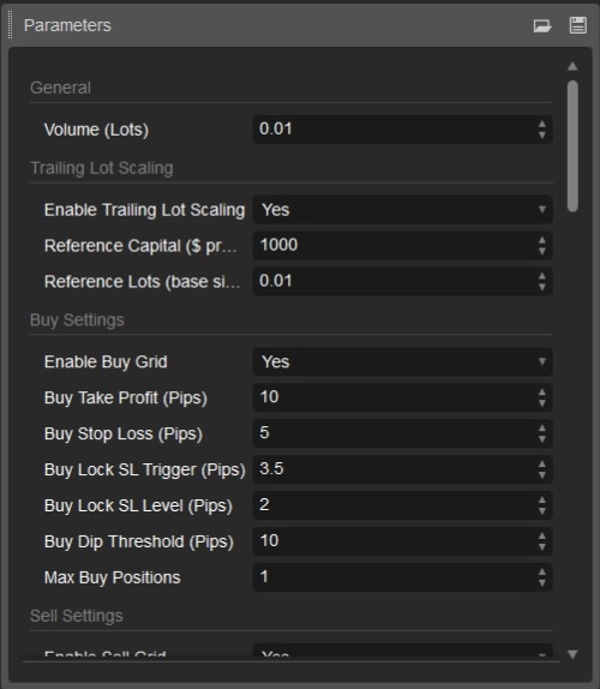
### 1. Chung & Tăng giảm khối lượng lệnh
| Tham số | Giá trị mặc định | Mô tả |
| --- | --- | --- |
| `Volume (Lots)` | `0.01` | Kích thước vị thế cơ bản mỗi lần thực thi |
| `Enable Trailing Lot Scaling` | `true` | Bật kích thước vị thế động dựa trên lợi nhuận thuần |
| `Reference Capital ($ profit per step)` | `1000.0` | Lợi nhuận ròng cần thiết để tăng kích thước vị thế một bước |
| `Reference Lots (base size AND step size)` | `0.01` | Kích thước lot thêm mỗi bước lợi nhuận |
### 2. Cài đặt thực thi mua & bán
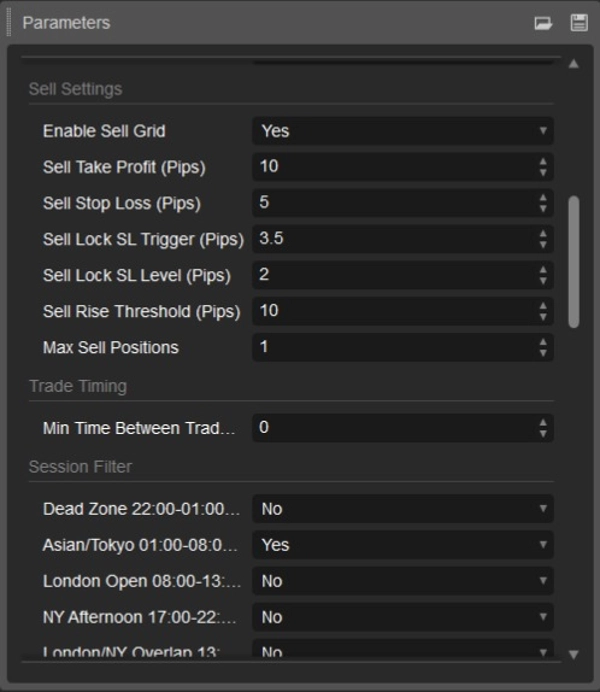
| Tham số | Bên mua | Bên bán | Mô tả |
| --- | --- | --- | --- |
| `Enable Grid` | `true` | `true` | Bật/tắt kích hoạt giao dịch theo hướng |
| `Take Profit (Pips)` | `10.0` | `10.0` | Mục tiêu chốt lời cứng phía broker |
| `Stop Loss (Pips)` | `5.0` | `5.0` | Cắt lỗ thảm họa cứng đặt khi khớp lệnh |
| `Lock SL Trigger (Pips)` | `3.5` | `3.5` | Lợi nhuận nổi cần để kích hoạt khóa lợi nhuận |
| `Lock SL Level (Pips)` | `2.0` | `2.0` | Mức mà Stop Loss được bảo vệ khi kích hoạt |
| `Dip / Rise Threshold (Pips)` | `10.0` | `10.0` | Khoảng cách giảm lại cần thiết để mở lệnh |
| `Max Positions` | `1` | `1` | Số vị thế mở tối đa đồng thời mỗi hướng |
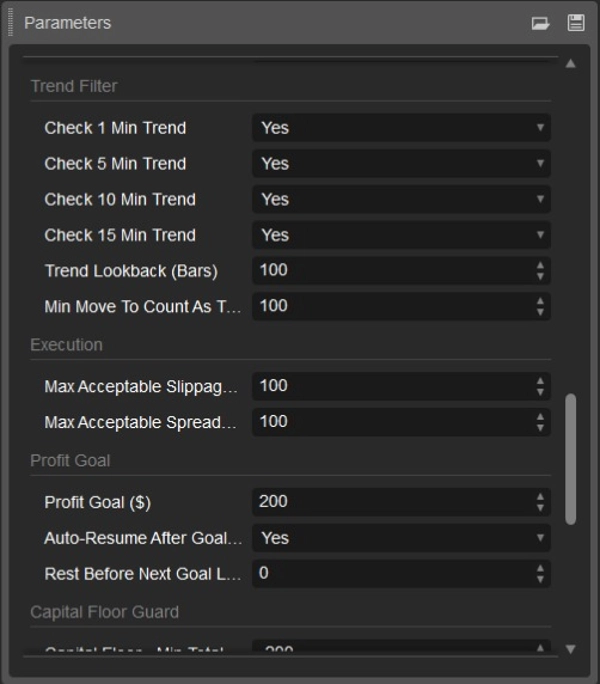
### 3. Bộ lọc thời gian, phiên & xu hướng
| Tham số | Giá trị mặc định | Mô tả |
| --- | --- | --- |
| `Min Time Between Trades (Seconds)` | `0.0` | Thời gian trễ tối thiểu giữa các giao dịch liên tiếp |
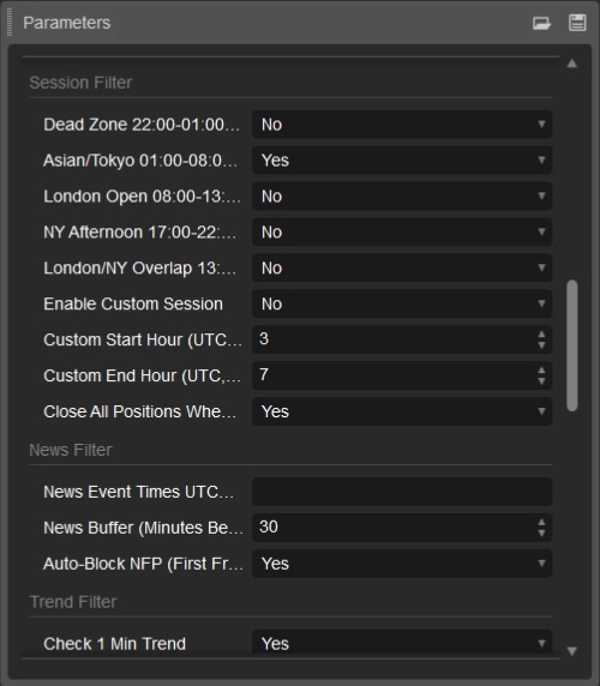
| `Enable AsianSession (01:00-08:00 UTC)` | `true` | Tập trung giao dịch vào giờ giao dịch yên tĩnh của châu Á |
| `Other Session Presets (Dead Zone, London, NY)` | `false` | Tắt để tránh các phiên biến động cao |
| `Close All Positions When Session Ends` | `true` | Đóng tất cả vị thế mở ngay khi phiên kết thúc |
| `Auto-Block NFP (First Friday Blackout)` | `true` | Tạm dừng lệnh vào trong các đợt công bố Bảng lương phi nông nghiệp Mỹ |
| `Check 1M / 5M / 10M / 15M Trend` | `true` (Tất cả) | Yêu cầu đồng thuận xu hướng đa khung thời gian trước khi vào lệnh |
| `Trend Lookback (Bars)` | `100` | Độ sâu thanh lịch sử được đánh giá cho kiểm tra xu hướng |
| `Min Move To Count As Trend (Pips)` | `100.0` | Khoảng cách di chuyển giá tối thiểu để xác định xu hướng |
### 4. Hàng rào thực thi & Mục tiêu lợi nhuận
| Tham số | Giá trị mặc định | Mô tả |
| --- | --- | --- |
| `Max Acceptable Slippage (Pips)` | `100.0` | Ngưỡng từ chối lệnh do trượt giá bất lợi |
| `Max Acceptable Spread (Pips)` | `100.0` | Spread tối đa cho phép trước khi tạm dừng lệnh vào |
| `Profit Goal ($)` | `200.0` | Mục tiêu lợi nhuận mỗi chu kỳ trước khi vào giai đoạn thu hồi |
| `Auto-Resume After Goal` | `true` | Tự động đặt lại và khởi động lại sau khi đạt mục tiêu lợi nhuận |
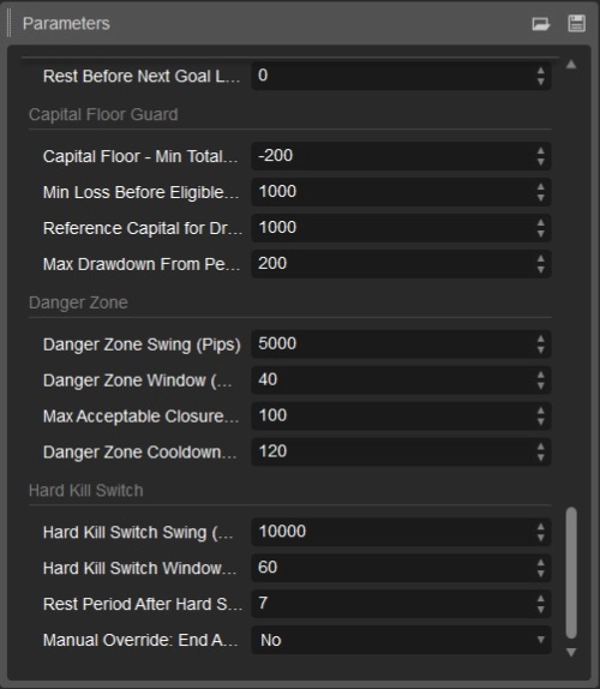
| `Rest Before Next Goal Leg (Hours)` | `0.0` | Thời gian nghỉ sau khi hoàn thành mục tiêu |
### 5. Công tắc ngắt bảo vệ đa tầng
| Tham số | Giá trị mặc định | Mô tả |
| --- | --- | --- |
| `Capital Floor - Min Total P&L ($)` | `-200.0` | Giới hạn thua lỗ tối đa của chiến lược trước khi đóng phòng thủ |
| `Min Loss Before Eligible (Pips)` | `1000.0` | Thua lỗ tối thiểu trước khi bảo vệ sàn cắt lệnh |
| `Reference Capital for Drawdown % ($)` | `1000.0` | Vốn cơ sở dùng để kiểm tra phần trăm thua lỗ chiến lược |
| `Max Drawdown From Peak (%)` | `200.0` | Ngưỡng thua lỗ từ mốc cao nhất |
| `Danger Zone Swing (Pips)` | `5000.0` | Ngưỡng dao động cục bộ để phát hiện biến động mềm |
| `Danger Zone Window (Minutes)` | `40` | Khoảng thời gian nhìn lại để đánh giá vùng nguy hiểm |
| `Max Acceptable Closure Loss (Pips)` | `100.0` | Mức thua lỗ tối đa khi vùng nguy hiểm kích hoạt |
| `Danger Zone Cooldown (Minutes)` | `120` | Thời gian nghỉ sau khi vùng nguy hiểm kích hoạt |
| `Hard Kill Switch Swing (Pips)` | `10000.0` | Ngưỡng dao động cực đoan để thanh lý sốc thị trường |
| `Hard Kill Switch Window (Minutes)` | `60` | Khoảng thời gian nhìn lại để tính điểm dừng cứng |
| `Rest Period After Hard Stop (Days)` | `7.0` | Thời gian nghỉ sau khi thanh lý dừng cứng |
| `Override Hard Stop Rest` | `false` | Bật/tắt thủ công để tiếp tục giao dịch sau dừng cứng |
---
## Hướng dẫn thiết lập người dùng từng bước
1. **Cài đặt cBot:**
* Tải file `.algo`. Nhấp đúp để tự động nhập vào **cTrader**, hoặc mở cTrader, chuyển đến tab **Automate**, nhấn **Add**, và chọn file.
2. **Mở biểu đồ:**
* Chọn ký hiệu **XAUUSD** (Vàng so với Đô la Mỹ).
* Đặt khoảng thời gian biểu đồ thành **m1** (biểu đồ 1 phút).
3. **Gắn chiến lược:**
* Kéo **Chiến lược Midas** từ bảng cBots vào biểu đồ XAUUSD m1 đang hoạt động của bạn.
4. **Cấu hình tài khoản & tham số:**
* Trong bảng tham số cBot, tải các tham số mặc định đã liệt kê ở trên.
* Nếu chạy với số dư thực $10,000, đảm bảo `Volume (Lots)` phù hợp với mức chịu rủi ro của bạn (khuyến nghị 0.01 lot cho mỗi $1,000–$10,000).
* Xác nhận cài đặt **Bộ lọc phiên** phù hợp với giờ UTC của môi giới bạn.
5. **Khởi động Bot:**
* Nhấn nút **Start** màu xanh lá trong cTrader.
* Mở tab **Logs** để xác nhận khởi tạo. Bạn sẽ thấy:
`PRO EXTENDED: Midas Initialized. Buy Grid: ENABLED. Sell Grid: ENABLED.`
6. **Triển khai VPS:**
* Giữ cBot chạy liên tục trên VPS đáng tin cậy, độ trễ thấp để duy trì giám sát giao dịch và khóa lợi nhuận ổn định.
---
## Giới hạn vận hành & Hướng dẫn sử dụng
* **Khung thời gian giao dịch:** Chiến lược Midas được tối ưu cho điều kiện thị trường biên độ giới hạn. Cài đặt mặc định nhắm vào phiên giao dịch châu Á (01:00 đến 08:00 UTC), tránh sự biến động cao của thời gian chồng lấn London/New York.
* **Sốc kinh tế vĩ mô:** Bảo vệ tin tức tự động theo dõi các sự kiện định kỳ như NFP hàng tháng. Tuy nhiên, trong các sự kiện địa chính trị lớn, công bố lãi suất khẩn cấp hoặc các đợt xả thị trường nhanh, hãy tạm dừng bot cho đến khi hành động giá ổn định.
* **Lưu ý về đơn vị pip:** Cấu hình pip của môi giới cho XAUUSD có thể khác nhau. Trên hầu hết các nguồn dữ liệu vàng có 2 hoặc 3 chữ số thập phân, 10 pips tương đương $1.00 biến động giá. Xác nhận quy ước pip của môi giới bạn trong giao dịch demo trước khi dùng vốn thực.
Tóm tắt
Key features include an algorithmic profit-locking mechanism that adjusts stop-loss levels to protect gains, multi-timeframe trend coherence filters to avoid counter-trend entries, and dynamic trailing lot scaling that increases position size based on accumulated profits. The bot maintains state persistence through cTrader’s LocalStorage, allowing it to recover its operational context after restarts.
Risk management is multi-layered, incorporating session boundary enforcement, capital floor guards that suspend trading and liquidate losing positions if drawdowns exceed thresholds, profit goal wind-down protocols, soft danger zone volatility detection, and a hard kill switch that triggers emergency liquidation and a cooling-off period after extreme market moves.
Recommended for traders with $1,000 to $10,000 capital and leverage between 1:100 and 1:500, the strategy requires a low-spread ECN or raw spread broker and benefits from deployment on a low-latency VPS near broker servers. The bot supports market orders and includes configurable stop loss, take profit, and trailing stop parameters.