

Market BIAS AI
指标
版本 1.0, Aug 2025
Windows 版、Mac 版


注册日期 29/05/2025
3.05M
交易量
68.12K
盈利点数
29
销售
886
免费安装
说明
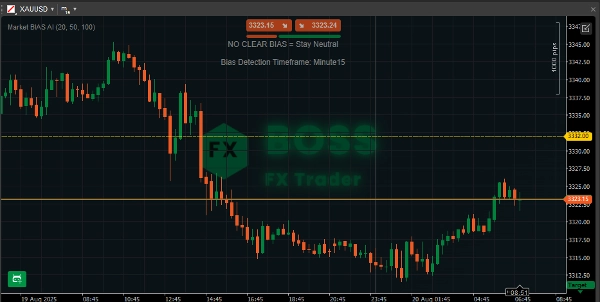
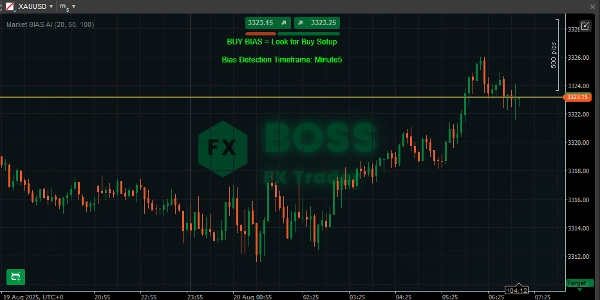
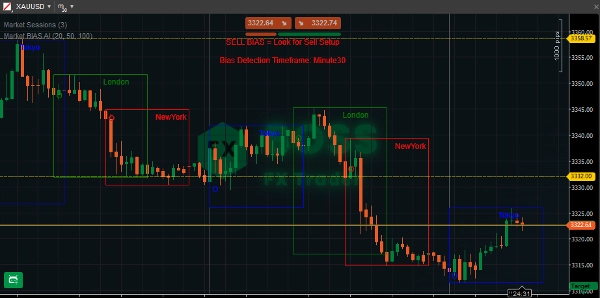
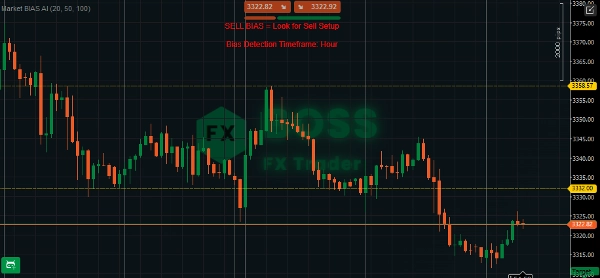
Market BIAS AI 指标 是一个为 cTrader 构建的技术分析工具,帮助交易者通过简单有效的对齐策略快速识别 市场方向偏向。
该工具专为希望简化趋势检测并专注于与整体市场方向一致的交易设置的交易者设计。
🔹 它如何显示在图表上?
- 在 图表顶部中央 显示三条消息之一:
-
- ✅ 买入偏向 = 寻找买入设置(绿色)
- ✅ 卖出偏向 = 寻找卖出设置(红色)
- ⚪ 无明确偏向 = 保持中立(灰色)
- 在其下方,还显示 偏向检测时间框架(图表的时间框架)。
示例: “偏向检测时间框架:H1”
这确保您始终知道 您正在交易的偏向时间框架。
🔹 如何使用它
- 附加指标
-
- 打开 cTrader → 进入您的图表。
- 右键点击 → “指标” → 选择 Market BIAS AI。
- 或者拖放到您的图表上。
- 选择时间框架
-
- 该指标适用于任何时间框架。
- 如果您想进行 日内交易,请选择 M15 / H1。
- 对于波段交易,使用 H4 / D1。
- 解读信号
-
- 🟢 买入偏向 → 仅寻找买入机会(例如,看涨价格行为设置,回调至支撑位)。
- 🔴 卖出偏向 → 仅寻找卖出机会(例如,看跌价格行为设置,反弹至阻力位)。
- ⚪ 无明确偏向 → 避免交易或等待更明确的趋势。
- 结合入场触发条件
-
- 该指标提供 方向性偏向,而非精确的入场信号。
- 最佳做法:结合蜡烛图形态、支撑/阻力或其他入场确认信号。
“祝您成为盈利交易者之一。”
摘要
AI 摘要
Market BIAS AI Indicator is a technical analysis tool designed for the cTrader platform that identifies market direction bias using AI integration and a straightforward alignment strategy. It displays one of three bias signals at the center-top of the chart: "BUY BIAS" (green) indicating a preference for buy setups, "SELL BIAS" (red) indicating sell setups, or "NO CLEAR BIAS" (gray) suggesting a neutral stance. Below the bias message, it shows the bias detection timeframe corresponding to the chart’s timeframe (e.g., H1), ensuring clarity on the timeframe context.
The indicator works on any timeframe, supporting intraday trading (e.g., M15, H1) and swing trading (e.g., H4, D1). It provides directional bias rather than exact entry points, so users are advised to combine it with other entry triggers such as candlestick patterns or support/resistance levels. Installation involves attaching the indicator to a cTrader chart via the indicators menu or drag-and-drop. This tool aims to simplify trend detection by focusing on setups aligned with the overall market direction.
The indicator works on any timeframe, supporting intraday trading (e.g., M15, H1) and swing trading (e.g., H4, D1). It provides directional bias rather than exact entry points, so users are advised to combine it with other entry triggers such as candlestick patterns or support/resistance levels. Installation involves attaching the indicator to a cTrader chart via the indicators menu or drag-and-drop. This tool aims to simplify trend detection by focusing on setups aligned with the overall market direction.
指标配置
讨论
客户评价
0.0
评价:0
客户评价
该产品尚无评价。已经试过了?抢先告诉其他人!
常见问答
cTrader Store 提供的所有产品,包括交易机器人、指标和插件,均由第三方开发者提供,仅供信息参考和技术访问之用。cTrader Store 并非经纪商,不提供投资建议、个人推荐或任何未来业绩保证。
该作者的其他作品









猜您喜欢









价格
注册日期 29/05/2025
3.05M
交易量
68.12K
盈利点数
29
销售
886
免费安装