
Deskripsi
Deskripsi Lengkap
Nama Produk: ProjectSyndicate Gold Order Block Finder (Edisi cTrader)
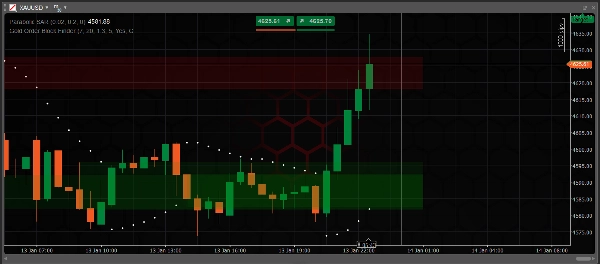
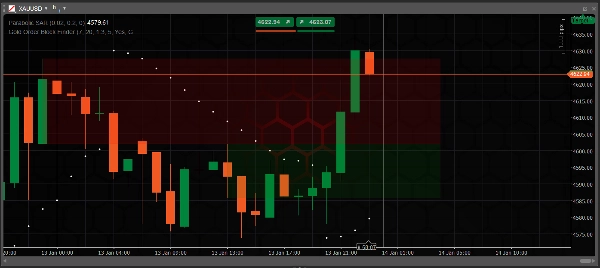
Deskripsi: Indikator ini adalah adaptasi asli C# dari "ProjectSyndicate Gold OB Finder" yang sangat dihargai yang awalnya dikembangkan dalam Pine Script untuk TradingView. Ini dirancang dengan presisi khusus untuk pasangan XAUUSD (Emas) untuk mengidentifikasi jejak "Uang Institusional" berdasarkan Konsep Smart Money (SMC).
Berbeda dengan banyak indikator standar yang mengalami flickering sinyal (repainting), versi ini memiliki algoritma inti yang sepenuhnya ditulis ulang untuk menjamin Zero Repaint. Setiap Order Block (OB) yang ditampilkan bersifat permanen dan didasarkan secara ketat pada data harga yang sudah ditutup dan dikonfirmasi. Ini menggunakan algoritma deteksi Swing High/Low yang ketat untuk menyaring noise pasar, memvisualisasikan hanya zona Supply dan Demand dengan probabilitas tinggi.
Fitur Utama:
- Asal: Porting 100% setia dari TradingView Pine Script ke cAlgo (cTrader), dioptimalkan untuk kecepatan eksekusi C#.
- Teknologi Anti-Repaint: Sinyal hanya dihasilkan setelah konfirmasi candle, memastikan akurasi historis.
- Optimasi Emas: Parameter default (Swing 7, Lookback 20) disesuaikan untuk volatilitas spesifik Emas.
- Perluasan Dinamis: Zona secara otomatis meluas ke kanan sampai terjadi interaksi harga.
- Auto-Mitigation: Zona yang ditembus (terbuka) secara otomatis dihapus untuk menjaga grafik tetap bersih.
3. Manual Instruksi
Pengaturan Dasar:
- Timeframe: Sangat disarankan untuk M30, H1, atau H4 untuk hasil yang paling dapat diandalkan.
- Aset: XAUUSD (Emas). Meskipun dapat digunakan pada pasangan lain, Anda mungkin perlu menyesuaikan parameter Swing Length.
Cara Membaca Sinyal:
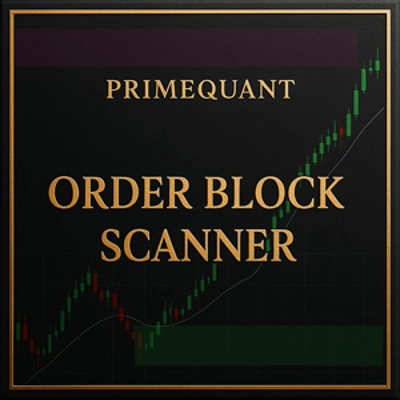
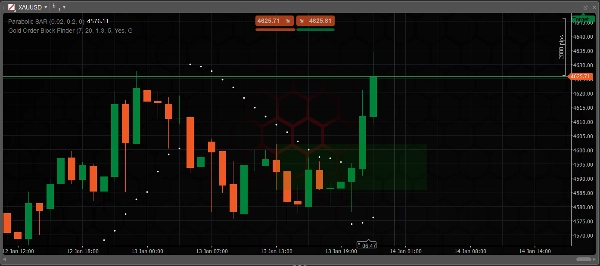
- 🟥 KOTAK MERAH (OB Bearish / Zona Supply):
-
- Definisi: Zona di mana penjualan institusional signifikan sebelumnya terjadi.
- Tindakan: Cari peluang JUAL saat harga kembali naik ke zona ini.
- Konfirmasi: Tunggu candle penolakan (misalnya, Bearish Engulfing atau Pinbar) terbentuk di dalam kotak merah sebelum masuk.
- 🟩 KOTAK HIJAU (OB Bullish / Zona Demand):
-
- Definisi: Zona di mana pembelian institusional signifikan sebelumnya terjadi.
- Tindakan: Cari peluang BELI saat harga turun kembali ke zona ini.
- Konfirmasi: Tunggu candle penolakan terbentuk di dalam kotak hijau sebelum masuk.
Aturan Kritis:
- Hindari "Blind Limit Orders": Jangan hanya menempatkan limit order di tepi kotak. Berita berdampak tinggi dapat dengan mudah menembus zona. Selalu tunggu reaksi harga.
- Logika Invalidasi:
-
- Jika sebuah candle Menutup di atas Kotak Merah, setup Jual tidak valid.
- Jika sebuah candle Menutup di bawah Kotak Hijau, setup Beli tidak valid.
- Catatan: Indikator akan secara otomatis menghapus kotak yang tidak valid.
- Penempatan Stop Loss (SL): Tempatkan SL Anda sedikit di luar zona (di atas Kotak Merah untuk Jual, di bawah Kotak Hijau untuk Beli).
Tips Strategi Sederhana: Sesuaikan dengan tren. Jika tren keseluruhan naik (misalnya, dikonfirmasi oleh Moving Averages atau Parabolic SAR), fokus hanya pada Kotak Hijau untuk masuk dan abaikan Kotak Merah (lawan tren).
Ringkasan
Key features include zero repaint technology, ensuring that signals are generated only after candle confirmation, making all displayed Order Blocks permanent and based on closed price data. It uses a Swing High/Low detection algorithm to filter market noise and highlight high-probability zones. Default parameters are tuned for Gold’s volatility, with zones dynamically extending until price interacts with them. Breached zones are automatically removed to maintain chart clarity.
Recommended for use on M30, H1, or H4 timeframes, the indicator displays red boxes for bearish (supply) zones and green boxes for bullish (demand) zones. Traders are advised to wait for price rejection candles within these zones before entering trades. The indicator also supports automatic invalidation and removal of zones when price closes beyond them.
This tool assists traders in identifying precise institutional market maker zones to inform buy and sell decisions on Gold.






![Logo "Gaussian Channel [Iridio Capital]"](https://cdn.ctrader.com/image/webp/2c4f9ca9-4e9b-476d-b5a6-787c8095032b_61546)