经纪商和自营
面向企业
00
Days
:
00
Hours
:
00
Minutes
:
00
Seconds
指标
NAS100
NZDUSD
Martingale
Forex
Fibonacci
EURUSD
MACD
BTCUSD
SMC
Indices
ATR
Stocks
Grid
RSI
Breakout
XAUUSD
FVG
Commodities
Signal
Bollinger
GBPUSD
AI
VWAP
ZigZag
Prop
Supertrend
Crypto
USDJPY
Scalping
Breakout channel
16/01/2026
261
Desktop
注册日期 04/03/2025
交易量
41.86M
盈利点数
6.11M
销售
64
免费安装
3144
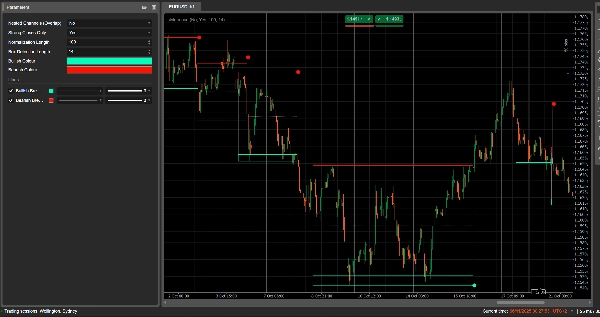
"Breakout channel" 已上传图片

Breakout Channels

What it does

Breakout Channels automatically detects consolidation ranges (price “boxes”) and marks breakout points when price escapes those ranges.

It draws:

  • A grey channel box around the consolidation zone
  • A red upper band (potential resistance)
  • A green lower band (potential support)
  • A white dotted midline (channel midpoint)
  • Coloured dots when a breakout occurs:
    • Green/cyan dot below the box → bullish breakout
    • Red dot above the box → bearish breakout

The idea is to visually highlight areas where price is coiling and where strong moves are likely to start when the range breaks.


How it calculates

  1. Price normalisation
    • Over the last Normalization Length bars it finds the highest high and lowest low.
    • It normalises the close into a 0–1 range:
      normalizedPrice=Close−LowestLowHighestHigh−LowestLow\text{normalizedPrice} = \frac{\text{Close} - \text{LowestLow}}{\text{HighestHigh} - \text{LowestLow}}normalizedPrice=HighestHigh−LowestLowClose−LowestLow​
  2. Volatility measure
    • It computes the standard deviation of the normalised price over 14 bars.
    • This gives a volatility series used to detect turning points in the market structure.
  3. Upper / Lower “volatility lines”
    • Over the last (Box Detection Length + 1) bars, it finds:
      • the bar where volatility was highest
      • the bar where volatility was lowest
    • From how many bars ago these extremes occurred, it builds two synthetic lines: Upper and Lower.
    • Crosses between these lines signal potential start/end of a channel phase.
  4. Channel start & duration
    • When Lower crosses above Upper, the indicator marks a potential channel start.
    • From that bar it tracks the duration and the highest high / lowest low in the period.
  5. Channel creation
    • When later Upper crosses back above Lower, and the duration is greater than 10 bars:
      • It defines the channel Top as the highest high in that period.
      • It defines the channel Bottom as the lowest low.
      • It measures the current ATR/2 to separate a thin zone at the top and bottom:
        • Red band at the top (bearish band)
        • Green band at the bottom (bullish band)
      • It draws:
        • Grey outline rectangle (full channel)
        • Red top outline
        • Green bottom outline
        • A dotted white midline through the centre
    • Channels remain on the chart as historical structure (they are not deleted after breakout).
  6. Breakout detection
    • For each active channel, on every new bar it calculates a reference price:
      • If Strong Closes Only = true → uses the midpoint of the candle body:
        refPrice=(Open+Close)/2\text{refPrice} = (\text{Open} + \text{Close})/2refPrice=(Open+Close)/2
        This requires more than half of the body to be outside the box.
      • If Strong Closes Only = false → uses simple Close.
    • Breakout rules:
      • If refPrice > Topbullish breakout
        • Plots a green dot at the channel Bottom.
        • Deactivates this channel (stops extending it), but the box stays visible.
      • If refPrice < Bottombearish breakout
        • Plots a red dot at the channel Top.
        • Deactivates the channel.
      • Otherwise, the channel is still active and its right edge is extended to the current bar.
  7. Nested Channels option
    • If Nested Channels = true, multiple channels can overlap in time and price.
    • If false, the indicator blocks creation of a new channel that would overlap an existing one.


How to read and use it

  1. Grey box (channel)
    • Represents a consolidation / balance zone where price has been trading for a while.
    • The longer and taller the box, the more significant the range.
  2. Red upper band (resistance zone)
    • The top portion of the channel, visually emphasised as a potential resistance area.
    • Repeated rejections near this band suggest selling pressure inside the range.
  3. Green lower band (support zone)
    • The bottom portion of the channel, highlighted as potential support.
    • Repeated bounces suggest buyers defending the lower edge of the range.
  4. White dotted midline
    • The midpoint of the channel – a kind of local “fair value”.
    • Price oscillating around this line indicates balance; strong moves away often precede a test of the opposite band.
  5. Breakout dots
    • Green dot below the box:
      • Price has closed strongly above the top of the channel (or simply closed above, depending on Strong Closes Only).
      • Suggests a bullish breakout – potential start of an up-move from a volatility squeeze.
    • Red dot above the box:
      • Price has closed strongly below the bottom of the channel.
      • Suggests a bearish breakout – potential start of a down-move.
  6. Typical ways to use it (idea-level)
    • Trend-following breakouts
      • Trade in the direction of the breakout (buy after green dot, sell after red dot), ideally in confluence with higher-timeframe trend or other indicators.
    • Filter & confirmation
      • Use the channel and its breakout only as a filter for your existing strategy (e.g. only take long setups if the last signal was a bullish breakout).
    • Risk placement
      • For bullish breakouts, many traders place stops inside or just below the former channel; for bearish, inside or above the box.


0.0
评价:0
客户评价
该产品尚无评价。已经试过了?抢先告诉其他人!
该作者的其他作品
指标
NAS100
NZDUSD
Martingale
+26
Volume Delta
Read aggressive flow in real time. Flexible resets (Day/Week/Month), optional EMA smoothing, and non-repainting cumulati
cBot
Grid
NAS100
RSI
+20
Breakout Premium Pro v2.0
A price-action-first algorithm to trade Breakout, Approach, and Return around prior High/Low levels—with Prop-style risk
指标
Grid
NZDUSD
XAUUSD
+16
vWAP Free
Editions: Free (core VWAP + bands) · Pro (multi‑VWAP, click‑to‑anchor, alerts).
cBot
NAS100
NZDUSD
Martingale
+26
Prop Ready Bot_v.2.0
The Prop-Ready Bot The Definitive Automaton for Challenges 🛡️ V2.0
cBot
NAS100
NZDUSD
Martingale
+26
ElliottWaveBot
N.B.: Results with an initial invested capital of 100 euros.
cBot
NAS100
NZDUSD
Martingale
+26
TradeCopierBot
✅ Buy 3 prop accounts and manage just 1: cut management effort by 66% with a professional tool.
指标
NAS100
NZDUSD
Martingale
+26
Volume Bubble
Volume Bubbles is a lightweight yet powerful visual indicator for cTrader
指标
ZigZag
Indices
Breakout
+1
Auto Tools Suite
Auto Trendlines, Fibonacci, Pitchfork and Patterns from non‑repainting pivots. One‑click Presets, targeted Alerts, and a
指标
NAS100
NZDUSD
Breakout
+14
ZIG ZAG Free
ZigZag Free is a clean swing-detection tool that marks significant pivot highs/lows
cBot
NAS100
NZDUSD
Martingale
+26
ElliottWave Pro cBot
The Elliott Wave Pro Bot is a sophisticated and highly configurable algorithmic trading system
指标
NAS100
NZDUSD
Martingale
+26
Liquidity Shift Indicator
Want a cBot based on this indicator? Contact us!
cBot
Indices
RSI
Forex
+2
US 2000+MACD+ADR+ADMIR+RSI+MANY MORE-TF4M
N.B.: Results with an initial invested capital of 100 euros.
指标
Grid
NAS100
NZDUSD
+15
EMA UP&DOWN 2025
SectorIndex Dual Moving Average Indicator: Your Market Compass 🧭
cBot
Indices
ATR
US500 LONG&SHORT TF 5M ALL SEASON!
🚀N.B.: Results with an initial invested capital of 100 euros.
指标
NAS100
NZDUSD
Martingale
+25
Volume Profile Suite trial7D
DEMO VERSION 7 DAYS VolumeProfileSuite is an advanced and flexible Volume Profile indicator for cTrader.
cBot
Grid
Indices
XAUUSD
+7
Scalper Pro PROP
Breakout scalping with prop-firm grade equity control.
指标
NAS100
NZDUSD
Martingale
+26
Pattern Scanner
Patter Scanner all Chart Let your chart tell you when patterns appear
cBot
NAS100
Indices
XAUUSD
+7
COT Institutional Sentiment Bot
Institutional COT sentiment, automated position trading and full prop-firm style risk control – all in one cBot.
猜您喜欢
指标
Grid
NAS100
NZDUSD
+19
Trend Cycle
Trend Cycle – measure the life of your trends. See how long the current move has been running and how long similar trend
Daily SD Levels - Indicator
Plots intraday VWAP and dynamic ±1/±2 standard deviation (SD) bands based on current day’s price and volume.
Session Highlight Framer
Frame the sessions
指标
NAS100
Indices
NZDUSD
+9
MultiTimeFrame MovingAverage MTF MA
MultiTimeframe MA
Breakout Mode Patterns
Brooks price action breakout mode patterns
Order Block Finder
Order Block Detector is built to spot and display Order Blocks on chart, often triggering strong price reactions.
指标
Indices
RSI
Bollinger
Clustering
Clustering tool for traders with visual insights into market patterns.
指标
NAS100
NZDUSD
XAUUSD
+15
VWAP_MTF
📊 VWAP with MTF & Dynamic Deviation Bands
指标
Indices
RSI
Signal
+1
[Stellar Strategies] QQE
The QQE indicator is a technical analysis tool designed to identify potential trend changes and trading signals 📈📉
指标
Indices
Commodities
Stocks
+2
Moving Averages Suite
28-method MA library in one indicator — from classic EMAs to adaptive & zero-lag variants.
指标
VWAP
Indices
Commodities
+1
vwap
Custom VWAP Indicator for cTrader
指标
NAS100
RSI
NZDUSD
+12
TrendMomentumScore
TrendMomentumScore_558: all-in-one EMA, MACD & RSI trend strength meter with clear -100 to +100 buy/sell zones.
指标
Indices
RSI
XAUUSD
+7
RSI Divergence
Detects bullish and bearish divergences
指标
FVG
Fibonacci
Fair Value Gap (Extended)
Detect FVGs with age, status, Fibonacci levels, and customizable fill threshold—extended version.
指标
Indices
RSI
ATR
AlgoCorner Crosshair Edge
Pinpoint, highlight and lock market data easily
指标
VWAP
VWAP Tabajara
VWAP Tabajara
指标
Forex
VegaXLR - Candlestick Patterns Pro
Identify 34 candlestick patterns, track trends across timeframes, and get instant alerts with this powerful trading tool
指标
NAS100
NZDUSD
Martingale
+26
Silver Bullet by LudwigICT