Deskripsi
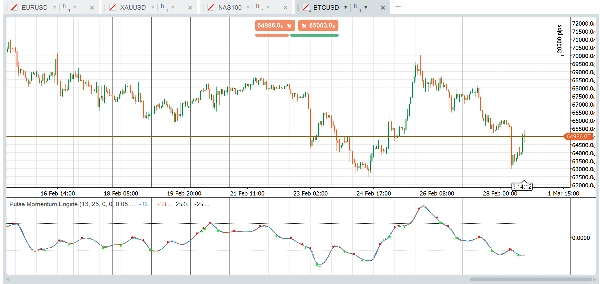
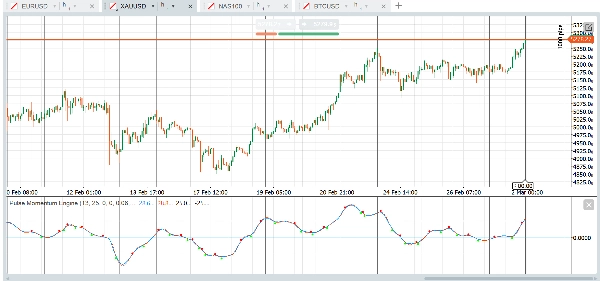
The Pulse Momentum Engine (PME) adalah osilator momentum adaptif canggih dengan koreksi lag bawaan dan filter konfluensi 5-kondisi. Ini mempercepat dalam tren, melambat dalam noise, dan hanya menunjukkan sinyal yang layak diambil. Bekerja pada Forex, indeks, emas, kripto, dan lainnya — langsung dari kotak.
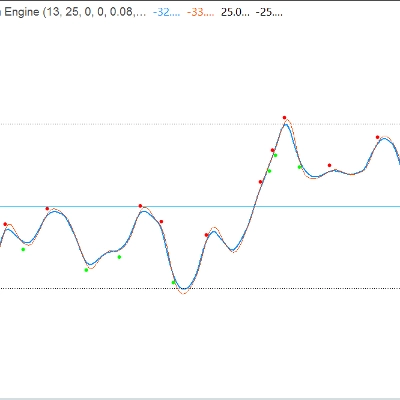
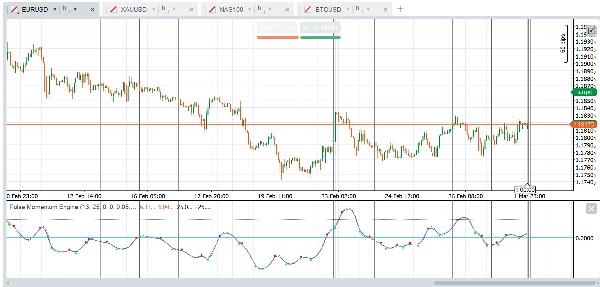
Indikator ditampilkan sebagai osilator sub-jendela dengan Pulse Line utama, opsi Signal Line, level Overbought/Oversold tetap, dan opsi panah crossover yang difilter oleh sistem konfluensi multi-kondisi.
Grup Parameter:
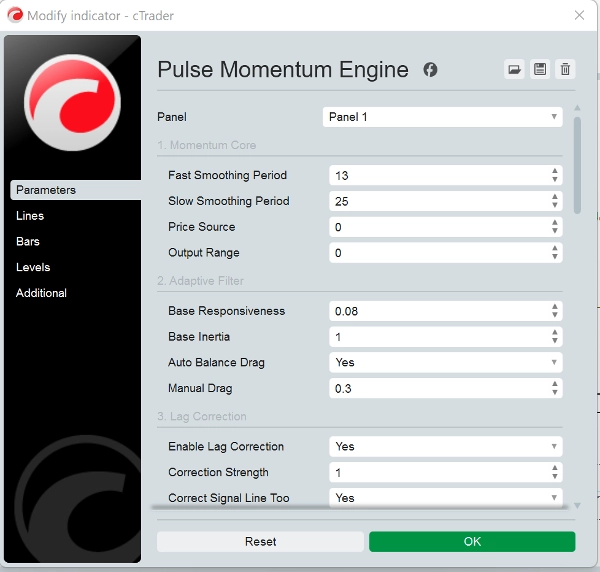
- Momentum Core: Mengontrol perhitungan momentum dasar. Rentang Output Default adalah 0 terpusat. Saat menggunakan Rentang Output = 1 (Bergeser), sesuaikan level OB/OS sesuai (misalnya, OB = 70, OS = 30)
- Filter Adaptif: Mengontrol bagaimana filter melacak sinyal momentum. Responsivitas Dasar (0,08) menentukan seberapa cepat filter merespons perubahan momentum. Lebih tinggi = lebih cepat tapi lebih berisik. Inersia Dasar (1,0) menentukan resistensi terhadap perubahan mendadak. Lebih tinggi = output lebih halus tapi lebih lag. Tarik Keseimbangan Otomatis (True) secara otomatis menghitung tarik optimal untuk mencegah ringing/oscillation. Disarankan untuk tetap diaktifkan. Tarik Manual (0,3) adalah koefisien tarik manual saat Tarik Otomatis dinonaktifkan. Lebih tinggi = lebih banyak redaman.
- Koreksi Lag: Mengurangi keterlambatan bawaan filter adaptif menggunakan umpan balik kesalahan dua lintasan.
- Pelacakan Dinamis: Membuat filter menyesuaikan perilakunya berdasarkan kondisi pasar.
- Mesin Adaptasi: Mengontrol mekanisme adaptasi keseluruhan.
- Signal Line: Garis referensi yang lebih lambat digunakan untuk sinyal berbasis crossover.
- Panah Crossover: Penanda visual di titik crossover garis utama/sinyal. Catatan: Non-Repainting: Saat "Require Confirmed Bar" True (default), sinyal crossover hanya muncul setelah bar ditutup dan tidak akan pernah hilang. Atur ke False hanya jika Anda membutuhkan peringatan waktu nyata dan memahami sinyal dapat berubah sebelum bar ditutup.
- Filter Konfluensi: Memerlukan beberapa kondisi setuju sebelum menampilkan panah crossover. Mengurangi sinyal palsu secara signifikan.
- Level Tetap: Garis referensi overbought dan oversold sederhana dan konstan. Konservatif (lebih sedikit sinyal): OB = 40, OS = -40 (terpusat) atau OB = 70, OS = 30 (bergeser). Agresif (lebih banyak sinyal): OB = 15, OS = -15 (terpusat) atau OB = 60, OS = 40 (bergeser).
- Performa: Max Bars to Calculate disetel ke 0. 0 = hitung semua riwayat yang tersedia. Setel ke 5000-10000 pada grafik sangat panjang untuk mengurangi beban CPU.
Penggunaan Dasar
- Arah Tren: Saat Pulse Line (biru) berada di atas nol dan naik, momentum bersifat bullish. Di bawah nol dan turun menunjukkan momentum bearish.
- Sinyal Crossover: Sebuah sinyal bullish terjadi saat Pulse Line melintasi di atas Signal Line (panah hijau). Sebuah sinyal bearish terjadi saat melintasi di bawah (panah merah).
- Zona Overbought/Oversold:
-
- Pulse Line di atas level OB → pasar mungkin terlalu diperpanjang ke atas. Cari crossover bearish sebagai sinyal pembalikan potensial.
- Pulse Line di bawah level OS → pasar mungkin oversold. Cari crossover bullish sebagai sinyal pembalikan potensial.
- Crossover yang terjadi di zona netral (antara OB dan OS) biasanya adalah sinyal mengikuti tren.
Strategi Filter Konfluensi
Konfigurasi default memerlukan 3 dari 5 kondisi untuk mengonfirmasi crossover. Ini secara signifikan mengurangi sinyal palsu. Anda dapat:
- Tingkatkan Kondisi Minimum menjadi 4-5 untuk sinyal yang lebih sedikit tapi berkualitas tinggi
- Turunkan Kondisi Minimum menjadi 1-2 untuk lebih banyak sinyal dengan kualitas individu lebih rendah
- Nonaktifkan filter individual untuk menyesuaikan konfirmasi mana yang penting untuk strategi Anda
Aset & Pasar yang Direkomendasikan
Pasangan Forex Utama- EUR/USD, GBP/USD, USD/JPY, AUD/USD (Likuiditas tinggi menghasilkan ayunan momentum yang bersih. Filter adaptif menangani volatilitas sesi yang bervariasi secara efektif)
Forex Crosses - EUR/GBP, GBP/JPY, AUD/NZD (Sering menunjukkan perilaku tren yang lebih kuat, yang dimanfaatkan dengan baik oleh filter konfluensi)
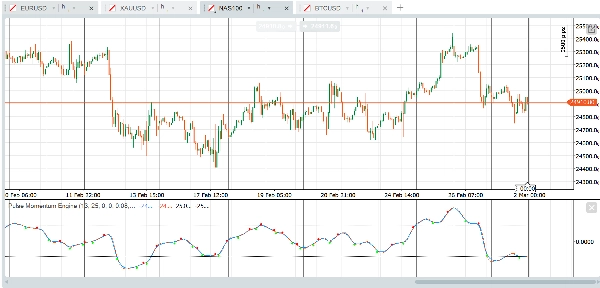
Indeks Saham - US30, NAS100, SPX500, GER40 (Fase tren yang persisten selaras dengan baik dengan filter adaptif. Koreksi lag menangkap breakout lebih awal)
Emas (XAU/USD) - Ayunan momentum panjang dan fase tren yang jelas cocok dengan desain filter.
Minyak Mentah - WTI, Brent (Persistensi momentum yang kuat)
Saham Large-Cap - AAPL, MSFT, AMZN, TSLA (Partisipasi institusional menghasilkan tanda momentum yang bersih)
Kripto Utama - BTC/USD, ETH/USD (Kecenderungan tren yang kuat. Tingkatkan Responsivitas ke 0.10 - 0.15 untuk siklus kripto yang lebih cepat).
Kurang Cocok untuk instrumen Illiquid (Lonjakan acak diperkuat sebagai sinyal palsu) dan pasangan dengan rentang ketat (Indikator memberikan sedikit informasi yang dapat ditindaklanjuti).
Mengenai kerangka waktu, pengaturan default dibuat untuk bekerja dengan grafik berbasis waktu satu jam langsung dari kotak tetapi kerangka waktu dan jenis grafik lain seperti renko, rentang, ticks juga bekerja dengan baik. Platform dan Indikator adalah milik Anda untuk bereksperimen menemukan pengaturan yang sesuai untuk strategi Anda. Berikut contoh preset cepat yang dapat Anda coba:
Preset Mulai Cepat
Forex Majors — Siap Pakai
Pengaturan default dioptimalkan untuk pasangan forex utama pada kerangka waktu H1. Tidak perlu perubahan. Cukup terapkan indikator dan atur level Overbought ke 25 dan level Oversold ke -25.
Emas & Minyak — Sedikit Lebih Responsif
Untuk emas (XAU/USD) dan minyak mentah, tingkatkan Responsivitas Dasar ke 0.10 untuk menangkap ayunan momentum khas mereka dengan lebih baik. Lebarkan level OB/OS sedikit menjadi 30 dan -30 untuk mengakomodasi rentang osilasi yang lebih lebar. Semua pengaturan lain dapat tetap pada defaultnya.
Indeks Saham — Lebih Cepat dan Ketat
Indeks seperti US30, NAS100, dan SPX500 mendapat manfaat dari periode pelunakan yang lebih pendek. Atur Periode Cepat ke 11 dan Periode Lambat ke 21 untuk reaksi lebih cepat terhadap pergeseran momentum intraday. Tingkatkan Responsivitas Dasar ke 0.10 dan kurangi Periode Sinyal ke 6 untuk waktu crossover yang lebih ketat. Pertahankan OB di 25 dan OS di -25. Min Confluence di 3 bekerja dengan baik untuk sebagian besar perdagangan indeks.
Kriptokurensi — Dibuat untuk Kecepatan
Pasar kripto bergerak cepat dan tren kuat. Pendekkan Periode Cepat ke 10 dan Periode Lambat ke 21. Tingkatkan Responsivitas Dasar ke 0.12 dan kurangi Inersia Dasar ke 0,8 sehingga filter merespons cepat terhadap ayunan volatil. Gunakan Periode Sinyal 5 untuk deteksi crossover lebih cepat. Naikkan batas Responsivitas Maksimum ke 0,5 untuk memberi mesin adaptasi lebih ruang. Turunkan Min Confluence ke 2 karena tren kripto cenderung lebih terarah dan kurang berisik setelah terbentuk. Atur OB ke 30 dan OS ke -30.
Obligasi & Instrumen Lambat — Sabar dan Selektif
Treasury, bund, dan instrumen bergerak lambat lainnya memerlukan periode lookback lebih panjang dan lebih banyak kesabaran. Tingkatkan Periode Cepat ke 18 dan Periode Lambat ke 34. Kurangi Responsivitas Dasar ke 0.05 dan naikkan Inersia Dasar ke 1,5 untuk mencegah filter merespons fluktuasi kecil. Perpanjang Periode Sinyal ke 10 dan Lookback Adaptasi ke 15. Tingkatkan Min Confluence ke 4 untuk memastikan hanya setup terkuat yang memicu sinyal. Gunakan level OB/OS yang lebih ketat yaitu 20 dan -20 karena instrumen ini berosilasi dalam rentang yang lebih sempit.
Catatan Penting
- Non-Repainting: Dengan "Require Confirmed Bar" diaktifkan (default), semua sinyal panah crossover didasarkan pada bar yang sudah ditutup dan tidak akan pernah berubah atau hilang secara retroaktif.
- Nilai Pulse Line dan Signal Line pada bar saat ini (belum ditutup) akan diperbarui secara real-time — ini adalah perilaku standar untuk indikator apa pun. Hanya sinyal panah yang dikontrol oleh pengaturan bar terkonfirmasi.
- Level OB/OS tetap adalah garis referensi sederhana. Tidak seperti level dinamis, mereka tidak menyesuaikan dengan kondisi pasar yang berubah. Sesuaikan berdasarkan aset dan kerangka waktu yang Anda perdagangkan.
- Saat mengganti Rentang Output dari Terpusat ke Bergeser, ingat untuk memperbarui level OB/OS sesuai (lihat tabel Pedoman Level di atas).
- Performa: Pada grafik sangat panjang (50.000+ bar), pertimbangkan untuk mengatur "Max Bars to Calculate" ke 5000-10000.
Penafian
Indikator ini adalah alat analisis teknis dan tidak merupakan nasihat keuangan. Kinerja masa lalu tidak menunjukkan hasil di masa depan. Selalu gunakan manajemen risiko yang tepat dan gabungkan dengan bentuk analisis lain sebelum membuat keputusan perdagangan.
Ringkasan
Key functionalities include:
- Adaptive filtering that adjusts responsiveness and inertia based on market conditions.
- Lag correction via two-pass error feedback to improve signal timeliness.
- A confluence filter requiring multiple conditions to confirm crossover signals, enhancing signal quality.
- Fixed overbought and oversold reference levels to identify potential reversal zones.
- Customizable parameters for momentum calculation, filter behavior, lag correction, and signal generation.
PME is optimized for one-hour charts but supports other timeframes and chart types. It provides presets tailored for different markets such as Forex majors, gold, oil, stock indices, cryptocurrencies, and bonds, allowing users to adjust responsiveness and signal sensitivity accordingly. The indicator is non-repainting when used with confirmed bar settings and is intended as a technical analysis tool to assist in trend detection and trade timing.
Diskusi
Ulasan pelanggan
5 | 25 % | |
4 | 75 % | |
3 | 0 % | |
2 | 0 % | |
1 | 0 % |