Courtiers & props
Pour entreprise
00
Days
:
00
Hours
:
00
Minutes
:
00
Seconds
Indicateur
NAS100
NZDUSD
Martingale
Forex
Fibonacci
EURUSD
MACD
BTCUSD
Indices
ATR
Stocks
Grid
RSI
Breakout
XAUUSD
FVG
Commodities
Signal
Bollinger
GBPUSD
AI
VWAP
ZigZag
Prop
Supertrend
Crypto
USDJPY
Scalping
Volume Profile Suite trial7D
10/12/2025
92
Desktop
Depuis le 04/03/2025
Volume tradé
36.33M
Pips gagnés
6M
Ventes
40
Installations gratuites
2300
Image mise en ligne de "Volume Profile Suite trial7D"Image mise en ligne de "Volume Profile Suite trial7D"Image mise en ligne de "Volume Profile Suite trial7D"

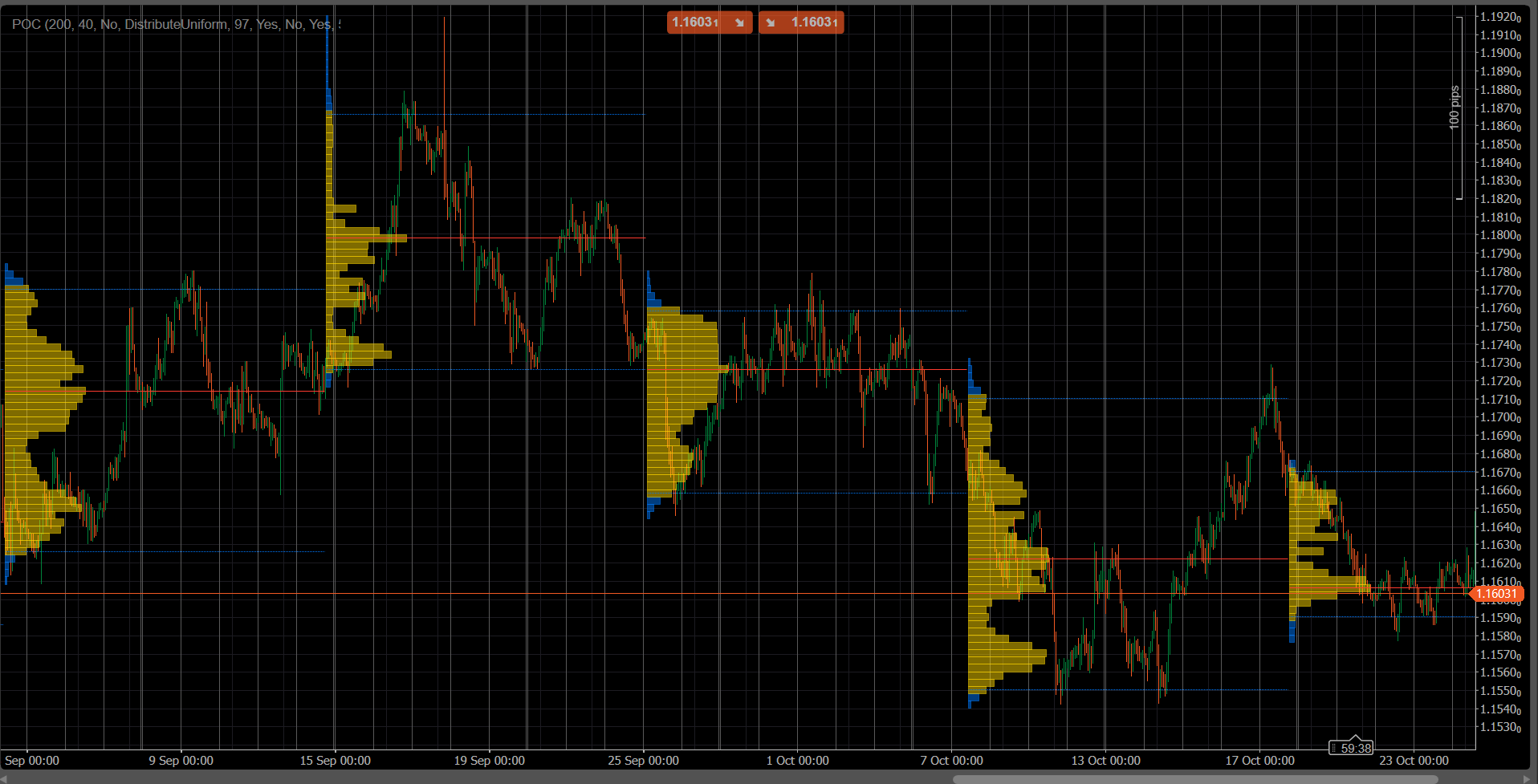
VolumeProfileSuite is an advanced and flexible Volume Profile indicator for cTrader.

Its primary purpose is to analyze volume distribution (i.e., where trading activity occurred) at different price levels to identify areas of "value" (high volume) and "rejection" (low volume). This helps you find the most significant support and resistance levels based on real market activity.

Its unique feature is that it combines two powerful analysis modes into a single tool, selectable via the Profile Mode parameter:

  1. FixedRange Mode: Perfect for macro analysis. It allows you to analyze a single, large block of your choice (like the last 1000 bars or a specific date range, e.g., "all of last week"). It is ideal for finding major, long-term support/resistance levels.
  2. Periodic Mode: Perfect for micro and behavioral analysis. It automatically draws a new profile every "N" bars (e.g., every 100 bars). This allows you to see how the POC and Value Area evolve over time and to study the market's repetitive patterns.
  3. Parameter Guide (English)


Here is the updated guide for your new unified VolumeProfileSuite indicator. This guide is crucial as it explains which parameters to use (and which to ignore) based on your selected mode.


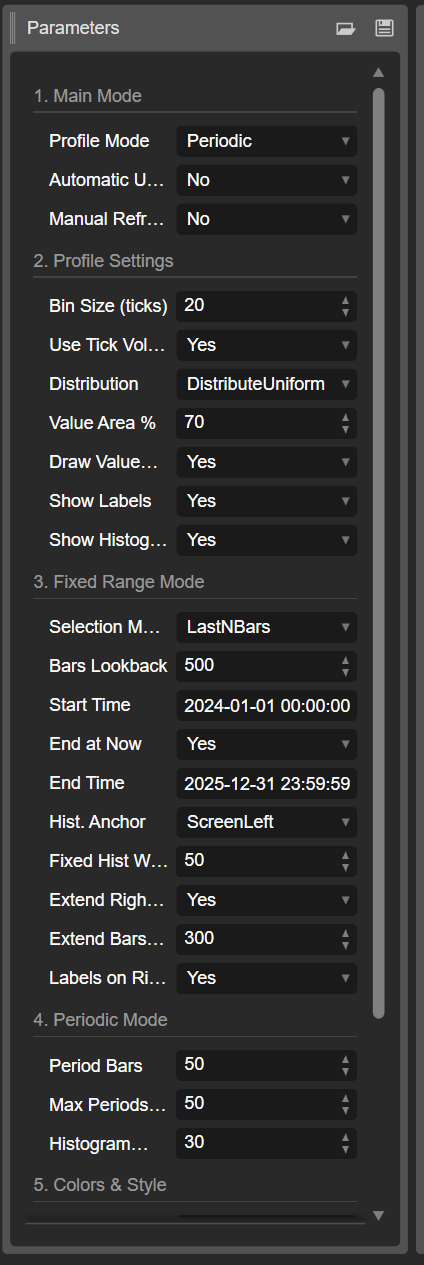
Group 1: Main Mode


  • Profile Mode: This is the most important parameter and acts as the master switch.
    • FixedRange: Activates the "single block" mode. The indicator will analyze only one interval specified by you (using the settings in Group 3).
    • Periodic: Activates the "cyclical" mode. The indicator will automatically analyze the entire chart in blocks (based on the settings in Group 4).

IMPORTANT: When in FixedRange mode, you must ignore all parameters in "Group 4: Periodic Mode". When in Periodic mode, you must ignore all parameters in "Group 3: Fixed Range Mode".


Group 2: Profile Settings


These parameters are common and apply to both modes (FixedRange and Periodic).

  • Bin Size (ticks): Controls the vertical "resolution" of the profile. A low value (e.g., 1) creates many thin price rows (very detailed). A high value (e.g., 10) groups prices into thicker rows (less detailed, "smoother").
  • Use Tick Volume: If true (recommended), the profile uses real tick volume, which is very accurate. If false, it simply counts "1" for each bar.
  • Distribution: Defines how a bar's volume is distributed.
    • DistributeUniform (default): "Smears" the bar's volume across all price levels it touched, from its low to its high.
    • CloseOnly: Assigns all of the bar's volume only to its closing price.
  • Value Area %: Sets the percentage of volume that constitutes the "Value Area" (the area of highest trade activity). A value of 70 (70%) is the market standard.
  • Draw Value Area (VAH/VAL): If true, draws the horizontal lines for the Value Area High (VAH) and Value Area Low (VAL).
  • Show Labels: If true, shows text labels ("POC", "VAH", "VAL"). (Be careful: in Periodic mode, this can clutter the chart).
  • Show Histogram: If true, draws the volume histogram (the horizontal bars).


Group 3: Fixed Range Mode


⚠️ Use these parameters ONLY if "Profile Mode" is set to FixedRange.

  • Selection Mode: Chooses how to define your single block.
    • DateRange: Uses a specific start and end date/time.
    • LastNBars: Uses the last N bars.
  • Bars Lookback: (For LastNBars only) How many bars back to analyze (e.g., 500).
  • Start Time / End at Now / End Time: (For DateRange only) Define the start and end of your interval.
  • Hist. Anchor: (For FixedRange only) Defines where to anchor the histogram.
    • DateRangeStart: At the start of your interval (can be off-screen).
    • ScreenLeft: To the left edge of the visible window.
    • ScreenRight: To the right edge of the visible window (in the empty space).
  • Fixed Hist Width (bars): The width of the histogram (in bars) for the FixedRange mode.
  • Extend Right Only: If true, the POC/VAH/VAL lines are extended into the future.
  • Extend Bars: (Only if Extend Right Only is true) How many bars to extend the lines by.
  • Labels on Right: If true, places price labels at the right end of the extended lines.


Group 4: Periodic Mode


⚠️ Use these parameters ONLY if "Profile Mode" is set to Periodic.

  • Period Bars: This is the key parameter for this mode. It defines how many bars to include in each cyclical block (e.g., 100).
  • Max Periods to Draw: 🌟 SAFETY PARAMETER! This limits the number of cyclical profiles drawn to prevent cTrader from crashing. 50 means it will only draw the most recent 50 profiles, even if the history has more. Do not set this too high (e.g., > 200) or cTrader may freeze!
  • Histogram Width (bars): The width of the histogram (in bars) for each cyclical block.


Group 5: Colors & Style


These parameters are common and apply to both modes.

  • POC Color: The color of the Point of Control line.
  • VA Color: The color of the VAH and VAL lines.
  • Line Thickness: The thickness of the POC, VAH, and VAL lines.
  • VA Histogram Color: The color of histogram bars inside the Value Area (default: Yellow).
  • Outside Hist Color: The color of histogram bars outside the Value Area (default: Blue).
  • Histogram Opacity %: The transparency (opacity) of the entire histogram.


0.0
Avis : 0
Avis clients
Il n'y a pas encore d'avis sur ce produit. Vous l'avez déjà essayé ? Soyez le premier à en parler aux autres !
Plus de cet auteur
Indicateur
NAS100
NZDUSD
Martingale
+26
Volume Delta
Read aggressive flow in real time. Flexible resets (Day/Week/Month), optional EMA smoothing, and non-repainting cumulati
cBot
NAS100
NZDUSD
Martingale
+26
ElliottWave Pro cBot
The Elliott Wave Pro Bot is a sophisticated and highly configurable algorithmic trading system
cBot
NAS100
NZDUSD
Martingale
+26
ElliottWaveBot
N.B.: Results with an initial invested capital of 100 euros.
cBot
Indices
ATR
US500 LONG&SHORT TF 5M ALL SEASON!
🚀N.B.: Results with an initial invested capital of 100 euros.
Indicateur
Grid
NZDUSD
XAUUSD
+16
vWAP Free
Editions: Free (core VWAP + bands) · Pro (multi‑VWAP, click‑to‑anchor, alerts).
cBot
Grid
NAS100
RSI
+20
Breakout Premium Pro v2.0
A price-action-first algorithm to trade Breakout, Approach, and Return around prior High/Low levels—with Prop-style risk
Indicateur
NAS100
NZDUSD
Martingale
+26
Breakout channel
Breakout Channels automatically detects consolidation ranges and highlights when price breaks out of them.
cBot
Indices
RSI
Forex
+2
US 2000+MACD+ADR+ADMIR+RSI+MANY MORE-TF4M
N.B.: Results with an initial invested capital of 100 euros.
Indicateur
NAS100
NZDUSD
Breakout
+14
ZIG ZAG Free
ZigZag Free is a clean swing-detection tool that marks significant pivot highs/lows
cBot
NAS100
NZDUSD
Martingale
+26
Prop Ready Bot_v.2.0
The Prop-Ready Bot The Definitive Automaton for Challenges 🛡️ V2.0
Indicateur
NAS100
NZDUSD
Martingale
+26
Volume Bubble
Volume Bubbles is a lightweight yet powerful visual indicator for cTrader
cBot
NAS100
NZDUSD
Martingale
+26
Dynamic Trendline Deluxe Pro Cbot - PROP edition
Major Update Announcement: Advanced Prop Firm Risk Management is Here! 🚀
Indicateur
Grid
NAS100
NZDUSD
+15
EMA UP&DOWN 2025
SectorIndex Dual Moving Average Indicator: Your Market Compass 🧭
cBot
Breakout
ATR
Signal
EMA Up&Down 2025 Ctrader bot
✨ N.B.: Results with an initial invested capital of 100 euros.📈
cBot
RSI
BASIC us500 SHORT 35%
N.B.: Results with an initial invested capital of 100 euros.
Indicateur
NAS100
Breakout
XAUUSD
+14
Initial Range
Initial Range – Where the open writes the script.
Indicateur
NAS100
NZDUSD
Martingale
+26
Pattern Scanner
Patter Scanner all Chart Let your chart tell you when patterns appear
cBot
NAS100
Indices
XAUUSD
+7
COT Institutional Sentiment Bot
Institutional COT sentiment, automated position trading and full prop-firm style risk control – all in one cBot.
Vous pourriez aussi aimer
Indicateur
Breakout
ATR
Signal
[Stellar Strategies] Market Structure Breakout
Flags breakouts of recent highs/lows on cTrader charts. Shows arrows/lines. Optional trend filter & sound alerts 📉📈
Indicateur
NAS100
Indices
XAUUSD
+6
OR Session Zones
A high‑precision Opening Range indicator that detects session opens (NY, London, EU, Tokyo, Shanghai)
Indicateur
Grid
NAS100
RSI
+18
QX SessionBox ORB
QX SessionBox ORB: Session boxes + ORB levels + clean dashboard with optional closed-candle breakout signals.
Indicateur
Indices
RSI
ATR
AlgoCorner Crosshair Edge
Pinpoint, highlight and lock market data easily
Indicateur
Indices
ATR
Stocks
+4
UT Bot Alert
A powerful ATR-based indicator generating clear BUY/SELL signals. Features real-time alerts and customizable sensitivity
Indicateur
NAS100
NZDUSD
Martingale
+26
z-score colored
The Rolling Z-Score Trend
Indicateur
NAS100
NZDUSD
XAUUSD
+12
Volume Meter
Volume Meter
Indicateur
RSI
Breakout
XAUUSD
+5
Shielded Trend
Buy/Sell signals filtering noise, color-coded trends & strength shield 🛡️. Trade only with POWER ⚡
smma tel
Wstęgi HTS 33 144 mobile
Indicateur
NAS100
Indices
Breakout
+6
All-in-One Session Levels Suite
Institutional Session Levels Pro OHLC,Prev(D,W,M OHLC)
Daily Sessions HighLow Helper
Shows daily and sessions highs / lows and session boxes, everything configurable
Indicateur
NAS100
NZDUSD
XAUUSD
+11
Consolidation Zones
Identify and trade breakouts with Consolidation Zones! Visualize price consolidation areas for trading opportunities.
Indicateur
NAS100
Indices
Prop
+6
WHT AMF
Adaptive Median Filter calculates price median to eliminate noise and extreme values.
Indicateur
Scalping
Grafico Diario
Bússola para Decisões de Trading Precisas e Eficientes!
Indicateur
Breakout
XAUUSD
Forex
+2
McDonalds Pattern-Bzier Curve
Designed to identify and visualize price reversal patterns using Bézier curves.
Tabajara corrigido[fix]
corrigido todos os bugs e cores invertidas tabajara antigo deleetado
Indicateur
Indices
Commodities
Stocks
+2
Balance of Power
Igor Levshin's Balance of Power measuring buyer vs seller strength for momentum and divergence analysis.
Indicateur
Breakout
Fibonacci
Linear Regression Channel
Statistically-grounded trend channels via linear regression — clear trend & reversal zones.