
Deskripsi
Ema Up&Down 2025: Sekutu Strategis Anda di Pasar
Apakah Anda siap untuk meningkatkan perdagangan algoritmik Anda ke tingkat yang baru? Ema Up&Down 2025 untuk cTrader bukan hanya sebuah cBot; ini adalah kekuatan strategis sejati yang dirancang untuk menawarkan Anda fleksibilitas, kontrol, dan manajemen risiko yang canggih. Lupakan jam-jam yang dihabiskan untuk memantau grafik: biarkan Ema Up&Down 2025 bekerja untuk Anda dengan presisi bedah.
Mengapa Ema Up&Down 2025 Menonjol:
- Beberapa Strategi, Kontrol Tunggal: Jangan terikat pada satu pendekatan saja! Ema Up&Down 2025 menempatkan Anda dalam kendali dengan tiga strategi masuk yang dapat disesuaikan dan digabungkan:
-
- MA Crossover: Manfaatkan kekuatan crossover moving average (EMA, SMA, dll.), sebuah klasik abadi untuk mengidentifikasi tren.
- Breakout: Tangkap pergerakan pasar yang eksplosif dengan masuk tepat waktu saat menembus level kunci.
- Deviasi Harga: Manfaatkan deviasi harga dari moving average, ideal untuk strategi mean-reverting atau kelanjutan setelah pullback. Pilih mode eksekusi yang Anda sukai –
OnBarCloseuntuk konfirmasi yang solid atauOnEveryTickuntuk responsivitas langsung.
- Manajemen Risiko Kelas Profesional:
-
- Stop Loss dan Take Profit Dinamis: Sesuaikan perlindungan dan target Anda dengan SL/TP tetap dalam pips atau berdasarkan volatilitas pasar nyata berkat ATR, dengan pengali berbeda untuk perdagangan Long dan Short.
- Trailing Stop Cerdas: Setelah perdagangan menghasilkan keuntungan (dengan
TrailingStartPips), bot mengaktifkan Trailing Stop yang mengikuti harga secara dinamis pada jarak yang Anda tentukan (TrailingDistancePips), melindungi keuntungan dan memaksimalkan potensi setiap operasi. - Break-Even Otomatis: Saat mencapai keuntungan tertentu (
BreakEvenTriggerPips), bot secara otomatis memindahkan Stop Loss ke break-even (ditambah sedikit ekstraBreakEvenExtraPips), membuat perdagangan Anda bebas risiko.
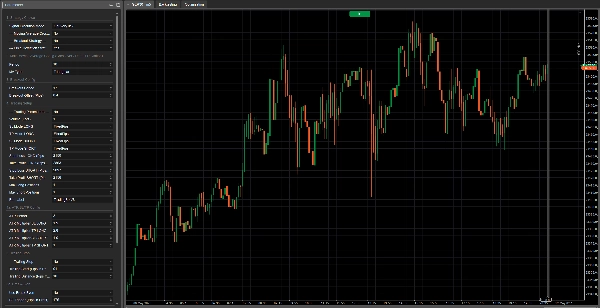
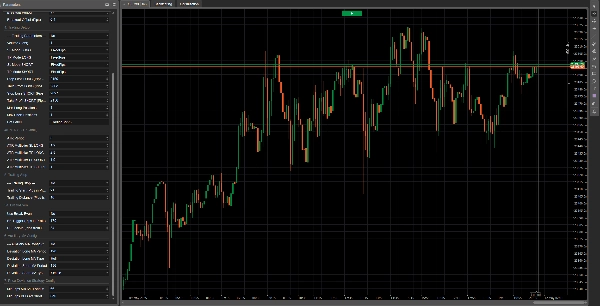
- Konfigurasi Mendalam dan Intuitif: Setiap aspek bot berada di bawah kendali Anda berkat panel parameter yang komprehensif dan terorganisir dengan baik. Tentukan volume, periode indikator, jenis moving average (termasuk MA tambahan untuk strategi deviasi), dan setiap detail manajemen perdagangan Anda.
- Dibangun untuk Efisiensi:
-
- Logika Inisialisasi yang Dioptimalkan: Indikator hanya dimuat jika benar-benar diperlukan, memastikan kinerja optimal.
- Kode Bersih dan Berkomentar: Bagi yang suka memahami apa yang terjadi "di balik layar," kode disusun dengan jelas dan logis.
- Umpan Balik Terperinci: Setiap tindakan bot, dari pembukaan order hingga manajemen SL/TP dan Trailing Stop, dilacak dengan pesan log yang jelas, memungkinkan Anda memantau setiap gerakannya.
Catatan Penting tentang Optimasi:
Harap diketahui bahwa versi Ema Up&Down 2025 ini adalah alat yang kuat dan fleksibel yang disediakan tanpa pra-optimasi untuk aset atau kondisi pasar tertentu. Ini memberi Anda kebebasan penuh untuk menguji dan menyesuaikannya dengan instrumen pilihan Anda. Kabar menarik! Versi yang dioptimalkan untuk berbagai aset akan segera tersedia. Jika Anda mencari optimasi khusus dan ad-hoc yang disesuaikan dengan strategi perdagangan unik Anda atau aset tertentu, jangan ragu untuk menghubungi kami!
Ema Up&Down 2025 ideal untuk:
- Trader yang mencari bot serbaguna yang mampu beradaptasi dengan berbagai kondisi pasar dan bersedia melakukan optimasi sendiri.
- Pengembang yang menginginkan fondasi yang solid dan terstruktur dengan baik untuk membangun kustomisasi lebih lanjut.
- Siapa pun yang ingin mengotomatisasi strategi mereka dengan tingkat kontrol tinggi atas manajemen risiko dan proses optimasi.
Dengan Ema Up&Down 2025, Anda tidak hanya mengotomatisasi perdagangan; Anda menerapkan visi strategis lengkap. Bersiaplah untuk menemukan cara baru menghadapi pasar, dengan asisten yang tidak pernah tidur dan bekerja tanpa lelah menuju tujuan Anda. arkets, with an assistant that never sleeps and works tirelessly towards your goals.
Berikut penjelasan setiap parameter:
Grup 1: Pilihan Strategi
Mode Eksekusi Sinyal-
- Nama Tampilan: Mode Eksekusi Sinyal
- Nilai Default:
OnBarClose - Penjelasan: Menentukan kapan bot harus mengevaluasi sinyal perdagangan dan berpotensi membuka posisi.
-
OnBarClose: Sinyal diperiksa hanya saat penutupan setiap bar. Pendekatan ini menunggu konfirmasi bar sebelum bertindak.OnEveryTick: Sinyal diperiksa pada setiap tick (perubahan harga). Pendekatan ini lebih reaktif tetapi dapat menghasilkan sinyal berdasarkan pergerakan harga yang belum dikonfirmasi oleh penutupan bar.
--- Strategi Moving Average Crossover ---(Parameter aktual:UseMACrossoverStrategy)-
- Nama Tampilan: --- Strategi Moving Average Crossover ---
- Nilai Default:
true(Diaktifkan) - Penjelasan: Saklar sederhana (true/false). Jika diatur ke
true, bot akan menggunakan strategi moving average crossover untuk menghasilkan sinyal beli atau jual.
--- Strategi Breakout ---(Parameter aktual:UseBreakoutStrategy)-
- Nama Tampilan: --- Strategi Breakout ---
- Nilai Default:
false(Dinonaktifkan) - Penjelasan: Saklar (true/false). Jika diatur ke
true, bot akan mengaktifkan strategi breakout, yang berusaha masuk pasar saat harga menembus di atas tertinggi baru-baru ini atau di bawah terendah baru-baru ini.
--- Strategi Deviasi Harga ---(Parameter aktual:UsePriceDeviationStrategy)-
- Nama Tampilan: --- Strategi Deviasi Harga ---
- Nilai Default:
false(Dinonaktifkan) - Penjelasan: Saklar (true/false). Jika diatur ke
true, bot akan menggunakan strategi berdasarkan deviasi harga dari moving average.
Grup 2: Konfigurasi Moving Average Utama (Crossover / Deviasi Default)
Parameter ini berlaku untuk moving average yang digunakan oleh strategi "Moving Average Crossover" dan, kecuali disebutkan lain, oleh strategi "Price Deviation".
Periode-
- Nama Tampilan: Periode
- Nilai Default: 20
- Nilai Minimum: 1
- Penjelasan: Menentukan jumlah bar sebelumnya yang digunakan untuk menghitung moving average utama. Periode yang lebih panjang menghasilkan moving average yang lebih halus dan bereaksi lebih lambat; periode yang lebih pendek membuatnya lebih responsif.
Jenis MA-
- Nama Tampilan: Jenis MA
- Nilai Default:
Simple(Simple Moving Average - SMA) - Penjelasan: Menentukan jenis moving average yang digunakan. Pilihan umum meliputi:
-
Simple (SMA): Menghitung rata-rata aritmatika sederhana dari harga penutupan.Exponential (EMA): Memberi bobot lebih pada harga terbaru, membuatnya lebih responsif dibanding SMA.Weighted (WMA): Mirip dengan EMA, memberikan bobot menurun secara linier pada harga masa lalu.- Jenis lain mungkin tersedia tergantung platform (misalnya, Smoothed, Hull).
Grup 3: Konfigurasi Breakout
Parameter ini khusus untuk "Strategi Breakout."
Periode Breakout-
- Nama Tampilan: Periode Breakout
- Nilai Default: 20
- Nilai Minimum: 2
- Penjelasan: Menentukan jumlah bar sebelumnya (tidak termasuk dua terakhir) untuk mencari tertinggi tertinggi dan terendah terendah. Bot akan mencoba masuk saat harga menembus level ini.
Offset Breakout (Pips)-
- Nama Tampilan: Offset Breakout (Pips)
- Nilai Default: 1.0
- Nilai Minimum: 0.0
- Langkah: 0.1
- Penjelasan: Nilai dalam pips yang ditambahkan ke tertinggi (untuk sinyal beli) atau dikurangi dari terendah (untuk sinyal jual) dari "Periode Breakout." Ini berfungsi sebagai buffer atau filter untuk menghindari breakout palsu yang terlalu dekat dengan level ekstrem. Offset 0 berarti sinyal dipicu tepat saat level ditembus.
Grup 4: Pengaturan Perdagangan
PlaceholderTrading-
- Nama Tampilan: --- Parameter Perdagangan --- (nama parameter aktual dalam kode adalah
PlaceholderTrading, tetapi grup ini dinamai "--- Parameter Perdagangan ---") - Penjelasan: Parameter boolean ini (
true/false) ada dalam kode tetapi tampaknya tidak memiliki penggunaan langsung dalam logika perdagangan. Mungkin merupakan sisa dari versi sebelumnya atau placeholder untuk fungsi masa depan. Dalam konteks saat ini, mengubahnya tidak akan memengaruhi perilaku bot.
- Nama Tampilan: --- Parameter Perdagangan --- (nama parameter aktual dalam kode adalah
Volume (Lot)Mode SL LONG/Mode TP LONG/Mode SL SHORT/Mode TP SHORT-
- Nama Tampilan: Mode SL LONG, Mode TP LONG, Mode SL SHORT, Mode TP SHORT
- Nilai Default:
FixedPipsuntuk semua - Penjelasan: Menentukan bagaimana Stop Loss (SL) dan Take Profit (TP) akan dihitung untuk posisi Long (beli) dan Short (jual).
-
FixedPips: SL/TP akan diatur pada jumlah pips tetap dari harga masuk (didefinisikan dalam parameter berikutnya).ATR: SL/TP akan dihitung secara dinamis berdasarkan Average True Range (ATR), dikalikan dengan faktor tertentu (didefinisikan dalam parameter grup "Konfigurasi ATR SL/TP").
Stop Loss LONG (Pips - Jika Tetap)/Take Profit LONG (Pips - Jika Tetap)/Stop Loss SHORT (Pips - Jika Tetap)/Take Profit SHORT (Pips - Jika Tetap)-
- Nama Tampilan: Stop Loss LONG (Pips - Jika Tetap), Take Profit LONG (Pips - Jika Tetap), dll.
- Nilai Default: SL 20 pips, TP 40 pips untuk Long dan Short.
- Nilai Minimum: 0
- Penjelasan: Jika mode SL/TP yang bersangkutan diatur ke
FixedPips, parameter ini menentukan jarak dalam pips untuk Stop Loss atau Take Profit. Nilai 0 berarti SL atau TP tersebut tidak akan diatur (jika mode adalah FixedPips).
Posisi Long Maksimum/Posisi Short Maksimum-
- Nama Tampilan: Posisi Long Maksimum, Posisi Short Maksimum
- Nilai Default: 1 untuk keduanya
- Nilai Minimum: 1
- Penjelasan: Jumlah maksimum posisi Long (beli) atau Short (jual) yang dapat dibuka secara bersamaan oleh bot untuk instrumen dan timeframe spesifik ini.
Label Bot-
- Nama Tampilan: Label Bot
- Nilai Default: "TradingBotV8" (Anda mungkin ingin mengubahnya menjadi "Ema Up&Down 2025")
- Penjelasan: Label teks yang digunakan untuk mengidentifikasi posisi yang dibuka oleh instance bot ini. Berguna untuk membedakan perdagangan bot ini dari bot lain atau perdagangan manual, terutama dalam log dan manajemen posisi (misalnya, untuk Trailing Stop dan Break-Even).
Grup 4a: Konfigurasi ATR SL/TP
Parameter ini relevan hanya jika salah satu mode SL/TP (untuk Long atau Short) diatur ke ATR.
Periode ATR-
- Nama Tampilan: Periode ATR
- Nilai Default: 14
- Nilai Minimum: 1
- Penjelasan: Jumlah bar yang digunakan untuk menghitung indikator Average True Range (ATR), yang mengukur volatilitas pasar.
Pengali ATR SL LONG/Pengali ATR TP LONG/Pengali ATR SL SHORT/Pengali ATR TP SHORT-
- Nama Tampilan: Pengali ATR SL LONG, Pengali ATR TP LONG, dll.
- Nilai Default: SL 1.5, TP 3.0 untuk Long dan Short.
- Nilai Minimum: 0.1
- Langkah: 0.1
- Penjelasan: Faktor yang digunakan untuk mengalikan nilai ATR guna menentukan jarak Stop Loss atau Take Profit dalam pips. Misalnya, jika ATR adalah 10 pips dan
Pengali ATR SL LONGadalah 1.5, maka Stop Loss untuk posisi Long akan diatur pada 15 pips (10 * 1.5) dari harga masuk.
Grup 5: Trailing Stop
--- Trailing Stop ---(Parameter aktual:UseTrailingStop)-
- Nama Tampilan: --- Trailing Stop ---
- Nilai Default:
false(Dinonaktifkan) - Penjelasan: Saklar (true/false). Jika diatur ke
true, bot akan mengaktifkan fungsi Trailing Stop untuk posisi terbuka.
Mulai Trailing (Pips dalam Keuntungan)-
- Nama Tampilan: Mulai Trailing (Pips dalam Keuntungan)
- Nilai Default: 10
- Nilai Minimum: 1
- Penjelasan: Jumlah pips dalam keuntungan yang harus dicapai posisi sebelum Trailing Stop mulai beroperasi.
Jarak Trailing (Pips dari Harga)-
- Nama Tampilan: Jarak Trailing (Pips dari Harga)
- Nilai Default: 10
- Nilai Minimum: 1
- Penjelasan: Setelah diaktifkan, Stop Loss akan dipertahankan pada jarak ini dalam pips dari harga pasar paling menguntungkan yang dicapai (dari Bid untuk posisi Long, dari Ask untuk posisi Short).
Grup 5a: Break-Even
Gunakan Break-Even-
- Nama Tampilan: Gunakan Break-Even
- Nilai Default:
false(Dinonaktifkan) - Penjelasan: Saklar (true/false). Jika diatur ke
true, bot akan mengaktifkan fungsi Break-Even.
Pemicu BE (Pips dalam Keuntungan)-
- Nama Tampilan: Pemicu BE (Pips dalam Keuntungan)
- Nilai Default: 15
- Nilai Minimum: 1
- Penjelasan: Jumlah pips dalam keuntungan yang harus dicapai posisi sebelum Stop Loss dipindahkan ke break-even (atau sedikit dalam keuntungan).
Penguncian BE (Pips dari Entry)-
- Nama Tampilan: Penguncian BE (Pips dari Entry)
- Nilai Default: 1
- Nilai Minimum: 0
- Penjelasan: Jumlah pips di atas harga masuk di mana Stop Loss akan diatur setelah Break-Even diaktifkan. Misalnya, dengan nilai 1, SL akan dipindahkan ke "harga masuk + 1 pip" untuk posisi Long, atau "harga masuk - 1 pip" untuk posisi Short. Nilai 0 akan memindahkannya tepat ke harga masuk.
Grup 6: Konfigurasi MA Tambahan (untuk Strategi Deviasi Harga)
Parameter ini relevan hanya jika "Strategi Deviasi Harga" aktif (UsePriceDeviationStrategy = true) DAN Anda memilih untuk menggunakan moving average terpisah untuk strategi ini (UseSeparateMAForDeviation = true).
UseSeparateMAForDeviation-
- Nama Tampilan: UseSeparateMAForDeviation
- Nilai Default:
false - Penjelasan: Saklar (true/false). Jika
false(default), strategi deviasi harga akan menggunakan moving average utama (yang dikonfigurasi di Grup 2). Jikatrue, akan menggunakan moving average terpisah untuk sinyal Long dan Short, yang dikonfigurasi dengan parameter berikut dalam grup ini.
Periode MA Long Deviasi/Jenis MA Long Deviasi-
- Nama Tampilan: Periode MA Long Deviasi, Jenis MA Long Deviasi
- Nilai Default: Periode 20, Jenis
Simple - Penjelasan: Periode dan jenis moving average yang digunakan untuk mengevaluasi sinyal beli (Long) dalam strategi deviasi harga, hanya jika
UseSeparateMAForDeviationadalahtrue.
Periode MA Short Deviasi/Jenis MA Short Deviasi-
- Nama Tampilan: Periode MA Short Deviasi, Jenis MA Short Deviasi
- Nilai Default: Periode 20, Jenis
Simple - Penjelasan: Periode dan jenis moving average yang digunakan untuk mengevaluasi sinyal jual (Short) dalam strategi deviasi harga, hanya jika
UseSeparateMAForDeviationadalahtrue.
Grup 7: Konfigurasi Strategi Deviasi Harga
Parameter ini relevan hanya jika "Strategi Deviasi Harga" aktif (UsePriceDeviationStrategy = true).
Min Pips DI ATAS MA Long untuk BELI-
- Nama Tampilan: Min Pips DI ATAS MA Long untuk BELI
- Nilai Default: 10.0
- Nilai Minimum: 0.0
- Langkah: 0.1
- Penjelasan: Untuk strategi deviasi harga, jumlah minimum pips harga saat ini (Ask) harus di atas moving average terkait (utama atau
DeviationLongMA) untuk menghasilkan sinyal beli.
Min Pips DI BAWAH MA Short untuk JUAL-
- Nama Tampilan: Min Pips DI BAWAH MA Short untuk JUAL
- Nilai Default: 10.0
- Nilai Minimum: 0.0
- Langkah: 0.1
- Penjelasan: Untuk strategi deviasi harga, jumlah minimum pips harga saat ini (Bid) harus di bawah moving average terkait (utama atau
DeviationShortMA) untuk menghasilkan sinyal jual.
Ringkasan
The bot features professional-grade risk management tools, including dynamic Stop Loss (SL) and Take Profit (TP) settings configurable as fixed pip distances or based on market volatility using the Average True Range (ATR) indicator with adjustable multipliers for long and short positions. It supports intelligent trailing stops that activate after a defined profit threshold and automatic break-even functionality to secure trades once a specified profit level is reached.
EMA Up&Down 2025 provides deep configurability through a comprehensive parameter panel, allowing users to define trade volumes, indicator periods, moving average types (Simple, Exponential, Weighted, etc.), and detailed trade management settings. The bot is optimized for efficiency, loading indicators only as needed, with clean, commented code and detailed logging of all trading actions.
This version is unoptimized for specific assets or market conditions, enabling users to tailor and optimize it for their preferred instruments. It is suitable for traders seeking adaptable automation, developers wanting a solid foundation for customization, and anyone requiring precise control over risk and strategy optimization.
Ulasan pelanggan
5 | 50 % | |
4 | 50 % | |
3 | 0 % | |
2 | 0 % | |
1 | 0 % |

























![Logo "[Fx4U]Risk & Reward Trading Tool Pro"](https://cdn.ctrader.com/image/webp/e26324ec-9547-4365-a38e-ccd0e7c4d86f_31374)