Mô tả
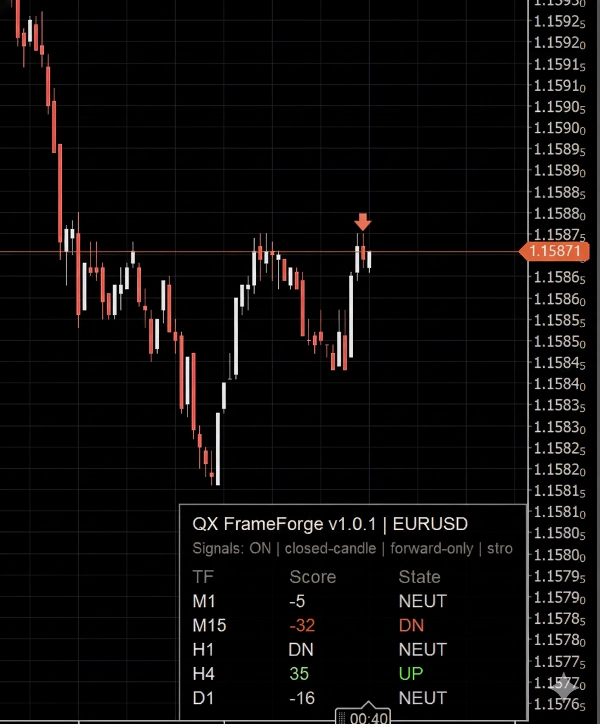
QX FrameForge là một bảng điều khiển trạng thái thị trường đa khung thời gian phủ lên trên cho cTrader. Nó nén những gì đang xảy ra trên nhiều khung thời gian thành một bảng điều khiển nhanh và dễ đọc, giúp bạn giao dịch có ngữ cảnh thay vì đoán mò.
Đối với mỗi khung thời gian được chọn, bảng điều khiển hiển thị:
- TF (khung thời gian)
- Điểm số (-100 đến +100) để thể hiện hướng và sức mạnh
- Trạng thái: LÊN / TRUNG TÍNH / XUỐNG để quyết định nhanh chóng
Có thể bật các mũi tên tùy chọn để đánh dấu xác nhận chỉ sử dụng nến đã đóng, giúp biểu đồ ổn định và tránh nhấp nháy trong thanh.
Cách đọc nó (dành cho người mới bắt đầu)
Hãy nghĩ bảng điều khiển như một đồng hồ chỉ hướng:
- Điểm số dương và LÊN có nghĩa là điều kiện tăng giá trên khung thời gian đó
- Điểm số âm và XUỐNG có nghĩa là điều kiện giảm giá trên khung thời gian đó
- TRUNG TÍNH có nghĩa là điều kiện hỗn hợp, dao động hoặc không đủ mạnh để có hướng rõ ràng
Một thiết lập Vùng Trung Tính kiểm soát mức độ dễ dàng mà chỉ báo chuyển sang TRUNG TÍNH. Vùng trung tính rộng hơn tạo ra ít trạng thái có hướng hơn (thận trọng hơn).
Bên trong Điểm số (tổng quan)
Điểm số kết hợp:
- một thành phần xu hướng (hướng và hành vi độ dốc)
- một thành phần động lượng (sức mạnh của sự tiếp tục so với sự do dự)
- một bộ lọc biến động tùy chọn để giảm các giai đoạn nhiễu
Kết quả là một điểm số có giới hạn được thiết kế cho căn chỉnh đa khung thời gian, không phải để “vào lệnh thần kỳ”.
Cách các nhà giao dịch thường sử dụng FrameForge
1) Căn chỉnh đa khung thời gian
- Ưu tiên giao dịch khi các khung thời gian cao hơn đồng thuận (ví dụ: H1 + H4 đều LÊN)
- Sử dụng khung thời gian thấp hơn (ví dụ: M5) để định thời gian
2) Lọc chế độ
- Quá nhiều trạng thái TRUNG TÍNH thường có nghĩa là dao động và điều kiện chất lượng thấp hơn
- Hướng khung thời gian cao hơn hỗn hợp gợi ý sự thận trọng hoặc giảm mức độ tiếp xúc
3) Lớp xác nhận
- Sử dụng FrameForge để xác nhận rằng thiết lập của bạn đã đồng bộ trước khi cam kết
Mũi tên tùy chọn (tín hiệu)
Mũi tên là một trợ giúp trực quan tùy chọn. Chúng được đánh giá chỉ trên nến đã đóng cuối cùng.
Bạn có thể chọn cách mũi tên kích hoạt:
- chỉ khi sức mạnh vượt ngưỡng,
- chỉ khi trạng thái hướng thay đổi,
- hoặc thường xuyên hơn khi điều kiện vẫn mạnh.
Bao gồm các điều khiển cho:
- ngưỡng sức mạnh
- thời gian chờ (số thanh tối thiểu giữa các mũi tên)
- một tín hiệu mỗi dao động (giảm mũi tên lặp lại cùng hướng)
- giới hạn biểu tượng (ngăn ngừa biểu đồ bị lộn xộn)
Quan trọng: mũi tên được thiết kế để chỉ tiến về phía trước từ thời điểm bạn bật chúng, để tránh spam đối tượng lịch sử và hình ảnh phản chiếu sai lệch.
Tương thích
- Hoạt động trên bất kỳ ký hiệu cTrader nào và bất kỳ khung thời gian biểu đồ nào
- Chỉ là chỉ báo. Không đặt lệnh nào.
- Cập nhật giao diện người dùng tối ưu để giữ cho biểu đồ phản hồi nhanh.
Tuyên bố rủi ro
Giao dịch có rủi ro. Hiệu suất trong quá khứ không đảm bảo kết quả trong tương lai.
Tóm tắt
The Score integrates trend direction and slope, momentum strength, and an optional volatility filter to reduce noise, producing a bounded metric aimed at multi-timeframe alignment rather than precise entry signals. Traders typically use FrameForge for aligning trades across timeframes (e.g., confirming higher timeframe trends before timing entries on lower timeframes), filtering market regimes by identifying choppy or mixed conditions, and adding a confirmation layer to their setups.
Arrow signals can be customized by strength thresholds, directional changes, cooldown periods, and icon limits to avoid chart clutter. The indicator works on any cTrader symbol and timeframe, updating efficiently to maintain chart responsiveness. It does not place orders and serves solely as a visual analytical tool.
Đánh giá của khách hàng
5 | 100 % | |
4 | 0 % | |
3 | 0 % | |
2 | 0 % | |
1 | 0 % |