
Descrizione
Edge Matrix Pro
Introduzione: smetti di ottimizzare. Inizia a sfruttare.
Non lasciarti ingannare dalla parola "Analisi". Questo strumento è un'arma di precisione progettata per gli scalper e i trader professionisti che richiedono risultati immediati basati sui dati.
Perché la maggior parte dei trader fallisce? Perché o commerciano il "rumore" del mercato, o peggio, sprecano settimane in ottimizzazioni di parametri complesse che falliscono al primo segno di cambiamento del mercato.
Edge Matrix Pro cambia le regole del gioco. Sostituisce l'ottimizzazione cieca con la certezza statistica.
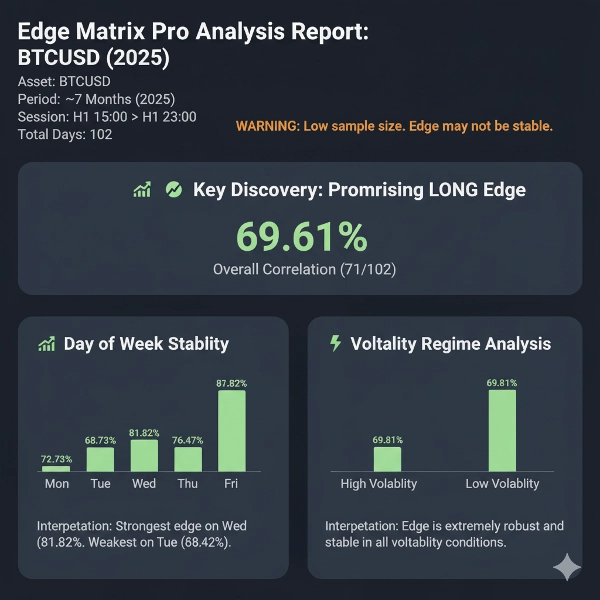
Invece di sprecare il tuo tempo, la Modalità Analisi del bot fa il lavoro pesante per te: scansiona più di 5 anni di dati in pochi minuti per trovare i segnali esatti delle candele H1 (come le 22:00 H1 su EURGBP) che storicamente prevedono la direzione del mercato con fino all'86% di accuratezza.
Questa analisi generata dal bot ti fa risparmiare settimane di tempo per ottimizzazioni lunghe, fornendoti immediatamente un vantaggio chiaro e verificabile su cui agire.
Poi, passi alla Modalità Trading. Il bot aspetta pazientemente quel momento esatto ad alta probabilità ed esegue la tua strategia—sia che si tratti di uno scalp di 5 minuti o di un trade di sessione di 8 ore—con una suite completa di strumenti professionali di gestione del rischio.
Questo non è trading lento, basato sull'acquisto e la speranza. Questo è scalping di precisione supportato da dati statistici.
Come funziona: la filosofia a 2 modalità
Il bot è diviso in due potenti modalità. Usi la Modalità 1 per trovare il vantaggio e la Modalità 2 per sfruttarlo.
🔬 Parte 1: Modalità Analisi (Il "Laboratorio Quantistico")
Questo è il tuo dipartimento di ricerca. In questa modalità, il bot non esegue alcun trade. Esegue un'analisi storica approfondita per costruire una "Matrice Statistica" del tuo mercato. Risponde alle domande che determinano la redditività:
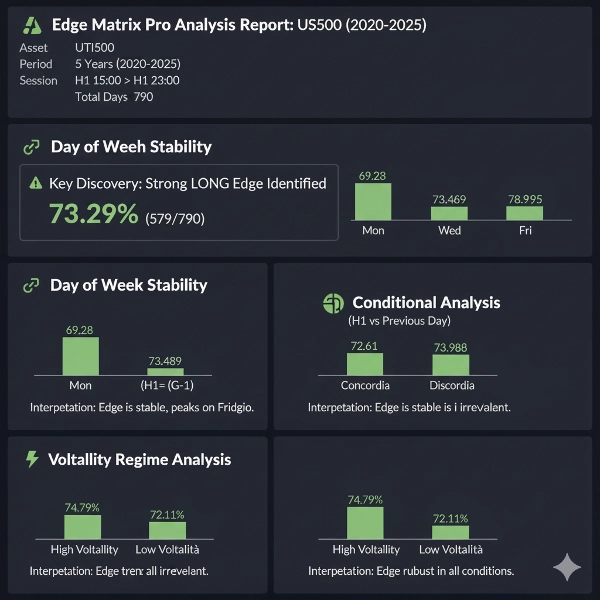
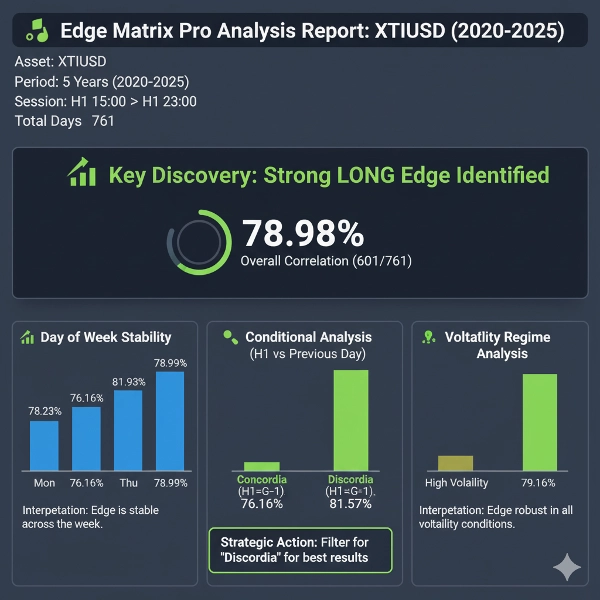
- Stat 1 (H1 vs. Sessione): Qual è il tasso di vincita principale? (es.,
Correlazione Finale:86.26%) - Stat 2 (H1 vs. Giorno Precedente): Il vantaggio funziona meglio con il trend (
Concordanza) o contro di esso (Discordanza)? (es.,Tasso di Successo Discordanza:81.57%) - Stat 3 (Regime di Volatilità): Il vantaggio funziona in mercati ad alta volatilità (in trend) o a bassa volatilità (laterali)?
- Stat 4 (Forza del Segnale): Il vantaggio migliora se filtriamo le candele "rumorose" deboli e scambiamo solo segnali forti?
- Stat 5 (Giorno della Settimana): Il vantaggio è stabile o fallisce in certi giorni (es., venerdì)?
⚙️ Parte 2: Modalità Trading (Il "Motore di Esecuzione")
Questa è la tua arma di esecuzione. Prendi i dati dalla tua analisi e costruisci una strategia precisa e filtrata.
- Logica Principale: Inserisci la tua
Correlazione Storica(es., 86.26% o 18.18%). Il bot sa automaticamente se fare trading Long (con il segnale) o Reverse (contro di esso) e evita automaticamente la "Zona Morta" del 40%-60% dove non esiste alcun vantaggio. - Filtraggio del Contesto: Puoi quindi aggiungere livelli di conferma, dicendo al bot di scambiare solo se la configurazione è perfetta:
-
Abilita Filtro D-1: Scambia solo su Discord (es., 81.57% tasso di vincita).Filtro Regime di Volatilità: Scambia solo in bassa volatilità.Abilita Filtro Giorno della Settimana: Disabilita il trading ilvenerdì(se è debole).Abilita Filtro Forza del Segnale: Ignora segnali H1 deboli che sono solo rumore.
- Uscite di Precisione (La cassetta degli attrezzi dello scalper): Hai il controllo totale sull'uscita.
-
Strategia di Uscita: Questa è la chiave.-
TimeOnly: Testa il vantaggio statistico "puro". Ignora tutti i pips ed esce solo in base al tempo.PipsAndManagement: La scelta dello scalper. Ignora tutto il tempo ed esce solo su SL, TP, Break Even o Trailing Stop.TimeOrPips: Modalità ibrida. "Prova a raggiungere il mio TP di 20 pips, ma se non succede in 15 minuti, chiudi il trade."
Tempo di Detenzione (Minuti): Il tuo timer per lo scalping. Impostalo su 5, 10 o 60 minuti per trade rapidi in entrata e uscita.
- Gestione Professionale del Rischio (Pronto per Prop):
-
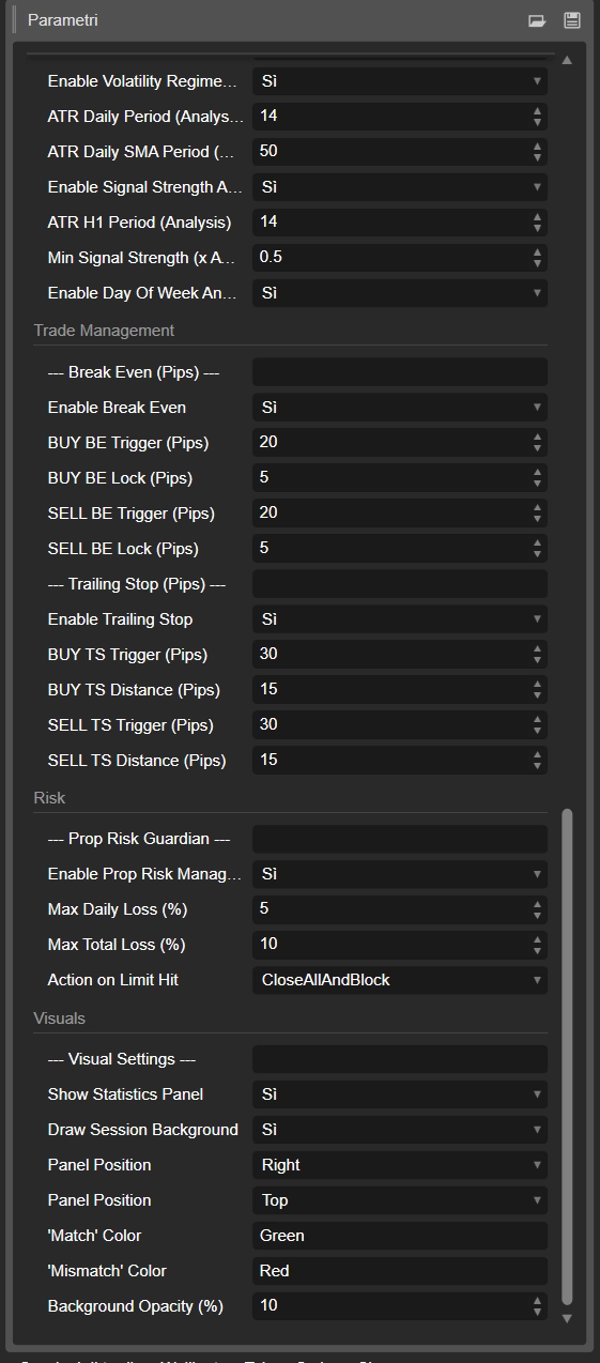
Modalità SL/TP: Scegli traFixedPips(statico) oATR_Multiplier(dinamico) stop che si adattano alla volatilità.Break Even & Trailing Stop: Moduli completi, per pip, per proteggere i vincitori.Prop Risk Guardian: Proteggi il tuo conto con limiti rigidi diPerdita Massima Giornaliera (%)ePerdita Totale Massima (%).
📊 I nostri dati di backtest
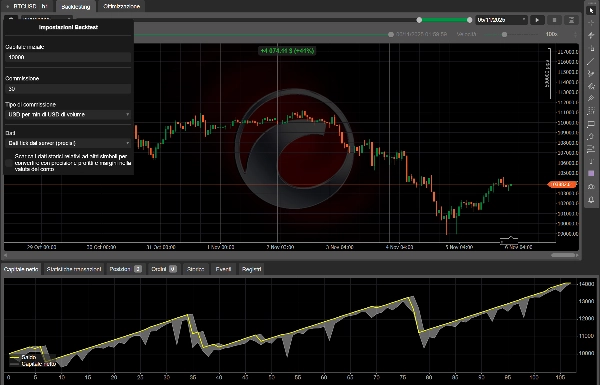
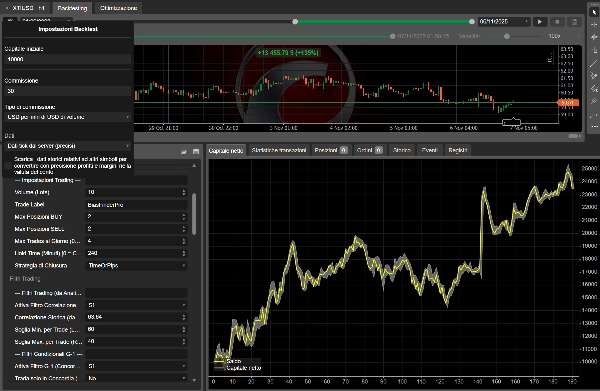
Per garantire l'affidabilità statistica, questo strumento è stato progettato per test robusti. Tutti gli esempi di analisi (come l'86% di tasso di vincita su EURGBP o l'81% di tasso di vincita su XTIUSD) sono stati generati da estesi backtest quinquennali (2020-2025) utilizzando dati di alta qualità basati su tick.
🛠️ Approfondimento sui parametri (v14 Inglese)
Generale
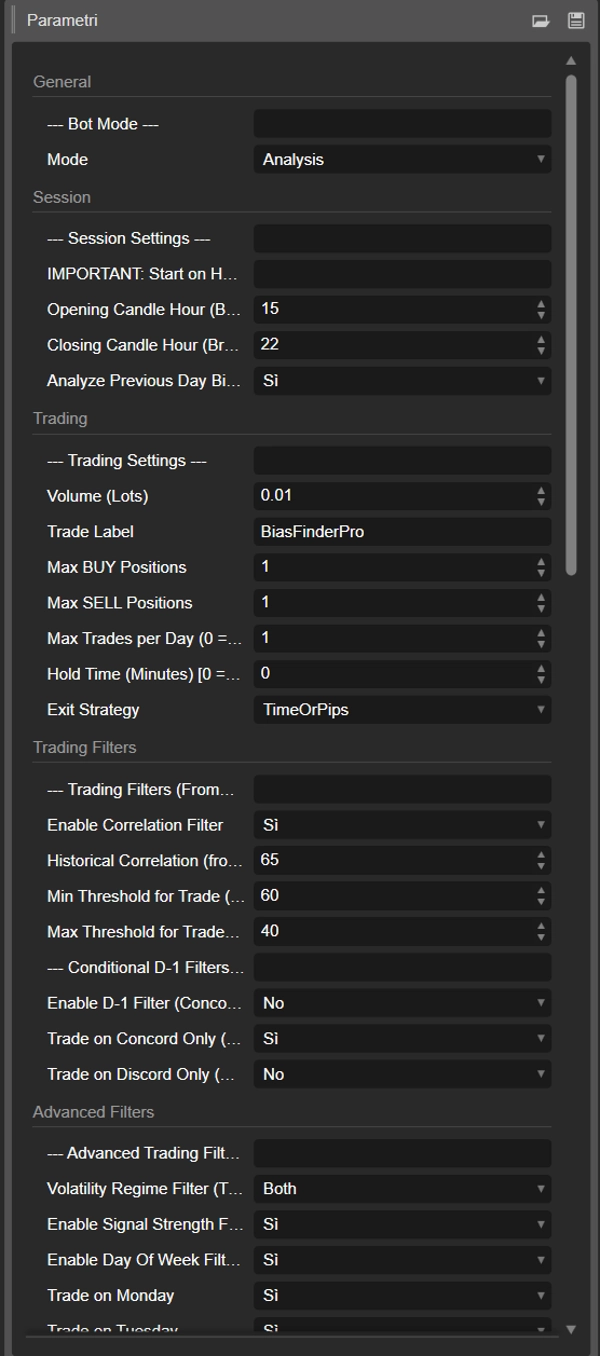
Modalità: Passa traAnalisi(trova il vantaggio) eTrading(esegue il vantaggio).
Sessione
Ora di apertura della candela (Broker): L'ora della candela H1 (0-23) che funge da segnale.-
- Esempio: Per l'apertura delle 9:30 AM NY (RTH) su XTIUSD, abbiamo trovato che l'ora corretta del broker era
16:00. Usare l'ora sbagliata (come15:00) dava dati non validi.
- Esempio: Per l'apertura delle 9:30 AM NY (RTH) su XTIUSD, abbiamo trovato che l'ora corretta del broker era
Ora di chiusura della candela (Broker): L'ora della candela H1 che definisce la fine della sessione per l'analisi e (seHold Time = 0) il tempo di uscita forzata per i trade.Analizza il bias del giorno precedente (D-1): SeTrue, la modalità Analisi calcolerà le statistiche avanzate "Concordanza/Discordanza".
Trading
Volume (Lotti): La dimensione fissa del lotto per ogni trade.Etichetta del Trade: Il numero magico unico per le posizioni del bot.Posizioni Massime BUY / SELL: Posizioni massime contemporanee. Per questa strategia, è consigliato1.Massimo numero di trade al giorno (0 = Illimitato): Un freno di sicurezza. Se impostato su1, il bot prenderà solo il primo segnale valido della giornata.Tempo di Detenzione (Minuti) [0 = Usa ora di chiusura]:-
0: Il bot usa la Modalità Intraday. Chiuderà forzatamente il trade all'Ora di chiusura della candela.> 0(es.,15): Il bot usa la Modalità Scalping/Swing. IGNORA l'Ora di chiusura della candelae chiuderà il trade dopo 15 minuti (o su SL/TP).
Strategia di Uscita: Il parametro di trading più importante.-
TimeOnly: Ignora TUTTI SL/TP/BE/TS. L'unica uscita è tramite tempo (Tempo di Detenzione o Ora di Chiusura). Usalo per testare il tuo vantaggio statistico "puro".PipsAndManagement: Ignora TUTTE le uscite temporali. L'unica uscita è tramite SL/TP/BE/TS.TimeOrPips: (Ibrido). Il bot usa entrambi. Qualunque venga raggiunto per primo (tempo o pips) chiuderà il trade.
Filtri di Trading
Abilita Filtro Correlazione: SeTrue, il bot usa i filtri sottostanti. SeFalse, scambia "alla cieca" (sempre Long).Correlazione Storica (da % Analisi): Qui inserisci il risultato della tua analisi.Soglia Minima per Trade (Long %)(es., 60): SeCorrelazione Storicaè sopra questo valore, il bot scambia Long (con la candela H1).-
- Esempio:
86.26>= 60è vero. Il bot scambia LONG.
- Esempio:
Soglia Massima per Trade (Reverse %)(es., 40): SeCorrelazione Storicaè sotto questo valore, il bot scambia Reverse (contro la candela H1).-
- Esempio:
18.18<= 40è vero. Il bot scambia REVERSE. - (Nota: un valore tra 40-60 è la "Zona Morta" e non verranno effettuati trade).
- Esempio:
Filtri Condizionali D-1
Abilita Filtro D-1: SeTrue, abilita i filtri sottostanti.Scambia solo su Concordanza (H1 = D-1): SeTrue, il bot scambierà solo nei giorni in cui il segnale H1 corrisponde al trend D-1.Scambia solo su Discordanza (H1 != D-1): SeTrue, il bot scambierà solo nei giorni in cui il segnale H1 è opposto al trend D-1.-
- Esempio: La nostra analisi su XTIUSD ha mostrato un 81.57% tasso di vincita solo in Discord. Imposteresti
Abilita Filtro D-1 = TrueeScambia solo su Discordanza = Trueper scambiare questo specifico vantaggio ad alta probabilità.
- Esempio: La nostra analisi su XTIUSD ha mostrato un 81.57% tasso di vincita solo in Discord. Imposteresti
Filtri Avanzati
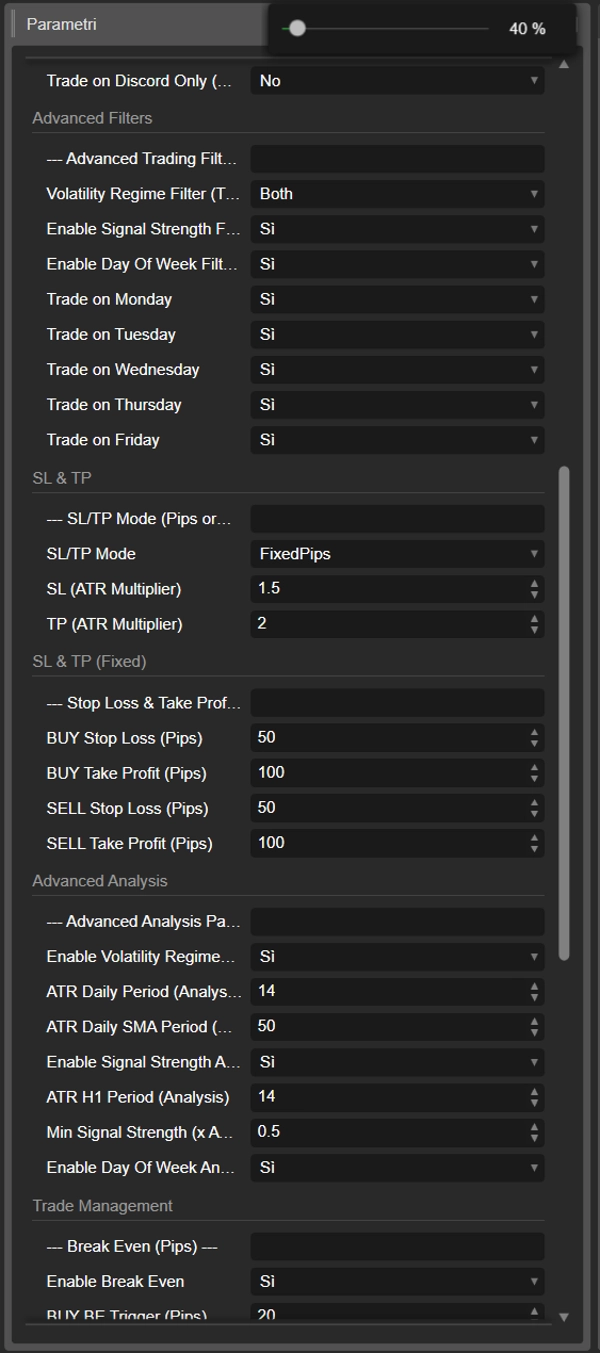
Filtro Regime di Volatilità (Trading): Ti permette di scambiareSolo Alta VolatilitàoSolo Bassa Volatilitàgiorni, basandoti sull'analisi.Abilita Filtro Forza del Segnale (Trading): SeTrue, il bot salterà i segnali di trading se la candela H1 è troppo piccola (basato sulMin Signal Strengthnei parametri di Analisi).Abilita Filtro Giorno della Settimana (Trading): SeTrue, ti permette di disabilitare il trading in giorni specifici.Scambia il lunedì... Scambia il venerdì: Imposta suFalseper saltare il trading in giorni deboli (es., se la tua analisi ha mostrato venerdì al 60% mentre altri giorni erano 80%+).
SL & TP
Modalità SL/TP:-
FixedPips: Usa i valori fissi di pip dal gruppo "SL & TP (Fisso)".ATR_Multiplier: Ignora i pips fissi. Calcola SL/TP basandosi sull'ATR H1 al momento del segnale (es., SL = 1.5 * ATR).
SL/TP (Moltiplicatore ATR): I moltiplicatori da usare (es., 1.5 per SL, 2.0 per TP).SL & TP (Fisso)Gruppo: Lo Stop Loss e Take Profit statico in pips (usato solo seModalità SL/TP = FixedPips).
Gestione del Trade
Abilita Break Even/Abilita Trailing Stop: Attiva i moduli BE e TS....Trigger (Pips): I pips di profitto necessari per attivare BE o TS....Lock/ ...Distance (Pips): I pips da bloccare (BE) o da seguire (TS).-
- Nota: Questi sono efficaci solo se la tua
Strategia di UscitaNON èTimeOnly.
- Nota: Questi sono efficaci solo se la tua
Rischio (Prop Risk Guardian)
Abilita Gestione del Rischio Prop: Attiva/disattiva il modulo di sicurezza.Perdita Massima Giornaliera (%): Blocca nuovi trade per la giornata se la perdita di equity giornaliera raggiunge questo limite.Perdita Totale Massima (%): Blocca permanentemente il cBot se la perdita totale di equity raggiunge questo limite.Azione al raggiungimento del limite: Decide seChiudiTuttoEBloccao soloBloccaNuoviTrade.
Analisi Avanzata
- Questi parametri influiscono solo sulla Modalità Analisi. Sono le impostazioni per i filtri avanzati.
Periodo ATR Giornaliero / Periodo SMA: Impostazioni per il filtro Regime di Volatilità.Periodo ATR H1 / Forza Minima del Segnale: Impostazioni per il filtro Forza del Segnale.Abilita Analisi...: Ti permette di disattivare parti dell'analisi che non ti servono (es., Giorno della Settimana) per velocizzare il backtest.
Riepilogo
In Trading Mode, users apply the analysis results to execute trades automatically. The bot supports customizable strategies ranging from quick 5-minute scalps to longer 8-hour trades, incorporating professional risk management tools. Features include configurable stop loss and take profit settings (fixed or ATR-based), break-even and trailing stops, and filters for trading only under optimal conditions (e.g., specific volatility regimes, signal strength thresholds, or days of the week). It also includes a Prop Risk Guardian module to enforce maximum daily and total loss limits.
Key parameters allow users to set session hours, trade volume, maximum concurrent positions, and exit strategies (time-based, pip-based, or hybrid). The bot’s design emphasizes precision execution based on statistically backed signals rather than traditional optimization, aiming to provide a clear, verifiable trading edge.
Recensioni dei clienti
5 | 100 % | |
4 | 0 % | |
3 | 0 % | |
2 | 0 % | |
1 | 0 % |