Descrizione
Cheat Sheet . 3 anni di dati riassunti di seguito con direzione ad alta probabilità.
Day trading
- Asia: B120 (Session Bias + Heikin 2H concordano) | alt: Solo Session Bias
- Londra: Heikin 1H
- New York: Heikin 2H
- Ovest (Londra e NY): Heikin 2H
- Tempistica: Ovest + Heikin 2H inversione → miglior follow-through a 30m
Swing (2–3 giorni)
- Direzione (3 giorni / 72h): Global Session Bias (Asia+Londra+New York combinati)
- Filtro di ingresso: Global Session Bias + Heikin 4H concordano (se non concordano → salta)
- Evitare default: 2 giorni / 48h
HeikinSessionBiasOnlyBot è un cruscotto di bias e “bussola” della struttura di mercato per trader discrezionali. Non effettua operazioni. Invece, ti offre una vista pulita e sempre aggiornata di trend/bias usando due motori indipendenti:
- Heikin Bias (bias direzionale a timeframe superiore)
- Session Bias (bias di range Asia/Londra/New York + profilo volume)
Cosa fa (in parole semplici)
1) Heikin Bias (motore bias di trend)
Questo motore lavora sul tuo Bias TF (minuti) scelto (default 360 min / 6H):
- Costruisce candele Heikin Ashi su quel timeframe.
- Rileva zone pivot quando il “colore” HA cambia (verde ↔ rosso).
- Il bias si inverte quando la chiusura rompe l’ultima zona pivot:
-
- La chiusura rompe sopra la zona di resistenza → Rialzista
- La chiusura rompe sotto la zona di supporto → Ribassista
- Se non avviene un’inversione per rottura pivot, può comunque invertire usando un Inside Engine v2:
-
- Osserva coil di inside-bar (una compressione) ancorata dall’intervallo delle ombre.
- Dopo MinInsideBarsForReversal inside bar, diventa “armato”.
- Una chiusura sopra l’intervallo dell’ombra di ancoraggio inverte rialzista; sotto inverte ribassista.
Risultato: ottieni un bias direzionale pulito a timeframe superiore che si aggiorna automaticamente.
2) Session Bias (motore bias Asia / Londra / New York)
Questo motore funziona su un timeframe di analisi 5 minuti hard-coded e si ricostruisce a ogni fine sessione.
Per ogni sessione (Asia, Londra, NY), esso:
- Costruisce il range high/low di quella sessione
- Costruisce un semplice profilo volume (bins) e trova il POC (Punto di Controllo)
- Usa una divisione volume a metà range:
-
- Prende il punto medio del range della sessione: mid = (Low + High) / 2
- Confronta il volume scambiato nella metà inferiore vs metà superiore
- Produce un punteggio di direzione per sessione da tre pilastri:
-
- HYB (posizionamento chiusura vs range + vs POC)
- V (skew volume effettivo dalla divisione a metà)
- BB (momentum di rottura corpo: logica solo rottura vs corpo candela precedente)
Poi calcola:
- DirScore = media(HYB, V, BB)
- Un Bias di sessione da DirScore usando DirBand
- Una Confidenza di sessione da:
-
- AGR (accordo tra HYB/V/BB)
- CLR (quanto forti/chiare sono gli input)
- PRG (quanto è stata “progressiva” la mossa durante la sessione)
Infine, combina le tre sessioni in un SetScore e etichetta il Session Bias complessivo.
3) “Combined Bias” finale (la tua risposta principale)
Scegli come combinare i due motori:
- BothAgree (default): mostra Bullish/Bearish solo se entrambi i motori concordano; altrimenti Balanced (o Pending se incompleto).
- HeikinOnly: solo il bias Heikin a timeframe superiore.
- SessionOnly: solo il risultato del motore sessione.
Questo è un filtro pratico: se vuoi meno operazioni ma un allineamento più pulito, usa BothAgree.
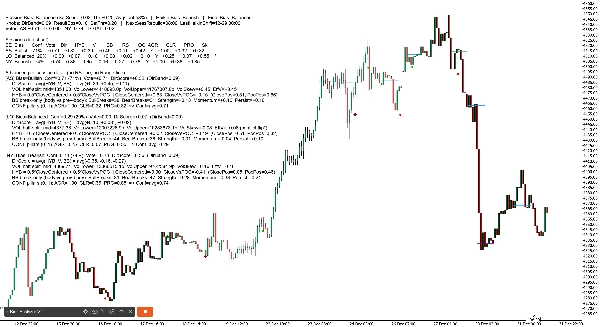
1) Intestazione Dashboard (linea superiore)
Vedrai qualcosa come:
Session Bias: Rialzista (SetScore +0.85, Thr ±0.20, AvgConf 72%) | Heikin Bias: Rialzista | Final Bias: Rialzista
Cosa significa ogni termine
- Session Bias: la direzione combinata da Asia/Londra/NY
- SetScore: il “totale voti” combinato dalle tre sessioni
-
- Ogni sessione contribuisce con un Voto = segno direzione × confidenza
- Rialzista aggiunge, ribassista sottrae
- Thr (SetThr): il SetScore minimo necessario per chiamare il Session Bias rialzista/ribassista
-
- Se SetScore è dentro ±Thr → Session Bias diventa Balanced
- AvgConf: confidenza media tra le tre sessioni (0–100%)
- Heikin Bias: il bias a timeframe superiore (Rialzista/Ribassista/Pending)
- Final Bias: il risultato finale dopo la modalità di combinazione scelta (BothAgree / HeikinOnly / SessionOnly)
2) Linea “Manopole” Dashboard (istantanea impostazioni)
Esempio:
Manopole: DirBand=0.09 ResultEps=0.10 SetThr=0.20 | NextSessRebuild=17:00 LastHeikinShift=12-30 06:00
Significato
- DirBand: quanto deve essere forte DirScore per etichettare una sessione rialzista o ribassista
-
- DirBand piccolo = più segnali, più “sensibile”
- DirBand grande = meno segnali, più conservativo
- ResultEps: la “zona morta” usata per decidere se i risultati sono chiari
-
- Aiuta a evitare di trattare piccole differenze come significative
- SetThr: la soglia usata a livello combinato di sessione (SetScore)
- NextSessRebuild: quando avverrà la prossima ricostruzione della sessione (UTC)
- LastHeikinShift: ultima volta che il bias Heikin è cambiato
3) Linea “Voti” (totale rapido)
Esempio:
Voti: AS +0.40 LO +0.20 NY -0.10 TOTALE +0.50
Significato
- Voto AS / LO / NY = segno(direzione) × confidenza
- TOTALE è semplicemente la somma
- Questo è fondamentalmente il tuo “tabellone sessione”.
4) Tabella Modalità Dettagliata (ripartizione per sessione)
In modalità Dettagliata, ottieni una tabella compatta come:
SE | Bias | Conf | Vote | Dir | HYB | V | BB | RS | OC | AGR | CLR | PRG | Sk
Spiegazione colonna per colonna (semplice)
- SE: etichetta sessione (AS, LO, NY)
- Bias: Rialzista / Ribassista / Balanced (per quella sessione)
- Conf: percentuale di confidenza per quella sessione
- Vote: voto direzionale (segno bias × confidenza)
- Dir: DirScore = media(HYB, V, BB)
- HYB: punteggio posizionamento chiusura ibrido
-
- Combina “chiusura dentro il range” + “chiusura vs POC”
- V: skew volume effettivo
-
- Basato su volume sessione metà superiore vs metà inferiore
- Può invertire se confligge con il “risultato” (vedi Sk sotto)
- BB: punteggio rottura corpo
-
- Misura il momentum solo rottura rispetto al confine del corpo della candela precedente
- RS: ResultScore (miscela di mossa netta + HYB)
-
- Usato per controlli di “chiarezza risultato”
- OC: risultato chiaro? (S/N)
-
- Se RS è abbastanza grande (oltre ResultEps), è considerato “chiaro”
- AGR: pilastro accordo (0..1)
-
- HYB/V/BB puntano nella stessa direzione?
- CLR: pilastro chiarezza (0..1)
-
- HYB/V/BB sono forti o deboli?
- PRG: pilastro progresso (0..1)
-
- La sessione si è mossa costantemente (meno oscillazioni / miglior follow-through)?
- Sk: indicatore conflitto skew
-
*significa che lo skew volume ha conflitto con la direzione risultato ed è stato invertito internamente per evitare bias fuorvianti
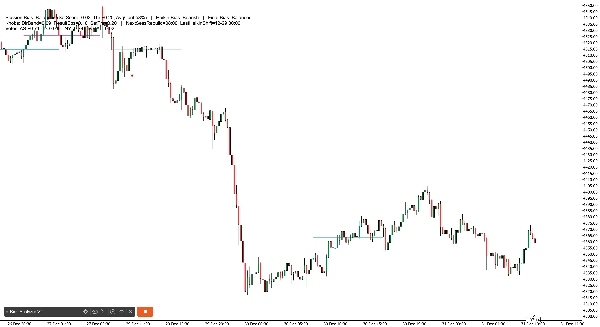
2) Linee Storico POC Sessione (sul grafico)
Il robot disegna linee orizzontali che mostrano POC (Punto di Controllo) per le sessioni recenti:
- Linee separate per AS, LO, NY
- Disegna più “set storici” (default 6), sfumando quelli più vecchi
3) Marcatori Inversione Heikin (sul grafico)
Quando il bias Heikin si inverte, il bot stampa marcatori:
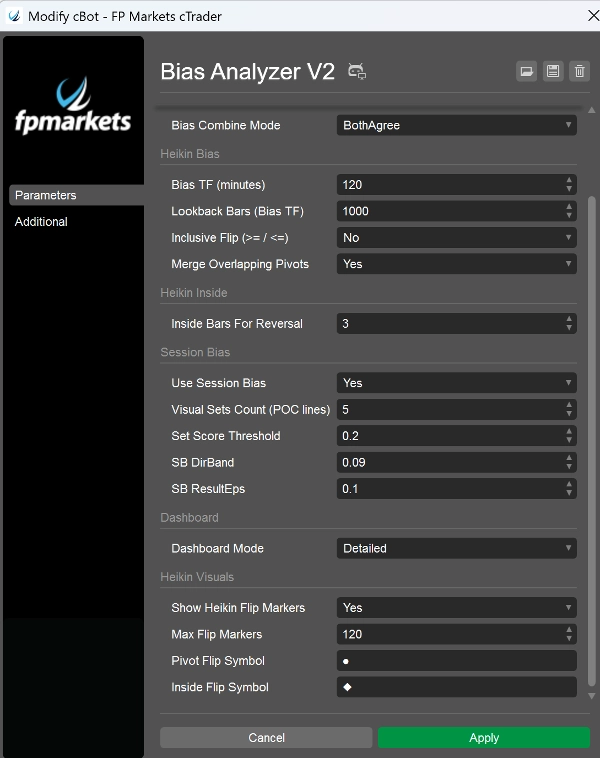
- Inversione rottura pivot usa il tuo Simbolo Inversione Pivot (default ●)
- Inversione Inside Engine usa il tuo Simbolo Inversione Inside (default ◆)
- I colori differiscono per direzione e tipo di inversione (così puoi capire “perché” è cambiato)
Parametri più importanti (cosa evidenziare nel tuo pitch)
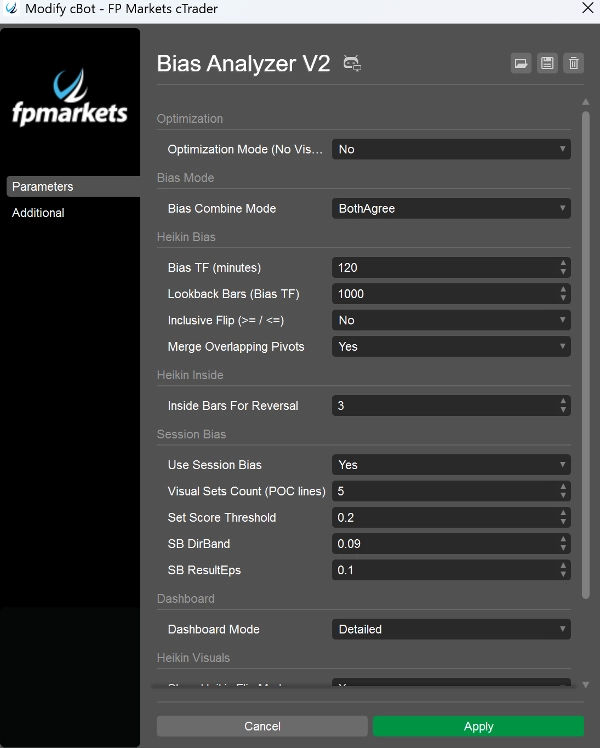
- Bias TF (minuti): imposta il “timeframe di ancoraggio” per il bias Heikin (es. 240, 360, 720)
- MinInsideBarsForReversal: controlla quanto deve essere stretto un coil prima che l’inside engine possa invertire
- Use Session Bias: abilita/disabilita il motore sessione
- Visual Sets Count: quante linee storico POC mantenere
- DirBand / ResultEps / SetScoreThreshold: controlla quanto è severo il motore sessione
- Bias Combine Mode: definisce quanto conservativo è il bias finale
- Dashboard Mode: BaseOnly vs Detailed
- Optimization Mode: disabilita visual/log per test di performance