"KST Momentum Heatwave v3" 로고
KST Momentum Heatwave v3
"KST Momentum Heatwave v3" 업로드된 이미지
41
판매
677
무료 설치
체험판에 관하여
Duration: 4 days Limits: Full indicator — all features active during trial Visuals: Trial watermark with days and hours remaining After expiry: indicator disables output, clears drawings, shows TRIAL EXPIRED message with link to buy full version in cTrader Store.

KST Momentum Heatwave — Turn Momentum Into Market Temperature (On-Chart)

Modern KST engine with optimized defaults (10/15/20/30 + 10/10/10/15, Signal 9)
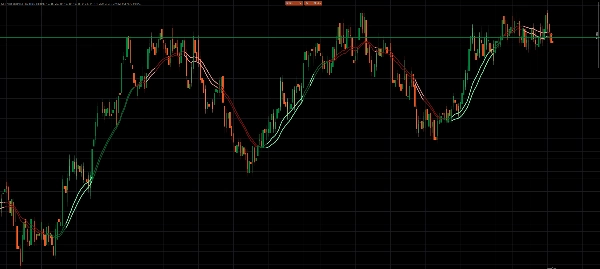
True price overlay — KST + Signal are projected directly onto the chart around a baseline EMA
4 Visual Modes: Pro Smooth / Classic / Raw Heat / Two Tier
Momentum Heatmap + Glow to visualize strength instantly
Normalized momentum strength for consistency across symbols and timeframes
Anti-chop hysteresis system to filter noise in sideways markets

This is not a traditional oscillator.

KST Momentum Heatwave transforms the classic Know Sure Thing (KST) indicator into a visual momentum temperature system built directly onto your chart.

Instead of watching an oscillator below the chart, momentum becomes a dynamic layer over price — showing direction, strength, and momentum lifecycle in a way that can be interpreted instantly.


What the indicator does and what it’s designed for

KST Momentum Heatwave converts momentum data into a visual temperature map of market pressure.

Traditional oscillators require traders to constantly switch attention between the price chart and a separate indicator window.
This indicator removes that friction by projecting momentum directly onto the price chart itself.

The result is a cleaner workflow where you can immediately see:

  • when momentum is accelerating
  • when a trend is strong and dominant
  • when momentum is cooling down
  • when the market is entering low-energy chop

It is designed for traders who want to quickly identify:

  • trend strength
  • momentum continuation opportunities
  • momentum exhaustion
  • regime shifts

Instead of guessing whether a move has power behind it, KST Momentum Heatwave makes that pressure visible.


What it plots on the chart and how to read it

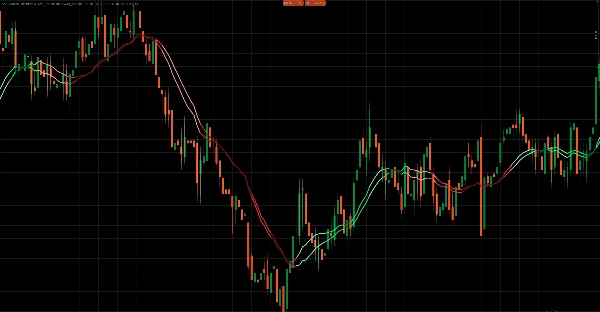
The indicator plots two momentum lines directly on the price chart, along with a visual heat layer.

1. KST Line — Momentum Core

The main momentum line calculated from four weighted ROC components.

Interpretation:

  • KST above Signal → bullish momentum
  • KST below Signal → bearish momentum

The distance between the two lines indicates momentum intensity.


2. Signal Line — Momentum Trigger

A smoothed moving average of the KST line.

It acts as the momentum trigger line.

  • Crossovers between KST and Signal often indicate momentum shifts or accelerations.


3. Momentum Heat Layer

The indicator converts the distance between KST and Signal into a normalized strength value between 0 and 1.

This value drives the color intensity and heatmap visualization.

Interpretation:

  • Bright/light colors → strong momentum
  • Normal colors → stable trend pressure
  • Dark colors → weakening momentum
  • Fading colors → potential slowdown or transition

Optional heatmap and glow effects paint the candles themselves, allowing traders to instantly see when the market is “heating up.”


4. Price Projection Layer

Instead of plotting raw oscillator values, the indicator projects momentum onto price using:

  • a baseline EMA
  • an ATR-scaled amplitude

This keeps the overlay proportional to the chart and ensures the indicator remains readable across different markets and timeframes.


Visual modes and behavior

KST Momentum Heatwave includes four visual styles that change how momentum is interpreted.

Pro Smooth

The most advanced mode.

Features:

  • lifecycle-based momentum coloring
  • hysteresis filtering
  • confirmation requirements before direction flips

This significantly reduces noise during sideways or choppy markets.


Classic

Uses lifecycle coloring without hysteresis filtering.

Result:

  • faster momentum responses
  • slightly more sensitive to market fluctuations

Best suited for intraday and swing trading.


Raw Heat

Focuses purely on absolute momentum strength.

Momentum is categorized into three tiers:

  • strong
  • medium
  • weak

This mode is ideal for traders who want a pure momentum power reading.


Two Tier

A simplified interpretation mode.

  • KST above/below Signal defines direction
  • a strength threshold defines strong vs weak momentum

Designed for traders who prefer minimal visual complexity.


How to use KST Momentum Heatwave

Step 1 — Select your visual mode

Use the mode that matches your trading style:

  • Pro Smooth → cleanest signals in noisy markets
  • Classic → faster reactions
  • Raw Heat → momentum strength focus
  • Two Tier → simple strong vs weak interpretation


Step 2 — Identify the momentum regime

Look for dominant color behavior:

  • Bullish colors dominating → long bias
  • Bearish colors dominating → short bias
  • Dark fading colors → momentum weakening
  • Frequent color flips → likely ranging conditions


Step 3 — Use momentum for trade timing

Typical use cases include:

Trend continuation

Enter during pullbacks when the momentum regime remains intact and strength stays elevated.

Momentum exhaustion

Reduce exposure when colors fade darker and strength declines.

Momentum reversal

Watch for KST/Signal flips combined with rising strength.


Example recommended setup

A balanced configuration for most markets:

Preset: Swing_Classic
Visual Mode: Pro Smooth

Baseline EMA: 34
ATR Period: 14
ATR Amplitude: 1.40

Normalize Lookback: 200

Heatmap: Enabled
Glow: Enabled


Recommended markets and timeframes

Because the indicator uses ATR scaling and normalized strength, it adapts well to most markets.

Works particularly well on:

Forex

  • M5 – H1 for intraday trading
  • H1 – H4 for swing trading

Indices

  • M1 – M15 for momentum scalping
  • M15 – H1 for structured trend trading

Crypto

  • M5 – H1 (Pro Smooth recommended)
  • H1 – H4 for trend environments

Commodities

  • M15 – H4

Lower timeframes benefit most from Pro Smooth filtering.


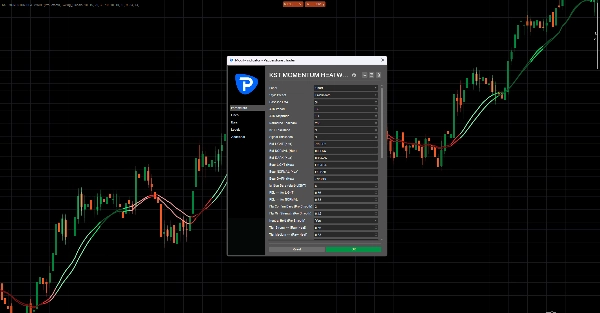
Key parameters and what they control

Preset system

Scalp_Clean, Swing_Classic, Smooth, and Aggressive presets adjust the internal KST configuration.

Custom mode allows full manual control.


Momentum normalization

Normalize Lookback

Controls the historical window used to scale momentum strength.

Higher values produce smoother readings.


Overlay projection

Baseline EMA

Defines the anchor line used to project the momentum overlay.

ATR Amplitude

Controls how far the overlay expands from the baseline.


Anti-chop controls (Pro Smooth)

Flip Confirm Bars

Number of bars required to confirm a regime change.

Flip Min Strength

Minimum momentum strength required before accepting a flip.

Neutral Hold

Helps stabilize the regime during weak momentum conditions.


Heat and glow visualization

Controls how strongly the heatmap reacts to momentum strength.

Parameters include:

  • Heat Width
  • Heat Alpha
  • Heat Gamma
  • Glow Strength


Performance management

Keep Bars

Limits how many visual objects remain on the chart to keep the indicator running smoothly.


Important notes

Chart object intensity

Heatmap and glow effects draw multiple objects.
If performance slows:

  • reduce KeepBars
  • reduce Heat Width
  • disable Glow


Strength saturation

Extreme volatility spikes may push strength close to its maximum quickly.

If this occurs:

  • increase Normalize Lookback
  • switch to Pro Smooth mode


Best used with structure

KST Momentum Heatwave is designed as a momentum regime layer, not a standalone entry generator.

For best results combine it with:

  • support and resistance
  • market structure
  • liquidity zones
  • trend analysis
체험판에 관하여
Duration: 4 days Limits: Full indicator — all features active during trial Visuals: Trial watermark with days and hours remaining After expiry: indicator disables output, clears drawings, shows TRIAL EXPIRED message with link to buy full version in cTrader Store.
Indicator profile
0.0
리뷰: 0
고객 리뷰
이 상품에 대한 리뷰가 아직 없습니다. 이미 사용해 보셨나요? 다른 사람들에게 가장 먼저 소개해 주세요!
Signal
Indices
Commodities
GBPUSD
MACD
Bollinger
Scalping
Supertrend
AI
XAUUSD
NAS100
BTCUSD
Forex
Breakout
RSI
EURUSD
NZDUSD
Fibonacci
Martingale
VWAP
Prop
ZigZag
ATR
SMC
Crypto
Grid
Stocks
Fair Value Gap (FVG)
USDJPY
Products available through cTrader Store, including trading bots, indicators and plugins, are provided by third-party developers and made available for informational and technical access purposes only. cTrader Store is not a broker and does not provide investment advice, personal recommendations or any guarantee of future performance.

이 작성자의 상품 더 보기

SR Commander is a clean and intelligent support and resistance indicator for cTrader, built to help traders identify key
Buy and Sell Signals
Know Sure Thing (KST) momentum engine
Overbought Oversold Indicator
WICK COMMANDER — Know Exactly When the Market Commits
Coloring trendline/ Colored Trendline / Color Trendline
Entry Momentum MACD Power Guide
VWAP Sniper Elite -- Institutional Trend Engine
Dynamic Liquidity Depth exposes hidden volume
SR Commander — Multi Timeframe Edition. See where the big money draws the line. Trade on your timeframe. Think on theirs
The "Market Temperature" Moving Average -Turn Your MA Into a Live Market Temperature Line
Imperium MTF Heatmap is a unique top-tier indicator for cTrader, created for traders who want more than signals

좋아하실 만한 다른 항목

🎯Generate precise BUY/SELL signals. 📈🎯 Tracks trends with colored candles & clouds.
This is an indicator that displays candlesticks from different timeframes. This is the demo version with a 30-day expira
Advanced Level 2 market analysis tool.
Order BlockIndicator reversal
BrickAlgo TrendPulse is an advanced technical analysis tool that combines multiple indicators with filterin mechanisms.
VWAP: Follow the smart money. Trade with real volume and the fair price on your side!
🟢 Real swing-based support & resistance with ATR-powered half-bands 🔴
All in One indicator designed to reveal Market Sentiment
This is a simple indicator to show the remaining time of a candle
Smart Money Breakout Channels – Auto-detect breakout zones with price, volume & volatility insights on cTrader.
Swing Flow is an advanced trend-following indicator that displays directly on the price chart
Indicatore di volatilità che filtra quando le bande di Bollinger sono in espansione
"Footprint Chart: Visualize bid-ask volume inside candles for clearer order flow and market depth insights."
John Ehlers' trendline using signal processing to filter cycle noise and identify trends with minimal lag.
Delta Volume Indicator - Advanced Order Flow Analysis for cTrader
SmartFibonacci — automatic Fibonacci retracements & extensions with swing detection, alerts and clean labels for cTrader
Turtle Soup ICT Strategy – Detect liquidity traps & trade smart money moves with precision on cTrader.
VA Footprint is HFT resistant and measures the true intent of the market using microstructure by price level.
41
판매
677
무료 설치