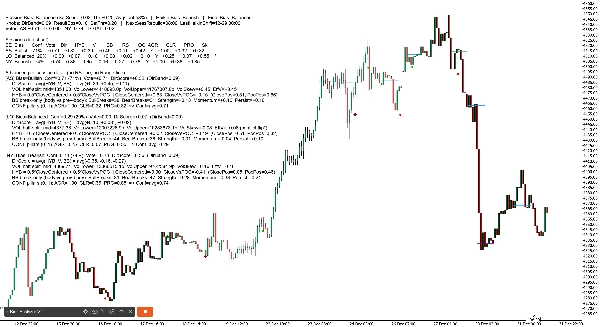
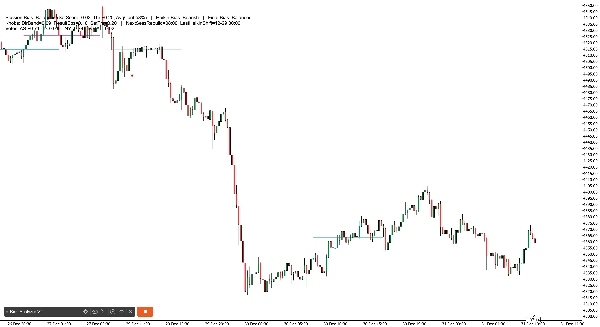
Penerangan
Lembaran Cheat . 3 tahun Data diringkaskan di bawah arah kebarangkalian tinggi.
Perdagangan harian
- Asia: B120 (Bias Sesi + Heikin 2H bersetuju) | alt: Bias Sesi sahaja
- London: Heikin 1H
- New York: Heikin 2H
- Barat(London dan NY): Heikin 2H
- Masa: Barat + Heikin 2H flip → susulan 30m terbaik
Ayunan (2–3 hari)
- Arah (3 hari / 72j): Bias Sesi Global (Asia+London+New York digabungkan)
- Penapis kemasukan: Bias Sesi Global + Heikin 4H bersetuju (jika tiada persetujuan → langkau)
- Elakkan lalai: 2 hari / 48j
HeikinSessionBiasOnlyBot ialah papan pemuka bias dan “kompas” struktur pasaran untuk pedagang budi bicara. Ia tidak membuat perdagangan. Sebaliknya, ia memberikan anda pandangan yang bersih dan sentiasa dikemas kini mengenai trend/bias menggunakan dua enjin bebas:
- Bias Heikin (bias arah jangka masa lebih tinggi)
- Bias Sesi (bias julat Asia/London/New York + profil volum)
Apa yang ia lakukan (dalam Bahasa Inggeris mudah)
1) Bias Heikin (enjin bias trend)
Enjin ini berfungsi pada Bias TF (minit) pilihan anda (lalai 360 min / 6H):
- Ia membina lilin Heikin Ashi pada jangka masa itu.
- Ia mengesan zon pivot apabila “warna” HA berubah (hijau ↔ merah).
- Bias berubah apabila penutupan memecah zon pivot terkini:
-
- Penutupan memecah di atas zon rintangan → Bullish
- Penutupan memecah di bawah zon sokongan → Bearish
- Jika tiada perubahan pivot-breach, ia masih boleh berubah menggunakan Inside Engine v2:
-
- Ia memerhati koil bar dalam (pengepaman) yang berangkai oleh julat wick.
- Selepas MinInsideBarsForReversal bar dalam, ia menjadi “bersedia.”
- Penutupan di atas julat wick berangkai menukar kepada bullish; di bawah menukar kepada bearish.
Hasil: anda mendapat bias arah jangka masa lebih tinggi yang bersih yang dikemas kini secara automatik.
2) Bias Sesi (enjin bias Asia / London / New York)
Enjin ini berjalan pada jangka masa analisis 5 minit yang dikodkan keras dan membina semula pada setiap akhir sesi.
Untuk setiap sesi (Asia, London, NY), ia:
- Membina julatan tinggi/rendah sesi itu
- Membina profil volum mudah (bin) dan mencari POC (Titik Kawalan)
- Menggunakan pembahagian volum separuh julat:
-
- Mengambil titik tengah julat sesi: mid = (Rendah + Tinggi) / 2
- Membandingkan volum dagangan dalam bahagian bawah vs bahagian atas
- Menghasilkan skor arah per sesi dari tiga tiang:
-
- HYB (penempatan penutupan vs julat + vs POC)
- V (skew volum efektif dari pembahagian separuh)
- BB (momentum pecah badan: logik pecah sahaja vs badan lilin sebelumnya)
Kemudian ia mengira:
- DirScore = purata(HYB, V, BB)
- Bias Sesi dari DirScore menggunakan DirBand
- Keyakinan Sesi dari:
-
- AGR (persetujuan antara HYB/V/BB)
- CLR (betapa kuat/jelas inputnya)
- PRG (betapa “progresif” pergerakan sepanjang sesi)
Akhirnya, ia menggabungkan tiga sesi menjadi SetScore dan melabelkan Bias Sesi keseluruhan.
3) “Bias Gabungan” Akhir (jawapan utama anda)
Anda memilih bagaimana untuk menggabungkan dua enjin:
- BothAgree (lalai): hanya menunjukkan Bullish/Bearish jika kedua-dua enjin bersetuju; jika tidak Seimbang (atau Tertunda jika tidak lengkap).
- HeikinOnly: hanya bias Heikin jangka masa lebih tinggi.
- SessionOnly: hanya hasil enjin sesi.
Ini adalah penapis praktikal: jika anda mahukan kurang perdagangan tetapi penjajaran yang lebih bersih, gunakan BothAgree.
1) Tajuk Papan Pemuka (baris atas)
Anda akan melihat sesuatu seperti:
Bias Sesi: Bullish (SetScore +0.85, Thr ±0.20, AvgConf 72%) | Bias Heikin: Bullish | Bias Akhir: Bullish
Apa maksud setiap istilah
- Bias Sesi: arah gabungan dari Asia/London/NY
- SetScore: “jumlah undian” gabungan dari tiga sesi
-
- Setiap sesi menyumbang Undi = tanda arah × keyakinan
- Bullish menambah, bearish menolak
- Thr (SetThr): SetScore minimum yang diperlukan untuk memanggil Bias Sesi bullish/bearish
-
- Jika SetScore berada dalam ±Thr → Bias Sesi menjadi Seimbang
- AvgConf: purata keyakinan dari tiga sesi (0–100%)
- Bias Heikin: bias jangka masa lebih tinggi (Bullish/Bearish/Tertunda)
- Bias Akhir: output akhir selepas mod gabungan anda (BothAgree / HeikinOnly / SessionOnly)
2) Baris “Knobs” Papan Pemuka (snapshot tetapan)
Contoh:
Knobs: DirBand=0.09 ResultEps=0.10 SetThr=0.20 | NextSessRebuild=17:00 LastHeikinShift=12-30 06:00
Maksud
- DirBand: betapa kuat DirScore mesti untuk melabel sesi bullish atau bearish
-
- DirBand kecil = lebih banyak isyarat, lebih “sensitif”
- DirBand besar = kurang isyarat, lebih konservatif
- ResultEps: “zon mati” yang digunakan apabila memutuskan jika hasil adalah jelas
-
- Membantu mengelakkan menganggap perbezaan kecil sebagai bermakna
- SetThr: ambang yang digunakan pada tahap sesi gabungan (SetScore)
- NextSessRebuild: bila pembinaan semula sesi seterusnya akan berlaku (UTC)
- LastHeikinShift: masa terakhir bias Heikin berubah
3) Baris “Undian” (jumlah cepat)
Contoh:
Undian: AS +0.40 LO +0.20 NY -0.10 JUMLAH +0.50
Maksud
- Undian AS / LO / NY = tanda(arah) × keyakinan
- JUMLAH adalah jumlah ringkas
- Ini pada dasarnya adalah “papan skor sesi” anda.
4) Jadual Mod Terperinci (pecahan per sesi)
Dalam mod Terperinci, anda mendapat jadual padat seperti:
SE | Bias | Conf | Vote | Dir | HYB | V | BB | RS | OC | AGR | CLR | PRG | Sk
Penjelasan lajur demi lajur (mudah)
- SE: label sesi (AS, LO, NY)
- Bias: Bullish / Bearish / Seimbang (untuk sesi itu)
- Conf: peratus keyakinan untuk sesi itu
- Vote: undian arah (tanda bias × keyakinan)
- Dir: DirScore = purata(HYB, V, BB)
- HYB: skor penempatan penutupan hibrid
-
- Menggabungkan “penutupan dalam julat” + “penutupan vs POC”
- V: skew volum efektif
-
- Berdasarkan bahagian atas vs bahagian bawah volum sesi
- Boleh berubah jika bertentangan dengan “hasil” (lihat Sk di bawah)
- BB: skor pecah badan
-
- Mengukur momentum pecah sahaja berbanding sempadan badan lilin sebelumnya
- RS: ResultScore (gabungan pergerakan bersih + HYB)
-
- Digunakan untuk pemeriksaan “kejelasan hasil”
- OC: hasil jelas? (Y/T)
-
- Jika RS cukup besar (melebihi ResultEps), ia dianggap “jelas”
- AGR: tiang persetujuan (0..1)
-
- Adakah HYB/V/BB menunjuk ke arah yang sama?
- CLR: tiang kejelasan (0..1)
-
- Adakah HYB/V/BB kuat atau lemah?
- PRG: tiang kemajuan (0..1)
-
- Adakah sesi bergerak dengan stabil (kurang kacau / susulan lebih baik)?
- Sk: penanda konflik skew
-
*bermaksud skew volum bertentangan dengan arah hasil dan telah diubah secara dalaman untuk mengelakkan bias yang mengelirukan
2) Garis Sejarah POC Sesi (di carta)
Robot melukis garis mendatar yang menunjukkan POC (Titik Kawalan) untuk sesi terkini:
- Garis berasingan untuk AS, LO, NY
- Ia melukis pelbagai “set sejarah” (lalai 6), memudarkan yang lebih lama
3) Penanda Flip Heikin (di carta)
Apabila bias Heikin berubah, bot mencetak penanda:
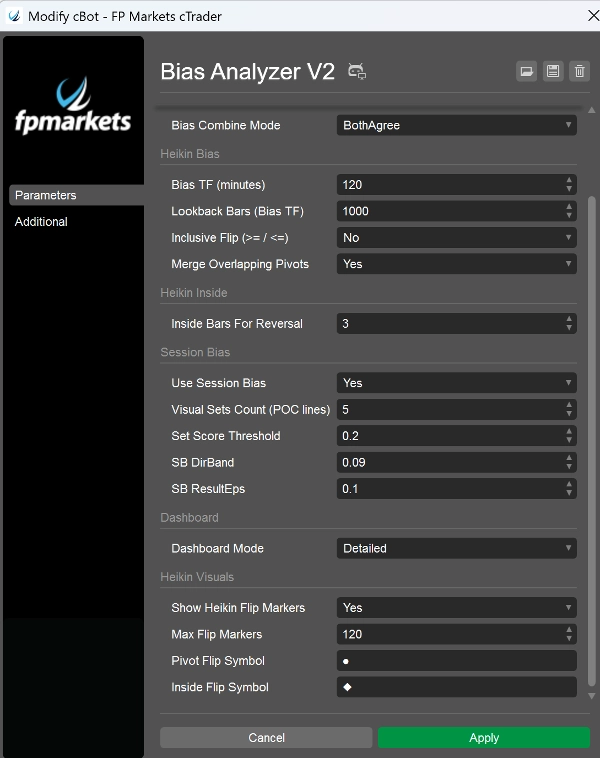
- Flip pelanggaran pivot menggunakan Simbol Flip Pivot anda (lalai ●)
- Flip Enjin Dalam menggunakan Simbol Flip Dalam anda (lalai ◆)
- Warna berbeza mengikut arah dan jenis flip (supaya anda boleh tahu “mengapa” ia berubah)
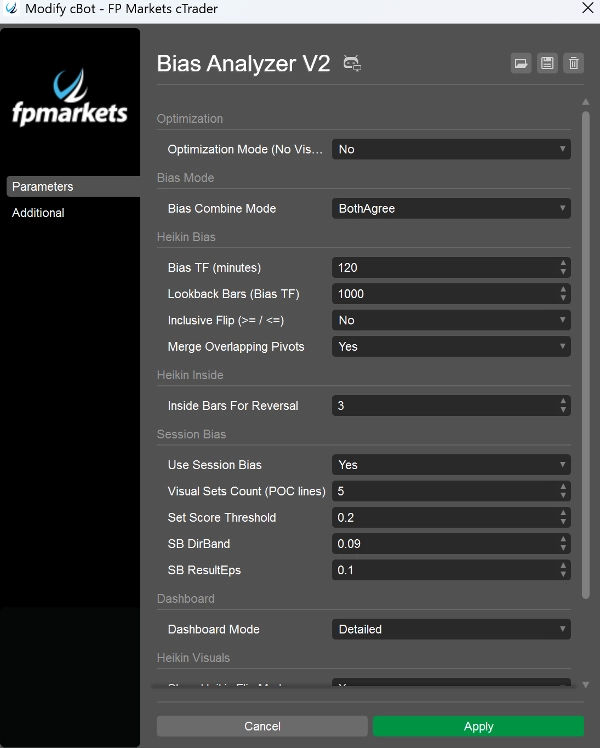
Parameter yang paling penting (apa yang perlu diketengahkan dalam pembentangan anda)
- Bias TF (minit): menetapkan “jangka masa sauh” untuk bias Heikin (contoh, 240, 360, 720)
- MinInsideBarsForReversal: mengawal betapa ketat koil mesti sebelum enjin dalam boleh flip
- Gunakan Bias Sesi: aktifkan/nonaktifkan enjin sesi
- Kiraan Set Visual: berapa banyak garis sejarah POC untuk disimpan
- DirBand / ResultEps / SetScoreThreshold: mengawal betapa ketat enjin sesi
- Mod Gabungan Bias: menentukan betapa konservatif bias akhir
- Mod Papan Pemuka: BaseOnly vs Terperinci
- Mod Pengoptimuman: melumpuhkan visual/kebisingan log untuk ujian prestasi